We had a client report a weird experience Monday and we wanted to share it for the benefit of others.
They'd just migrated a few metric tons of calendar data into Exchange 2003 sp2.
The data looks fine, but after deleting a resource account that had been registered to the Auto Accept Agent (see the Deployment Guide) they discovered their server CPU usage pegged at 100% (not even a calendar migration usually does this!) and various other wrath-of-your-favorite-deity-type plagues on their Exchange server.
Turns out this is a well-known problem documented in the KnowledgeBase article An Exchange Server 2003 SP2 server becomes unresponsive after you delete a mailbox on which you registered the Auto Accept Agent event sink.
The best way to deal with the problem is to avoid it. (Patient: It hurts when I do this. Doctor: Well don't do that.)
But if you're already in the soup, fixing this problem if it happens to you involves using MfcMAPI. More than that you're going to need to know which registered resource was removed so you can make things right. Since there are no logs to guide you if this should suddenly happen, we recommend the Microsoft Exchange Team Blog article How do you know which mailboxes are registered with the Auto Accept Agent?
Keep track of your resources!
Tuesday, April 08, 2008
Sunday, March 23, 2008
Creating Delegates / Proxies in Zimbra
Sometimes we find out the coolest stuff while searching for something else.
And this was how we discovered how Meeting Maker users can migrate their read-write and read-only proxies and Oracle Calendar users can migrate their designates into Zimbra Viewer or Manager Roles.
As the Zimbra Wiki points out, zmmailbox can be used to set calendar READ-ONLY permissions (Viewer):
zmmailbox -z -m zyg@DOMAIN mfg -i /Calendar account russ@DOMAIN r
and the followng will set READ-WRITE (Manager):
zmmailbox -z -m zyg@DOMAIN mfg -i /Calendar account russ@DOMAIN rwidx
In the above examples Zyg makes Russ a delegate/proxy/pick your term.
So how do you get the list? In the intermediate MS Access database we use for Meeting Maker conversions it's in the PROXIES table. So the logical next step is for us to write a macro that just exports a batch file you can use to execute this command for everyone you're migrating. Any of you working on a Zimbra migration now we'll happily work with on this (though Zyg is taking a crack at it anyway).
For Oracle Calendar Server conversions it's even easier. Look up UNIACCESSRIGHTS in your OCS Reference Manual.
And this was how we discovered how Meeting Maker users can migrate their read-write and read-only proxies and Oracle Calendar users can migrate their designates into Zimbra Viewer or Manager Roles.

As the Zimbra Wiki points out, zmmailbox can be used to set calendar READ-ONLY permissions (Viewer):
zmmailbox -z -m zyg@DOMAIN mfg -i /Calendar account russ@DOMAIN r
and the followng will set READ-WRITE (Manager):
zmmailbox -z -m zyg@DOMAIN mfg -i /Calendar account russ@DOMAIN rwidx
In the above examples Zyg makes Russ a delegate/proxy/pick your term.
So how do you get the list? In the intermediate MS Access database we use for Meeting Maker conversions it's in the PROXIES table. So the logical next step is for us to write a macro that just exports a batch file you can use to execute this command for everyone you're migrating. Any of you working on a Zimbra migration now we'll happily work with on this (though Zyg is taking a crack at it anyway).
For Oracle Calendar Server conversions it's even easier. Look up UNIACCESSRIGHTS in your OCS Reference Manual.
Friday, March 21, 2008
Tasks in Zimbra 5 - migrating them in
You know the simplest things always have some kind of hellacious complication lurking in them. So it is with what in Zimbra and OCS are called Tasks and in Meeting Maker are called To-Dos.
Meeting Maker has 7 Task Priorities while Zimbra has only 3.
This is how the priorities map when we do a migration:
Meeting Maker Urgent-> Zimbra High
Meeting Maker Important-> Zimbra High
Meeting Maker High -> Zimbra High
Meeting Maker Medium -> Zimbra Normal
Meeting Maker Normal -> Zimbra Normal
Meeting Maker Low -> Zimbra Low
Meeting Maker None -> Zimbra Low
For “Progress” options, Meeting Maker has only 2 levels (Done or Not Done) and Zimbra has 5 (Not started, Completed, In Progress, Waiting on Someone Else, and Deferred). “Done” maps to “Completed” and “Not done” maps to “In progress.”
Tasks are ICS files, but they can't be uploaded with the calendar data so we need to do them separately.
The following curl command will insert “tasks-zyg.ics” into User Zyg’s Tasks list:
curl -vvv -u zyg:PASSWORD --data-binary @tasks-zyg.ics http://SERVER/home/zyg/Tasks?fmt=ics
Oracle Calendar has a weirder case that we're not sure what to do with yet. OCS has priorities 1-9 and A-Z. In Outlook we map to priorities 1-5 with anything above “5” becoming “5.”
For Zimbra from OCS we'll wait until it's an issue for one of you and just define it that way from then on.
Oracle's other bugaboo is in access levels: Personal, Confidential, Normal, Public. Personal and Confidential map to PRIVATE in Zimbra, the other two map to PUBLIC.
Meeting Maker has 7 Task Priorities while Zimbra has only 3.
This is how the priorities map when we do a migration:
Meeting Maker Urgent-> Zimbra High
Meeting Maker Important-> Zimbra High
Meeting Maker High -> Zimbra High
Meeting Maker Medium -> Zimbra Normal
Meeting Maker Normal -> Zimbra Normal
Meeting Maker Low -> Zimbra Low
Meeting Maker None -> Zimbra Low
For “Progress” options, Meeting Maker has only 2 levels (Done or Not Done) and Zimbra has 5 (Not started, Completed, In Progress, Waiting on Someone Else, and Deferred). “Done” maps to “Completed” and “Not done” maps to “In progress.”
Tasks are ICS files, but they can't be uploaded with the calendar data so we need to do them separately.
The following curl command will insert “tasks-zyg.ics” into User Zyg’s Tasks list:
curl -vvv -u zyg:PASSWORD --data-binary @tasks-zyg.ics http://SERVER/home/zyg/Tasks?fmt=ics
Oracle Calendar has a weirder case that we're not sure what to do with yet. OCS has priorities 1-9 and A-Z. In Outlook we map to priorities 1-5 with anything above “5” becoming “5.”
For Zimbra from OCS we'll wait until it's an issue for one of you and just define it that way from then on.
Oracle's other bugaboo is in access levels: Personal, Confidential, Normal, Public. Personal and Confidential map to PRIVATE in Zimbra, the other two map to PUBLIC.
Wednesday, March 12, 2008
Why can't I create mailboxes in Exchange 2007 via VMware
I thought it would be simple to create an additional user mailbox in our Exchange 2007 server running in VMWare virtual server. The mailbox creation process fails with this message: "An Exchange 2007 server on which an address list service is active cannot be found." 
Why do simple tasks that fail drive me nuts, and take forever to resolve?

Why do simple tasks that fail drive me nuts, and take forever to resolve?
What broke? The Microsoft Exchange System Attendant failed to start! Once restarted, I created the mailbox with ease. This was the same thing I saw when creating mailboxes for an Exchange Resource Forest Trust. So for whatever reason, the SA continues to randomly fail to start. A three minute task stretched to fifteen. Reminds me of the joke... I always give 100% effort at work: 10% on Mon, 25% on Tue, 35% on Wed, 25% on Thu, 5% on Fri.
Friday, March 07, 2008
DST: The Gift that Keeps on Giving
The new North American Daylight Savings Time rules are a lot like the message in Repo Man: the life of migrating calendar servers is aways intense.
Here's the thing to keep in mind: If you're going into Exchange 2003 -- make sure you've applied patches for the new DST shifts.
EHLO has this good posting on the subject: Exchange 2003 and DST fix.
Exchange 2007 automatically has the DST shift dealt with.
Now there are some vendors out there who tell you that as long as you're in the same time zone you're covered, you don't need to upgrade Meeting Maker or Oracle Calendar Server. That's true -- until you migrate.
We can handle re-basing the events in either of these to make them work if necessary. Please just be on the lookout in your test lab for meetings and appointments off an hour in the "DST Delta" in March and November.
As always, it is much easier to deal with these if we find them early.
Here's the thing to keep in mind: If you're going into Exchange 2003 -- make sure you've applied patches for the new DST shifts.
EHLO has this good posting on the subject: Exchange 2003 and DST fix.
Exchange 2007 automatically has the DST shift dealt with.
Now there are some vendors out there who tell you that as long as you're in the same time zone you're covered, you don't need to upgrade Meeting Maker or Oracle Calendar Server. That's true -- until you migrate.
We can handle re-basing the events in either of these to make them work if necessary. Please just be on the lookout in your test lab for meetings and appointments off an hour in the "DST Delta" in March and November.
As always, it is much easier to deal with these if we find them early.
Thursday, March 06, 2008
Entourage adds spice to recurring meetings in Exchange 2007
This has been the week to report about Entourage and its unusual calendar behavior. The day after our blog about Entourage seeing double, Microsoft released another KB article about Entourage and problems with calendaring. We are thrilled to share the spice of life that Entourage has added to our jobs. Brace yourself folks:
"Unexpected modified instances of a recurring meeting may appear when you use Entourage to access a calendar on a computer that is running Exchange Server 2007". This will happen after modifies one or more instances of a recurring meeting. Please see: http://support.microsoft.com/kb/949113. We have not come across this issue, so we don't know the version of Entourage......
"Unexpected modified instances of a recurring meeting may appear when you use Entourage to access a calendar on a computer that is running Exchange Server 2007". This will happen after modifies one or more instances of a recurring meeting. Please see: http://support.microsoft.com/kb/949113. We have not come across this issue, so we don't know the version of Entourage......
Tuesday, March 04, 2008
Seeing double with Entourage and Exchange 2007
One of Sumatra's academic clients has a significant Mac user base. They use Entourage to access their Exchange 2007 calendars. The Mac users have reported that after a few days of use, they saw duplicate items in their calendar. We suspected Entourage (OWA or Outlook 2003 did not create dupes when accessing the same calendars), but we couldn't pinpoint the root cause of the duplicates.
Microsoft reported the duplicates are an Entourage problem. The problem occurs whenever users edit an appointment with a subject line that is identical to other calendar items. Come on... That has to be rare....you're more likely to find a four-leaf clover. Anyone have "Weekly Staff Meeting", "Lunch", "Vacation" on their calendars?
See the KB article: Duplicate calendar items may appear when you use Entourage to access a calendar on an Exchange 2007 server (http://support.microsoft.com/kb/949114)
Note: They were using Entourage 10. The KB article didn't specify the version.
Microsoft reported the duplicates are an Entourage problem. The problem occurs whenever users edit an appointment with a subject line that is identical to other calendar items. Come on... That has to be rare....you're more likely to find a four-leaf clover. Anyone have "Weekly Staff Meeting", "Lunch", "Vacation" on their calendars?
See the KB article: Duplicate calendar items may appear when you use Entourage to access a calendar on an Exchange 2007 server (http://support.microsoft.com/kb/949114)
Note: They were using Entourage 10. The KB article didn't specify the version.
Monday, March 03, 2008
1,300 recurring appointment limit fixed in E2k7 SP1 Update Rollup 1
Remember back in June 07 when Sumatra blogged about how 1,300 recurring appointments broke Exchange 2007? (OK, I forgot, too.) Well, as of 2/28/2008 Microsoft fixed this bug and others in the "Update Rollup 1 for Exchange Server 2007 Service Pack 1" .
Sumatra recommends its migration clients -- and any one who uses calendaring -- install SP1 and Update Rollup 1.
There are many things this update fixes. Here are some that impact calendaring users:
Sumatra recommends its migration clients -- and any one who uses calendaring -- install SP1 and Update Rollup 1.
There are many things this update fixes. Here are some that impact calendaring users:
- The 1,300 recurring appointment bug (MS calls it "Event IDs 8206, 8213, and 8199 are logged in a Microsoft Exchange Server 2007 environment") (http://support.microsoft.com/kb/943371/)
- The GetItem operation in Exchange Web Service obtains duplicate strings in Microsoft Exchange Server 2007 (http://support.microsoft.com/kb/938957/)
- An e-mail message is in disorder and is unreadable in a Microsoft Exchange Server 2007 environment (http://support.microsoft.com/kb/945428/)
- And for customers folks in Europe, Error message when you try to schedule a yearly recurring appointment on the 31st day of certain months: "The recurrence date is invalid" (http://support.microsoft.com/kb/941805/)
Sunday, February 24, 2008
Hidden Treasure in your Calendar Data
We at Sumatra revel in our reputation as quantitative calendar geeks. One of the means we use to show our prowess with calendar data comes from some of the statistics we can read so readily from Meeting Maker databases, of which the following data we ran on February 8, 2008 is a sanitized example.
Some of the most interesting statistics, the number of meetings that are current is only 2.53% of the total meeting volume. Activities track almost exactly the same at 2.56%. As some of you have heard us say: Our highly advanced mathematics has proven that most events have already happened.
You can expect the same statistics from your Exchange calendar data on an ongoing basis.
When we turn our attention to the top meeting users, we see some other interesting results. From the same server with approximately 2000 users, the top ten users account for almost 20% of the total meeting activity, account for about 15% of all guests, and about 3% of all activities. While your mileage may vary, it will not vary by much.
Now let's take a look at one of everyone's favorite subjects: Meetings and Recurring Meetings. As you can see, over 90% of meeting objects are one-time meetings. Of the recurring meetings, the most common are "Daily_Every_N" (which when N=7 means a weekly meeting).
Some of the most interesting statistics, the number of meetings that are current is only 2.53% of the total meeting volume. Activities track almost exactly the same at 2.56%. As some of you have heard us say: Our highly advanced mathematics has proven that most events have already happened.
You can expect the same statistics from your Exchange calendar data on an ongoing basis.
Overall Stats
| Item | Value | % Total |
|---|---|---|
| 8Feb_DB_v8.8.0.7.mdb File size: | ||
| Total number of meetings: | ||
| Meeting timeframe: | 1/1/1940 5:00:00 AM-12/31/2039 12:30:00 PM | |
| Total number of meetings newer than 2/8/2008: | 1,591. | 2.54% |
| Total number of meetings older than 2/8/2008: | 60,969. | 97.45% |
| Total number of meetings without any mapped users: | 62,560. | 100.00% |
| Total number of meetings without any mapped users and newer than 2/8/2008: | 1,591. | 2.54% |
| Total number of Guests: | 211468 | |
| Total number of guests attending meetings newer than 2/8/2008: | 7,791. | 3.68% |
| Total number of guests attending meetings older than 2/8/2008: | 203,677. | 96.31% |
| Total number of guests attending meetings without any mapped users: | 209,603. | 99.11% |
| Total number of guests attending meetings without any mapped users and newer than 2/8/2008: | 7,791. | 3.68% |
| Number of foreign guests | 0 | 0.00% |
| Total number of activities: | 1,869,557. | |
| Activity timeframe: | 1/1/1940-1/2/2040 8:00:00 AM | |
| Total number of activities newer than 2/8/2008: | 48,026. | 2.56% |
| Total number of activities older than 2/8/2008: | 1,821,531. | 97.43% |
| Total number of Activities without any mapped users: | 1,869,557. | 100.00% |
| Total number of Activities without any mapped users and newer than 2/8/2008: | 48,026. | 2.56% |
| Overall Timeframe: | 1/1/1940-1/2/2040 8:00:00 AM | |
| Number of days: | 36526 |
When we turn our attention to the top meeting users, we see some other interesting results. From the same server with approximately 2000 users, the top ten users account for almost 20% of the total meeting activity, account for about 15% of all guests, and about 3% of all activities. While your mileage may vary, it will not vary by much.
Top Meeting Users
| User | Num Mtgs | % Total Mtgs | Num Guests | % Total Guests | Num Actvy | % Total Actvy | Grand Total | % Grand Total |
|---|---|---|---|---|---|---|---|---|
| AV Student Staff | 3,025. | 4.83% | 5,939. | 2.80% | 563. | 0.03% | 3,588. | 0.18% |
| Bela Bartok | 1,488. | 2.37% | 5,514. | 2.60% | 3,134. | 0.16% | 4,622. | 0.23% |
| Adam Ant | 1,281. | 2.04% | 4,516. | 2.13% | 2,799. | 0.14% | 4,080. | 0.21% |
| Claudette Colbert | 1,084. | 1.73% | 3,318. | 1.56% | 12,446. | 0.66% | 13,530. | 0.70% |
| Deanna Durbin | 1,065. | 1.70% | 2,385. | 1.12% | 2,045. | 0.10% | 3,110. | 0.16% |
| Erik Estrada | 1,031. | 1.64% | 2,755. | 1.30% | 4,655. | 0.24% | 5,686. | 0.29% |
| Felix Frankfurter | 906. | 1.44% | 2,029. | 0.95% | 10,234. | 0.54% | 11,140. | 0.57% |
| Research Team Conf Room | 895. | 1.43% | 2,596. | 1.22% | 289. | 0.01% | 1,184. | 0.06% |
| Gary Gilmore | 857. | 1.36% | 1,845. | 0.87% | 3,590. | 0.19% | 4,447. | 0.23% |
| Harry Hope | 755. | 1.20% | 2,375. | 1.12% | 2,947. | 0.15% | 3,702. | 0.19% |
| Top User Total | 12,387. | 19.80% | 33,272. | 15.73% | 42,702. | 2.28% | 55,089. | 2.85% |
| Grand Total | 62,560. | - | 211,468. | - | 1,869,557. | - | 1,932,117. | - |
Now let's take a look at one of everyone's favorite subjects: Meetings and Recurring Meetings. As you can see, over 90% of meeting objects are one-time meetings. Of the recurring meetings, the most common are "Daily_Every_N" (which when N=7 means a weekly meeting).
Meeting Frequency Profile
| Day | Num Recurring Meetings | % Total Meetings | % Total Recurring Meetings |
|---|---|---|---|
| ONCE | 58,824. | 94.02% | - |
| DAILY_EVERY_N | 2,991. | 4.78% | 80.05% |
| DAILY_DAYS_OF_WEEK | 364. | 0.58% | 9.74% |
| WEEKLY | 315. | 0.50% | 8.43% |
| MONTHLY | 66. | 0.10% | 1.76% |
| Grand Total | 62560 | - | 5.97% |
Recurring Meeting Profile
| Day | Num Recurring Meetings | % TotalMeetings | % Total RecurringMeetings |
|---|---|---|---|
| Finite end date | 3,568. | 5.70% | 95.50% |
| Ongoing (no end date) | 168. | 0.26% | 4.49% |
| Grand Total | 3736 | 5.97% | - |
Friday, February 22, 2008
Trust Me (Part Four) - I see a Resource Forest thru the trees
What's the old expression -- you can't see the forest for the trees? Well, on my fourth attempt, I can.
To recap: What was the problem? I wanted to insert calendar data into Exchanged 2007 that was configured using a Exchange Resource Forest topology. The user mailboxes were linked to a accounts in a user forest. Those user mailbox accounts were disabled. You can not use Exchange Web Services to impersonate a disabled account.
What worked? Here is what I did:
To recap: What was the problem? I wanted to insert calendar data into Exchanged 2007 that was configured using a Exchange Resource Forest topology. The user mailboxes were linked to a accounts in a user forest. Those user mailbox accounts were disabled. You can not use Exchange Web Services to impersonate a disabled account.
What worked? Here is what I did:
- Upgraded Exchange 2007 to SP1,
- Created a service account in the resource forest
- Gave that service account DELEGATE permissions to ALL of the disabled accounts.
- Granted permission for the service account to see the user forest's AD
- Inserted calendar data!
Finding the disabled accounts, and assigning delegate rights to the service account turned out to be easy, thanks to Jian Li’s MSExchange Team Blog “How to access multiple resource mailboxes in Exchange Web Services (EWS)”. He described how it works, and (even better) created a script that has worked well for us (get the Microsoft Script.)
Oh, for the last few days the Exchange System Attendent decided to automatically start, and remain running. No idea why.
-R
Sunday, February 17, 2008
Trust Me (Part Three)
Ran into two issues when configuring the resource forest and the user forest: service accounts and Address List System Service failing.
Service Account: I created two service accounts, one on each machine. The service accounts had the same name. When I went to link the resource account to the account in the user forest, accessing the linked domain controller failed.
Lesson learned - The link failed because I didn't qualify the service account with the user forest (e.g. userforest\mySvcAccount). So Exchange tried to link to the user forest domain controller with the resource service account and failed. Had I created service accounts with two different names, this problem would not have tripped me up.
Service Account: I created two service accounts, one on each machine. The service accounts had the same name. When I went to link the resource account to the account in the user forest, accessing the linked domain controller failed.
Lesson learned - The link failed because I didn't qualify the service account with the user forest (e.g. userforest\mySvcAccount). So Exchange tried to link to the user forest domain controller with the resource service account and failed. Had I created service accounts with two different names, this problem would not have tripped me up.
Address List:
After I fixed the service account issue, the last step of in the "linked mailbox" wizard failed with an invalid address. After much head-scratching, I discovered the system attendent had failed with an MSExchangeSA event ID 1005: "Unexpected error The Local Security Authority cannot be contacted ID no: 80090304 Microsoft Exchange System Attendant occurred. "
Dave Goldman blogged about this: Creating a new mailbox in Exchange 2007 with the new-mailbox cmdlet fails with Address List Service not Available, but only addressed one aspect. My problem was choice (4) - SA stopped. I haven't figured out why it's failing, but restarting the SA allowed me to complete the mailbox link.
OK--everything is set. Next time I'll report on the results of impersonation.
Wednesday, February 13, 2008
Export-Mailbox -- "Exmerge" for Exchange 2007
I had to generate a five PSTs from client data inserted in our lab to help a prospect prove to his management team that the Sumatra Migration tool could read and insert their calendar data into Exchange 2007. It gave me an opportunity to test a new commandlet "export-mailbox" released with Exchange 2007 SP1. Export-Mailbox offers many of the features most of us loved in Exchange 2003's ExMerge.
Be forwarned - the commandlet comes with contraints:
Export-Mailbox –Identity < mailboxuser > -PSTFolderPath < pathToSavePST >
Yea! Another calendar migration tool for Exchange 2007.
-R
Be forwarned - the commandlet comes with contraints:
- It must be run from a 32 bit client machine with Exchange Management Tools (Version Exchange 2007 SP1 or later) installed and Windows PowerShell (Download: Microsoft Exchange Server 2007 Management Tools (32-Bit));
- It requires Outlook 2003/Outlook 2007 be installed on the 32-bit client machine;
- Must be "run-as" using an account with Exchange Organization Admin or an Exchange Server Admin privs.
Export-Mailbox –Identity < mailboxuser > -PSTFolderPath < pathToSavePST >
Here is how we told the client to Import the data from a PST into a client mailbox:
Import-Mailbox -Identity < mailboxuser > -PSTFolderPath < pathToSavePST >
Yea! Another calendar migration tool for Exchange 2007.
-R
Tuesday, February 12, 2008
Trust Me (Part Two)
This is the second installment on my experience trying to setup a resource forest trust.
Last night I re-installed VMware's Server product on an Windows Server 2003 SP2 box that also had Exchange 2007 SP1 installed. I rebooted the box and left. I lost today's popularity contest to "Smiling Bob" after our early-morning users received "Service Unavailable" when they tried to visit our intranet, OWA, and anything that used Exchange Web Services.
What happened? The Application Event Logs show W3SVC-WP Event IDs 2268 and 2214, and System Events IDs 1002, 1039. It looks like VMware Server and Exchange 2007 are both trying to control IIS (VMware wins....)
To restore the server, I uninstalled VMware Server and reset IIS to run in native mode using this AdsUtil command line:
cscript %systemdrive%\inetpub\AdminScripts\adsutil.vbs set w3svc/AppPools/Enable32BitAppOnWin64 0
BTW, if you want to re-enable 32 bit apps (WOW64 Mode), run this command:
cscript %systemdrive%\inetpub\AdminScripts\adsutil.vbs set w3svc/AppPools/Enable32BitAppOnWin64 1
It was suggested that VMware's WORKSTATION product would be a better choice. I just installed the evaluation version. 'Sure n b'gora' ...web services and the intranet are still available. (Thanks, Chrisopher Q., for the tip!)
Now it's back to trying to build a one-way resource forest-trust.
-R
Last night I re-installed VMware's Server product on an Windows Server 2003 SP2 box that also had Exchange 2007 SP1 installed. I rebooted the box and left. I lost today's popularity contest to "Smiling Bob" after our early-morning users received "Service Unavailable" when they tried to visit our intranet, OWA, and anything that used Exchange Web Services.
What happened? The Application Event Logs show W3SVC-WP Event IDs 2268 and 2214, and System Events IDs 1002, 1039. It looks like VMware Server and Exchange 2007 are both trying to control IIS (VMware wins....)
To restore the server, I uninstalled VMware Server and reset IIS to run in native mode using this AdsUtil command line:
cscript %systemdrive%\inetpub\AdminScripts\adsutil.vbs set w3svc/AppPools/Enable32BitAppOnWin64 0
BTW, if you want to re-enable 32 bit apps (WOW64 Mode), run this command:
cscript %systemdrive%\inetpub\AdminScripts\adsutil.vbs set w3svc/AppPools/Enable32BitAppOnWin64 1
It was suggested that VMware's WORKSTATION product would be a better choice. I just installed the evaluation version. 'Sure n b'gora' ...web services and the intranet are still available. (Thanks, Chrisopher Q., for the tip!)
Now it's back to trying to build a one-way resource forest-trust.
-R
Monday, February 11, 2008
Zimbra to Exchange Migration - First Request
It happened sooner than we thought it would: we've got our first request to migrate calendars from Zimbra into Exchange. Any other interest out there in this path?
Thursday, February 07, 2008
Trust me
We are testing Exchange 2007 in our 64-bit Windows Server 2003 Exchange Resource Forest Topology using two virtual servers (with VMWare -- Microsoft Virtual Server does not work in a 64-bit environment). We created two VMs -- the "user forest" and the "Exchange forest". We set up a one-way trust between the two forests, and tried to create a "Linked" user mailbox.
After a head-banging week, we can NOT get this to work. No matter what we do, when we try to link to the mailbox we get a Event ID 2130 (MsExchangeADAccess....Exchange Active Directory Provider could not find an available domain controller). We can ping the domain, the nsLookup is fine, dcdiag /v, netdiag /v -- everything comes back without errors.
Is anybody else having this problem? How did you solve it?
One of Sumatra's clients suggested this might work if we created five VMs - one for the DNS/DHCP, a second for the user DC, a third for the resource DC, a fourth for Exchange, and a fifth for the client. We will test his theory later this week (or this weekend).
Here is an image of the topology linked from the Microsoft Exchange Resource Forest Topology article:

-R
After a head-banging week, we can NOT get this to work. No matter what we do, when we try to link to the mailbox we get a Event ID 2130 (MsExchangeADAccess....Exchange Active Directory Provider could not find an available domain controller). We can ping the domain, the nsLookup is fine, dcdiag /v, netdiag /v -- everything comes back without errors.
Is anybody else having this problem? How did you solve it?
One of Sumatra's clients suggested this might work if we created five VMs - one for the DNS/DHCP, a second for the user DC, a third for the resource DC, a fourth for Exchange, and a fifth for the client. We will test his theory later this week (or this weekend).
Here is an image of the topology linked from the Microsoft Exchange Resource Forest Topology article:
-R
Sumatra Migration Documentation version 9.4
Based on some feedback from the folks at the University of Pennsylvania we've revised the migration documentation set.
It's now at version 9.4.
Those of you in active migrations should have it in your ftp accounts if we haven't already emailed it to you.
Since there are a fair number of folks on what we sometimes refer to as the "ninety-nine year plan" contact us if you want the most recent version.
It's now at version 9.4.
Those of you in active migrations should have it in your ftp accounts if we haven't already emailed it to you.
Since there are a fair number of folks on what we sometimes refer to as the "ninety-nine year plan" contact us if you want the most recent version.
Wednesday, February 06, 2008
Client Side Migration to Exchange from Oracle Calendar
I might have mentioned sometimes that things in our office go in weird phases. December was "Pennsylvania" month because of the four migrations we had going on in that state all at once.
February seems to be "can you tell us how inexpensively we can do this, preferably without you?" Sort of the exact opposite of Valentine's Day, and not really geared to get on our good side, but it does illustrate a point.
Given that we're about moving calendars server-side and avoiding the limitations I end this with, and we're really up-front about what we can do that nobody else can, we're going to give you the safe migration advice on how to do this client-side, user-by-user, and not involve us.
As is traditional for us we use John Lennon as an OCS 9.0.4 user, migrating to Outlook.
Export Your Oracle Calendar Data
From OCS, go to the File menu, choose Export Data...
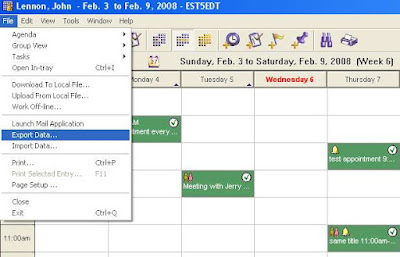
Select vCalendar file: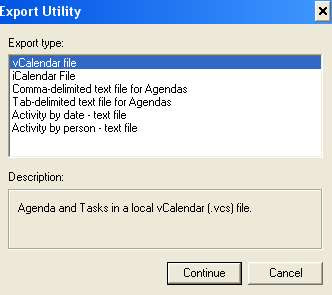
If you select iCalendar, you can't move tasks.
Continue and make your selections:
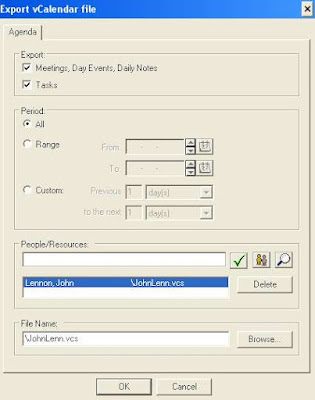
To pull task and calendar data into Outlook you run the same process in reverse on the Outlook side.
Here we use Outlook 2003 as the example (lots of you are still using it).
Import Your Oracle Calendar Data into Outlook
Open Outlook
On the File menu, choose Import and Export...
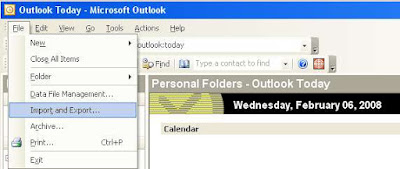
Select Import an iCalendar or vCalendar file (.vcs):
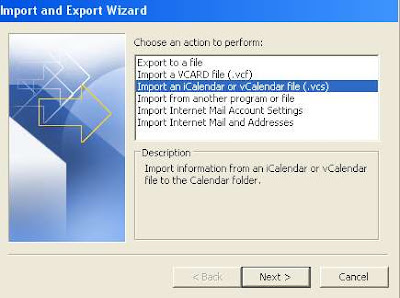 Browse to your export file from OCS.
John's end result looks something like this:
February seems to be "can you tell us how inexpensively we can do this, preferably without you?" Sort of the exact opposite of Valentine's Day, and not really geared to get on our good side, but it does illustrate a point.
Given that we're about moving calendars server-side and avoiding the limitations I end this with, and we're really up-front about what we can do that nobody else can, we're going to give you the safe migration advice on how to do this client-side, user-by-user, and not involve us.
As is traditional for us we use John Lennon as an OCS 9.0.4 user, migrating to Outlook.
Export Your Oracle Calendar Data
From OCS, go to the File menu, choose Export Data...
Select vCalendar file:
If you select iCalendar, you can't move tasks.
Continue and make your selections:
To pull task and calendar data into Outlook you run the same process in reverse on the Outlook side.
Here we use Outlook 2003 as the example (lots of you are still using it).
Import Your Oracle Calendar Data into Outlook
Open Outlook
On the File menu, choose Import and Export...
Select Import an iCalendar or vCalendar file (.vcs):
Browse to your export file from OCS.John's end result looks something like this:

The limitations of this process:
- It is client-side only. Each user or someone else must do this.
- It does not handle resources well. Yes, you can bring the resource calendar over, but they are not linked to the end users who are scheduled for the resource
- Recurring appointments become individual appointments.
- Daily Notes and Day Events do not automatically become "All day" events
- Guest lists are dropped and meetings therefore all become appointments
Advantages of this method:
- It is inexpensive
- It uses only off-the-shelf functionality
- With a good help desk it is probably do-able
You can go through a similar process for importing into Zimbra with pretty much the same limitations. I'll write that up if I get any requests.
Friday, February 01, 2008
Zimbra to Yahoo to (possibly) Microsoft?
You've got to start asking yourself what would Microsoft do with an open source alternative to Exchange if they consummate a union with Yahoo.
I envision an episode of Oz or some "reeducation camps" inspired by the Chinese Cultural Revolution.
Whatever comes we're still cranking away on our migration technology -- ironically we've (almost) completed the first prototype for an Exchange to Zimbra migration.
Now, of course, we're also working on migrating Zimbra to Exchange.
This is not a surprise to those of you who have dealt with us in the past. Our decision process on which projects to work on is based on simple free market economics: who is asking us to do things and are they willing to pay for it?
I envision an episode of Oz or some "reeducation camps" inspired by the Chinese Cultural Revolution.
Whatever comes we're still cranking away on our migration technology -- ironically we've (almost) completed the first prototype for an Exchange to Zimbra migration.
Now, of course, we're also working on migrating Zimbra to Exchange.
This is not a surprise to those of you who have dealt with us in the past. Our decision process on which projects to work on is based on simple free market economics: who is asking us to do things and are they willing to pay for it?
Wednesday, January 23, 2008
Terminated Users, Broken Meetings, and Exchange 2007
Given the current economic situation we expect that many US corporations will soon be filled with a "right-sized" group of users. This will of course leave rotting corpses throughout the organization and some of them are going to be festering away in your Exchange 2007 store.
We've heard it referred to as the "terminated user" problem and it works like this:
Yorick, a diligent young exec just fresh from his MBA with little experience other than managing his BMW and his credit cards, has been busily setting up meetings with people across all departments. He is now gone but his meetings live on. (Note: We realize this is an idealized scenario. In the real world Yorick would be promoted while people with far more experience but higher salaries and more benefits would be nuked wholesale, but we try not to be bitter.)
So recurring meetings managed by Yorick, which might or might not be relevant anymore, are sitting in calendars across the company.
You the Exchange Administrator would like to get rid of them wholesale, but there's no way of doing this except for logging in as Yorick and manually finding and cancelling all meetings, making sure to send updates. Multiply this hassle by the body count in your reorg.
But it does not need to be like this.
Since as part of our calendar migrations we're creating and deleting meetings ALL THE TIME, we've started experimenting with some tools based off our insertion code that will go through a user's calendar, cancel all meetings they proposed, and automatically send updates to guests.
Problem solved.
We've started with a congruent problem: finding orphan conference rooms from cancelled meetings and built it into our main code via the "Test" button (which those of you in the midst of E2K7 migrations have gotten used to)
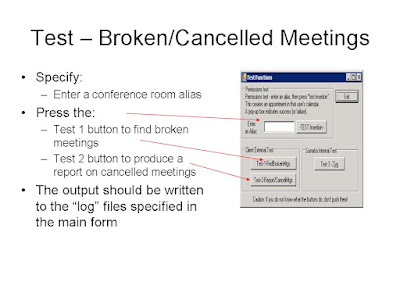 Why are we telling you all of this? Because we're looking for folks who really want the problem solved and are willing to work with some early code to help us work out the best way to invoke and use this in the Exchange environment.
We've heard it referred to as the "terminated user" problem and it works like this:
Yorick, a diligent young exec just fresh from his MBA with little experience other than managing his BMW and his credit cards, has been busily setting up meetings with people across all departments. He is now gone but his meetings live on. (Note: We realize this is an idealized scenario. In the real world Yorick would be promoted while people with far more experience but higher salaries and more benefits would be nuked wholesale, but we try not to be bitter.)
So recurring meetings managed by Yorick, which might or might not be relevant anymore, are sitting in calendars across the company.
You the Exchange Administrator would like to get rid of them wholesale, but there's no way of doing this except for logging in as Yorick and manually finding and cancelling all meetings, making sure to send updates. Multiply this hassle by the body count in your reorg.
But it does not need to be like this.
Since as part of our calendar migrations we're creating and deleting meetings ALL THE TIME, we've started experimenting with some tools based off our insertion code that will go through a user's calendar, cancel all meetings they proposed, and automatically send updates to guests.
Problem solved.
We've started with a congruent problem: finding orphan conference rooms from cancelled meetings and built it into our main code via the "Test" button (which those of you in the midst of E2K7 migrations have gotten used to)
 To check for orphan conference rooms:
Why are we telling you all of this? Because we're looking for folks who really want the problem solved and are willing to work with some early code to help us work out the best way to invoke and use this in the Exchange environment.You're going to need to set Permissions for a service account to run this app as you would for a migration -- so be advised of that. But we're more than happy to share this with folks who contact us directly looking to try it out.


Sunday, January 20, 2008
Outlook Meeting Reminders: OL2003 + E2K7 = Confusing
We have some folks migrating into Exchange 2007 keeping their Outlook 2003 calendars, who started to notice some odd behavior with their reminders.
Among the classics:
The reminder for the meeting is removed when you accept a meeting request in Outlook 2003 which is based on Rules removing reminders
A reminder for an all day event meeting request is reset to 18 hours when you send the meeting request in Outlook 2003 which is self-explanatory.
Try just hitting the support.microsoft.com and searching for "Outlook reminders".
15 Minutes seems to be the magic number for a meeting reminder default when you put Outlook 2003 in an Exchange 2007 environment.
Expect that under a variety of conditions of meetings being proposed to and from OL2003 that the default will be set to 15 minutes on the ATTENDEE's calendar, regardless of where it was set in the meeting ORGANIZER's, and regardless of the ATTENDEE's Default reminder setting.
The situation arises with default settings and reminders if Outlook 2003 is the origination point. We haven't (yet) seen problems with OWA or Outlook 2007.
There are in the support database a variety of problems listed with meeting reminders in Outlook (appointments seem to be working OK, but maybe that's just our eyes glazing over).Among the classics:
The reminder for the meeting is removed when you accept a meeting request in Outlook 2003 which is based on Rules removing reminders
A reminder for an all day event meeting request is reset to 18 hours when you send the meeting request in Outlook 2003 which is self-explanatory.
And Meeting reminder settings in a meeting request may be cleared or may take precedence over the meeting reminder settings in Outlook 2003 which says there should not be a problem (but which we cannot reproduce).
Try just hitting the support.microsoft.com and searching for "Outlook reminders".
Saturday, January 19, 2008
findItem and restrictions in EWS code
For those of you Exchange 2007 migrators who wondered why Sumatra needed to put categories in the subject line -- We ran into a bug in Exchange 2007 RTM (Microsoft confirmed fixed in SP1). The same problem showed up in this post involving contacts: http://forums.microsoft.com/TechNet/ShowPost.aspx?PostID=1849174&SiteID=17
Basically: you can't use FindItem with restrictions that use SUBSTRING in an EWS XML query:
So in contrast to almost every other release Microsoft has done for Exchange -- SP1 actually IMPROVES the migration process! I feel like Fred Sanford expecting to join Elizabeth imminently.
Basically: you can't use FindItem with restrictions that use SUBSTRING in an EWS XML query:
<restriction>
<t:contains containmentmode="Substring"
ContainmentComparison="IgnoreCaseAndNonSpacingCharacters">
<t:ExtendedFieldURI PropertySetId="00062008-0000-0000-C000-000000000046"
PropertyId="34100" PropertyType="String"/>
<t:Constant Value="mmConv102659080256Z"/>
</t:Contains>
</restriction>
So in contrast to almost every other release Microsoft has done for Exchange -- SP1 actually IMPROVES the migration process! I feel like Fred Sanford expecting to join Elizabeth imminently.
Friday, January 18, 2008
Exchange 2007: to sp1 or not to sp1?
One of the features clients love about the Sumatra migration technology is our back out strategy: if something goes wrong during a calendar insertion we can selectively remove all the data we put in and do it more quickly than a full Exchange restore.
We do this using keywords.
For Exchange 2007 pre-sp1 because we were under the gun to complete the code for a migration in July, we took a quick path that placed the keyword in the "Subject" line (and created an option to remove these).
For sp1 we no longer insert our keywords into the Subject: line (meaning you get all the benefits of our back out capability without the annoyance of having to remove the keywords).
Bottom line: either pre-sp1 or sp1 will support a calendar migration, but each method requires a different version of the insertion code.
Consult with Sumatra if you need to decide which version to use during your migration.
Update: January 19, 2008: We've confirmed there were some bugs with EWS that the sp1 service pack fixes. We'll blog on it soon.
We do this using keywords.
For Exchange 2007 pre-sp1 because we were under the gun to complete the code for a migration in July, we took a quick path that placed the keyword in the "Subject" line (and created an option to remove these).
For sp1 we no longer insert our keywords into the Subject: line (meaning you get all the benefits of our back out capability without the annoyance of having to remove the keywords).
Bottom line: either pre-sp1 or sp1 will support a calendar migration, but each method requires a different version of the insertion code.
Consult with Sumatra if you need to decide which version to use during your migration.
Update: January 19, 2008: We've confirmed there were some bugs with EWS that the sp1 service pack fixes. We'll blog on it soon.
Wednesday, January 16, 2008
Rate Limiting Steps in an Exchange 2007 migration
We've started to get the question "What's the choke point in a calendar migration into Exchange 2007?"
Keeping in mind that in 2007 we use EWS, you've got to think of the migration as running via HTML. So network efficiency and I/O are the crucial factors.
Russ produced this list of limiting factors (in priority order)
Keeping in mind that in 2007 we use EWS, you've got to think of the migration as running via HTML. So network efficiency and I/O are the crucial factors.
Russ produced this list of limiting factors (in priority order)
- Speed of the SAN (Mostly it's I/O bound)
- Speed of the NETWORK (Next, it's related to how fast HTTPS requests are
sent/received) - Speed of the SERVERS (CAS, then MBX) (Third, how fast the Web Services Requests are PROCESSED)
- Speed of the 32-bit (Fourth, how fast those requests are GENERATED)
In Exchange 2000/2003, where we used CDO, the horsepower of the individual back end Exchange server played a more crucial role.
Wednesday, January 09, 2008
Categories and Extended MAPI Properties in Exchange 2007
Sumatra used categories and extended MAPI properties to "tag" items that it inserts into Exchange. Sumatra uses this tagging strategy to find (and update) specific meetings. This works well in Exchange 2003, and doesn't work at all in Exchange 2007.
We set these items on messages in the meeting organizer's calendar. But wait--those categories and extended MAPI properties do not get transmitted with a messages in Exchange 2007! A PSS call yesterday confirmed that this behavior is possibly a bug.!?! I'll re-post if we find a solution
Here's the most relevant part of the code that adds categories (using XML):
<t:CalendarItem>
<t:ItemClass>IPM.Appointment</t:ItemClass>
<t:Subject>Russ and Nancy 1 on 1</t:Subject>
<t:Categories><t:String>mmConv102659080256Z!9</t:String></t:Categories>
<t:ExtendedProperty> <t:ExtendedFieldURI PropertySetId="00020329-0000-0000-C000-000000000046" PropertyName="SumatraKeys" PropertyType="String"/> <t:Value>E1D5E39F08206011E39F9218</t:Value></t:ExtendedProperty>
We set these items on messages in the meeting organizer's calendar. But wait--those categories and extended MAPI properties do not get transmitted with a messages in Exchange 2007! A PSS call yesterday confirmed that this behavior is possibly a bug.!?! I'll re-post if we find a solution
Here's the most relevant part of the code that adds categories (using XML):
<t:CalendarItem>
<t:ItemClass>IPM.Appointment</t:ItemClass>
<t:Subject>Russ and Nancy 1 on 1</t:Subject>
<t:Categories><t:String>mmConv102659080256Z!9</t:String></t:Categories>
<t:ExtendedProperty> <t:ExtendedFieldURI PropertySetId="00020329-0000-0000-C000-000000000046" PropertyName="SumatraKeys" PropertyType="String"/> <t:Value>E1D5E39F08206011E39F9218</t:Value></t:ExtendedProperty>
Tuesday, January 08, 2008
Zimbra and Private Activities / To-Dos
In the several Meeting Maker to Zimbra migrations we've done, the issue of what to do with "Private" activities and to-dos always come up.
Since Zimbra pre-version 5 does not have Private capability at the meeting level we've done all of these options:
Since Zimbra pre-version 5 does not have Private capability at the meeting level we've done all of these options:
- Delete "Private" Activities / To-Dos before they are inserted (clean, easy to understand, infuriating for some users)
- Pre-pend "PRIVATE:" to the relevant activities (easy to find and the user can deal with them as they will)
- Separate the "Private" items into a separate database and insert into separate calendars. A little time-consuming all around, but it worked this weekend at a migration in Pennsylvania.
In Zimbra 5 this all becomes moot -- but we want to make sure current clients contemplating a Zimbra migration know their options.
Thursday, January 03, 2008
Exchange 2007 sp1
Our preliminary read on how sp1 has an impact on our insertion code: No problems.
Russ ran an insertion in the test lab with no problems.
We have a field test coming up this weekend and we'll let you know the real world results.
Russ ran an insertion in the test lab with no problems.
We have a field test coming up this weekend and we'll let you know the real world results.
Saturday, December 15, 2007
Contacts Migration into Zimbra
For soon-to-be former Meeting Maker sites, you can now put your MM contacts into Zimbra.
Contacts get exported as CSV files which you can upload with curl or zmprov.
To create them:
Contacts get exported as CSV files which you can upload with curl or zmprov.
To create them:
- Create a directory called c:\sumatra\contacts
- Open the Database and go to "Macros"
- Double click the macro entitled "M_OutputZimbraContacts"
- Walk away from the machine for about a half hour. We haven't done a good interface for telling where things are in the process, but if you look at the directory you created you'll see the contacts files being created.
- They'll be in the form LOGIN_ID.csv so it's hard to confuse them with the calendar files
Right now this only works for Meeting Maker contacts because we can read them server-side.
For Oracle Calendar Server contacts, which we can only read client-side, we'd need to do something different. Which we will if we hear sufficient demand.
Friday, December 14, 2007
Accessing Exchange Resource Mailboxes
Microsoft confirmed Exchange Web Services (EWS) does not support to "impersonation" access to a mailbox if the account is disabled. (see: http://msexchangeteam.com/archive/2007/12/13/447731.aspx) This requires Sumatra customers enable resources before an insertion.
That Microsoft post did say the only way to access disabled-account mailboxes with EWS is to use Delegate Access. Sumatra's support team suggests an additional use for the script as an easier way to set up access to the resources, particularly when an end user "manages" one or more resources.
http://msexchangeteam.com/files/12/attachments/entry447730.aspx
That Microsoft post did say the only way to access disabled-account mailboxes with EWS is to use Delegate Access. Sumatra's support team suggests an additional use for the script as an easier way to set up access to the resources, particularly when an end user "manages" one or more resources.
http://msexchangeteam.com/files/12/attachments/entry447730.aspx
Thursday, December 13, 2007
The 1300 limit and the 256 exception limit
We need to extend our complements to Markus Mohmeyer who did not let the 1300 recurring appointment limit in Outlook stand in his way.
Check out his article. Put that Babelfish translator to the test.
Now, one other limit we've seen is that it's impossible to create more than 256 exceptions to a recurring appointment. While this happens in some legacy data we've seen it usually happens with appointments entitled "lunch" which go back 4-5 years.
Check out his article. Put that Babelfish translator to the test.
Now, one other limit we've seen is that it's impossible to create more than 256 exceptions to a recurring appointment. While this happens in some legacy data we've seen it usually happens with appointments entitled "lunch" which go back 4-5 years.
Tuesday, December 11, 2007
Exchange 2007 migration - alerts to pagers / cell phones
We have a client at the University of Pennsylvania to thank for the idea of paging administrators as phases complete in a calendar migration.
Those of you who are familiar with SuExchange2007.exe will see the "Configure Alerts" button in the upper right hand corner, along with a tiny cell phone icon.

Those of you who are familiar with SuExchange2007.exe will see the "Configure Alerts" button in the upper right hand corner, along with a tiny cell phone icon.

With fairly straight-forward options and input fields.
Why would you want this? If you're asking you've never been through a migration.
This is going to be great for administrators because:
- Now they can move from their workstation and make sure everything ELSE is going on
- Now they can keep tabs on the process from home or late night pizza
- Now they can keep others informed about migration status
Monday, December 10, 2007
Free/Busy Data, Outlook 2003, and Exchange 2007
If you're upgrading from Exchange 2000 or 2003 to Exchange 2007 and keeping Outlook 2003, check out this article from the Microsoft KnowledgeBase (945602):
Users who use Outlook 2003 cannot publish their free/busy data in Exchange Server 2007
Users who use Outlook 2003 cannot publish their free/busy data in Exchange Server 2007
Friday, December 07, 2007
Resource Scheduler for Outlook/Exchange migration flow
These go through the flow process for how we migrate data from PeopleCube Resource Scheduler for Outlook/Exchange into Exchange 2007.
This is an excellent overview of scheduling resources in Exchange 2007.
Phase I: Resources scheduled via Outlook

Resource accounts MUST:
This is an excellent overview of scheduling resources in Exchange 2007.
Phase I: Resources scheduled via Outlook
Resource accounts MUST:
- Exist and be mail-enabled in Exchange 2007 and Active Directory
- Be configured to process meeting requests
- Client (that's you) must provide a map between RSOE resource name and Exchange Resource alias/email address
Testing and Use:
Service Account defined with impersonate + send-as permissions
- Test this in a lab prior to running in production
- Sumatra code will run on a 32-bit machine (NOT on a 64-bit server)
- Code will use Exchange Web Services through an Exchange 2007 CAS
- End Users use Outlook 2007
- Meeting updates:
a) Accepted as part of Exchange 2007 features,
b) might remain in all end user’ inbox post-update and will not be removed - The Sumatra process:
a) will not check for resource double-booking or conflicts
b) will work on CURRENT meetings only – it will skip expired/completed meetings as determined by RSOE’s meeting end date
c) will not configure Exchange resources with settings to ensure resource will behave as RSOE resources (i.e., you control the process by provisioning your resources as you want beforehand)
d) Responses from Exchange’s Resource management will remain in the meeting organizer’s inbox
e) Note: Outlook-booked meetings are defined as those meetings, found in the user’s Exchange "Calendar" folder, that have an "RSOE" meeting tag (The tag is attached to the meeting as a hidden MAPI code.)

PROCESS ASSUMPTIONS:
See assumptions from Phase 1.
Phase 2 should be run after phase 1 completes
The Sumatra process:
- Creates a meeting with the name "RSOE_Migrated" in the organizer’s calendar. The meeting with have the resource as the only "attendee". All Direct-booked meetings will be created as one-time meetings.
- Does not check for double-booking or conflicts (That's what Exchange is for).
For the resource: If a conflict exists, Exchange will decline the meeting request
For the meeting organizer: A "double booked" meeting will be added to the end-user’s calendar - Works on CURRENT meetings only – it skips expired/completed meetings as determined by RSOE’s meeting end date
- Does not attempt to link or match this meeting to an existing meeting in the
organizer’s calendar - Note: direct-booked meetings are defined as those meetings in booked in RSOE that do not have an outlook "RSOE" tag.
- Responses from Exchange’s Resource management will remain in the meeting organizer’s inbox
- Meeting times are recorded in RSOE as the server’s "local" time, and will be added to the meeting organizer’s calendar in the "local" time and time zone (even if the meeting organizer is in a different time zone.)
Friday, November 30, 2007
Migrating from Oracle Calendar or Meeting Maker? Upgrade to Zimbra 4.5.10
Gentle readers,
Ms. Migrations recommends upgrading to Zimbra 4.5.10 if you are migrating from either of the legacy systems Oracle Calendar Server or Meeting Maker.
Version 4.5.10 fixes this problem:
http://bugzilla.zimbra.com/long_list.cgi?buglist=20684 which you are likely to encounter in a migration.
Ms. Migrations recommends upgrading to Zimbra 4.5.10 if you are migrating from either of the legacy systems Oracle Calendar Server or Meeting Maker.
Version 4.5.10 fixes this problem:
http://bugzilla.zimbra.com/long_list.cgi?buglist=20684 which you are likely to encounter in a migration.
Thursday, November 29, 2007
Exchange 2007 Permissions
In Exchange 2003 permissions were by far the biggest headache for folks wanting to migrate.
Exchange 2007 is shaping up to be a bigger headache. Think migraine. Think migraine with sinusitis. Then double it. You know what I mean. We have had to create an entire Label for permissions.
However, we would really like to thank Rohit from Extreme Networks for coming up with the following variation on setting permissions.
He was looking to migrate Resource Scheduler, but it's just as viable for general calendar migrations.
If you're using Ex2007 as the service account to run our code, execute this command:
Get-OrganizationConfig Add-AdPermission -user ex2007 -accessRights GenericAll -extendedrights "Receive as","Send as", "ms-Exch-EPI-May-Impersonate", "ms-Exch-EPI-Impersonation" -InheritanceType All
1) Added '-InheritanceType All' to the commandlet. Sometimes permission inheritance issues prevent access to calendars.
2) Remember that RESOURCE accounts must be ENABLED (via ADU&C)
3) If you want to look at calendars via OWA, you need fullaccess. This commandlet grants 'exsu' full access to all accounts in the domain:
Get-Mailbox -resultsize unlimited add-mailboxpermission -user exsu -accessrights: fullaccess -InheritanceType: All
--Russ
Exchange 2007 is shaping up to be a bigger headache. Think migraine. Think migraine with sinusitis. Then double it. You know what I mean. We have had to create an entire Label for permissions.
However, we would really like to thank Rohit from Extreme Networks for coming up with the following variation on setting permissions.
He was looking to migrate Resource Scheduler, but it's just as viable for general calendar migrations.
If you're using Ex2007 as the service account to run our code, execute this command:
Get-OrganizationConfig Add-AdPermission -user ex2007 -accessRights GenericAll -extendedrights "Receive as","Send as", "ms-Exch-EPI-May-Impersonate", "ms-Exch-EPI-Impersonation" -InheritanceType All
Takes care of all necessary permissions with one swoop.
(Note: Revised 2/15/2008 -- a pipe ("") should be place between get-organizationconfig and add-adpermission. It was stripped when pasting the command line in this blog)
Update 11/11/2010:1) Added '-InheritanceType All' to the commandlet. Sometimes permission inheritance issues prevent access to calendars.
2) Remember that RESOURCE accounts must be ENABLED (via ADU&C)
3) If you want to look at calendars via OWA, you need fullaccess. This commandlet grants 'exsu' full access to all accounts in the domain:
Get-Mailbox -resultsize unlimited add-mailboxpermission -user exsu -accessrights: fullaccess -InheritanceType: All
--Russ
Tuesday, November 20, 2007
Migrating RSOE (Resource Scheduler for Exchange) data into Exchange 2007
A few months ago we got asked if we could extract data out of Resource Scheduler for Exchange (RSOE) from PeopleCube and insert it into Exchange 2007.
Well, because of a request from the West Coast we went ahead and did it. They mainly use RSOE for straight-forward room reservations and are looking to simply transition to the resource reservation features in Exchange 2007. So all we're interested in is moving the reservations in as few steps as possible into Exchange. We make no effort to recreate most of the other features of RSOE (prep time, cleanup times, etc.), all we're doing is transitioning the resource management over.
There are two ways to reserve a resource in RSOE:
Well, because of a request from the West Coast we went ahead and did it. They mainly use RSOE for straight-forward room reservations and are looking to simply transition to the resource reservation features in Exchange 2007. So all we're interested in is moving the reservations in as few steps as possible into Exchange. We make no effort to recreate most of the other features of RSOE (prep time, cleanup times, etc.), all we're doing is transitioning the resource management over.
Here's how it works.
There are two ways to reserve a resource in RSOE:
- Via a from in Outlook
- Directly from a web browser
So we deal with each of these cases differently.
From Outlook
This is the easy case. Resource Scheduler puts a MAPI flag and an RSOE identification number in the meeting.
Technical background: Those of you who know how to use OutlookSpy (an invaluable tool for the Exchange developer) can look for RSOCEntryID.
We read this from the RSOE SQL database into an Access database and (since we know the meeting organizer and can uniquely identify the meeting via the MAPI tag), we add the E2K7 resource to the meeting and update it.
The code relies on Outlook 2007/Exchange 2007 to automatically apply meeting updates if an end user has already accepted that meeting. e.g. a time or location change to the meeting is received, the meeting will be automatically updated and the old invitation marked out of date so users will not accidentally accept it. See the TechNet article:
http://www.microsoft.com/technet/technetmag/issues/2006/12/outlook/default.aspx
DONE.
From the Web
This is a more interesting case and we took the most general way of solving it.
Since there is no unambiguous link between the meeting reservation in RSOE and any existing data in Outlook (and a quick look at real world data will convince you that just being at the same time and date is not enough), we just create one meeting owned by the resource owner, with the resource in E2K7.
E2K7 books it and then the meeting organizer can add users or modify as they see fit.
PROCESS ASSUMPTIONS
- Resource accounts MUST:
a) exist and be mail-enabled in Exchange 2007, Active Directory
b) be configured to process meeting requests
c) Client must provide a map between RSOE resource name and Exchange Resource alias/email address - Testing and Use:
a) Service Account defined with Impersonate and Send-As permissions
b) Test in a lab prior to running in production!!
c) Sumatra code runs on a 32-bit machine (NOT on a 64-bit Exchange server)
d) Code uses Exchange Web Services through an Exchange 2007 CAS - End Users use Outlook 2007
- Meeting updates:
a) accepted as part of Exchange 2007 features,
b) might remain in all end user’ inbox post-update and will not be removed by our code (up to the end user). - The Sumatra process:
a) does not check for resource double-booking or conflicts
b) works on CURRENT meetings only – it will skip expired/completed meetings as determined by RSOE’s meeting end date
Wednesday, November 07, 2007
Oracle Calendar Command Line Conversion
As usual the best ideas come from our clients, and in this case kudos go to Steve in Georgia.
For an Oracle Calendar to Zimbra migration he suggested "Why not make the OCS conversion command-line driven? Then we can script the entire process end to end."
Not a bad idea -- so we went ahead and did it.
OraCalReader.exe is our tool that takes OCS Export files from UNICPOUTU and turns them into our intermediate format (from here they can go into Exchange or Zimbra).
So now to run this on the DOS command line:
OraCalReader /ALL /TZ:tzValue /TH:xx /DROPDT:"dt" /EXPDIR:pp /OUTDB:ppdb
Notes:
/TZ:tz Timezone.
Acceptable values are: EST5EDT CST6CDT MST-3MDT PST8PDT
NAST9NADT MST7MDT GMT0BST MET-1METDST MEZ-1MESZ
CIST-12:45CIDT IST-2IDT MST-3MDT UCT-5:30 UCT-7 CST-8 UCT-8
JST EST-10EDT UCT6 UCT4 UCT EST5EDT
/Th:xx Threshold xx is a percent, ranging from 1 to 100, Default is 80
This is a number, not a decimal. Exclude the percent sign
/DROPDT:dt DROP/Cutoff Date Where dt is any valid date format in US format time, e.g., mm/dd/yyyy, mm-dd-yyyy
One year from today
/EXPDIR:pa OCS export file directory (path) Where: Pa is any path, e.g.:“f:\data\ocsout”
Defaults to the current path. The path should be enclosed in quotes. Do not include a trailing "\"
/OUTDB:db MS Access Output database Where db is the name of the database, including the path NO DEFAULT You must specify this parameter!
So the following would be a real world example:
oracalreader /all /TH:80 /TZ:"EST5EDT" /EXPDIR:"C:\Documents and Settings\Zyg\Desktop\Tech Data" /OUTDB:"C:\Documents and Settings\Zyg\Desktop\Tech Data\gt3-prime.mdb" /DROPDT:"11/1/2006"
The above command specifies an 80% recurrence threshold, Oracle's Eastern Standard Time, directories and database as shown, and to only take calendar data AFTER November 1, 2006.
For an Oracle Calendar to Zimbra migration he suggested "Why not make the OCS conversion command-line driven? Then we can script the entire process end to end."
Not a bad idea -- so we went ahead and did it.
OraCalReader.exe is our tool that takes OCS Export files from UNICPOUTU and turns them into our intermediate format (from here they can go into Exchange or Zimbra).
So now to run this on the DOS command line:
OraCalReader /ALL /TZ:tzValue /TH:xx /DROPDT:"dt" /EXPDIR:pp /OUTDB:ppdb
Notes:
- If you run /ALL without any other command line parameters, the code takes the DEFAULT settings saved in the UI preferences. UI preferences are visible by running the application without any switches on the command line
- The code will read the export files and insert them into the database.
- The code's default behavior is to delete ALL existing data in the database prior to insertion.
- Two Logfiles are generated: _OraCalReader_log.log, and _OraCalReader_Error.log
/TZ:tz Timezone.
Acceptable values are: EST5EDT CST6CDT MST-3MDT PST8PDT
NAST9NADT MST7MDT GMT0BST MET-1METDST MEZ-1MESZ
CIST-12:45CIDT IST-2IDT MST-3MDT UCT-5:30 UCT-7 CST-8 UCT-8
JST EST-10EDT UCT6 UCT4 UCT EST5EDT
/Th:xx Threshold xx is a percent, ranging from 1 to 100, Default is 80
This is a number, not a decimal. Exclude the percent sign
/DROPDT:dt DROP/Cutoff Date Where dt is any valid date format in US format time, e.g., mm/dd/yyyy, mm-dd-yyyy
One year from today
/EXPDIR:pa OCS export file directory (path) Where: Pa is any path, e.g.:“f:\data\ocsout”
Defaults to the current path. The path should be enclosed in quotes. Do not include a trailing "\"
/OUTDB:db MS Access Output database Where db is the name of the database, including the path NO DEFAULT You must specify this parameter!
So the following would be a real world example:
oracalreader /all /TH:80 /TZ:"EST5EDT" /EXPDIR:"C:\Documents and Settings\Zyg\Desktop\Tech Data" /OUTDB:"C:\Documents and Settings\Zyg\Desktop\Tech Data\gt3-prime.mdb" /DROPDT:"11/1/2006"
The above command specifies an 80% recurrence threshold, Oracle's Eastern Standard Time, directories and database as shown, and to only take calendar data AFTER November 1, 2006.
Wednesday, October 31, 2007
Zimbra Insertion: Suppress Resource Responses
So you're migrating all your calendar data into Zimbra and you're not forgetting the all important resources.
BUT you notice that the INBOXes of meeting organizers is full of responses from the resources post-migration.
Not to worry -- you can turn that off with:
zmprov mcrzimbraCalResAutoAcceptDecline FALSE
Just don't forget to turn it on again when you go live.
Many thanks to the folks at Zimbra for cluing me in and to Jennifer who field tested it!
BUT you notice that the INBOXes of meeting organizers is full of responses from the resources post-migration.
Not to worry -- you can turn that off with:
zmprov mcr
Just don't forget to turn it on again when you go live.
Many thanks to the folks at Zimbra for cluing me in and to Jennifer who field tested it!
Tuesday, October 30, 2007
Free-Busy lookups from Oracle Calendar into Zimbra or Outlook
Oracle Calendar users yearning to break free, what do you see that's unusual about this picture of the Oracle Windows Client?
 Right! It's the little button that says "Z-Conflicts" just underneath "Remind Me" and "Tentative."
Oh, we have no doubt this will not be supported by Oracle, but hey, you're looking to get out of that suite anyway.
 Right! It's the little button that says "Z-Conflicts" just underneath "Remind Me" and "Tentative."
Why have we hacked our way into the OCS client? (Windows only for now, sorry Mac and *nix users.)
Because some of you have been asking for free-busy look ups from OCS into Outlook/Exchange and Zimbra, and this is how we can do it. Your reasons are usually that you must do a phased migration from OCS rather than a "Big Bang" and the problem just seemed so perfectly up our alley.
Right now you click it and it just brings up our internal web page -- but the next step is to click it and have it offer a list of non-OCS users to check free-busy status on. When you select a time it'll drop those into the OCS external email calendar invitation interface so you can more easily customize your invitation.
We're working on the interface between migrations. Stay tuned.Oh, we have no doubt this will not be supported by Oracle, but hey, you're looking to get out of that suite anyway.
Monday, October 29, 2007
Automatic insertion into Zimbra
Users moving from Oracle Calendar Server or Meeting Maker to Zimbra:
The Sumatra application that takes your intermediate format database and converts it to ICS files can now also automatically post to Zimbra (saving you a crucial step).
The Sumatra application that takes your intermediate format database and converts it to ICS files can now also automatically post to Zimbra (saving you a crucial step).
 The format is the same as you are used to:
zinsert -fo -tf_utc_to_timezone -cs DSN=Zimbra -post http://YOURSERVER/home/[login]/Calendar?fmt=ics -loginpwdb
will auto insert, reading the User ID and Passwords from the Users table of the database.
In the example above you see that user "Puffy Amiumi" gave the error "No TZID for TimeZone" because we had not yet mapped the Japanese OCS Time Zone to Zimbra format.
Wednesday, October 24, 2007
When Exchange aliases are the same as Meeting Maker aliases
All our best improvements come from users, and this one is no exception.
Current migration uses can use conversion database version 8.7.7.3 or above to achieve these ends.
Scenario:
Let's say “Most” of your Exchange aliases are similar to Meeting Maker Logins, so you built the list of Exchange aliases from the MM user table. Now you have to update accounts that have a different Exchange alias:
New Approach:
Current migration uses can use conversion database version 8.7.7.3 or above to achieve these ends.
Scenario:
Let's say “Most” of your Exchange aliases are similar to Meeting Maker Logins, so you built the list of Exchange aliases from the MM user table. Now you have to update accounts that have a different Exchange alias:
New Approach:
- Add your domain name to the “customer_setup” table
- Run a query “Q_Build_CustIDs_From_MMUserids” to build the “customer_setup” table from the MM “Users” table
- Add entries to the “User_Adjusted_Maps” table to “remap” MM Logins to Exchange aliases. Please remember to include both the MM Login and UserID
- Run the query “Q_Build_CustIDs_AdjustExchangeAliases” to update the customer_setup with the correct exchange aliases
- Run the query “Q_1_Make_User_Map” to build the mm_exchange_user_map table.
We haven't tried this with Oracle Calendar Server conversions yet but the logic should work exactly the same.
Exchange 2007: Running Parallel Insertions
Let's say that you have 5000 or more users, or 2000 users with lots of history (5 or 6 years), and you are migrating into Exchange 2007. You are a likely candidate for running multiple instances of the insertion code. Multiple instances leverages the speed of the 64-bit server processors and the speed of the SAN as you push simultaneous transactions at your CAS server.
Step 7: For all instances, select the Lower Limit and the Upper Limit by alpha that you want to run. You want to make these roughly equal. For example, you might select:
A to J (Or you can set the upper alpha limit to "J")
K to R
S to Z (or set the lower alpha limit to "S")
Step 8: Start running all instances
Step 9: Wait. Actually we're not trying to be funny here -- the application is going is to pause before steps 6 and 10. When all instances show the same pop-up box, you can resume all instances. (We've taken you through the reasons for this -- but if you have any questions, please ask.)
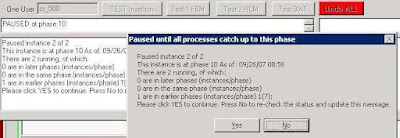 Next step: Analyzing your data and doing QA on the insertion.
If you're running multiple instances follow this procedure:
Step 1 VALIDATE your main conversion database, fix any validation issues and re-validate. You've been taken through this multiple times if you've been in the lab with Sumatra for anything beyond an hour.
Step 2 MAKE COPIES of your validated conversion database and name them something OBVIOUS, like Instance1_YourCompany_28Dec07_DB_v8.7.7.7.mdb, Instance2_..... etc.
Step 3 DISTRIBUTE accordingly to separate client machines (remember, this is Exchange 2007 and you can't run on the 2007 server)
Step 4: EXECUTE SuExchange2007.exe (aka the Sumatra 2007 Insertion Code)
Step 5: SELECT Run Multiple Instance at the "Single Instance" prompt, enter the instance number. You should clear the stats table if you've run multiple instances before. Here's a screen shot:
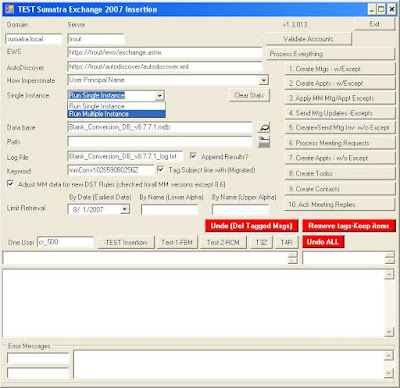
Background: You'll need a separate database to track the progress of each instance. We call this the "sync database", which you can think of as the traffic cop keeping all the instances running smoothly. It's usually called SyncStats.mdb.
Step 6: Point to SyncStats.mdb in the InstanceDB box.Step 7: For all instances, select the Lower Limit and the Upper Limit by alpha that you want to run. You want to make these roughly equal. For example, you might select:
A to J (Or you can set the upper alpha limit to "J")
K to R
S to Z (or set the lower alpha limit to "S")
SET UNIQUE Instance Numbers for each of these before executing.
Anything preceeded by numbers (e.g., 3rdFloor Conf Rm) will automatically come at the beginning of the alphabet with A.
Keep track of these so you do not forget letters. This HAS happened in test cases in the field and it became really obvious really fast.Step 8: Start running all instances
Step 9: Wait. Actually we're not trying to be funny here -- the application is going is to pause before steps 6 and 10. When all instances show the same pop-up box, you can resume all instances. (We've taken you through the reasons for this -- but if you have any questions, please ask.)
Next step: Analyzing your data and doing QA on the insertion.
Saturday, October 13, 2007
E2K7 Adding Delegates to Other Users' Accounts
For a migration into Exchange 2003/2007 we recommend you not have set Delegates. Those of you who have left your Delegates on in your lab and migated a few years worth of data have seen why: very full delegate inboxes, and very irate delegates.
The problem still remains: What's the best way to set Delegates AFTER a migration? You could use this as a learning opportunity for your users: let THEM set their own darn delegates, thank you very much.
But sometimes your user community is more demanding and wants (nay, NEEDS) this all done for them.
We have an account in Connecticut (thank you, Vince) who wrote up this account of how to set Delegates for calendars in Exchange 2007 (do not attempt on E2K3). This assumes your Exchange Admin account with adequate permissions to execute (and you know that is its own separate issue) is called "sumatra"
The problem still remains: What's the best way to set Delegates AFTER a migration? You could use this as a learning opportunity for your users: let THEM set their own darn delegates, thank you very much.
But sometimes your user community is more demanding and wants (nay, NEEDS) this all done for them.
We have an account in Connecticut (thank you, Vince) who wrote up this account of how to set Delegates for calendars in Exchange 2007 (do not attempt on E2K3). This assumes your Exchange Admin account with adequate permissions to execute (and you know that is its own separate issue) is called "sumatra"
- Logon to Windows box as yourself.
- Delete the "sumatra" account if it is in C:\documents and setting. If it is not there then it will be after this first account adjustment. You are good for the 1st run.
- Locate the Outlook app and "Run as..." and run as the Domain Administrator
- Setup the user you want to add Delegates to
- Once done you will be asked to logon, again. This time logon as "sumatra"
- The account will then be setup in the app.
- Set your Delegates.
- When done close Outlook
- Delete the sumatra account (as mentioned in step 2) and the administrator account.
- Repeat steps 3-9 until you are done with your account setup.
All bets are off once sp1 hits the street -- we can almost guarantee this process will change.
Thursday, September 27, 2007
Inserting Oracle Calendar Server / Meeting Maker into Zimbra
By this point the idea is to make the actual insertion into Zimbra a boring anti-climax.
We have the same goal inserting legacy data into Microsoft Exchange, but because of Exchange architecture this is a little more intricate than Zimbra (So we deal with it separately).
Your primary tool is called zinsert.exe, which you invoke from the Command Prompt (which those of us of a certain age refer to as "DOS").
Simply typing zinsert (-Enter-) will give you a brief summary of functionality.
We have the same goal inserting legacy data into Microsoft Exchange, but because of Exchange architecture this is a little more intricate than Zimbra (So we deal with it separately).
Your primary tool is called zinsert.exe, which you invoke from the Command Prompt (which those of us of a certain age refer to as "DOS").
Simply typing zinsert (-Enter-) will give you a brief summary of functionality.
 First off, use ODBC (available under Control Panel) to point to the conversion database. Let's call your ODBC connection "Zimbra."
To create a series of ICS files with appropriate cross-linked GUIDs, use this command:
zinsert -fo -cs DSN=ZIMBRA -tf_utc_to_timezone
In general, converting for the appropriate time zone, use the -tf_utc_to_timezone option unless we determine another one is better (not likely, but we keep them there in case -- you never know what the US Congress is going to do with Daylight Savings Time).
Inserting into Zimbra
That's what the -post command is for, which as of this date we haven't actually had to use (also it will require knowing each user's password which is a pain)
You can use curl, or (thanks to a college in New Jersey), you can use this method.
This solution doesn't require an admin to know the user's password.
It does require a configured web server and assumes there is a separate ICS for each user calendar.
1. The ICS files need to be placed on a web server that the Zimbra server will be able to access via http (or https). I'll assume a base of http://YOURDOMAIN/migrate/.
2. Create a file (e.g. /tmp/importcals.zcs) that will be fed to zmprov with contents like this:
selectMailbox USERID1
emptyFolder Calendar <--- optional command
importURLIntoFolder Calendar http://YOURDOMAIN/migrate/USERID1.ics
selectMailbox USERID2
emptyFolder Calendar <--- optional command
importURLIntoFolder Calendar http://YOURDOMAIN/migrate/USERID2.ics
3. Run that through zmprov.
zmprov -f /tmp/importcals.zcs
Wednesday, September 26, 2007
So we revised the Oracle Calendar Converter User Interface
 We think it's easier to follow. If you're working with us it's in your FTP account.
Mapping Oracle Calendar/ Meeting Maker users for a Zimbra insertion
NB: This is for migration into Zimbra. Migration into Exchange is a whole different issue which we deal with separately.
You have your Oracle Calendar Server data, you've converted it into an Access database -- now you just need to map your users for Zimbra.
You have your Oracle Calendar Server data, you've converted it into an Access database -- now you just need to map your users for Zimbra.
Why? Usually there's at least a handful of users who have changed their names through marriage, divorce, or the witness protection program.
Also since you're migrating anyway many sites use the opportunity to standardize their naming conventions.
Step 1: Open the database and go to the Users Table: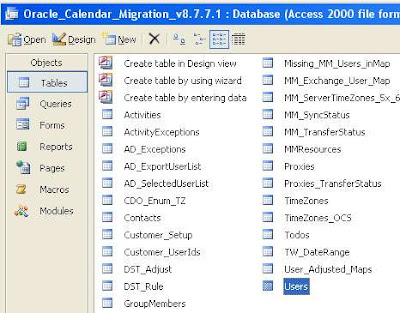
There's a lot going on here, but don't let it scare you.
In the Email column just put your new Zimbra email

Note that even though the login for "Adam Ant" is "aant" we can substitute "adam_ant" or anything else we need so long as it matches the Zimbra address.
This simple Query will duplicate your login IDs to the Email field, appending the appropriate domain name (which you'll need or else guests will not be notified of meeting updates). Of course, this is generally modifiable into anything that makes sense for your environment.

Next step: inserting your data!
Tuesday, September 25, 2007
Converting your OCS exports to migration format
So you've gotten your calendar data out of Oracle Calendar Server and now you wonder "What ELSE do I have to do with it?"
Well, you have to convert it into a (new) relational database so that we can reassemble any attributes not exported from OCS.
Like what you ask? Guest lists, guest responses, recurrence patterns, all the sorts of things you want.
Do you need to go through this? Well, if you want to do this all server-side and keep all the information that makes schedulers valuable, yes.
Well, you have to convert it into a (new) relational database so that we can reassemble any attributes not exported from OCS.
Like what you ask? Guest lists, guest responses, recurrence patterns, all the sorts of things you want.
Do you need to go through this? Well, if you want to do this all server-side and keep all the information that makes schedulers valuable, yes.
The tool that takes your exports runs in Windows and looks like this: How do I use this?
While the design reminds you of an early farm tractor (which we are very proud of) - it's designed with the same single-minded focus: get the job done as quickly as possible and the heck with how it looks (you're tossing it out after this is done anyway).
The idea here is to take in the files you got from UNICPOUTU, and match them with users and resources from USERS.TXT and RESOURCES.TXT.
Specifically this will:
- Match export data to users and resources (the users and resources will be mapped to your new calendar system)
- Add guests to your meeting
- Group one-time instances into “recurring meetings” (makes the insertion run faster)
- Remove old items you do not intend to insert (makes the insertion run faster)
- Reformat OCS-specific items to calendar-neutral terms (e.g. map Daily Notes and Daily Events to All Day Events)
Note that if you're planning on multiple test insertions you only need to read the users and resources into the database once. It is possible to parallelize conversions, e.g., convert A-L on one machine, M-Z on another and join them together to get the job done in half the time (but please talk with us before you do that).
This also includes a blank template database (MS Access format), which we recommend you rename a copy of to something descriptive, like "December 1 migration test." Please preserve the database version in the file name; it really helps when debugging.
Let's go into some details on the specifics.
Time Zone: Select the Time Zone of your OCS node. This is really crucial otherwise everything will be off on your insertion by some multiple of hours. If you have users outside of the default time zone you can modify the USERS.TXT file for them (see earlier post).
Drop Items Prior to this Date: You can selectively export items from certain date ranges -- but in case you have a data set with everything and want to pare it down for a test insertion, you have that option here.
Threshold for recurrence patterns: When we get the events from OCS they are all individual events rather than a series. We reconstruct the series, but (as a little thinking will show you) with exceptions to recurrences this can get a little dicey. Our software analyzes the sequence and comes up with its best guess of the recurrence pattern, taking account the threshold you set.
A couple of quick things to note:
- Historical events (i.e., any events before the date you convert them) all go in as individual events (it's faster this way) with meeting guest list in the Agenda field (except for BCC guest whom only the meeting proposer sees)
- There needs to be at least five recurring events before we attempt to re-create the sequence. (Quick math -- at an 80% threshold, one exception to a five event pattern puts you at the threshold)
- If we can't match a pattern all events will go in as individual instances. So worst case scenario is that a recurring meeting or event comes in as a series of individual instances. (But as opposed to an ics RDATEs list these will display properly in Outlook clients).
- If you migrate only a subset of users, meetings to and from users outside that subset will not show up. Think about this one: if the meeting owner or guest is not in the system you're migrating to -- how can they be on a meeting in your new system? This is the main reason we're always advocating "Big Bang" migrations for meeting-centric corporate cultures.
How does this work?
In two phases: the first phase reads the OCS exports and turns them into an intermediate file. The second phase reads the intermediate file into the database template.
Why not just put everything into the database as we're going along? It's faster this way.
Everything in a calendar server migration is a trade-off between time and convenience.
It's certainly easier for the average admin to work with an Access file. But the overhead of constant transactions at the volume we need is huge. Saving them for the end makes the system much faster.
Monday, September 24, 2007
How to Extract Data from Oracle Calendar Server for a migration into Exchange or Zimbra
This is Part I of a three-part series. Part II will be about converting this output and Part III is about inserting it into your target system.
So you've seen your future and it no longer involves Oracle Calendar Server (OCS).
We're there with you.
The problem we deal with now is: How to get the Data OUT of OCS.
As usual, we like to rely on the native tool set of the legacy system (less code on the legacy system implies easier to maintain the migration process as a whole).
Let’s say you run a single Oracle Calendar Server node (number 1) with administrative password “jimmorrison” and have users John Lennon, Jerry Garcia, Jimmy Page, Puffy Amiumi, and Walter Liberace. As well as the Mozart Conference Room and Shea Stadium. The following command lines will pull all data Sumatra requires:
uniuser -ls -format "%s%:%g%:%uid%:%id%:%node-id%:" -n 1 -p jimmorrison >users.txt
uniuser -resource -ls "S=*" -n 1 -p jimmorrison >resources.txt
unicpoutu -u "S=Liberace/G=Walter" -f exp-liberace.txt -n 1 -p jimmorrison
unicpoutu -u "S=Garcia/G=Jerry" -f exp-garcia.txt -n 1 -p jimmorrison
unicpoutu -u "S=Lennon/G=John" -f exp-lennon.txt -n 1 -p jimmorrison
unicpoutu -u "S=Amiumi/G=Puffy" -f exp-amiumi.txt -n 1 -p jimmorrison
unicpoutu -u "S=Page/G=Jimmy" -f exp-page.txt -n 1 -p jimmorrison
Execute this batch file to extract these data files, and place them in a convenient directory.
How this is organized, and what we do with it.
The first two lines extract the names of all users and all resources in a standard format.
Sumatra Development LLC reads these two files in first to establish the list of users and resources being migrated. These become really important to make sure the connections among users is maintained when we insert into either Exchange or Zimbra (Notes 8 coming if we get sufficient interest). The programmers among you will recognize this is crucial to maintain GUID integrity.
THEN, all user calendar data in the exp-(name).txt files are read in, and matched against these users and resources.
The users.txt file looks something like this:
Garcia:Jerry:Jerry.Garcia:256:1:
Lennon:John:John.Lennon:257:1:
Amiumi:Puffy:Puffy.Amiumi:258:1:
Liberace:Walter:Walter.Liberace:260:1:
Page:Jimmy:Jimmy.Page:262:1:
NB: It is certainly possible to script these so that the output from the initial users export can be the input for a script that automatically exports all user data/
For users with a different default Time Zone from the node time zone, manually add the Oracle Time Zone code following them in the user.txt file.
Let’s say Puffy Amiumi is based in Japan and therefore uses JST.
The resulting users.txt file would be the following:
Garcia:Jerry:Jerry.Garcia:256:1:
Lennon:John:John.Lennon:257:1:
Amiumi:Puffy:Puffy.Amiumi:258:1:JST
Liberace:Walter:Walter.Liberace:260:1:
Page:Jimmy:Jimmy.Page:262:1:
The resources.txt file looks like this:
. R=Shea Stadium/N=ResNum0000/CA=200,000/S=Steinbrenner/G=George/
+ LOC=Da Bronx\r\nNew York/PHONE=617-555-1212/FAX=617-555-1213/ID=259/
+ EMAIL=shea@sumatra.local/UID=Shea Stadium/ALLOW-CONFLICT=NO/ENABLE=TRUE/
+ LANG=en/NODE-ID=1
. R=CR Mozart/N=ResNum0002/CA=10/S=Mozart/G=Wolfgang/
+ LOC=3 Colonial Terrace Strasse\r\nWien, Ostereich/PHONE=617-555-1212/
+ FAX=617-555-1213/ID=261/EMAIL=crmozart@sumatra.com/UID=CR Mozart/
+ ALLOW-CONFLICT=NO/ENABLE=TRUE/LANG=en/NODE-ID=1/PUBLISHEDTYPE=PUBLISHED
More on OCS Calendar Data
Our recommended method for extracting Oracle data is to use the off-the-shelf Oracle utility:
UNICPOUTU
This is typically found in the directory:
C:\ocsinfra\ocal\bin on Windows servers
ORACLE_HOME$/ocal/bin on UNIX/Linux servers
The command:
UNICPOUTU –u “S=Garcia/G=Jerry” –f output.txt –n 1
will export Jerry Garcia’s entire calendar from OCS Node 1 to the output file output.txt.
You will be asked for the calendar administrator password (or alternately can pass it with the –p parameter).
This is also configurable for different start and end dates, depending on how much data you wish to transfer.
So if you only wanted to take data since January 1, 2006, you would use:
UNICPOUTU –u “S=Garcia/G=Jerry” –f output.txt -start 1 jan 2006 –n 1
NB: Dates can only be in "day month year" format.
Resources
If resources are only guests and do not have their own non-meeting events, you do not need to export them. If however you have reason to, we include the information here.
The command:
UNICPOUTR –u “R=CR Mozart” –f output.txt –n 1
Will export the Conference Room “CR Mozart” on OCS Node 1 to output.txt
Users for a node
The following command will export all of the users on Oracle Calendar Server node 1:
UNIUSER –user –ls “S=*” –n 1
The following command will export all of the resources on Oracle Calendar Server node 1:
UNIUSER –resource –ls “S=*” –n 1
Designate Access Rights
What in Outlook / Exchange are called the Delegate rights are in Oracle called Designate rights. To extract these use:
UNIACCESSRIGHTS –ls
More detail on this can be found in your Oracle Calendar Server Reference manual.
Sumatra does not currently insert Designate Access Rights into Exchange or Zimbra from OCS – but if this is a requirement for you please consult with us (the issue is more about trade-offs on the Exchange 2003 side than the Oracle side or the Zimbra).
Why not UNIICAL?
If you're asking this question you probably already know the answers:
So you've seen your future and it no longer involves Oracle Calendar Server (OCS).
We're there with you.
The problem we deal with now is: How to get the Data OUT of OCS.
As usual, we like to rely on the native tool set of the legacy system (less code on the legacy system implies easier to maintain the migration process as a whole).
Let’s say you run a single Oracle Calendar Server node (number 1) with administrative password “jimmorrison” and have users John Lennon, Jerry Garcia, Jimmy Page, Puffy Amiumi, and Walter Liberace. As well as the Mozart Conference Room and Shea Stadium. The following command lines will pull all data Sumatra requires:
uniuser -ls -format "%s%:%g%:%uid%:%id%:%node-id%:" -n 1 -p jimmorrison >users.txt
uniuser -resource -ls "S=*" -n 1 -p jimmorrison >resources.txt
unicpoutu -u "S=Liberace/G=Walter" -f exp-liberace.txt -n 1 -p jimmorrison
unicpoutu -u "S=Garcia/G=Jerry" -f exp-garcia.txt -n 1 -p jimmorrison
unicpoutu -u "S=Lennon/G=John" -f exp-lennon.txt -n 1 -p jimmorrison
unicpoutu -u "S=Amiumi/G=Puffy" -f exp-amiumi.txt -n 1 -p jimmorrison
unicpoutu -u "S=Page/G=Jimmy" -f exp-page.txt -n 1 -p jimmorrison
Execute this batch file to extract these data files, and place them in a convenient directory.
How this is organized, and what we do with it.
The first two lines extract the names of all users and all resources in a standard format.
Sumatra Development LLC reads these two files in first to establish the list of users and resources being migrated. These become really important to make sure the connections among users is maintained when we insert into either Exchange or Zimbra (Notes 8 coming if we get sufficient interest). The programmers among you will recognize this is crucial to maintain GUID integrity.
THEN, all user calendar data in the exp-(name).txt files are read in, and matched against these users and resources.
The users.txt file looks something like this:
Garcia:Jerry:Jerry.Garcia:256:1:
Lennon:John:John.Lennon:257:1:
Amiumi:Puffy:Puffy.Amiumi:258:1:
Liberace:Walter:Walter.Liberace:260:1:
Page:Jimmy:Jimmy.Page:262:1:
NB: It is certainly possible to script these so that the output from the initial users export can be the input for a script that automatically exports all user data/
For users with a different default Time Zone from the node time zone, manually add the Oracle Time Zone code following them in the user.txt file.
Let’s say Puffy Amiumi is based in Japan and therefore uses JST.
The resulting users.txt file would be the following:
Garcia:Jerry:Jerry.Garcia:256:1:
Lennon:John:John.Lennon:257:1:
Amiumi:Puffy:Puffy.Amiumi:258:1:JST
Liberace:Walter:Walter.Liberace:260:1:
Page:Jimmy:Jimmy.Page:262:1:
The resources.txt file looks like this:
. R=Shea Stadium/N=ResNum0000/CA=200,000/S=Steinbrenner/G=George/
+ LOC=Da Bronx\r\nNew York/PHONE=617-555-1212/FAX=617-555-1213/ID=259/
+ EMAIL=shea@sumatra.local/UID=Shea Stadium/ALLOW-CONFLICT=NO/ENABLE=TRUE/
+ LANG=en/NODE-ID=1
. R=CR Mozart/N=ResNum0002/CA=10/S=Mozart/G=Wolfgang/
+ LOC=3 Colonial Terrace Strasse\r\nWien, Ostereich/PHONE=617-555-1212/
+ FAX=617-555-1213/ID=261/EMAIL=crmozart@sumatra.com/UID=CR Mozart/
+ ALLOW-CONFLICT=NO/ENABLE=TRUE/LANG=en/NODE-ID=1/PUBLISHEDTYPE=PUBLISHED
More on OCS Calendar Data
Our recommended method for extracting Oracle data is to use the off-the-shelf Oracle utility:
UNICPOUTU
This is typically found in the directory:
C:\ocsinfra\ocal\bin on Windows servers
ORACLE_HOME$/ocal/bin on UNIX/Linux servers
The command:
UNICPOUTU –u “S=Garcia/G=Jerry” –f output.txt –n 1
will export Jerry Garcia’s entire calendar from OCS Node 1 to the output file output.txt.
You will be asked for the calendar administrator password (or alternately can pass it with the –p parameter).
This is also configurable for different start and end dates, depending on how much data you wish to transfer.
So if you only wanted to take data since January 1, 2006, you would use:
UNICPOUTU –u “S=Garcia/G=Jerry” –f output.txt -start 1 jan 2006 –n 1
NB: Dates can only be in "day month year" format.
Resources
If resources are only guests and do not have their own non-meeting events, you do not need to export them. If however you have reason to, we include the information here.
The command:
UNICPOUTR –u “R=CR Mozart” –f output.txt –n 1
Will export the Conference Room “CR Mozart” on OCS Node 1 to output.txt
Users for a node
The following command will export all of the users on Oracle Calendar Server node 1:
UNIUSER –user –ls “S=*” –n 1
The following command will export all of the resources on Oracle Calendar Server node 1:
UNIUSER –resource –ls “S=*” –n 1
Designate Access Rights
What in Outlook / Exchange are called the Delegate rights are in Oracle called Designate rights. To extract these use:
UNIACCESSRIGHTS –ls
More detail on this can be found in your Oracle Calendar Server Reference manual.
Sumatra does not currently insert Designate Access Rights into Exchange or Zimbra from OCS – but if this is a requirement for you please consult with us (the issue is more about trade-offs on the Exchange 2003 side than the Oracle side or the Zimbra).
Why not UNIICAL?
If you're asking this question you probably already know the answers:
- It does not export ATTENDEES
- It does not export ATTENDEE responses
- It exports RDATEs rather than RRULEs (which will cause you trouble down the line, not least of which because it really does a number on Outlook if you use that as a client for any target systems)
Still with me? Wait a few days for Part II: Converting and Mapping your OCS data.
Monday, September 17, 2007
So Yahoo acquired Zimbra?
So Yahoo acquired Zimbra?
Good.
I was never impressed with Yahoo's calendaring.
Here's hoping it improves.
Good.
I was never impressed with Yahoo's calendaring.
Here's hoping it improves.
Thursday, September 13, 2007
Migrating Data from Resource Scheduler to Exchange 2007 Resources
A typical week here at Sumatra involved at least one request to take data from one system we've never seen before and put it into one we know (or vice-versa).
A few weeks ago it involved a request to migrate data from Resource Scheduler for Exchange from PeopleCube.
The idea was that they wanted to start using the native room and resource scheduling capability in Exchange 2007 instead additional software.
This presents some interesting problems.
Before we coded anything, we thought we'd ask our reading public if there was anyone else out there who wanted to migrate Resource Scheduler data, because it's only worth doing this if there's more than one site.
A few weeks ago it involved a request to migrate data from Resource Scheduler for Exchange from PeopleCube.
The idea was that they wanted to start using the native room and resource scheduling capability in Exchange 2007 instead additional software.
This presents some interesting problems.
Before we coded anything, we thought we'd ask our reading public if there was anyone else out there who wanted to migrate Resource Scheduler data, because it's only worth doing this if there's more than one site.
Thursday, September 06, 2007
Oracle Calendar Server -- Multiple User Names and Migration
We were astounded to discover in customer data that it was possible to have non-unique user names in Oracle Calendar Server. 


However, as the screenshots show, it was very easy for us in our test lab to create two "Jerry Garcia" users:
Despite the fact that I entered a valid password for only one of them I get the following screen on log-in asking me to select the one I mean (as though there's a way to tell them apart?)
This is bad enough -- but we then took the next step and invited them both to the same meeting.
Using the standard UNICPOUTU output this is the resulting data:
S 8780430
D 30
T Meeting with the two Jerrys
I 0
R N2
M Lennon John
W Lennon John
A TRUE 3 10
C [ .+] Garcia Jerry
C [ .-] Garcia Jerry
O
... making it impossible to tell which Jerry is which.
SO we've just added the capability to detect this in the USERS.TXT file before we get too far into a migration. If this situation arises, an error will pop up:
Wednesday, September 05, 2007
Yet another significant Entourage / Outlook discrepancy
If some of your users have Entourage clients and create recurring meeting requests (and if they're not creating recurring meeting requests what are they doing with an Exchange account anyway?), then please check out this recent KB article (number 933093):
You receive a message that states that your meeting request was declined when you use Entourage for Mac to send a recurring meeting request to an Exchange 2003 resource mailbox
You receive a message that states that your meeting request was declined when you use Entourage for Mac to send a recurring meeting request to an Exchange 2003 resource mailbox
Saturday, September 01, 2007
Oracle Calendar Server to Zimbra and Exchange
Yep, we've got Oracle Calendar Server to Zimbra migration working.
John's calendar in OCS 9.0.4 looks like this, note the Declined meeting (in red) and the Tentative meeting (in blue):

In Zimbra it converts to this (with the Tentative and Declined acting as they should in Zimbra):


Note also that the OCS Day Event becomes an All Day Event in both Outlook/Exchange and Zimbra.
John's calendar in OCS 9.0.4 looks like this, note the Declined meeting (in red) and the Tentative meeting (in blue):
In Zimbra it converts to this (with the Tentative and Declined acting as they should in Zimbra):
As we've told some of you, the tool that we used to take the OCS exports and re-create recurrence patterns (ICS as RRULES) is being re-worked for field use (as opposed to the way we used to do it in Sumatra labs). It looks like this:
with our trademark "as few buttons as possible but make all of them useful" design philosophy.
In Outlook / Exchange 2007, the same calendar looks like this (Declined and Tentative are dealt with in the Outlook INBOX rather than directly on the calendar):
Note also that the OCS Day Event becomes an All Day Event in both Outlook/Exchange and Zimbra.
Subscribe to:
Posts (Atom)