Showing posts with label Free-Busy. Show all posts

Sunday, October 23, 2016

Microsoft Exchange Free/Busy

Good read:  The Hybrid Mesh: why free/busy is broken and what you can do about it.

If you have any external free/busy relationships configured things can get complicated in Exchange.  In truth outside of Exchange they can get almost impossible (props to Zimbra for its efforts on Exchange free/busy integration).

The short answer is that it gets really complicated (basic reason: in email systems where calendaring is an after-thought, free/busy is an after thought to the after thought).

Follow the instructions therein to have any hope of making it work,


Tuesday, September 01, 2015

You know you are a calendar geek when....

You know you are a calendar geek when you go to the Museum of Modern Art and on seeing this painting:

your first thought is "Out of Facility."  
I'm pretty sure that is not the reaction Ruscha intended.


Monday, March 07, 2011

Oracle Calendar / Outlook Free Busy Interchange

Free/Busy Lookups from MS Outlook into Oracle Calendar Server
Congratulations – you are dropping Oracle Calendar for Exchange. One problem: you need to stage it and you need some kind of connectivity between the two systems. This outlines how you can get Free/Busy lookups in Outlook / Exchange from OCS.
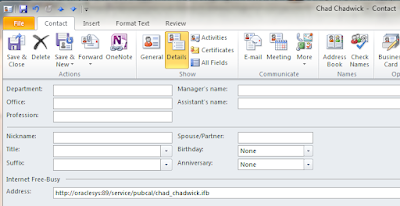
Outlook lets you have Internet Free Busy for Contacts:

SO: If we can produce IFBs for your OCS users (sorry about all the TLAs here), you can get Free-Busy lookups automatically working for your Outlook users into OCS.
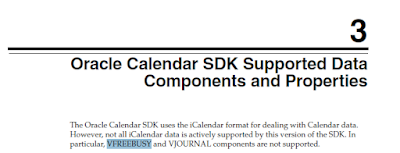
One problem: The Oracle Calendar interface specifically does not create the IFB format known as VFREEBUSY:

Probably Oracle wanted to avoid exactly what we want in this case.
Not a problem. We can create VFREEBUSY from off the shelf tools in the OCS environment. In particular we will use the utility UNIICAL.
The solution works as follows:
· Select the OCS users you want to have Free-Busy available for in Outlook.
· Set up an internal share that is available to your OCS environment (you will be publishing to it) and your Exchange environment (you will be reading from it)
· One directory call “/…/EXPORT”
· Another directory call “/…/CURRENT”
· A third directory call “/…/IFB”
We’re going to take you through the process for one specific user, who we call Jimi.Hendrix
Create a batch file something like the following:

Uniical –export –u “S=Hendrix/G=Jimi” –f /…/EXPORT/jimi.hendrix.ics -n 1 –end 12/31/2011 –start 10/31/2011 –p PASSWORD
So we’re going to publish an ICS file into the /EXPORT directory.
Notes to this point: The above batch file hardcodes two dates. Obviously we want to make it general to start from TODAY and end at (TODAY + Default F/B Horizon). But let’s start with small ambitions and grow from there.

On a separate computer, we set up a process which interrogates the EXPORT ICS, compares it to the CURRENT ICS (say by comparing the MAX (CREATED) to see if it needs to parse or not), and if so moves it into the CURRENT and parses into an IFB. Practically any scripting language of your choice will work.
So what does ICS look like and what schematic takes it into IFB?

OCS ICS example
An OCS ICS file has a simple structure with a three-line preface before VEVENTS begin.
<><>
<><>For a one-time appointments we need only look at the DTSTART and the DTEND (they are in Zulu time, which is a godsend for IFB). These need to get converted into VFREEBUSY format:
FREEBUSY:DTSTART/DTEND map to:
FREEBUSY: 20110210T140000Z/20110210T150000Z
For recurring, we need to worry about RDATE and RRULE. First RDATE (because from OCS I have not yet found an RRULE in version 9.0.4, but they DO exist in version 10.x)
In this case this maps to:
FREEBUSY:DTSTART/DTEND
FREEBUSY:RDATE(1)/RDATE(1)+(DTEND-DTSTART)
FREEBUSY:RDATE(2)/RDATE(2)+(DTEND-DTSTART)
FREEBUSY:RDATE(3)/RDATE(3)+(DTEND-DTSTART)
Etc.
NOTES TO THIS POINT: IFB so far does not appear to need to be in chrono order to function properly. Of course a maintenance release could change that in a moment.
Optimization issue: IF MAX(CREATED ) in an ICS < export =""> is there no need to parse?
OUR END POINT NEEDS TO LOOK LIKE THIS:
Microsoft Free/Busy .vfb Format – External file
-----------------------------------------------------------------
BEGIN:VCALENDAR
PRODID:-//Microsoft Corporation//Outlook 11.0 MIMEDIR//EN
VERSION:2.0
METHOD:PUBLISH
BEGIN:VFREEBUSY
ORGANIZER:/o=First Organization/ou=First Administrative
Group/cn=Recipients/cn=jimi.hendrix
DTSTAMP:20070223T145148Z ; Time of FB File gene
DTSTART:20070201T050000Z ; Start of period NB:
DTEND:20070401T040000Z ; End of period
FREEBUSY:20070205T140000Z/20070205T143000Z ; Begin events
FREEBUSY:20070222T140000Z/20070222T143000Z
FREEBUSY:20070222T160000Z/20070222T163000Z
FREEBUSY:20070223T130000Z/20070223T133000Z ; Busy -- 1/2 hr mtg starting at 8AM
FREEBUSY:20070223T150000Z/20070223T153000Z ; EST = 1PM Zulu
FREEBUSY:20070224T130000Z/20070224T133000Z
FREEBUSY:20070226T140000Z/20070226T143000Z
FREEBUSY:20070228T150000Z/20070228T153000Z
FREEBUSY:20070319T140000Z/20070319T143000Z
FREEBUSY:20070319T180000Z/20070319T183000Z
FREEBUSY:20070320T160000Z/20070320T163000Z
FREEBUSY:20070321T140000Z/20070321T143000Z
FREEBUSY:20070323T140000Z/20070323T143000Z
FREEBUSY:20070326T140000Z/20070326T143000Z
FREEBUSY:20070328T140000Z/20070328T143000Z
END:VFREEBUSY
END:VCALENDAR
NOTES:
· When Outlook says “Publish 2 months” it means from the START of the current month to the end of the next month. It doesn’t roll with the day of the month.
· TIME SEQUENCE does not appear to be significant. I can move the VFREEBUSY entries around and they are still interpreted correctly for a reasonable (2 month-3 month) FB window.
What is the User Experience?
A user needs to create a Contact in Outlook
REQUIREMENTS: The contact must be in the CONTACTS folder. NOT a sub-folder, or any other folder.
Note that the email address does not need to match the IFB name.
They can then add that contact to their meeting list and see their Free/Busy just as if they were native on the Exchange server. (caveat: the timeliness of the information depends on how often you set your processes to export ICS files on the OCS side and how often you interrogate for parsing)
Do we recommend this long-term?
Heck no. But as a short-term-help-you-over-the-hump to get OUT of OCS it’s more useful in integrating the remaining OCS users into your growing Exchange environment than anything else, and it is workable with minimal effort (and real-time OCS-Exchange calendar sync is just one of those things you should cringe at).
References:
How to use the Internet Free/Busy Feature in Outlook
Using Free/Busy without Exchange Server (can be very helpful)

WARNING: Experimental evidence has shown that for this to work a contact with Internet Free Busy MUST be in your Contacts folder, not a subfolder, or a folder with any other name.

Monday, December 27, 2010

Oracle Calendar / Exchange Free/Busy

An odd combination today here in the Boston-Cambridge area. A request last week for Free/Busy interchange between OCS and Exchange, and a blizzard put one of us into the Zen-like frame of mind to come up with solutions that do not involve lots of custom programming.

If any sites currently in an OCS to Exchange migration with us want to try out Outlook based Free/Busy queries into Oracle Calendar, please drop your Sumatra contact a line.

We are looking for "informed consent experimental subjects."

Thursday, June 11, 2009

Free/Busy not working in Outlook 2007 (Exchange 2007)

Zyg interrupted my Friday development meeting and asked why a client could not see Free/Busy in Outlook 2007, but saw F/B in OWA. He drops this on us without even bribing us with coffee and bagels. Someone says the Exchange Availability service has problems. But that makes no sense. OWA uses the availability service (pointing directly at the CAS servers). Outlook 2007 does too. Well sort of. It uses the autodiscover to find the availability service. I bet autodiscover was not correctly configured. I was wrong - it was DNS. Here is how we figured it out:

Use Outlook 'Test E-mail Autoconfiguration'
Outlook 2007 has a tool "Test E-mail Autoconfiguration" to identify the current autodiscover URLs. You can find this tool by launching Outlook 2007, then holding the Ctrl key and right-clicking on the Outlook icon in the system tray while clicking your heels together. In the form, enter an email address and password, uncheck Use Guessmart and Secure Guessmart Authentication and click Test. We looked at the log tab and saw AutoDiscover is failing -


or there was a problem with the autodiscover URL. The errors 0x800C8203 and 0x80072EE7 pointed to DNS - either DNS did not resolve the name or there was no web server at that URL. (We hope it's just a name resolution.) We checked by configuring logging in Outlook: Tools, Options, Other, Advanced, Check logging. We restarted outlook, opened a meeting, then refreshed free busy. (BTW, remember to turn off logging after you are done!) We saw:


Fix the problem in DNS

DNS. Ugh. I’d rather talk to my teenagers about sex, drugs, and the merits of doing their homework than wrestle with DNS. But the problem was simple - add a Forward Lookup Zone, then add a CNAME record. We used “DNSmgmt” (Start-Administrative Tools – DNS)

Forward Lookup Zone: Right-click on your existing forward lookup zone and select a New Zone. A wizard will walk you through the steps. The goal is to redirect ‘autodiscover.domain’ to ‘servername.domain’. You do this in five steps:

  1. Select Primary zone for the zone type;

  2. Store the zone in Active Directory

  3. Set the replication to all DNS servers in AD (this is just for internal requests)

  4. Enter the FULL NAME, e.g. autodiscover.ex2007.sumatra.local

  5. Allow both nonsecure and secure dynamic updates (this minimizes the possibility of Exchange giving you a hard time should you resign your Certificate.)

Create a new CNAME: Right-hand click on your newly created autodiscover zone and select New CNAME

  1. Browse the fully qualified domain name, traverse the DNS tree, and look for the Host (A) record in the DNS (e.g., it might be (same as parent folder).

  2. We did not add a name to the CNAME record. Click OK and you are done.

  3. Wait a few minutes until the DNS changes are sent throughout the organization.

And that worked.
-RVI

Monday, September 29, 2008

Exchange 2007 - Zimbra Free/Busy: The Magic PowerShell Command

We'd like to thank some folks we really enjoy working with at the University of Pennsylvania. They spent some time last week getting Free-Busy connectivity to work between Exchange 2007 and Zimbra.

I've got to give Zimbra credit for how well they executed Free-Busy connectivity with Exchange, a good summary of which and links pertaining thereunto are here:

http://www.zimbrablog.com/blog/archives/2008/06/are-you-free-or-busy.html


Penn's problem was that Zimbra is set up to handle Free-Busy data with Exchange 2003 via Public Folders (which are de-emphasized in Exchange 2007).

Exchange looking at Zimbra Free-Busy was no problem, but Zimbra looking at Exchange was generating an error like:

ERROR [EXCHANGE Free/Busy Sync Queue] [] fb - cannot modify resource

However, you can get it to work. The Magic PowerShell Command on the Exchange side is:

Add-AvailabilityAddressSpace -ForestName [zimbra domain] -AccessMethod PublicFolder

Credit for figuring this out belongs to Eric at Penn. He also used the phrase "Magic PowerShell Command" which I kind of really groove on.

You might also want to check out Microsoft's Implementing Calendar Interoperability (which shows how to do this without lots of coding and judicious use of Exchange Group Policy settings) and Managing Public Folders with the Exchange Management Shell.

Gorier Detail Added September 30, 2008 (again, thanks to Eric at Penn)

To configure Free-Busy from Exchange to Zimbra:
  1. Create a Service Account on Exchange. Call it "zimbra" (watch your permissions -- see next section)
  2. Configure Zimbra to connect to the Public Folder Free/Busy interface via this account. You do this on the Zimbra side.

# Specify the Service Account

mcf zimbraFreebusyExchangeAuthUsername
zimbra

mcf zimbraFreebusyExchangeAuthPassword
[password]

mcf zimbraFreebusyExchangeAuthScheme form

# Specify the url to Exchange 2007 CAS
server

mcf zimbraFreebusyExchangeURL
https://cas.exchange.YOURDOMAIN.com/

# Set the legacydn in Exchange 2007

mcf zimbraFreebusyExchangeUserOrg "/o=First
Organization/ou=Exchange Administrative Group (

fydibohf23spdlt)/"

Linux folk and Arthur C. Clarke fans: fydibohf23spdlt explained here.

To configure Free-Busy from Zimbra to Exchange:

1. Create a "Zimbra" OU in Active Directory. Make sure all your Zimbra users are in it. But let's define some rules for keeping everyone straight:

  • User "Elvis" on Zimbra will in this Active Directory Group be known as "Elvis_Zimbra"

2. Set the Service Account ("zimbra") to update the Free-Busy folder. You do this in PowerShell on the Exchange side.

add-publicfolderclientpermission -identity "\NON_IPM_SUBTREE\SCHEDULE+ FREE
BUSY\EX:/o=First Organization/ou=Exchange Administrative Group
(FYDIBOHF23SPDLT)" -user zimbra -accessrights owner

3. Make Exchange 2007 aware of the Public Folders in the Zimbra domain. You do this in PowerShell on the Exchange side:

Add-AvailabilityAddressSpace -forestname zimbra.YOURDOMAIN.COM -accessmethod publicfolder

4. Update Zimbra accounts to be aware of the email accounts on the AD side. You do this in Zimbra.

# add link from elvis to elvis_zimbra mail contact in AD
ma elvis
@zimbra.yourdomain.com
+zimbraForeignPrincipal ad:elvis_zimbra
# add link to OU
ma zimbraFreeBusyExchangeUserOrg "/o=First Organization/ou=Exchange Administrative Group (FYDIBOHF23SPDLT)"

Friday, August 22, 2008

Delegates / Proxy Migration in Exchange 2007 sp1

One thing we notice is that folks sometimes want to have their Proxies (Meeting Maker term) or Designates (Oracle Calendar Server term) migrated into Exchange 2007 as Delegates (Outlook term).

For Exchange 2007 before sp1 you were out of luck. For Exchange 2003 you only need to use CDO 1.21 with documented memory leaks. Those of you for whom we have migrated Proxies know this is why the process to migrate proxies takes almost as long as the process to migrate your calendar data. And annoyingly CDO 1.21 is not supported at all in .NET code.

For E2K7 sp1, Microsoft documentation gives you the impression this is possible using only Exchange Web Services. DeVa expands on this a bit in Adding delegates in Exchange Web Services (sp1).

However, our direct experience with a recent client migration to E2K7 sp1 and Glen (whom we cannot praise too much) confirm that setting permissions via Exchange Web Services is insufficient. You also need to set permissions on the Schedule+ NON_IPM_SUBTREE.

Wait you say -- this is 2008 and I just saw the word "Schedule+" appear in print, like it was... 1992 or something. Is this possible?

Rest assured, it is mos def.

In fact at least one user has reported a problem and documented a solution in in this data structure during a migrating from Exchange 2003 to Exchange 2007. Microsoft seems to have picked up on this in KB 945602.

For those of you who want a fuller story on how Delegates relate to the Free/Busy folder, thank Ximian for their work in reverse-engineering and publishing the results (which they did for E2K3).

So the end result here: be really careful writing scripts to set Delegates for calendar functions in Exchange 2007 and make sure you take into account the NON_IPM_SUBTREE in addition to the documented EWS code.

And, this being Exchange, there are additional complications because .... well.... because Exchange is clearly built by committee. So if you have BOTH Outlook 2003 and Outlook 2007, and use Delegate (and I'll bet the answer is "yes" all around), you need to check out KB 924470. While you're at it -- these also give you some idea how funky basic Delegate functioning is in E2K7: KB 950794, KB 918797, KB 932207, and KB 942418.

Does it work or not? This is so convoluted we're not sure. If any of you have feedback let us know.

Monday, December 10, 2007

Free/Busy Data, Outlook 2003, and Exchange 2007

If you're upgrading from Exchange 2000 or 2003 to Exchange 2007 and keeping Outlook 2003, check out this article from the Microsoft KnowledgeBase (945602):

Users who use Outlook 2003 cannot publish their free/busy data in Exchange Server 2007

Tuesday, October 30, 2007

Free-Busy lookups from Oracle Calendar into Zimbra or Outlook

Oracle Calendar users yearning to break free, what do you see that's unusual about this picture of the Oracle Windows Client?

Right! It's the little button that says "Z-Conflicts" just underneath "Remind Me" and "Tentative."

Why have we hacked our way into the OCS client? (Windows only for now, sorry Mac and *nix users.)

Because some of you have been asking for free-busy look ups from OCS into Outlook/Exchange and Zimbra, and this is how we can do it. Your reasons are usually that you must do a phased migration from OCS rather than a "Big Bang" and the problem just seemed so perfectly up our alley.

Right now you click it and it just brings up our internal web page -- but the next step is to click it and have it offer a list of non-OCS users to check free-busy status on. When you select a time it'll drop those into the OCS external email calendar invitation interface so you can more easily customize your invitation.

We're working on the interface between migrations. Stay tuned.

Oh, we have no doubt this will not be supported by Oracle, but hey, you're looking to get out of that suite anyway.