Showing posts with label Contacts. Show all posts

Wednesday, February 16, 2022

Video of Kerio calendar and contact data migrating to Office 365


Return with us to the days of the silents.  

To start -- a blank calendar and a single contact in Office 365.

We insert data using our latest tool from a single user.

You see the calendar data insert and then the contact data.

We then use our selective UNDO capability to remove the data.

This is all happening in real time -- no editing.

Tuesday, February 19, 2019

Non-mapping contact info in migrations from Zimbra to Office 365

It happens.

You have data in custom contact fields in Zimbra that do not map one-to-one to existing contact fields in Office 365.

So this contact, Horatio Warmonger in Zimbra has info like this:

Note his current "Note:" field in Zimbra pre-migration:

Have no fear -- Sumatra's migration takes all contact data not readily categorize-able in Office 365 and inserts it into the Notes field.


Tuesday, June 27, 2017

MDaemon migration: Suggested Contacts to Office 365 / Exchange

As usual we cannot keep ourselves out of trouble.  "Trouble" in this case meaning "adding more migration features so legacy calendar systems hate us even more."

The latest is migrating Suggested Contacts from MDaemon into Office 365 / Microsoft Exchange.

This has subtlety.  As is the case with Notes going from MDaemon into Exchange, we cannot place them directly in the folder "Suggested Contacts."  On Suggested Contacts, see this link.  

So we insert into the main Contacts folder (usually under an interface tag of "People" now) and give it the category "Suggested Contacts" to make them easy to find. 

Viewing your Contacts as a List and looking at Categories you'll see them this way:


As the above link documented,  "You can no longer add contacts to the Suggested Contacts folder."

To set this up in our migration tool we added a new option to the user interface.


We also have field confirmation that our migration works with two-byte character systems, such as Chinese:


Tuesday, January 26, 2016

Microsoft Exchange to Office 365 Calendar Migration Preserving Meetings as Meetings

Microsoft does not offer full-state calendar migrations from Exchange to Office 365.

Your meetings will all become appointments.  It's like printing your calendars from one Exchange system into office 365.

If you're a small site this is no big deal and easily managed.

If you're an enterprise where people live in meetings and conference room and resource allocation is crucial this can be a huge hassle which can delay your migration to the cloud.

If you use our technology your meetings will stay meetings. Problem solved.

And this shows synchronization working, again with full-state meeting migration, from one Exchange environment to another:
Since we added sync for meetings we also did it for tasks and contacts

And of course this is fully-mappable and includes our UNDO capability for easy testing and disaster recovery.

Why don't we do email as well?  Because imapsync does a superlative job for 100 Euros for any number of seats!  We cannot beat that.  Actually I do not think anyone can beat that.

Given the popularity of our MDaemon to Exchange and Zimbra to Office 365 email migration guides we're seriously considering an Exchange to Exchange email migration guide for imapsync.  Stay tuned.


If you do not need or want all that utility we have an option that runs faster but still tells you who is supposed to be in your meetings.  This is the information no one else provides you.

If you need Microsoft Exchange to Microsoft Office 365 calendar migration, feel free to contact us.

Thursday, January 14, 2016

Printing a Paper Backup of Your iCloud Contacts

From today's New York Times:  Printing a Paper Backup of Your iCloud Contacts.

Folks are sometimes amazed when I pull out my long-treasured filofax.

Why does someone who worked on the first Personal Information Manager and the first group scheduler still use PAPER?

Simple.  Every calendar server and calendar client at Sumatra can become test data with no notice at all.  It's a principle as ingrained as our minimum two brain rule.

Paper doesn't suddenly disappear in a software meltdown.

We still haven;t added contacts to our Apple iCalendar to Exchange migration, but it also does not seem to be a big issue to anyone in a migration phase right now.


Tuesday, January 12, 2016

Sharing calendar and contacts in Office 365 - Microsoft's Guided Walkthrough

Because once you're done migrating into Exchange from a legacy system you want to USE the calendars and contacts you've brought in, you may wish to check out 

Sharing calendar and contacts in Office 365 Guided Walkthrough

Looking at the URL it's in the /common/survey directory so it's at least doing thinly-veiled double-duty as market research, but it has some good information.

You may also wish to refer to some of our earlier posts:

Shared Calendars in Exchange 2007 sp1  (still one of our most popular posts ever!)

and

Create a Company Shared Contacts Folder in Office 365

Thursday, August 06, 2015

Windows 10 and Calendar / Contact Privacy

For those of you who have upgraded to Windows 10 (and if you had Windows 8 this was a no-brainer), you HAVE to read:  Windows 10 is spying on almost everything you do – here’s how to opt out and Windows 10 defaults to keylogging, harvesting browser history, purchases, and covert listening and Digging into and Understanding Windows 10’s Privacy Settings

The most sober reading I've seen comes from Lifehacker.

Now since we're calendar geeks, we're going to show you how to keep your calendar and contacts private, which should be the default in the first place, but is not.

You do not have many choices in your Calendar.  If you want to use Cortona to set your appointments, it needs to check your calendar.  If you are worried Cortona is a nosy rhymes-with-witch who is ratting you out at every opportunity, then turn this off.


You have more choices in your Contacts -- but what "App connector" and "Windows Shell Experience" are is 1.) unclear 2.) why these are options for contacts but not calendar and 3.) WTF?  Microsoft support ducks the question not only about what they are but why they need specific access.


Short answer: beats the heck out of me -- but I dialed my privacy settings to the max.

My main previously unanswered question:  I'm happy with Windows 7 on my desktop.  How do I get rid of the Microsoft annoyanceware in my lower left hand corner?

Simple.

Click that nearly invisible "Up" triangle:

Then select: GWX "Hide icon and notifications"
Yeah!  I get to keep Windows 7!!!!!  And NOT be badgered about it!!!!!!

Our conversion server for Meeting Maker to Exchange still runs Windows XP.  I needed to take the darned thing off the network to make sure Microsoft / Java / Whoever didn't "improve" it by making it unusable with an automatic update.

Tuesday, June 17, 2014

Oracle Beehive to Microsoft Exchange Calendar Migration: Beehive-Buddy

Oracle Beehive seems to be the legacy system folks are replacing at record pace these days.

So we've been burnishing some of the features.

Latest one: Beehive Buddy Lists.  
Any contacts tagged as Beehive-Buddy will not migrate.  This reduces the number of duplicate contacts.


Tuesday, April 22, 2014

The Curious Case of the Outlook 2013 Contact Notes

UPDATE 9/4/14: Microsoft released a fix for this issue. See our Disappearing Contact/Calendar item body fixed in Exchange 2013 CU6 blog post


Found something weird with Outlook 2013.

This showed up in our Beehive to Exchange migration but it would not be limited to that particular situation.

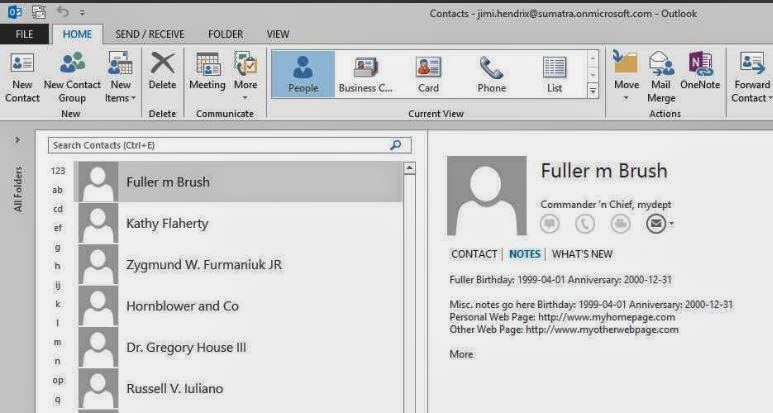
Let's look at the results first.  All of these clients were accessing the exact same contact record on our Office 365 test system, though we have confirmed the same behavior with Exchange on-premises as well (no surprise there since this looks to be an Outlook 2013 bug).


Contacts and Notes (including some data we capture to the contact notes either because of EWS bugs or there's no other place to put it) show up fine in Outlook 2007 post-migration.


And they show up fine in Outlook 2010.


OWA and the Surface are no problem.


THEN we get to Outlook 2013:


PROBLEM!  Where did the Notes go?  The situation seems to only show up if you have a contact created using EWS.

This gets weirder because you can CREATE a contact with notes in either OWA or Outlook 2013 and it will properly display and edit in either.

This gets EVEN WEIRDER because in Outlook 2013 you get Notes displayed correctly in the PEOPLE view....
but not in any other view (Business Cards for example):

We think this is fairly definitive proof that Outlook 2013 has a bug in it.

Tuesday, April 15, 2014

Exporting Contacts to a CSV file using the EWS Managed API and Powershell

Exporting Contacts to a CSV file using the EWS Managed API and Powershell by Glen Scales will show you how to get this information OUT of Exchange server-side if you want to.

Normally we see people wanting to put this information INTO Exchange server-side, but there are legit reasons for wanting this capability:  archiving crucial customer data from former employees, saving vital contact data, legal discovery, migrating to Google, etc.

For the same reasons you will want to check out his scripts in Export the GAL or Address list with EWS to Vcards in 2013 MEC sample 1.

Arm yourselves with knowledge.


Tuesday, March 04, 2014

Create a Company Shared Contacts Folder in Office 365

We got asked to look into shared contacts folders in Office 365.

It turns out we did not need to do anything because some folks at Cogmotive have already done it.

Check out their article Create a company Shared Contacts folder in Office 365.  It's very detailed and thorough.

Thursday, January 16, 2014

Useful Guided Walkthroughs for Calendaring in Office 365

Since one of our most popular posts ever is Shared Calendars in Exchange 2007 sp1, largely to show folks how to create shared calendars, I'm really happy that Microsoft is finally doing its own tutorials on some things that are just darned hard in Exchange.  Well, in this case Office 365.

Check out the new Guided Walkthroughs Microsoft has put up.

Of special interest to those followers of our blog are:


and

Of course the other walkthroughs on email and mailbox access will be useful to you as well.

Wednesday, October 22, 2008

Dude -- Here's My Contacts

Thanks go out to our Kiwi friends for this information.

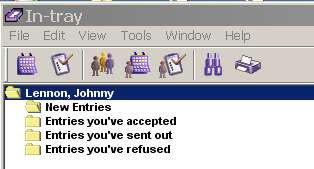
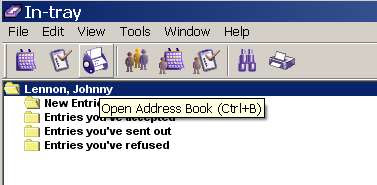
Let's say you want access to your Oracle Connector for Outlook contacts from within an Oracle client. Notice the lack of a "Contacts" icon in the Oracle In-tray:

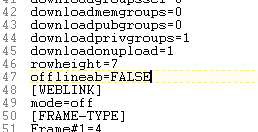
Go to your UNISON.INI file under C:\Documents and Settings\USERID\Application Data\Oracle\Calendar

Find the [GENPREFS] section.

Change:

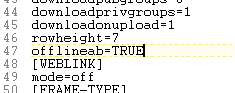
offlineab=FALSE to offlineab=TRUE


Restart your Oracle client (not OCFO), and you have access to your Contacts.

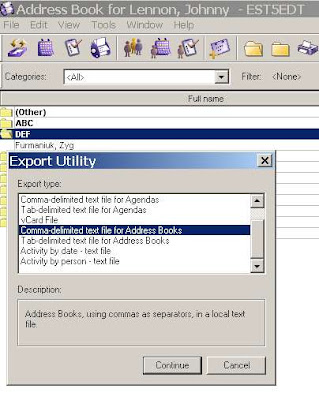
You even have options to EXPORT them (from which you can also take them into Outlook).

Friday, October 10, 2008

Oracle Connector for Outlook: Dude, Where's My Contacts?

So we just helped several thousand folks in New Zealand migrate their calendars from OCS to Exchange 2007 and they called us across the Pacific (Side bar: Across the Pacific is a WAY better movie than Dude, Where's My Car?) for some insight into how to migrate their contact data using Oracle Connector for Outlook and PSTs.


They tried the obvious method of just opening the local PSTs and the contact data from OCS was not there. This sounding like the kind of spooky weirdness that intrigues us in the calendar migration business we needed to dust off and install Oracle Connector for Outlook, look into this, and discover that it indeed is the case.

Initially we thought it might be that Offline Use needed to be enabled (we got that hare-brained idea from one of Oracle's architectural diagrams of OCFO), so we set that.


And we followed through on the Offline Folders Setting:


There is indeed a PST file there (which is usually a good sign)


but when I opened this PST in Outlook on a different machine there were no contacts.

In OCFO I see this:


In "New" Outlook I see this (we had no doubt our friends in New Zealand were correct about this, but we love the phrase "trust but verify"):

We did manage to extract the contact data and what we had to do was make it all REALLY EXPLICIT. Note that I also used two different versions of Outlook (2002 vs. 2003) just to keep the locations straight.

To start in OCFO select File-Import and Export:


You're exporting to a file


In fact a PST


And all we want right now is the Contacts:


Pick a location where you can save it (I picked next to the standard Outlook.PST file, because the size difference 48 vs 64 KB between the two is interesting).


And voila.

Now on the Exchange side, you can run the process in reverse, or you can use Data File Management


Add a new PST, Point to your contacts.pst file,


And the end result is that you've got your contacts over:

So for the really curious calendar person: What the heck is going on here?

Let's take a look at the file structure of OCFO. Almost all the files under the /Outlook/Oracle Connector... directory are pretty small, except for the one I found called "mdb" which being within the same order of magnitude as the PST files we found makes it a good candidate for the location where OCFO data gets stored.


In fact there are several of these throughout this directory structure. Those of you who ever had the pleasure of working in 1980's era dBase will feel deja-vu. I started doing correlations between GUIDs for the contacts in Outlook/OCFO and the data here using a binary viewer, but that got to be a hassle very quickly. Russ looked at running SOAP requests for contact data using the OCS API, which he rapidly decided was "obscure and painful."

We know the contact data is in there (somewhere), but the method we sketch above has the advantages of being simple, fast, and actionable without coding.