Showing posts with label Microsoft API bugs. Show all posts

Tuesday, April 22, 2014

The Curious Case of the Outlook 2013 Contact Notes

UPDATE 9/4/14: Microsoft released a fix for this issue. See our Disappearing Contact/Calendar item body fixed in Exchange 2013 CU6 blog post


Found something weird with Outlook 2013.

This showed up in our Beehive to Exchange migration but it would not be limited to that particular situation.

Let's look at the results first.  All of these clients were accessing the exact same contact record on our Office 365 test system, though we have confirmed the same behavior with Exchange on-premises as well (no surprise there since this looks to be an Outlook 2013 bug).


Contacts and Notes (including some data we capture to the contact notes either because of EWS bugs or there's no other place to put it) show up fine in Outlook 2007 post-migration.


And they show up fine in Outlook 2010.


OWA and the Surface are no problem.


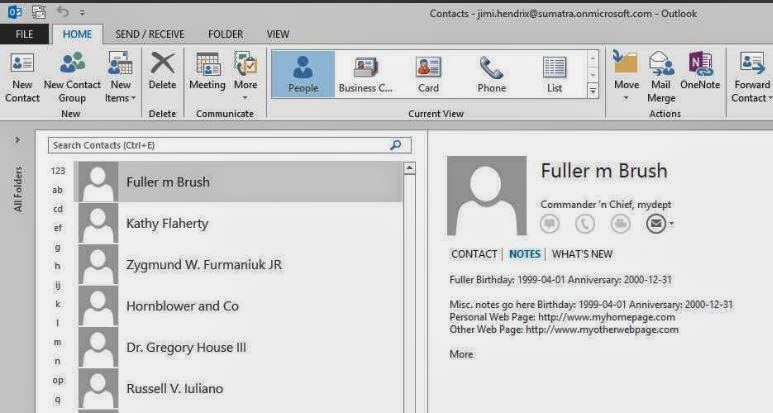
THEN we get to Outlook 2013:


PROBLEM!  Where did the Notes go?  The situation seems to only show up if you have a contact created using EWS.

This gets weirder because you can CREATE a contact with notes in either OWA or Outlook 2013 and it will properly display and edit in either.

This gets EVEN WEIRDER because in Outlook 2013 you get Notes displayed correctly in the PEOPLE view....
but not in any other view (Business Cards for example):

We think this is fairly definitive proof that Outlook 2013 has a bug in it.

Saturday, September 21, 2013

Contact.Birthday property in EWS

Has anyone else noticed that the Contact.Birthday property in EWS seems to not work?  We noticed the same thing with Contact.WeddingAnniversary.

It's a small nit -- but it's kind of annoying us.

Monday, June 25, 2012

Where did the HTML in my note body go?

One of our customers asked us to put up a custom message in the Sumatra Holiday tool.  This message needed a small bit of HTML formatting in EWS Managed API v1.2 code.  A "slam-dunk."  Yet this simple HTML produces horrible output:


Microsoft published a KB article that confirmed the problem:  meeting request that you send from an EWS application is in plain text format instead of HTML format when an attendee opens the request by using Outlook in online mode

The fix? Patch your servers! Here's the link: Update Rollup 3 for Exchange Server 2010 Service Pack 2 (KB2685289)

We patched our dev server this weekend and confirmed it works!

(PS: we're tagging this as an API bug, but it really isn't.....

Monday, July 13, 2009

GeekSpeak: Memory Leaks in System.DirectoryServices

It rained 22 days in June (in Boston). The last few days were glorious. And I missed the sun while dealing with a memory leak.

We hit this problem while translating legacy Exchange DNs into SMTP addresses in our Exchange Room analysis tool. The culprit -- System.DirectorServices (.Net 3.5)
calls to GetDirectoryEntry().Properties. With each call to System.Directoryservices, memory use jumped by 120 bytes. The annoyance became a problem after we looked up three fields - for 8,000 users.

Microsoft's MSDN Reference says: "Due to implementation restrictions, the SearchResultCollection class cannot release all of its unmanaged resources when it is garbage collected. To prevent a memory leak, you must call the Dispose method when the SearchResultCollection object is no longer needed.".

I did that. So did other folks posted similar problems in the MS forums. All were told to use dispose. It didn't work. After reading dozens of responses, someone said try the "using" contruct along with "dispose". I did. It worked.

For those of you who don't want to find the mines by stomping on the ground, here is sample code that shows System.DirectoryServices calls broken out into an excessive number of using blocks:


'return ONE value from AD given a filter
Public Function GetADField(byval strFilter as string, _
 byval strField as string) As String
 GetADField = ""
 Using dsDir As System.DirectoryServices.ActiveDirectory.Domain = _
  System.DirectoryServices.ActiveDirectory.Domain.GetCurrentDomain
    Using dsRoot As New DirectoryEntry(dsDir.Name)
      Using dsSearcher As New DirectoryServices.DirectorySearcher
        dsSearcher.SearchRoot = dsRoot
        dsSearcher.Filter = strFilter
        dsSearcher.SearchScope = SearchScope.Subtree
        dsSearcher.PropertiesToLoad.AddRange(New String() {strField})
        dsSearcher.FindAll() 'results
        Using dsResult As DirectoryServices.SearchResultCollection = _
            dsSearcher.FindAll() 'results
            Dim result As DirectoryServices.SearchResult
            For Each result In dsResult
             Using de As DirectoryEntry = result.GetDirectoryEntry()
               GetADField = de.Properties("mail").Value.ToString
               de.Dispose()
             End Using 'de
           Next 'result
           dsResult.Dispose()
           result = Nothing
        End Using 'dsResult
      dsSearcher.Dispose()
    End Using 'dsSearcher
   dsRoot.Close()
   dsRoot.Dispose()
  End Using 'dsRoot
  dsDir.Dispose()
 End Using 'dsDir
 Return GetADField
End Function


-Russ