After reading How My Boss Monitors Me While I Work From Home in the New York Times I sort of shuddered at the degree of surveillance you can put on someone's machine.
Putting on my calendar geek hat I could see how you could extract this kind of "how I spend my time" information from on Office 365 / Microsoft Exchange server without having to load possibly vulnerable code on a laptop or desktop.
Drop us a line if there's interest in this.
Showing posts with label Exchange 2016. Show all posts
Showing posts with label Exchange 2016. Show all posts
Friday, May 08, 2020


Tuesday, September 10, 2019
MIT Media Lab investigation uses calendar info
I read MIT Will Investigate Media Lab's Ties to Jeffrey Epstein Following Director's Resignation as just another "yeah, people will do just about anything for money" article until I came to this part:
THIS is really interesting!
If you want to know how to do stuff like this forensically (or even proactively) in Exchange or Office 365 let us know -- our wheels are already turning on this and a few other things.
On Ito’s calendar, which typically listed the full names of participants in meetings, Epstein was identified only by his initials. Epstein’s direct contributions to the lab were recorded as anonymous.(underlining mine)
THIS is really interesting!
If you want to know how to do stuff like this forensically (or even proactively) in Exchange or Office 365 let us know -- our wheels are already turning on this and a few other things.
Tuesday, October 23, 2018
Exchange online: Conference Room Provisioning changed to AutoAccept
A heads up for admins who plan to provision new resources in Exchange Online: the defaults will change from AutoUpdate to AutoAccept. This change will occur on November 15, 2018.
What does this mean? It's another 80/20 rule: depends on the type of resources and if you are a new or existing customer.
For existing Office 365 customers:
Get-Mailbox -RecipientTypeDetails @("Equipment","RoomMailbox") -ResultSize unlimited | Get-CalendarProcessing | Format-Table-Property Identity, AutomateProcessing

See the MS announcement here: Exchange Online - calendar AutomateProcessing changes through PowerShell
What does this mean? It's another 80/20 rule: depends on the type of resources and if you are a new or existing customer.
For existing Office 365 customers:
- 80%: Most of our clients configure resources (rooms, equipment) as AutoAccept. If the user wants to book a room on a particular date/time, Exchange will book it if it's free.
- 20%: "Managed" rooms. Those are the ones only specific users can book, or an admin has to approve. Examples are the Executive conference rooms, HR Interview rooms, the Auditorium, etc. For those rooms, this will be a problem.
- NO IMPACT: For all migration customers, we recommended you set ALL of your rooms to either None or AutoAccept (depending upon the migration tool). You will replace the defaults.
Get-Mailbox -RecipientTypeDetails @("Equipment","RoomMailbox") -ResultSize unlimited | Get-CalendarProcessing | Format-Table-Property Identity, AutomateProcessing
See the MS announcement here: Exchange Online - calendar AutomateProcessing changes through PowerShell
Tuesday, August 21, 2018
Enterprise Exchange / Office 365 Resources: You can manage them better
As an enterprise Exchange / Office 365 administrator you've probably run across some problems that drive you bug-house: security, backup, compliance, forensics, response time, .... the list drones on like a "Wonderwall" knock-off.
But one thing we can help you with is RESOURCES. There are a series of things you can do to make your resource management smoother from an end-user experience in Exchange. AND you can do them server-side.
The resources we're talking about here are the resources in a calendaring sense: Rooms and objects/services that are scheduled with meetings. (I mean, you KNOW this is what the whole blog is about, right?)
A (few) word(s) of warning on prerequisites here: it helps to have experience with PowerShell and Permissions. You are definitely going to need experience setting permissions for resources in Exchange.
We've blogged on all of this before, but this is the first time we've put it all together in one convenient post.
Let us begin.
Have you really thought through Delegate Access?
You may be using Delegate in the less effective way. In general you should use booking delegation instead of classic delegation.
See: Two ways to grant access to a Resource in #MSFTExchange
Explanation: Booking delegation makes it easier to access the resource should you need to (since classic delegation resources are disabled accounts by default) and you do not have issues with server vs. client-side rules and priorities.
This does mean having resource delegation managed by the administrator. As we proceed you'll increasingly see how this saves you hassle later on.
Do you ever have two meeting groups showing up for the same room?
You have had a double booking issue and didn't think you could do anything about it.
We KNOW you do because Double-Booked Meeting Rooms in Office 365 (and how to avoid them) is one of our most popular posts EVER!
But you can
If you just want to see how big an issue you have, use our reporting tool:
See: Callable PowerShell script to report on double booked resources in Exchange 2016 / Office 365
it's a PowerShell script that will tell you which resources have double-bookings.
If you want to proactively manage the issue on an on-going basis -- check out our solution to the problem:
Three Basic Ways of Dealing with Double-Booked Resources in the Sumatra cmdlet
But one thing we can help you with is RESOURCES. There are a series of things you can do to make your resource management smoother from an end-user experience in Exchange. AND you can do them server-side.
The resources we're talking about here are the resources in a calendaring sense: Rooms and objects/services that are scheduled with meetings. (I mean, you KNOW this is what the whole blog is about, right?)
A (few) word(s) of warning on prerequisites here: it helps to have experience with PowerShell and Permissions. You are definitely going to need experience setting permissions for resources in Exchange.
We've blogged on all of this before, but this is the first time we've put it all together in one convenient post.
Let us begin.
Have you really thought through Delegate Access?
You may be using Delegate in the less effective way. In general you should use booking delegation instead of classic delegation.
See: Two ways to grant access to a Resource in #MSFTExchange
Explanation: Booking delegation makes it easier to access the resource should you need to (since classic delegation resources are disabled accounts by default) and you do not have issues with server vs. client-side rules and priorities.
This does mean having resource delegation managed by the administrator. As we proceed you'll increasingly see how this saves you hassle later on.
Do you ever have two meeting groups showing up for the same room?
You have had a double booking issue and didn't think you could do anything about it.
We KNOW you do because Double-Booked Meeting Rooms in Office 365 (and how to avoid them) is one of our most popular posts EVER!
But you can
If you just want to see how big an issue you have, use our reporting tool:
See: Callable PowerShell script to report on double booked resources in Exchange 2016 / Office 365
it's a PowerShell script that will tell you which resources have double-bookings.
If you want to proactively manage the issue on an on-going basis -- check out our solution to the problem:
Three Basic Ways of Dealing with Double-Booked Resources in the Sumatra cmdlet
Wednesday, August 15, 2018
Zimbra to Exchange / Office 365 Calendar, Contacts, Tasks migration again field-proven
Once again we've migrated a domain from Zimbra to Exchange 2016 -- calendars, contacts, and tasks. They also followed our guide to Zimbra email migration with imapsync.
This in itself is not noteworthy.
What was different about this was it was a municipality running at small scale (100 accounts) and they took the lead on running the migration themselves with little input from us. So they could keep their costs down while still getting a high quality calendar migration.
To quote them:
Huzzah!
The system works!
This in itself is not noteworthy.
What was different about this was it was a municipality running at small scale (100 accounts) and they took the lead on running the migration themselves with little input from us. So they could keep their costs down while still getting a high quality calendar migration.
To quote them:
The migration went off without a hitch – no complaints that I have heard about missing items. Thanks so much for the helpful tool!
Huzzah!
The system works!
Tuesday, July 10, 2018
New Zimbra Authentication Options in Office 365 Calendar Migration
Zimbra on-premise migration customers have typically kept their legacy directory services until they went live in production.
When customers migrated from hosted Zimbra, they ran a hybrid deployment (i.e. ran directory services in parallel with Office 365.)
Typically, both legacy and target servers were in the same domains. That is, until we received a request from a client who wanted to migrate from Zimbra to Office 365 AND change the domain name.
In zCalReader 6.2.03 and above they can.
A pull-down on the configuration screen will let you choose your URL format based on your authentication scheme.

Note: You should still use your Zimbra Admin credentials for the Zimbra side.
When customers migrated from hosted Zimbra, they ran a hybrid deployment (i.e. ran directory services in parallel with Office 365.)
Typically, both legacy and target servers were in the same domains. That is, until we received a request from a client who wanted to migrate from Zimbra to Office 365 AND change the domain name.
In zCalReader 6.2.03 and above they can.
Note: You should still use your Zimbra Admin credentials for the Zimbra side.
Tuesday, May 15, 2018
False positives in antivirus software
So last week we had a low-level inquiry from a company wanting to migrate MDaemon calendars to Office 365.
They'd already tried the arduous PST method and found it wanting.
So we set them up with a trial version of the migration software. Next thing we heard from them was that TrendMicro AV was flagging it as containing ransomware.
Seriously?
Like, how realistic is it for us to send out ransomware when we maintain a blog going back to 2005 (you're on it), a public web site, a Twitter account, and we give you our direct email addresses?
A quick search in the spirit of JFGI for "false positives antivirus" gives some insight.

So this is not just something that is affecting us.
We can understand your caution. We in fact encourage your skepticism and welcome your desire to challenge us. Anyone who's been through our various doc sets for migrations knows that we promote planning and preparation.
Since our code works on Exchange / Office 365 servers it is by definition server-modifying, so I can understand how detection algorithms could get wary.
Keep in mind, though that Sumatra Development is one of the few companies you deal with where if you're not talking to the people who wrote your migration code you're only one degree of separation away from the person who did.
They'd already tried the arduous PST method and found it wanting.
So we set them up with a trial version of the migration software. Next thing we heard from them was that TrendMicro AV was flagging it as containing ransomware.
Seriously?
Like, how realistic is it for us to send out ransomware when we maintain a blog going back to 2005 (you're on it), a public web site, a Twitter account, and we give you our direct email addresses?
A quick search in the spirit of JFGI for "false positives antivirus" gives some insight.

So this is not just something that is affecting us.
We can understand your caution. We in fact encourage your skepticism and welcome your desire to challenge us. Anyone who's been through our various doc sets for migrations knows that we promote planning and preparation.
Since our code works on Exchange / Office 365 servers it is by definition server-modifying, so I can understand how detection algorithms could get wary.
Keep in mind, though that Sumatra Development is one of the few companies you deal with where if you're not talking to the people who wrote your migration code you're only one degree of separation away from the person who did.
Tuesday, March 27, 2018
DAVical and Open Source Calendar Migration to Exchange / Office 365
We got an inquiry a while back about migrating DAVical to Exchange.
They vanished as happens in the way of people with more ambition than budget, but it did get us thinking about how to do Open Source calendar server migration to Exchange or Office 365.
This is made easier because we already have a full-state migration method out of Zimbra into Exchange and Office 365.
Works like this:
In Zimbra the format to download an ICS to our migration is:
http://SERVER/home/username/calendar?fmt=ics
In DAVical (https://www.davical.org/clients.php) it's
http://SERVER/caldav.php/username/calendar/
The ICS is close enough that it presents no problems, and there is admin
access to all accounts.
So we have a decent chance of getting this to
work.
Also Zyg's tried it out in the lab and got it to function, but undoubtedly there's a bug or two in there that real-world hardening will discover and squash.
So sites with several hundred users and a willingness to spend part of their test phase in careful mode can feel free to contact us.
DAVical is built on top of PostgreSQL which we read in order to migrate Apple's iCalendar server, but there's no indication that's a superior migration path. And it represents a little more work so -- nope.
Tuesday, January 16, 2018
Migrating Delegate Permissions: The 80/18/2 Rule
From the Oracle Communication User Documentation,


Exchange has the following delegate options.
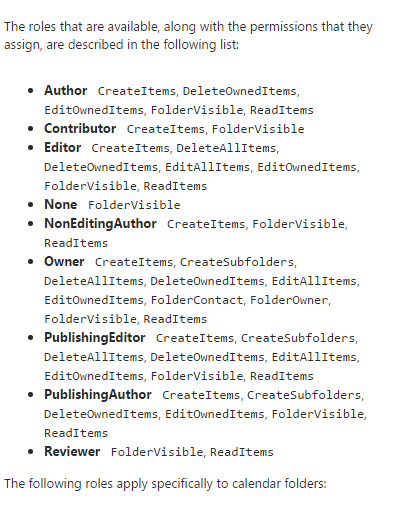
You should now see the problem about how you move from legacy to target and keep everyone happy.
Basically, you cannot possibly keep everyone happy if you try to migrate delegate permissions from Oracle to Exchange. The only sane solution is to let users set delegates themselves post-migration.
While it is possible to set Delegates via PowerShell in Exchange via Add-MailboxFolderPermission, Sumatra does not recommend migrating legacy delegate lists.
Basically, you cannot possibly keep everyone happy if you try to migrate delegate permissions from Oracle to Exchange. The only sane solution is to let users set delegates themselves post-migration.
While it is possible to set Delegates via PowerShell in Exchange via Add-MailboxFolderPermission, Sumatra does not recommend migrating legacy delegate lists.
- The access
model between legacy and target system are different enough that
any mapping is a “best guess.”
While this is fine for many users, it will lead to dissatisfaction
among an undetermined subset. And
long experience with migrations has shown us that user communities are
happier with a migration with clear rules and expectations universally
applied.
- Migrating
delegates automatically propagates a situation of “maximum access.” Now is a perfect time for end users to
review who has access to their calendars and re-think it.
- Use it as a
primary incentive to get users training on the new system.
Exception to the rule: Zimbra to Microsoft Exchange.
Since Zimbra consciously decided to rip-off emulate as much Microsoft functionality as explicitly and exactly as it could, you have a higher chance of success here. But please see comment #2 above about propagating a culture of "maximum access."
BEWARE:
Migrating Zimbra permissions to Exchange does not automatically set up menus for user access via Outlook or OWA!
You will likely perpetuate security issues for users who have changed roles and should no longer have access to some accounts! Your migration is the best time to review all of these!
To extract Zimbra delegate permissions:
Zmmailbox will give permissions for any mailbox or calendar you want as follows
./zmmailbox -z -m jimi@sumatra.local gfg /Inbox
./zmmailbox -z -m jimi@sumatra.local gfg /Calendar

This also works for tasks and contacts.
To save to a text file append '> permissions.txt'
See: https://wiki.zimbra.com/wiki/Ajcody-User-Management-Topics
Permissions exist as per the following table:
r = read
w = write
i = insert
d = delete
x = accept/decline invitations
a = administer
To insert Zimbra permissions into Exchange:
Use:
Add-MailboxPermission in PowerShell
Add-MailboxFolderPermission -Identity jimi@sumatra.local -User zyg@sumatra.local -AccessRights Editor
This will give Zyg editor delegate access to Jimi's mailbox.
And of course, you will need to manipulate or edit the text file you originally extracted from Zimbra. But this is not beyond high school programming or scripting, people.
You can also delegate other folders like jimi@sumatra.local:\Calendar and so forth.
See also: How to use Powershell to set delegate for user mailbox in Exchange 2010 and Office 365
Again, just because you can migrate permissions does not mean you should.
Seriously talk this over.
Migrating Zimbra permissions to Exchange does not automatically set up menus for user access via Outlook or OWA!
You will likely perpetuate security issues for users who have changed roles and should no longer have access to some accounts! Your migration is the best time to review all of these!
To extract Zimbra delegate permissions:
Zmmailbox will give permissions for any mailbox or calendar you want as follows
./zmmailbox -z -m jimi@sumatra.local gfg /Inbox
./zmmailbox -z -m jimi@sumatra.local gfg /Calendar

This also works for tasks and contacts.
To save to a text file append '> permissions.txt'
See: https://wiki.zimbra.com/wiki/Ajcody-User-Management-Topics
Permissions exist as per the following table:
r = read
w = write
i = insert
d = delete
x = accept/decline invitations
a = administer
To insert Zimbra permissions into Exchange:
Use:
Add-MailboxPermission in PowerShell
Add-MailboxFolderPermission -Identity jimi@sumatra.local -User zyg@sumatra.local -AccessRights Editor
This will give Zyg editor delegate access to Jimi's mailbox.
And of course, you will need to manipulate or edit the text file you originally extracted from Zimbra. But this is not beyond high school programming or scripting, people.
You can also delegate other folders like jimi@sumatra.local:\Calendar and so forth.
Again, just because you can migrate permissions does not mean you should.
Seriously talk this over.
Tuesday, January 09, 2018
Migration: Email Distribution Groups and the 80/18/2 Rule
Distribution groups are not as much a pain in some cases as you might imagine!
Keep in mind these are an email migration issue as opposed to a calendar migration issue -- but we're interested in writing about stuff to solve problems, not pass blame.
For MDaemon to Exchange public distribution lists we needed to write our own specific application. Our specific application did the mapping from legacy domain to target domain and also used our own mapping files for user/resource IDs, so .... it really kicks butt.
Nobody else we know does this.
And in general for legacy systems it may not be possible to even generate the information you need in order to make this work. As usual we're talking server-side solutions for the entire enterprise as opposed to lame client-side solutions for one freaking user at a time.
But we'll tell you how to do this if you have the chance.
Again we begin with the end business goal of migrating into Exchange or its cloud sibling clearly in mind.
Refer to: Distribution groups and EWS in Exchange and use New-DistributionGroup.
From Zimbra it's not too bad.
In Zimbra getting this information for public groups is actually very straightforward. See Zimbra.List all existing distribution list and the respective members
This command:
for i in `zmprov gadl` ;
do zmprov gdl $i zimbraMailAlias zimbraMailForwardingAddress ;
done > /tmp/dist_list.txt
accomplishes the same thing
Now -- keep in mind, if in going into Exchange you are changing any user IDs or your domain you're going to need to do some work on the export file before you start using EWS to re-create the lists.
To export single distribution lists in Zimbra (see: https://forums.zimbra.org/viewtopic.php?t=48514)
zmprov gdl dist_list@domain.com > dist_list.txt
To create a distribution list (what Exchange refers to as a distribution group) in on-premises Exchange 2013 use
New-DistributionGroup -Name (+Additional parameters as necessary)
See: https://technet.microsoft.com/en-us/library/aa998856(v=exchg.150).aspx
To create a distribution list in Office 365 / Exchange 2016
New-DistributionGroup -Name "RockIcons" -Members jimi@sumatra.com,janis@sumatra.com,jerry@sumatra.com,puffy.amiumi@sumatra.com
See: https://technet.microsoft.com/en-us/library/aa998856(v=exchg.160).aspx#Syntax
Dynamic Distribution Groups
And for some business purposes you want to consider Dynamic Distribution groups. You may also know these by their former name of Query-Based Groups.
These come to the fore when you have a (wait for it....) very dynamic membership in the sense of people changing roles or having a high turnover. Example: A project group or a support desk.
Check over Dynamic Office 365 Groups might come with a big cost for a good analysis of the pros and cons.
Keep in mind these are an email migration issue as opposed to a calendar migration issue -- but we're interested in writing about stuff to solve problems, not pass blame.
For MDaemon to Exchange public distribution lists we needed to write our own specific application. Our specific application did the mapping from legacy domain to target domain and also used our own mapping files for user/resource IDs, so .... it really kicks butt.
Nobody else we know does this.
And in general for legacy systems it may not be possible to even generate the information you need in order to make this work. As usual we're talking server-side solutions for the entire enterprise as opposed to lame client-side solutions for one freaking user at a time.
But we'll tell you how to do this if you have the chance.
Again we begin with the end business goal of migrating into Exchange or its cloud sibling clearly in mind.
Refer to: Distribution groups and EWS in Exchange and use New-DistributionGroup.
From Zimbra it's not too bad.
In Zimbra getting this information for public groups is actually very straightforward. See Zimbra.List all existing distribution list and the respective members
This command:
zmprov gadl -v > dist_list.txt
will list all distribution lists with their members and output it to a text file.
The same command with some variations:
do zmprov gdl $i zimbraMailAlias zimbraMailForwardingAddress ;
done > /tmp/dist_list.txt
accomplishes the same thing
Now -- keep in mind, if in going into Exchange you are changing any user IDs or your domain you're going to need to do some work on the export file before you start using EWS to re-create the lists.
To export single distribution lists in Zimbra (see: https://forums.zimbra.org/viewtopic.php?t=48514)
zmprov gdl dist_list@domain.com > dist_list.txt
To create a distribution list (what Exchange refers to as a distribution group) in on-premises Exchange 2013 use
New-DistributionGroup -Name (+Additional parameters as necessary)
See: https://technet.microsoft.com/en-us/library/aa998856(v=exchg.150).aspx
To create a distribution list in Office 365 / Exchange 2016
New-DistributionGroup -Name "RockIcons" -Members jimi@sumatra.com,janis@sumatra.com,jerry@sumatra.com,puffy.amiumi@sumatra.com
See: https://technet.microsoft.com/en-us/library/aa998856(v=exchg.160).aspx#Syntax
Dynamic Distribution Groups
And for some business purposes you want to consider Dynamic Distribution groups. You may also know these by their former name of Query-Based Groups.
These come to the fore when you have a (wait for it....) very dynamic membership in the sense of people changing roles or having a high turnover. Example: A project group or a support desk.
Check over Dynamic Office 365 Groups might come with a big cost for a good analysis of the pros and cons.
Tuesday, December 05, 2017
Calendar Migrations: The 80/18/2 rule
Enterprise migrations are as much a social engineering issue as a data conversion issue.
Keep in mind, we're talking organizations here as opposed to single-users, and we're focused on server-to-server solutions as opposed to client-to client solutions.
Let's get into that social engineering by way of the perceived utility among your user base, shall we?
If you're acquainted with the 80/20 rule, we're going to give you, based on our experience of doing this kind of stuff since 2001, our own 80/18/2 rule when it comes to migrating into Exchange or Office 365.
To wit:
We've done several posts on how to use imapsync to migrate into Exchange / Office 365.
If all you (need to) care about is email you're done here.
Your likely result in this 80%:
Your end-user efforts: Minimal
Your Admin efforts: Moderate to high
Your End User Satisfaction: Moderate (if you stop here)
Your next 18%
If you do not care about attendees, attendee responses, and resource bookings, there are a variety of solutions. If your enterprise wants "no data loss" when it moves to a new collaboration platform, i.e., to keep its meetings as meetings, please search this blog for the legacy system and read the appropriate articles.
Your likely result in this 18% with Sumatra methods:
Your end-user efforts: Minimal
Your Admin efforts: Moderate to high (depends on experience level)
Your end-user satisfaction: HIGH
Your likely result in this 18% without Sumatra methods:
Your end-user efforts: HIGH (Need to re-create meetings, resource bookings)
Your Admin efforts: Low. (We have seen sites choose based on Admin efforts -- their call)
Your end-user satisfaction: Low to moderate
Keep in mind, we're talking organizations here as opposed to single-users, and we're focused on server-to-server solutions as opposed to client-to client solutions.
Let's get into that social engineering by way of the perceived utility among your user base, shall we?
If you're acquainted with the 80/20 rule, we're going to give you, based on our experience of doing this kind of stuff since 2001, our own 80/18/2 rule when it comes to migrating into Exchange or Office 365.
To wit:
- 80% of what you need to migrate is email.
- 18% is calendars (full-state or flat, doesn't matter), contacts, tasks
- 2% is user preferences, settings, delegates
Getting 80% done should cost you NOTHING
Email is manageable with imapsync and your cost is €100 EUR for product and support no matter your enterprise size. Why on earth would you pay anybody for email migration when this is available (unless you have a backroom deal with a consultant)? We've even done a couple of guides one of which you can download here.
We've done several posts on how to use imapsync to migrate into Exchange / Office 365.
If all you (need to) care about is email you're done here.
Your likely result in this 80%:
Your end-user efforts: Minimal
Your Admin efforts: Moderate to high
Your End User Satisfaction: Moderate (if you stop here)
Your next 18%
Contacts and tasks are not other-user-connected information and (worst case) you can move them via CSV/TXT file methods.
Calendars are a more complex discussion. In fact this entire blog is dedicated to migrating calendars and keeping as much of the useful connections between users intact.
Anybody who's promising you "no data loss" in a migration and takes calendars without re-creating the guest list has been dealing in alternate facts.
Anybody who's promising you "no data loss" in a migration and takes calendars without re-creating the guest list has been dealing in alternate facts.
If you do not care about attendees, attendee responses, and resource bookings, there are a variety of solutions. If your enterprise wants "no data loss" when it moves to a new collaboration platform, i.e., to keep its meetings as meetings, please search this blog for the legacy system and read the appropriate articles.
We do charge for that capability.
Your likely result in this 18% with Sumatra methods:
Your end-user efforts: Minimal
Your Admin efforts: Moderate to high (depends on experience level)
Your end-user satisfaction: HIGH
Your likely result in this 18% without Sumatra methods:
Your end-user efforts: HIGH (Need to re-create meetings, resource bookings)
Your Admin efforts: Low. (We have seen sites choose based on Admin efforts -- their call)
Your end-user satisfaction: Low to moderate
The final 2% (the last mile to the finish line)
Let's talk about that last part since it's portrayed out of proportion to its time value:
- User preferences,
- Delegates
- Junk Mail filtering rules
- Client-side Outlook re-configuration
User Preferences
Many of these are scriptable.
One of us has in fact has been itching to write about how to script user preference migration so keep an eye on this blog.
The important things to keep in mind here are:
You would LIKE to think Delegates are a simple matter.
This is exactly incorrect.
First off, because the model for delegates is usually very different between your legacy system and Microsoft Exchange. Example: In Oracle Calendars delegate access (called Designate access in OCS) is OBJECT-BASED and in Exchange it's FOLDER-BASED.
Second because over time the number of delegates in legacy systems has usually out-grown the organization's needs and some re-thinking is most definitely in order. During a migration is the perfect time to reset those access permissions. Or, worst case, you migrate all legacy delegates (and we mean it’s the worst case.)
Third because after you set those delegate permissions in Exchange you discover that users can edit conference room bookings, and can see other’s calendar information. What’s the worst case: there is no good way to reverse the permissions. Exchange has some native peculiarities that you're not going to really understand until you're in the thick of actually production deploying it and then it's either too late to change or a pain in the neck to re-do. See: Two ways to grant access to a Resource in #MSFTExchange.
While it is possible to devise very clever technical solutions (and we have!) experience in this shows that (in stark contrast to a full-state calendar migration) it always leaves a subset of users grumbling that it did not do what they wanted.
And grumbling is the enemy of a successful enterprise migration. We prefer a fewwhining grumbling users to the entire organization ready to “run you out of town.”
Our conclusions from doing these: The effort is better spent as a training opportunity to get users active in setting up their delegates post-migration.
Junk Mail / filtering Rules
Many of these are scriptable.
One of us has in fact has been itching to write about how to script user preference migration so keep an eye on this blog.
The important things to keep in mind here are:
- From almost any legacy system there is going to be a disconnect between user preferences offered and Exchange / Office 365.
- Even if there is not a disconnect in a specific functionality, the question is can you get at the legacy data via server-side utilities?
- Setting user preferences is a great opportunity (a "teachable moment") to
enforceencourage your users getting training and actually taking steps in Exchange before or after a migration.
You would LIKE to think Delegates are a simple matter.
This is exactly incorrect.
First off, because the model for delegates is usually very different between your legacy system and Microsoft Exchange. Example: In Oracle Calendars delegate access (called Designate access in OCS) is OBJECT-BASED and in Exchange it's FOLDER-BASED.
Second because over time the number of delegates in legacy systems has usually out-grown the organization's needs and some re-thinking is most definitely in order. During a migration is the perfect time to reset those access permissions. Or, worst case, you migrate all legacy delegates (and we mean it’s the worst case.)
Third because after you set those delegate permissions in Exchange you discover that users can edit conference room bookings, and can see other’s calendar information. What’s the worst case: there is no good way to reverse the permissions. Exchange has some native peculiarities that you're not going to really understand until you're in the thick of actually production deploying it and then it's either too late to change or a pain in the neck to re-do. See: Two ways to grant access to a Resource in #MSFTExchange.
While it is possible to devise very clever technical solutions (and we have!) experience in this shows that (in stark contrast to a full-state calendar migration) it always leaves a subset of users grumbling that it did not do what they wanted.
And grumbling is the enemy of a successful enterprise migration. We prefer a few
Our conclusions from doing these: The effort is better spent as a training opportunity to get users active in setting up their delegates post-migration.
Junk Mail / filtering Rules
This is potentially a real pain. Thunderbird HAD a tool for email filtering migration but it's atrophied.
While Microsoft makes it possible to export rules from Outlook and import them to other Outlook clients, in general the methods for taking rules from legacy systems and migrating them simply to Outlook are lacking. And we've never seen it done server-side.
Best strategy we've seen for those who need to deal with it is to identify the high need individuals and get them or their admins training to help re-create essential rule sets.
Client-side Outlook re-configuration
If users were using Outlook as a client in your legacy system you need to point them all to your Exchange domain now.
Not too difficult. See Deploy Outlook mail profile settings via GPO or script
Your likely result in this 2%: Experience tells us user response is almost a complete crap-shoot if you try to automate it. Best you can hope for is a low complaint level. No one is ever really grateful for it.
Your end-user efforts: Low to Moderate
Your Admin efforts: Moderate to high
Your end-user satisfaction: it’s dependent upon end-user communication and expectation management
While Microsoft makes it possible to export rules from Outlook and import them to other Outlook clients, in general the methods for taking rules from legacy systems and migrating them simply to Outlook are lacking. And we've never seen it done server-side.
Best strategy we've seen for those who need to deal with it is to identify the high need individuals and get them or their admins training to help re-create essential rule sets.
Client-side Outlook re-configuration
If users were using Outlook as a client in your legacy system you need to point them all to your Exchange domain now.
Not too difficult. See Deploy Outlook mail profile settings via GPO or script
The process as described in that link is
solid, but we have found problems with the VB script in it. If you are a
Sumatra client please feel free to ask us for our VB script: deployprf.vbs
Your likely result in this 2%: Experience tells us user response is almost a complete crap-shoot if you try to automate it. Best you can hope for is a low complaint level. No one is ever really grateful for it.
Your end-user efforts: Low to Moderate
Your Admin efforts: Moderate to high
Your end-user satisfaction: it’s dependent upon end-user communication and expectation management
Tuesday, November 28, 2017
Prevent Double-Bookings in Office 365 Calendar
We keep getting Office 365 sites coming the blog with search terms something like "prevent double bookings in 365 calendar."
Invariably they find our post Double-Booked Meeting Rooms in Office 365 (and how to avoid them)
October 2022: We just updated our cmdlet for Modern Authentication.
Invariably they find our post Double-Booked Meeting Rooms in Office 365 (and how to avoid them)
Let's keep in mind this is usually a problem for conference rooms. People are double-booked all the time and it's expected.
Lots of technical info there, but as with anything in calendaring you need to also put it into a social context.
The only ways to prevent double-bookings entirely in advance and at meeting creation time are:
- Disallow recurring bookings for resources
- Set the allowable conflict rate to 0%
- Make the resources go through a human gatekeeper
Now the social aspect of this: Your users are probably going to balk at any of these. And with good reason:
- Recurring meetings are just so darned useful.
- An allowable conflict rate of 0% is highly unrealistic
- Having someone in charge of each resource defeats the purpose of calendaring
This is what makes double-booking a thorny problem.
Our solution based on what we've seen is to create a PowerShell cmdlet that searches for up-coming resource conflicts and informs users or alternately takes action.
It's configurable and customize-able for a variety of situations. Since it's a cmdlet it seems to be making more headway with on-prem Exchange sites, but it there's demand for something entirely cloud-based we're happy to discuss the issue.
October 2022: We just updated our cmdlet for Modern Authentication.
Tuesday, November 21, 2017
SuPump when used on disabled accounts
We had an issue crop up in one of our favorite sites using the Sumatra Pump.
Calendar item insertion jobs were hanging and the error logs were showing things like this:
GetUserFromAD-ERROR: Failed while reading AD: (employeeId=F112ZHW); err: Object reference not set to an instance of an object.
GetUserFromAD-ERROR: Failed while reading AD: (employeeId=F112ZHY); err: Object reference not set to an instance of an object.
'ERROR: Failed while reading AD.(employeeId=F112ZHT)
ERROR: Failed while reading AD.(employeeId=33460A)
LDAP://DC=YOUR_DC,DC=COMPANY,DC=COM;(&(mailNickName=*)(employeeID=*)(!userAccountControl:1.2.840.113556.1.4.803:=2))
What the heck do those strange numbers mean????
It’s a bitwise AND filter for the UAC.
For more info on the UAC please see:
Calendar item insertion jobs were hanging and the error logs were showing things like this:
GetUserFromAD-ERROR: Failed while reading AD: (employeeId=F112ZHW); err: Object reference not set to an instance of an object.
GetUserFromAD-ERROR: Failed while reading AD: (employeeId=F112ZHY); err: Object reference not set to an instance of an object.
'ERROR: Failed while reading AD.(employeeId=F112ZHT)
ERROR: Failed while reading AD.(employeeId=33460A)
Simple to diagnose: The accounts causing the problem were DISABLED accounts.
To deal with it exclude the disabled accounts.
Patient: "Doctor, it hurts when I do this."
Doctor: "Don't do that!"
WHAT (NOT) TO DO
Patient: "Doctor, it hurts when I do this."
Doctor: "Don't do that!"
WHAT (NOT) TO DO
An easy fix: add this criteria to exclude disabled
accounts to the LDAP string in the _config.xml file:
(!userAccountControl:1.2.840.113556.1.4.803:=2)
Thus, your LDAP4USER setting should look something
like this
Saturday, August 12, 2017
Special Cases of Attachments in Oracle Calendar Migrations to Microsoft Exchange
Secure signed attachments in Oracle
Communication Convergence Calendar, that is anything named “smime.p7m” or with
a “.p7m” extension. These are signed,
secured attachments in in Oracle Communication Convergence Calendar so the
Sumatra process takes them as the secured, signed (therefore encrypted)
attachments they are.
Please make sure your security-tasked
admins know this and are prepared to deal with it in a post-migration Microsoft
Exchange environment and have their certificates and security arranged
appropriately.
Otherwise we are migrating data that cannot
be read in your Office 365 / Microsoft Exchange environment.
Inline attachments in Oracle Communication
Convergence Calendar
OCC identifies inline attachments by
excluding the file name and the format type. Since Sumatra doesn’t know
the file name or file type, we name the attachment “att_” + <>, without extension, and attach as a FILE (not inline.)
Oftentimes users can leverage their browsers
to view each attachment. In the calendar event select the attachment and
Right-Click-Open, selecting the appropriate application if you know what it is
or Microsoft Explorer if you do not. If the attachment does not display
correctly please contact the meeting organizer.
Tuesday, August 08, 2017
Attachments in Oracle Communication Convergence Calendar Migration to Exchange Version 2
Okay okay....
Remember this article?
We changed our minds.
Our test site did not want just the URL.
SO we needed to actually attach the damned binary file(s).
Sure. We're getting a paycheck somewhere in here, right?
The insertion team (kudos to Russ!) put this together.
Export using fetchattach=1 in WCAP.
Select this option in your configuration:

Notes:
Remember this article?
We changed our minds.
Our test site did not want just the URL.
SO we needed to actually attach the damned binary file(s).
Sure. We're getting a paycheck somewhere in here, right?
The insertion team (kudos to Russ!) put this together.
Export using fetchattach=1 in WCAP.
Select this option in your configuration:

Notes:
Attachments will slow down the process!
Attachments are not supported in historical archive mode.
Subscribe to:
Posts (Atom)