Showing posts with label Oracle Calendar. Show all posts

Tuesday, January 16, 2018

Migrating Delegate Permissions: The 80/18/2 Rule

From the Oracle Communication User Documentation,
calendars have the following delegate options:


Exchange has the following delegate options.
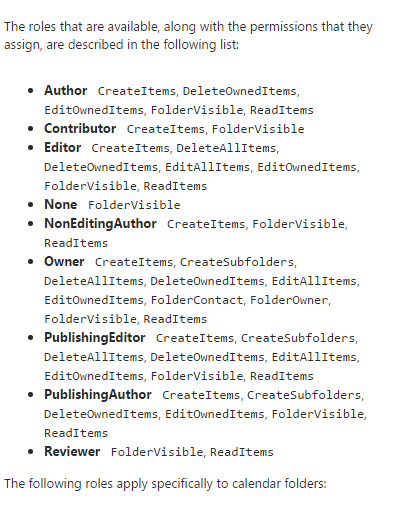

You should now see the problem about how you move from legacy to target and keep everyone happy.

Basically, you cannot possibly keep everyone happy if you try to migrate delegate permissions from Oracle to Exchange.  The only sane solution is to let users set delegates themselves post-migration.

While it is possible to set Delegates via PowerShell in Exchange via Add-MailboxFolderPermission, Sumatra does not recommend migrating legacy delegate lists.

  1. The access model between legacy and target system are different enough that any mapping is a “best guess.”  While this is fine for many users, it will lead to dissatisfaction among an undetermined subset.  And long experience with migrations has shown us that user communities are happier with a migration with clear rules and expectations universally applied.
  2. Migrating delegates automatically propagates a situation of “maximum access.”  Now is a perfect time for end users to review who has access to their calendars and re-think it.
  3. Use it as a primary incentive to get users training on the new system.

Exception to the rule:  Zimbra to Microsoft Exchange.

Since Zimbra consciously decided to rip-off emulate as much Microsoft functionality as explicitly and exactly as it could, you have a higher chance of success here.  But please see comment #2 above about propagating a culture of "maximum access."

Using PowerShell to SET permissions in Exchange is straight-forward.


BEWARE:
Migrating Zimbra permissions to Exchange does not automatically set up menus for user access via Outlook or OWA!

You will likely perpetuate security issues for users who have changed roles and should no longer have access to some accounts! Your migration is the best time to review all of these!

To extract Zimbra delegate permissions:

Zmmailbox will give permissions for any mailbox or calendar you want as follows

./zmmailbox -z -m jimi@sumatra.local gfg /Inbox
./zmmailbox -z -m jimi@sumatra.local gfg /Calendar


This also works for tasks and contacts.

To save to a text file append '> permissions.txt'

See: https://wiki.zimbra.com/wiki/Ajcody-User-Management-Topics

Permissions exist as per the following table:
 r = read
 w = write
 i = insert
 d = delete
 x = accept/decline invitations
 a = administer

To insert Zimbra permissions into Exchange:

Use:

Add-MailboxPermission in PowerShell

Add-MailboxFolderPermission -Identity jimi@sumatra.local -User zyg@sumatra.local -AccessRights Editor


This will give Zyg editor delegate access to Jimi's mailbox.

And of course, you will need to manipulate or edit the text file you originally extracted from Zimbra.  But this is not beyond high school programming or scripting, people.

You can also delegate other folders like jimi@sumatra.local:\Calendar and so forth.

See also: How to use Powershell to set delegate for user mailbox in Exchange 2010 and Office 365

Again, just because you can migrate permissions does not mean you should.

Seriously talk this over.

Tuesday, December 12, 2017

Access Runtime in a click-to-run world

A quick FYI:

Some Sumatra products require MS Access Runtime.   Microsoft offers two versions:

Microsoft Access 2016 Runtime Download  and
Microsoft Access 2013 Runtime Download

Both version of the Access Runtime products are installed via an "MSI" or Windows installer.

Here's the rub: C2R and MSI of the same major version cannot be installed side by side. 

If you have Office 365, you are likely to have the Office "click-to-run" (C2R) version.  Since there is no C2R for either Access Runtime, you'll have to install the Access 2013 Runtime.  Microsoft says the two versions are functionally equivalent, and this installation should work smoothly.

If you wonder what will happen if you install the Access 2016 Runtime and Office C2R, this is what you'll see:


Saturday, August 12, 2017

Special Cases of Attachments in Oracle Calendar Migrations to Microsoft Exchange

Secure signed attachments in Oracle Communication Convergence Calendar, that is anything named “smime.p7m” or with a “.p7m” extension.  These are signed, secured attachments in in Oracle Communication Convergence Calendar so the Sumatra process takes them as the secured, signed (therefore encrypted) attachments they are.
Please make sure your security-tasked admins know this and are prepared to deal with it in a post-migration Microsoft Exchange environment and have their certificates and security arranged appropriately.
Otherwise we are migrating data that cannot be read in your Office 365 / Microsoft Exchange environment.
Inline attachments in Oracle Communication Convergence Calendar
OCC identifies inline attachments by excluding the file name and the format type.  Since Sumatra doesn’t know the file name or file type, we name the attachment “att_” + <>, without extension, and attach as a FILE (not inline.) 

Oftentimes users can leverage their browsers to view each attachment.  In the calendar event select the attachment and Right-Click-Open, selecting the appropriate application if you know what it is or Microsoft Explorer if you do not.  If the attachment does not display correctly please contact the meeting organizer.

Tuesday, May 16, 2017

Speeding your Oracle to Exchange calendar migration

Migrations are time-consuming and resource-intensive.

If you did not know this before, welcome to being woke.

The way we do them is of course even MORE time-consuming and resource-intensive because we re-create connections to attendees in meetings.  Because of the way EWS works this means more time and effort.

UNLESS... you consider that historical events do not really need to be fully-recreated.

Oh... please tell me more!

YES!  If you (say) do a full-state migration take data from (say) a month back and into the future as full-state.  

The key is the Calendar Selection Dates in your Configuration.


Your usual insertion settings for live meetings is this:  Do that for say (Today-30 days) into the Future at 2039.


For an archive / historical insertion:  Do this for (Whenever your earliest necessary date is) to (Today-30) Date.

Big warnings:
Make sure you use a different  in the _Config.xml for the historical insertion and the current insertion.  Reason: If your historical needs to be rolled back you do not want it to also remove your current data.  That's what we call a resume-generating process.

Tuesday, August 16, 2016

Oracle calendar to Zimbra via ICS does NOT solve all your problems....

In response to our post: Oracle + Zimbra?  we got at least one person writing in saying "But we can just import the ICS files."

Yes, you can use ICS export/import and it SORT OF works.

You will not have your recurrence patterns and every recurring meeting and appointment will come in as a series of single, disconnected instances.

That is for starters.

Then there are the issues of mapping users throughout the OCS namespace so they map to the new IDs in your Zimbra namespace.

Then there's the issues of conference room / resource behavior that OCS allows but Zimbra does not and how you should deal with that.


Thursday, August 04, 2016

Oracle + Zimbra?

My latest newsletter from Zimbra had the following:


As the referenced Press Release Oracle Gives Partners a Fast Path to Cloud explains: "Zimbra plus the Oracle Cloud means users can start small and grow, or start big and get bigger"

Forget the fact that Zimbra's had its own cloud that's been promising the same thing.

The Zimbra back-end of mySQL (now owned by Oracle) makes this start to look more interesting than it might otherwise seem.

Consider this:  Microsoft has the very successful Exchange and Google has its office suite.

What Oracle has is the obsolete Oracle Calendar and the moribund Oracle Beehive.  

Given that Oracle traditionally cannot stand not having anything in the enterprise that Microsoft and Google already have. are we looking at the first tentative steps towards an acquisition?

OCS / Beehive into Zimbra is doable on your own if you want, but you'll need to be really careful of resources.  If you want to do it the right way and you've at least a few thousand users drop us a line.  We've got a long history taking both Oracle and Zimbra into Exchange (I mean, check out the rest of this blog).


Monday, July 11, 2016

After 20 Years Sega Saturn DRM Cracked.... and what it has to do with calendaring.....

Bravo to Dr Abrasive for cracking the Sega Saturn DRM method.

What on earth does this have to do with calendaring?

Well, since we broke Meeting Maker, Oracle Calendar Server, Zimbra, Oracle Beehive, and a few other encoding schemes, we're not allowed to talk about, we're sort of connoisseurs of reverse engineering and call out kudos where they are warranted.

What's kind of amazing is that none of the engineers came forward in the last 20 freaking years with anything that would help this.  Of course, for Meeting Maker the group of hacks finally working on it only started to contact us after we'd done everything significant to read their data and insert it into Exchange.

And don't even get us started about the Oracle people!!!!

Tuesday, March 22, 2016

Turning off reminders during a calendar migration to Microsoft Exchange / Office 365

We've been doing a bunch of Oracle Calendar Server to Exchange migrations lately and this has the benefit of giving me lots of detail oriented stuff to write about, and the downside that I'm getting tired of writing about it.

So what happens when you do not want to get reminders for meetings as you migrate into Exchange?

This is an Outlook configuration issue.  That is to say, this is normal Exchange functionality.  Meeting requests in Exchange create a tentatively accepted calendar item that carries with it the “default reminder time” set in Calendar Options.  Note that this applies to meeting invitations, not to appointments (calendar events with no attendees) which will all go in with no reminders set in an OCS to Exchange migration (because Oracle Calendar Server strips them off in the ICS export).

The PowerShell syntax, to TURN OFF for all MBX USERS (before migration)

get-mailbox -resultsize unlimited  -filter {isResource -eq $false} | Set-MailboxCalendarConfiguration -RemindersEnabled:$false 
-DefaultReminderTime:0  -ReminderSoundEnabled:$false


to TURN ON (after migration)
get-mailbox -resultsize unlimited  -filter {isResource -eq $false} | Set-MailboxCalendarConfiguration -RemindersEnabled:$true 


-DefaultReminderTime:00:15:00 -ReminderSoundEnabled:$true

This can be set in PowerShell for one user as in this screenshot:

Finally, note that if a user is logged in or connected (OWA/Outlook) setting these preferences will not kick in until the user logs out and logs back in.  So, if you are testing it, you will see the settings change BUT you won’t see an reminders turn off until you log out/in.

Thursday, March 17, 2016

Microsoft SQL going after Oracle? Don't forget the calendars in Oracle Calendar Server or Beehive!

Microsoft waves the 'free licenses' flag to try to grab Oracle database users?

Sure.

I'm not certain that the arrogance of Microsoft is preferable to the arrogance of Oracle (what's the difference between Larry Ellison and god?  God doesn't think he's Larry Ellison.).  But free is a hard argument.

Just remember we can migrate your enterprise calendars (Key word:  Enterprise-- if you have 100 Oracle calendars, just use client-side methods.  If you have 500+ users and mission-critical meetings, check us out).


Tuesday, March 15, 2016

Special case: When there is no user GUID in your OCS Exports

The ICS export for Oracle Calendar Server is inconsistent with exporting GUIDS:  As in this edited real world example:


Why is this relevant to anything that you care about?

Because interspersed with these very valid users you wish to migrate are also decommissioned users you do not.  Our process will send invitations to them during migration.
For valid (whether mapped or not) users in Exchange this is not an issue and they will be dealt with properly.
For users who have been decommissioned and do not have addresses on Exchange, this will result in NDRs (Non-delivery reports) being send back to the meeting organizer for these decommissioned users.  We have no way of knowing who they are (since they look like other perfectly valid users) and some sites keep these users in attendee lists as a matter of historical record.
The consequences to you:
1.       Our clean-up process REMOVES any NDRs before end users see them post-migration.  We find users and admins value this ease of use and clean migration
2.       The decommissioned user will still be in the meeting attendees list.  So: a.) All attendees will still see that user in the attendee list and b.) In future meeting updates post-migration the organizer will again get NDRs and it will be up to them to remove the user at that time, or maintain them in the guest list as they so choose.

Tuesday, March 08, 2016

Easy way of finding Oracle Calendar meetings without organizers post-migration to Exchange

You're migrating Oracle Calendar Server to Microsoft Exchange or Office 365 and you want to deal with the situation of Meetings without Organizers.  See our earlier post.

Given that we can run an analysis to identify these meetings before your migration you have your choice of informing your users about specific meetings (to make it as easy as possible), or handling it afterwards.  Both is probably good.

Easiest way to find them post-migration is to search on the "Meeting_MissingOrganizer" category in Outlook.

But if you are using Office 365 or on-premises via OWA instead of Outlook there's no easy list display.

You can can however find all of these visually using categories.

So set a specific color looking for the category we added on insertion, as so:

And you'll get an easy-to-locate display like this:


Again, better to get the word out to your users before the migration and get them used to the way things work in Exchange as opposed to Oracle Calendar Server, but we're all about the reality of the situation.

Tuesday, March 01, 2016

Oracle Meeting Scheduling Practices and Microsoft Exchange Best Practices

There are several common OCS meeting scheduling practices we need to document, so you, in turn, can educate your users about the differences between scheduling meetings in OCS and Exchange.
FIRST:  Oracle Calendar Server allows a user to organize a meeting and then remove themselves as an attendee.
THIS BEHAVIOR IS IMPOSSIBLE IN EXCHANGE! In fact if users manage to figure out how to do it’s one of the ways to really damage calendar data in Exchange.  We feel it our duty to recommend our customers adopt Microsoft Exchange best practices.  Thus, we do not recommend this behavior get replicated in Exchange.  To help you find and fix those meetings, we have integrated a pre-processing diagnostic step to both diagnose and remedy the issue. 
What it does is to re-create ICS files for the affected users and their meetings.  These files are then inserted using the standard Sumatra process.  The reports allow you to proactively notify or involve any critical calendaring users that they are going to be added to the meetings they though they removed themselves from.
How this works / what you need to do
1.   Export ALL your ICS files into a single directory.  You need to do this anyway for the migration process.
2.   If you create a separate directory that contains the oCalreader, please configure it, and point to the ENTIRE export of ICS files created in step 1
3.   Press the Organizer not Attendee button. Note: this might change in some versions of the tool.  You will have to check “Show Migration Steps”, and then you can click the Organizer button.
                                                        

4.       The tool outputs things in TWO directories
a.    The “Logfile” directory contains three files: the summary text file, along with the two CSV files for the Organizer not Attendee accounts.  These tell you which meeting organizers are affected by this situation.
b.    A subdirectory of the iCalData path gets created called “SpecialICSUsers”. The tool regenerates the ICS files that contain JUST those problem meetings -- and adds the organizer back to the meeting.  This is where the newly generated ICS files are stored


5.      It is possible there are situations where not all meeting organizers’ ATTENDEE record can be found.  Look in the SpecialICSUsers subdirectory, and see if there are any files that start with “_noattendee_”. You will have to figure out how to handle these users/meetings.  For example, if you might see a file called “_noattendee_sarah.jane.smith.ics”. You will have to either have the organizer to the meeting by hand, ask the organizer to add him/herself to the meeting in OCS and then re-export the ICS files, or choose not to migrate the meeting by deleting the files.
6.      oCalReader also checks for missing or invalid email information.  The resultant file is written to the “logfile path”, and called “AccountMissingOrInvalidEmail.txt”.  Read and act on these in advance of your cut-over into production.  For example:


CN=Clara Oswald:mailto:""
CN=Companions Conf Rm:mailto:""
CN=Companions Conf Rm:mailto:100000518943623636038552@email.invalid
CN=Medieval History Room:mailto:""
CN=Medieval History Room:mailto:182D1D7DF8E9ECA5E050C68489657375@email.invalid
CN=Martha Jones:mailto:""
CN=Martha Jones:mailto:100000250843623636038553@email.invalid
                                               
The logfile shows two users, Clara Oswald and Martha Jones, no longer have email addresses (are they terminated accounts?)  It also shows two rooms with problems.  You will have to add those rooms, “Companions Conf Rm” and “Medieval History Room”, to the resources map file to map those accounts to valid SMTP addresses.

7.       Finally to insert meetings where oCalReader has added the organizer back to the meetings, follow these steps:
a)       In the ocalreader directory include your accounts and resource mapping file(s)
b)       Edit the oCalreader Configuration
i.      Change the ICS data file directory to the “SpecialICSUsers” subfolder
ii.     Ensure there are no “limits” set
8.   Push “Read and Insert”

Note these assumptions:
  • We add the organizer back to the entire series to preserve recurrence patterns and the integrity of the meeting -- even if the organizer cancels their presence on some (but not all) of the instances.  Implication: There is the potential for duplicated meetings if some occurrences do have the organizer present.)
  • We set the organizer to ACCEPT the meeting (that happens by default).  Because the organizer removed themselves from the meeting we set their Free/BUSY status to FREE UNLESS the organizer has set the series to BUSY (then it becomes busy).
  • For the very curious this is a full ICS generated by this process.


SECOND:  Oracle Calendar Server allows resources to be meeting organizers.
In Exchange unmanaged public resources should NOT be organizers, but we relax this in certain cases to migrate data.  Why should unmanaged public resources not be meeting organizers?  Resource accounts are DISABLED by default.  As with many rules there are exceptions.  It is perfectly acceptable to have a room direct booked or managed by a delegate (for example: “CEO’s Private Conference Room”).
If you choose to allow direct booking into conference rooms:
Exchange, by default, strips both the subject and owner in the resource calendar
If you wish to retain this information (which is common in Oracle calendar)
You will need to execute this command for those resources: 
set-calendarprocessing  : -deletesubject: $False -addorganizertosubject: $True
This has privacy repercussions!  Showing subjects and organizers reveal potentially sensitive information, such as (these fabricated examples): “Interview James Bond to replace Provost”, “Implications of the 2019 500% Tuition Hike on staff reduction plans” booked in the “President’s Conference Room.” 
You have been warned.

If you do want to determine which resources organize meetings, the “Organizer as Attendee” component generates a file, ResourcesAsMeetingOrganizers, which lists of those accounts. For example, if the Doctor as a designate to the “Tardis Control Room” proposed a meeting on behalf of the “Tardis Control Room”, called “How to use the New Dimensional Portal Controls”, the ResourcesAsMeetingOrganizers file would contain:

CN=Tardis Control Room:mailto:doctor@drwho.timetraveller.org


THIRD:  Oracle calendar server allows resources emails to be assigned to a user account.
In Exchange resources have their own SMTP accounts.  OCS allows the OCS administrator to assign a designate/delegate email to the room (so messages are sent to him/her. For example, the Tardis Break room has an email address that belongs to Amy Pond

ORGANIZER;X-ORACLE-GUID=269167A2DA4992BCE050C6848965230C;CN=Tardis Break Room:mailto:amy.pond@drwho.timetraveller.org
                                                                      
What are your choices?
1)       REMOVE the email address from the OCS rooms and re-export the data;
2)       Leave it unchanged, the designate will become the organizer of the meeting, something that they will not be happy to see on their calendars.
3)       Figure out how big a problem this is.  The “Organizer as Attendee” button generates a file, ResourcesWithUserEmails , that shows the list. For example, the file would contain:
CN=Tardis Break Room:mailto: amy.pond@drwho.timetraveller.org

Friday, February 19, 2016

Follow-on to January 1, 1970 and your iPhone

In the annals of "why there?" starting dates for calendar systems, the iPhone is not alone.

Consider UNIAPI_TIME for Oracle Calendar System (a relic of when it was Steltor and prior to that CSandT).

So if you're using OCS and do a UNICPOUTU export (aka the OLD way of doing a full-state calendar migration with us) you'll see lines in the data files that look like:


K Events:
S 9699600
D 30
T J2J
G CR Mozart
I 0
R N2
M Hendrix Jimi
W Hendrix Jimi
A TRUE 0 10
C [ .+] Hendrix Jimi
C [ .-] Garcia Jerry


That "S" entry is the start time measured as the number of seconds since January 1, 1991 at 00:01:00 AM.

And of course you need to be careful of this since the great North American DST redefinition.

Tuesday, January 05, 2016

UNDO options in an #Oracle Calendar Server to #MSFTExchange migration

We were dealing with a client who needed to do an UNDO of a previous test migration and this meant we gave the site a concise summary of their options.

Of which there are three.

The fastest: dismount the stores, delete the database file(s) and logs, and then remount the stores.  This clears everything from all provisioned accounts!   This is the nuclear option on the data. It’s OK to do IN A TEST ENVIRONMENT.  It will cause a “resume-generating” action if done in production.  Remove the guest response database and start a new insertion.  Note that you will not need to re-provision the mailboxes. That’s what’s so good about this option:  Exchange remembers that accounts/users are already provisioned in Active Directory and Exchange recreates mailboxes once meeting invitations start flowing in.

Remember, if anyone else is working on the server, the nuclear options wipes their data.

Here's an example of how to script the removal of two databases "mbx01" and "mbx02"

d:
cd "D:\Ex13DB\"
Dismount-Database "mbx01" -confirm:$false
Dismount-Database "mbx02" -confirm:$false
remove-item -Path mbx01 -recurse -force
remove-item -Path mbx02 -recurse -force
Mount-Database "mbx01" -force
Mount-Database "mbx02" -force


Next fastest: Keep the guest response DB and do an UNDOALL.   This clears everything and the guest response table. Then delete the guest response DB and start a new insertion.

The slowest but safest: keep the guest response DB do a regular UNDO.  Then remove the guest response DB and start a new insertion.

Tuesday, October 06, 2015

Full-state Calendar Migrations from #Oracle, #Zimbra, #MSFTExchange, etc into @Office365

There must be a forest around here somewhere, I just cannot see it through all these trees.

These are Sumatra's full-state calendar migrations into Microsoft Exchange that 
  • re-create meetings
  • keep recurrence patterns 
  • preserve guest responses. 
  • book conference rooms and resource
  • make it like your users have been using Outlook and Exchange all along. 
  • Everyone else who claims to do calendar migrations skips over all this functionality. To be fair, it is hard to execute correctly (and most of them have their hands full convincing you to do email when imapsync does it so well and so much less expensively), and it's not too important if you have a few hundred users. But it is the whole ball of wax if you're any real-sized corporation.
Exchange to Office 365
with Incremental Sync
Oracle Calendar Server to Exchange / Office 365 (via ICS files, which we still use to create live meetings):
Oracle Beehive to Exchange:
MDaemon to Exchange (we don't do full-state on this)
Meeting Maker we've been doing but we didn't do a video on it.  And at this point -- why bother?

Zimbra to Office 365:


Tuesday, August 18, 2015

#Oracle Calendar Server migration to #MSFTExchange: Users OUTSIDE your organization

Got this question in:
What do the partial and full Oracle calendar server migration options do with meeting invitations to guests outside the organization? 

Gentle reader of calendar migration-mindedness:

Re-sending proposals to users outside your domain is OPTIONAL, as below in yellow.


In general – this is confusing as heck to outside users, since they’ve already responded to an invitation and you probably do not keep them all informed about your migration plans. Your internal users KNOW a migration is going on (well, most of them, let's be realistic). But you have ZERO control over users outside your domain.

In general we recommend you NOT re-send them (though we've had one or two that demanded it).

We insert the address in the agenda, so it’s straightforward to keep track of these and add them post-migration if a meeting updates (which is the real issue)

Your call, but I’d treat it as a training and post-migration issue.