Showing posts with label hosted Exchange. Show all posts

Saturday, March 16, 2013

Calendaring Incident in Office365 March 15

Sometimes clients wonder about our paranoia religion of checking and re-checking everything in migrations.

This is the latest battle story of WHY.

Last night as we were running a migration we started noticing that invitations were not being sent for migrated meetings.  Appointments and regular email seemed to be going in fine.

This in our world is a first-rate fuster-cluck disaster.

First we naturally suspected a bug in our own code or throttling changes.  This led us to a code review, soul-searching, and much sweat-producing anxiety.  We did solve this, and it was enlightening.

Wait for it.

Office 365 ITSELF was DOWN for all practical calendar migration purposes.

We never START with blaming Microsoft. It is with great regularity their fault, but it's better practice to look at ourselves first.


So adieu this weekend's migration into Office 365, we'll have to reschedule since as of this morning this is what the situation looks like in Service Health.


Was there any kind of alert to either THEIR administrator or say OUR Office 365 administrator that this was going down?  No.  I suspect there is some way to configure these, but am perfectly willing to give someone else credit for showing me how.  Right now with the tension buzz just coming down I feel more in need of documenting the situation.

To the credit of the Office 365 team they did acknowledge that the system was throwing defecation at the ventilator.

The way this presents itself in a migration is that invitations will seemingly disappear. (Amended from earlier posting where I showed a DIFFERENT issue.)


Tuesday, October 23, 2012

Injecting Student Class Schedules into Exchange Online

At one site we've been injecting class schedules and recruiting events into individual student calendars for a few years now -- and we've just found out some others want to do it.

So here's a quick primer of what is possible.

We built a special-purpose tool for this particular client, but you can use our holiday cmdlet with the schedules in a CSV file.

Here is Zyg's daughter's Economics class in the syllabus and translated into a CSV.


Because her university probably won't give me credentials, I loaded it into my calendar (initially blank)


Then populated with her classes:

Opening one of them gives some more detail as well as seeing it tied to a useful Category.

We also have the capability to selectively REMOVE these classes, set them as Free or Busy, all the usual sorts of things you'd want to do.
Keep in mind - this is all going on server-side with no end user intervention.

Monday, September 17, 2012

The Legacy of BPOS when you migrate to O365

Had an interesting one come over the fence the other day.

A site is migrating into Office 365 but HAD been in BPOS before they started the migration process.  They were having problems with their conference rooms.

Conference rooms and resources were validating fine but no data was coming into the calendars for them.

Why should this be, we wondered?

Turns out it was an artifact of their BPOS installation.

They had the rooms set up in BPOS previously and had deleted them.  However, creating what they thought were new rooms (just with the old names) resulted in SMTP addresses like:

G9c5........a5962b@company.com

instead of 

Room_101@company.com

The alternate names were validating but email was being lost in the bowels of hosted Exchange when we tried to actually insert (remember our main recommendations: test, test, test). 

The first time when they created the rooms with the OWA user console (log in and go to Options > See all options > Manage my organization > Mailboxes). Rooms created this way using the same name values that were previously used in BPOS (say Room_101), would have  the email SMTP value assigned as Room_101@company.com and the UPN as the secondary.  BUT when you checked the same account name in the Admin console, only the UPN would be present. 

To make a migration work in this situation you have to give the rooms a NEW unique name that was never used for the SMTP address to be assigned as the primary for users to see the calendars.  In setting up your MM_Exchange_User_Map for these resources, copy the UPN name assigned as the account name and use that SMTP address.  You still have the hellacious hexadecimal as a UPN, but the method will work.


Worked like a champ.

And remember to use the UPN when setting defaults for rooms prior to migrating.  I.e., you want to NOT enforce a horizon and you want to allow conflicts.  Example:


PS C:\Windows\system32> Set-CalendarProcessing 
     -Identity  G9c5........a5962b@company.com
     -AutomateProcessing None
     -EnforceSchedulingHorizon $false
     -AllowConflicts $true


And to see what your settings are:

PS C:\Windows\system32> Get-CalendarProcessing
     -Identity   G9c5........a5962b@company.com  | fl


RunspaceId                          : 304a36b7-NNNNNNNNNNN
AutomateProcessing                  : None
AllowConflicts                      : True
BookingWindowInDays                 : 180
MaximumDurationInMinutes            : 1440
AllowRecurringMeetings              : True
EnforceSchedulingHorizon            : False
ScheduleOnlyDuringWorkHours         : False
ConflictPercentageAllowed           : 0
MaximumConflictInstances            : 0
ForwardRequestsToDelegates          : True
DeleteAttachments                   : True
DeleteComments                      : True
RemovePrivateProperty               : True
DeleteSubject                       : True
AddOrganizerToSubject               : True
DeleteNonCalendarItems              : True
TentativePendingApproval            : True
EnableResponseDetails               : True
OrganizerInfo                       : True
ResourceDelegates                   : {}
RequestOutOfPolicy                  : {}
AllRequestOutOfPolicy               : False
BookInPolicy                        : {}
AllBookInPolicy                     : True
RequestInPolicy                     : {}
AllRequestInPolicy                  : False
AddAdditionalResponse               : False
AdditionalResponse                  :
RemoveOldMeetingMessages            : True
AddNewRequestsTentatively           : True
ProcessExternalMeetingMessages      : False
RemoveForwardedMeetingNotifications : False
MailboxOwnerId                      : _4th Floor
Identity                            : _4th Floor
IsValid                             : True


As always, this is why we stress testing early and often.

Train hard -- fight easy.


Wednesday, May 16, 2012

Throttling in Hosted Exchange

Microsoft does not close a window without slamming a door and bricking you in.

One of our least favorite topics again comes to the fore: Throttling in hosted Exchange.

Redmond claims these changes are customer-driven, which may or may not be so, but from the standpoint of customers who want to migrate a lot of calendar data into Hosted Exchange, these modifications are like getting a grenade tossed in your lap.

In an on-premises migration it's straightforward to turn these limits off.  Going into Hosted you're at the mercy of Microsoft (good luck with that) or the cleverness of your developer (yes, we can handle this).


If like me you find an hour long video of Exchange Web Services Affinity and Throttling as and act of stultification on the order of Hypnotoad, you can read most of the gist of this at More throttling changes for Exchange Online.


Our recommendations going forward for Hosted Migrations:   


During validation, point to different CAS servers to reduce CAS-server throttling (our code is going to need to change to do this)


During an insertion, use MULTIPLE service accounts which means using parallel insertion processes and point these to different CAS servers.  We're set up for this already, but we now recommend it in smaller migrations than we used to.


During migration, set the batch input to at least 50 calendar objects.


Props to Andrew at UC Irvine who called this to our attention by stepping on the landmine in test last week.

2


Wednesday, March 21, 2012

Shared Mailboxes -- Warning Will Robinson!

One of the new features in Exchange 2010 Sp1 contained a client side feature that enabled auto mapping of shared mailboxes to user’s Outlook 2010 profiles.)  This should be a major win for the shared mailboxes (e.g, IT Vacation Calendar, Helpdesk Coverage, etc.....)  AutoMapping allows the "delegate" to simply open Outlook and *poof*  there is the shared calendar.  No more navigating the GAL!  No more support headaches (at least in this area.) 

In fact, Steve Goodman has written a step-by-step approach in his blog post Auto-Mapping shared mailboxes in Exchange 2010 Sp1 with Outlook 2010 and Outlook 2007

There is a caveat, though.  What happens if you have users who do not want the mailboxes they "share"  to show up in their Outlook? I hit this issue, and have blogged about how to remove automapping.

If you automatically populating shared mailboxes in end user's calendrs is something you want, consider the implications from of a shared calendar showing up in an end user's calendar -- and leaving the end user no facility to remove those mailboxes. 

Wednesday, January 11, 2012

Migrating Group Calendar from Oracle Calendar to Exchange

An interesting case came up the past few days as a site was migrating from Oracle Calendar Server to Live@ Edu. 

They maintained a calendar in Oracle for users to post when they were In or Out and wanted to take this to hosted Exchange as a Shared Calendar.

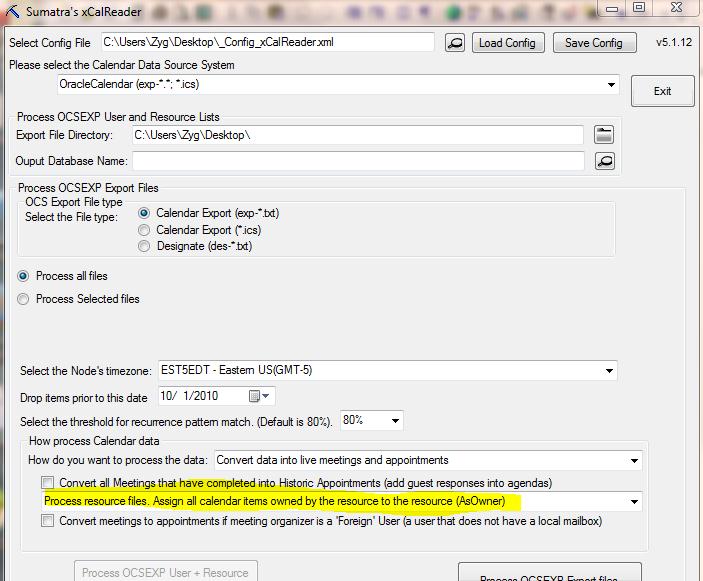
Since the Designate model in OCS is very different from the Delegate model in Exchange, when you're converting the OCS export files, choose this option for the raw data from those calendars and then run an insertion.  You'll get the results you desire.


Why this option? When events were added to the calendar by Designates in OCS they were OWNED by the Designates, and not the actual calendar.  The above option normalizes that for an Exchange environment by making the events owned by the shared calendar.

Sunday, July 10, 2011

Migrating Zimbra Calendar to Hosted Microsoft Exchange

We've been getting a lot of inquiries lately from people wanting to migrate calendars out of Zimbra and into Exchange.

A few quick guidelines:
  • If you have more than 250 users it is cost-effective to use our full-scale migration technology.  It's completely server-to-server, leaves end-users out of the loop, and has results as though you've been using Exchange calendaring all along.
  • For a few hundred users or under, try our Decaf option.  Application here.  Documentation here.  It's a server-side ICS import to hosted Exchange, and right now it's mainly geared towards Oracle Calendar migrations, but we'll open it up to Zimbra users if we see enough demand.

Thursday, June 30, 2011

Our Office 365 Experience Thus Far...

So we've been pretty good letting our readers know that migration performance into both Live @ Edu and Office 365 is about 14% the performance of on-premises Exchange.  And then there's the problems with quotas.

That none of this has changed or been addressed through the beta period of O365 should not be surprising to anybody not under the influence of Prozac or electroshock. 

In fact, despite bringing this to Redmond's attention, we've gotten zero feedback, seen zero progress, and expect zero results.

Now that Office 365 is out of beta and in the production, plan on all these nagging "problems" getting re-classified as "features."

Friday, June 24, 2011

Follow-on to the Headaches of Cloud Migration

As a follow-on to our earlier postings, you might want to check out

http://ferris.com/2011/06/03/moving-to-hosted-exchange-plan-for-hiccups/

There is never a free ride when you move an entire server.

Wednesday, May 25, 2011

Inserting holidays into hosted Exchange without an Outlook client

Holidays.We've been doing them server-side for years now.
So extending Decaf to insert holiday files was not too much of a stretch.
Since we focus on migrating OCS to Exchange, we used the relevant parts of their ICS format for our template.
Create a text file using this template to insert holidays:

BEGIN:VCALENDAR
BEGIN:VEVENT
TRANSP:TRANSPARENT
SUMMARY:New Year’s Day
STATUS:CONFIRMED
LOCATION: Any time zone in your system
DESCRIPTION: No work day
DTSTART;VALUE=DATE:20120101
DTEND;VALUE=DATE:20120101
END:VEVENT
END:VCALENDAR
BEGIN:VCALENDAR
BEGIN:VEVENT
TRANSP:TRANSPARENT
SUMMARY:Holiday on the 14th
STATUS:CONFIRMED
LOCATION: Company-Wide
DESCRIPTION: Suppose Jan 14 was a holiday in your company
DTSTART;VALUE=DATE:20120114
DTEND;VALUE=DATE:20120114
END:VEVENT
END:VCALENDAR


This will insert server-side and happen on the given dates, regardless of time zone (!) So a user in the USA or Canada need only put one holiday file together and can use it for all users.

And you go here to insert it.  Our usual restrictions apply.  Of course UNDO works for this.

As always, any feedback is welcome.

We're debating whether to include an option to insert for all users on a domain -- which is certainly possible but we're a little leery if it's in demand.

Thursday, May 05, 2011

Web-Based, one-step Oracle Calendar to Hosted Exchange migration


This is an early look at something we call Sumatra Decaf and a call for informed consent volunteers.


We've built a really good business out of migrating calendars full-state into Exchange.


But some folks do not need the whole magilla and are just looking for the simplest way of getting data from your legacy system into Exchange in a "good enough" fashion. So we've done that as well.


So yea, we have server-side ICS insertions to Hosted Exchange.


Let's take a look at Puffy Amiumi's calendar in OCS (also in Japanese Standard Time)


Use UNIICAL to export it and then read it into our web-based application (shown here in Alpha):


and in Outlook Web Access on Live at Edu, the results look like this:


Notice we're prefacing them with _TEST_ for the moment to make sure it does not get into the wild before we're ready.


The 5:00 PM Meeting at which Puffy is a guest looks like this in the agenda so that you know who's organized it and who else is supposed to be there.


Quick, simple, and executable without a lot of prep time.


Now our other option for a migration remains: longer, planned, and full-featured.
We're looking at how we want it to evolve and would welcome some input from you folks.


Monday, April 04, 2011

Creating a Room in Office 365 Beta

Working in Office 365 Beta we found it very simple to set up users but a little confusing to set up a Conference Room. So we're documenting the process here. First create the room as though it were a regular old user, like so (you could do all this through PowerShell but I like the simplicity of the Office 365 Admin interface): Now use PowerShell to set up your session: $LiveCred = Get-Credential This will prompt you for your admin credentials on Office 365. Follow this with the next two commands: $Session = New-PSSession -ConfigurationName Microsoft.Exchange -ConnectionUri https://ps.outlook.com/powershell/ -Credential $LiveCred -Authentication Basic –AllowRedirection and Import-PSSession $Session You are now ready to rock and roll by changing your “room” into a ROOM. This PowerShell command will now transform the ID into a Room. Set-Mailbox room222 –Type Room Check this by trying to add it in Outlook: And we’re certain that it is now behaving like a room! Since you’re here you might as well also configure the room as you wish. My preference for daily use (though for a calendar migration you’d want to turn OFF AutoAccept): Set-CalendarProcessing -AutomateProcessing:AutoAccept -DeleteSubject:$FALSE -AddOrganizerToSubject:$TRUE -AllowConflicts:$TRUE -EnforceSchedulingHorizon:$FALSE Wash, rinse, and repeat for any other resources you need. When done, be a good doobie and disconnect PowerShell from Office365: Remove-PSSession $Session
Friday, January 28, 2011

Color-coding your inserted calendar data

Something our QA department has been doing for almost a year now has suddenly struck me as a really really good idea suitable for blogging.
Did you know it's possible to color-code your inserted calendar data?
What amazes me is how simple it is.
In the following example we've inserted several times (with a minimal data set) adding additional digits to our usual Category string:

All you need do on an individual basis is Manage the categories (seen here in OWA our client of choice on the Cloud).

You can also use Group Policy to propagate this for everyone if that helps you out. See Configure Categories in Outlook 2007.

Wednesday, January 19, 2011

More on Live @ Edu vs. On-Premises Exchange Speed Differential

Live@EDU

On-Premises

Object Count

7675

7585

Total Time (seconds)

4193.25

597.01

Total Time (minutes)

69.89

9.95

Average Insertion time

0.55

0.08

Mode

0.41

0.05

Median

0.44

0.05

Max

9.29

3.5

Min

0.10

0.03


So our latest tests on inserting calendar items into Live@Edu vs. inserting into on-premises Exchange gives us a 7:1 time ratio.
That is: it is currently about seven times faster to migrate calendar data into your own Exchange server than it is to migrate it to Live@Edu. We've seen the same data set go far longer, but this is a good estimate to use in your planning purposes. Also yesterday another real-world site reported a figure similar to the one we found.
Just so you know.

Monday, December 20, 2010

Quotas and Live @ Edu Migrations

The calendar elves were busy this weekend migrating TWO former Oracle Calendar Server sites into Exchange in this Cloud thing.


One went into BPOS (one of the dumbest acronyms EVER!) which is in reality Exchange 2007, which does NOT have submission quotas. (So now you know where this is heading)


The other site went into Live @ Edu which, despite their having had their submission quotas removed for purposes of migration, found the quotas very much in place.


So this is about what you'll see if one of your users hits submission quota in a migration.


In this example we kept inserting meetings until we hit quota. So one went in fine (you see the guest list and responses) and one did NOT (it says "Invitations haven't been sent for this meeting").

Once your submission quota rolls over (and when is that exactly?) you can send this and it'll go out like a regular meeting invitation. Not fatal in a migration, but we agree, it is darned annoying.

Thursday, December 09, 2010

EWS, Outlook Live, Exchange Release Levels, OWA, and WTF?

Come with us on a journey to mystery.

The subject started out as Holidays but morphed into the more general one of All Day Events (ADEs).

Using EWS, it is possible to insert ADEs and we do LOTS of them in the course of a migration.
BUT, some combination of EWS, Exchange release levels, and OWA are currently giving our usually stable process conniption fits.

Start off with inserting an ADE under either Exchange 2007 rules (with deprecated Time Zone, rules, but bear with us for a moment here) into Live@Edu (not that we have a client trying to do this exactly now or anything like that).

In Outlook attached to Live @ Edu they will appear correctly (as below) if you specify Exchange 2007 SP1. But it will appear as a two day banner if you specify Exchange 2010.

JUST to keep thing really really interesting, viewing the EXACT SAME ADEs in OWA shows the 2007 SP1-defined ADE showing up correctly, and the 2010-defined ADE spanning THREE days:

If your head does not hurt you have not been paying attention.
SO, for the time being while running a holiday insertion with our tools, specify Exchange 2007 SP1. Everything will be hunky-dory.

Don't believe us? Here's the VB .net code (we use Exchange Web Services Managed API v1.1. )

Public Function ewsBuildAllDayEvent() As String

Try

Dim myUserEmail As String = "user10@test.com"
Dim myEWSURL As String = "https://sn1prd0202.outlook.com/EWS/Exchange.asmx"
Dim myExchangeVersion As ExchangeVersion = ExchangeVersion.Exchange2007_SP1
Dim myLogon As String = "admin@test.com"
Dim myPassword As String = "Gu3ssWh0"
'create Service
service = New ExchangeService(myExchangeVersion)
service.Url() = New Uri(myEWSURL)
service.Credentials = New WebCredentials(myLogon, myPassword)
service.ImpersonatedUserId = New ImpersonatedUserId(ConnectingIdType.SmtpAddress, myUserEmail)
'build appointment
Dim appointment = New Microsoft.Exchange.WebServices.Data.Appointment(service)
appointment.subject = "MyTestADE"
appointment.Start = CDate(Now.ToShortDateString)
appointment.End = CDate(DateAdd(DateInterval.Day, 1, Now))
If myExchangeVersion = ExchangeVersion.Exchange2007_SP1 Then
appointment.StartTimeZone = System.TimeZoneInfo.FindSystemTimeZoneById("Eastern Standard Time")
Else
appointment.StartTimeZone = System.TimeZoneInfo.FindSystemTimeZoneById("Eastern Standard Time")
appointment.EndTimeZone = System.TimeZoneInfo.FindSystemTimeZoneById("Eastern Standard Time")
End If
appointment.LegacyFreeBusyStatus = LegacyFreeBusyStatus.Busy
appointment.isalldayevent = True
appointment.Save(SendInvitationsMode.SendToNone)
Return "OK"

Catch ex As Exception
Return ("ERROR: " & ex.Message)
End Try

End Function

Monday, November 08, 2010

Putting Holidays into Live @ Edu Server-Side

We tested our holiday insertion code on Live @ Edu and a list of holidays like this:


Note that this is an All Day Event (and you can specify if the time is to be shown BUSY or FREE):

While this is an appointment we've put into every calendar without any muss or fuss. You could use the same technology to do that for anything else you want (Shareholder's Meetings, Fire Drills, as your business and imagination dictate).

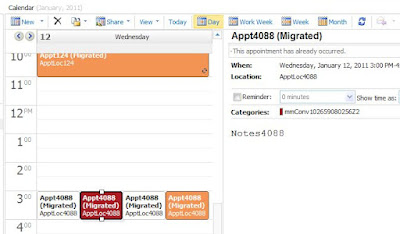
Any of you who have been through a migration with us know why we keep the "(Migrated)" tags, but you can decide to not use them.
This is scriptable so you can create holidays as you provision users if you have an automated system for so doing.


A few other things to keep in mind:


  • This runs as an EWS application from a 32-bit workstation. So all your credentials are completely under your control. If there's demand to run this as an online service we'll listen.

  • We take the default time zone of your server for all insertions. If you have users in multiple time zones and want to do this contact us -- that would be a different version.

  • You can specify a single user, a list of users, or an LDAP query to handle your insertion.


Tuesday, August 17, 2010

Migrating from Exchange to Live@Edu - NOT a no-brainer

We've been getting a lot of email from people who are weighing the decision between on-premises Exchange and Live @ Edu. We got worried when we started picking up on two assumptions that a lot of them are making: that both Live @ Edu and on-premises Exchange 2010 are functionally equivalent and that should you decide to move between them it is a simple, no-brainer activity to shift from on-premises Exchange 2010 to cloud-hosted Exchange later on.

Disillusionment Time!

There are two things you need to be aware of at the outset:
  1. Live @ Edu has limits compared to on-premises hardware (and this affects migrations disproportionately)
  2. Going from on-premises hardware to Live @ Edu is just as major a migration as going from (say) Oracle Calendar Server to Live @ Edu.
We've dealt with the first issue already in this blog, including some differences from a coding perspective.
Now let's talk about going from on-premises to Live @ Edu:
First the voice of experience, in this case a user going from E2K7 to Live @ Edu:
http://nzschooltech.blogspot.com/2010/04/migrating-from-exchange-2007-to-liveedu.html
Yes, you CAN devise and execute your own migration process. But but do not plan on it being either simple or fast.
Second, we have the voice of authority, Microsoft, warning about this:
http://outlookliveanswers.com/forums/p/519/4961.aspx#4961
So Microsoft is working the IMAP mail migration angle (be sure to test how long it takes), but calendars, contacts, tasks are not included.

Third, we have the voice of Sumatra:
If someone is moving your calendars, ask if the meetings come over live with guest lists and responses intact.
Our general recommendation: If you're looking at migrating from a legacy system and considering going into Live @ Edu sometime down the road -- all indications are that it is better to make your end-point decision FIRST. It will save you tons of work down the road.

Saturday, July 17, 2010

Outlook Live and Outlook On-Premises Differences

You know.... there's a bunch of these differences between Outlook live and Exchange on-premises.
And like discovering land mines you're only going to know when you step on one of them.
Such is the case with Throttling Policies and the EWSFindCountLimit.
What does this have to do with calendar migrations? Just in our UNDO function (a prudent safeguard which many of you seem to find comforting).
Our QA team discovered weird behavior in Live @ Edu that does not exist in on-premises Exchange when we were trying to UNDO several test insertions at once. The default limit in ESWFindCOuntLimit is 1000 items (and this in our case includes things in the Deleted folder).
So some of our higher-end users were not being UNDO-ne.
We're fixing that and preparing for the next landmine.
Stay tuned.

Tuesday, July 06, 2010

Inserting into Live @ Edu vs. inserting into on premises hardware

We were working with a client doing a migration into Live @ Edu and wanted to get some absolute data on calendar migration performance on their machines versus everyone else. So in true Sumatra fashion we created a test database of 20 users and had them insert it in their test environment. It took 19 minutes.

And we then inserted the same database into our Exchange environment. That took 12 minutes (not surprising, we have good hardware and not an enterprise-level load)

Then we inserted the same data into Outlook Live @ Edu. It took 71 minutes.

Just to be sure we were not doing something really wrong we ran it twice and got the same manatee-like languid pace. We're used to measuring migrations with a clock, not a calendar.

We're sure we're not processor bound on our client system. The question is whether we're processor-bound on the server (likely) or network-bound (not as likely). The results are in any event troubling for anyone wanting to do a bulk calendar migration.

But wait -- there's even MORE BAD NEWS FOR calendar migrations!

According to Message, Mailbox, and Recipient Limits (tip 'o the hat to Duncan in London), there are limits of 30 messages per minute and 500 recipients per day. And the logs from London's test runs indicate they are already hitting this limit.

Taking calendar data over in a full-state method we re-create all of these and it is not unusual for the even moderately-scheduled user to hit these limits.

Stay tuned. We're working on creative solutions.
There is a ray of hope, though. This thread indicates others are running into the same absurd limits and Microsoft MAY be willing to make exceptions (check out the procedure at the end).

We suggest you folks who want to do a full-state calendar migration contact your Microsoft Rep and ask them if they can get these limits removed for the duration of your migration.