Prior to E2K7 sp1 your only option was to migrate it into a user calendar or resource calendar and then make share it.
In a minimally-documented feature you can actually migrate the calendar data to a Shared Mailbox.
But wait you say -- you've been through the Mailbox Wizard, and there ain't no "Shared Mailbox" in it:
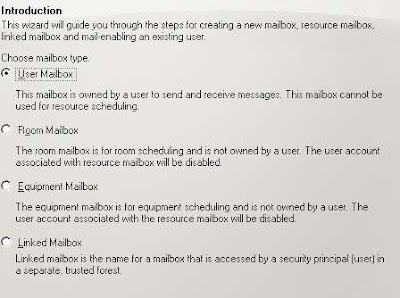
That's because you can only create it in the Exchange Management Shell.
So to create a shared mailbox for the former Market Department Group calendar, you might use the following
[PS] c:\New-Mailbox -alias DeptCal -name "Marketing Department Calendar" -database "Mailbox Database" -org Users -shared -UserPrincipalName DeptCal@YOURDOMAIN.com
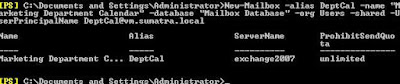 THEN it will show up in the Exchange Management Console!
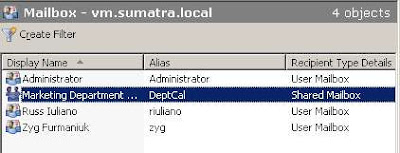 What do you do with it now?
Well, not much.... yet.
This is a disabled account. We need to add user access to it, and this brings us into the dreaded world of Permissions.
First, create a security group (via Active Directory Users and Computers) in your domain called "Marketing Department Security Group" and add the users you want to access the calendar. And in our friend the Management Shell, grant that group full mailbox permissions:
[PS] c:\Add-MailboxPermission DeptCal -User:'Marketing Department Security Group' -AccessRights:FullAccess
We're not done yet. You will need to add "Send-As" permissions to the group as well. Those of you doing migrations are really used to this.
[PS] c:\Add-ADPermission "Marketing Department Calendar" -User:'Marketing Department Security Group' -ExtendedRights:Send-As -AccessRights:ReadProperty, WriteProperty -Properties:'Personal Information'
Users in the Group now have full rights to that shared calendar.
So in OWA just pass the DeptCal email address and use your own credentials to log in (please do not send me posts about my Certificate Error, it's a test server for gosh sakes).
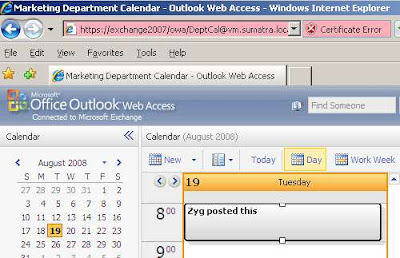
SO in Meeting Maker if you have had a group calendar, map and migrate it into a USER calendar and then CHANGE it post-migration to a shared calendar using the "Type" command.
e.g.,
[PS] c:\Set-Mailbox DeptCal -Type:Shared
and set up your Security Groups.
Why not just create a Shared mailbox in Exchange and migrate into that? The account is Disabled -- we won't be able to re-create data in it with full fidelity. Create it as a User and then change it to Shared and you'll be happier with the results.
Need some Exchange Calendar applications or utilities developed for your enterprise-sized organization? Contact us.


7 comments:
Thank you very much, also very helpful for setting up shared calendars from scratch. :-)
Keep it up, mate
This is great infoand I appreciate you sharing it! When I tried it the users in the security group can not access the calendar or see it in the global address list. However everyone out side of that group can see it in the address book but can't access it. Any thoughts where i went wrong?
Look at the effective permissions … perhaps something about that group does not inherit permission changes (e.g. those in an IT group are in “protected” OUs or Groups). To check: go into AD sites & services, find your server under services, and do a properties. Add one of those accounts, then check the effective permissions (sometimes under advanced). See if there are any denys.
I've setup the shared calendar in Ex2007 per this blog. I noticed that when a user creates a calendar event and includes this shared mailbox (Add attendee), the event shows in the shared mailbox but if the user cancels the event, it shows as "Cancelled" instead of completely removing the event. Is there something that can be done to completely remove the event when it's cancelled?
Thanks in advance.
Only way to get them automatically deleted without programming something:
1. Log into the Shared mailbox (the shared calendar) via Outlook (NOT OWA)
2. GO TO Tools > Options > Preferences > Calendar Options > Resource Scheduling
3. Select “Automatically accept meeting requests and process cancellations.”
(As long as Anonymous is configuring things , does Anonymous want to 'Automatically decline conflicting meeting requests', too?
I think this is exclusively client-side and will only work while Outlook is open, but it should fire off when you open Outlook.
Not an ideal solution, but very little not built directly into Exchange is.
Feedback from a 7000+ Meeting Maker migration we did a month back: if folks want to rename categories (so you see different items in different colors, e.g., sick is blue, out of office green, etc) admins will need FULL ACCESS to the calendar.
Also categories can only be set be set via Outlook.
For the Exchange 2016 / Office 365 generation you may wish to go through this thinly-disguised market research posting on sharing calendars and contacts: https://support2.microsoft.com/common/survey.aspx?scid=sw;en;3704&showpage=1
Post a Comment