Bravo to Dr Abrasive for cracking the Sega Saturn DRM method.
What on earth does this have to do with calendaring?
Well, since we broke Meeting Maker, Oracle Calendar Server, Zimbra, Oracle Beehive, and a few other encoding schemes, we're not allowed to talk about, we're sort of connoisseurs of reverse engineering and call out kudos where they are warranted.
What's kind of amazing is that none of the engineers came forward in the last 20 freaking years with anything that would help this. Of course, for Meeting Maker the group of hacks finally working on it only started to contact us after we'd done everything significant to read their data and insert it into Exchange.
And don't even get us started about the Oracle people!!!!
Showing posts with label Meeting Maker. Show all posts
Showing posts with label Meeting Maker. Show all posts
Monday, July 11, 2016


Tuesday, October 06, 2015
Full-state Calendar Migrations from #Oracle, #Zimbra, #MSFTExchange, etc into @Office365
There must be a forest around here somewhere, I just cannot see it through all these trees.
Zimbra to Office 365:
These are Sumatra's full-state calendar migrations into Microsoft Exchange that
- re-create meetings
- keep recurrence patterns
- preserve guest responses.
- book conference rooms and resource
- make it like your users have been using Outlook and Exchange all along.
- Everyone else who claims to do calendar migrations skips over all this functionality. To be fair, it is hard to execute correctly (and most of them have their hands full convincing you to do email when imapsync does it so well and so much less expensively), and it's not too important if you have a few hundred users. But it is the whole ball of wax if you're any real-sized corporation.
Exchange to Office 365
with Incremental Sync
Oracle Calendar Server to Exchange / Office 365 (via ICS files, which we still use to create live meetings):
Oracle Beehive to Exchange:
MDaemon to Exchange (we don't do full-state on this)
Meeting Maker we've been doing but we didn't do a video on it. And at this point -- why bother?
Zimbra to Office 365:
Friday, September 11, 2015
Converting a Meeting Maker server to a relational database
We had someone ask us "Can you guys convert a Meeting Maker server to a relational database?"

Short answer is: Yes - that's how our migration process has always worked. Raw Meeting Maker data exists in an object-oriented database format that I have described as a cross between a PhD thesis and a junior high school science project.
Even though we formally ended our MM to Exchange migrations we've been contacted by some Friends of Sumatra who've been through migrations with us before so we've kept our conversion software running.
Time frame: depending on how much history you have and how many users are on your Meeting Maker server we can convert your data into an Microsoft Access database in (at the most) an afternoon. Usually it's only a few hours but breaking out and spinning up the conversion server is the real hassle.
This converted database alone is insufficient to run a full migration into Exchange. Do not allow that idea to entertain your mind.
The converted database is completely appropriate for converting / archiving Meeting Maker servers into a standard database format so that you can do searches for legal compliance, history, investigations, or whatever your data-driven needs require.

Short answer is: Yes - that's how our migration process has always worked. Raw Meeting Maker data exists in an object-oriented database format that I have described as a cross between a PhD thesis and a junior high school science project.
Even though we formally ended our MM to Exchange migrations we've been contacted by some Friends of Sumatra who've been through migrations with us before so we've kept our conversion software running.
Time frame: depending on how much history you have and how many users are on your Meeting Maker server we can convert your data into an Microsoft Access database in (at the most) an afternoon. Usually it's only a few hours but breaking out and spinning up the conversion server is the real hassle.
This converted database alone is insufficient to run a full migration into Exchange. Do not allow that idea to entertain your mind.
The converted database is completely appropriate for converting / archiving Meeting Maker servers into a standard database format so that you can do searches for legal compliance, history, investigations, or whatever your data-driven needs require.
Saturday, September 20, 2014
#MeetingMaker User Password Recovery
Meeting Maker 7x / 8x
User Password Recovery
First get comfortable with reading binary data.
Second, open up a Meeting Maker Server Export in said binary
file viewer.
Third, figure out how to turn all this gobbledygook into
something semi-useful (as we have done below), but barring that, search for
your USER NAME or USER LOGIN, in the example below we use “Adam Ant” with User
Login “adam”
Adam’s password is encrypted in the line beginning with
“OVNI 0103” (which will ALWAYS immediately follow his USER LOGIN)
The first digit “1” tells me the password is 1-byte
long. In this example I know his
password is “b” but it is encrypted in the export file as “c”
You should start to suspect a pattern.

If the clear password is “aa” (61 61h) the hex string is “63
8C”
The pattern holds.
The first encrypted character = character + LENGTH of password
Now we proceed to the next digits in turn and build a table (a, aa, aaa, aaaa, b, bb, bbb...) you get the idea) which we will leave as an exercise for the reader.
Going down the column is less clear than going across the
rows. Going from “a” to “b” everything
augments by one (and this has held across a range of experimentation), meaning
we can in a pinch use each “a” length cipher as a base to figure out anything
of that length.
So the algorithm:
1.
Find a user
2.
Read the password length
3.
Subtract length from the first digit to get the
hex of the first character
4.
Use the “a” column in your table as an
offset for all the other letters in the password sequence.
5.
Do not ask for any more information you script
kiddies in India – this is more than adequate.
So the 7 digit string “7B 96 BA E9 04 38 26” deciphers as
“theman5”
7 letter “50 A4 B6 EA 04 FD 24” deciphers as “Ivana33”
5 letter “70 8F D0 E1 14” is “kayak”
Go wild.
Wednesday, September 17, 2014
Hacking Canon Firmware -- Use This on Meeting Maker
With Meeting Maker in the final throes of its extended swan song, I'd like to point folks who still want to roll their own server-side migration to Hacking Canon Pixma Printers. Aside from being an excellent tutorial on reverse engineering, it's pretty much the same method we used (all those years ago) in breaking the Meeting Maker export format.
Keep in mind, the issue there is not getting at the encryption key (since except for the user passwords there isn't one and you can break those in a few minutes), but establishing the encoding scheme for individual data records. After you run this for the first few you'll have the wash-rinse-repeat cycle for the entire data set.
You'll then have to assemble object-oriented database elements into something like a coherent whole, but if you get this far into the process that should not be a barrier to success.
Only other hint I need to give you: work on the server export file not the live server data. The live server data is a hot mess horror show.
Keep in mind, the issue there is not getting at the encryption key (since except for the user passwords there isn't one and you can break those in a few minutes), but establishing the encoding scheme for individual data records. After you run this for the first few you'll have the wash-rinse-repeat cycle for the entire data set.
You'll then have to assemble object-oriented database elements into something like a coherent whole, but if you get this far into the process that should not be a barrier to success.
Only other hint I need to give you: work on the server export file not the live server data. The live server data is a hot mess horror show.
Tuesday, January 08, 2013
Retiring Meeting Maker Migrations December 20, 2013
Folks, it has been a great evening out but now the bartender is calling for last orders.
As of December 20, 2013 we will no longer be doing Meeting Maker migrations. We of course continue to do both full state and faster-simpler migrations from Oracle Calendar to Exchange, and faster-simpler migrations from Zimbra to Exchange. Our Holiday cmdlet continues to thrive and our custom calendar engineering is unparalleled.
To those of you who have been asking us about migrating in the last few years: we'd recommend starting your test cycles sooner rather than later.
We're sympathetic to your budget cycles, so if you need to discuss timing we're open to that. But we do need to put a stake in the ground so we can all move on.
As of December 20, 2013 we will no longer be doing Meeting Maker migrations. We of course continue to do both full state and faster-simpler migrations from Oracle Calendar to Exchange, and faster-simpler migrations from Zimbra to Exchange. Our Holiday cmdlet continues to thrive and our custom calendar engineering is unparalleled.
To those of you who have been asking us about migrating in the last few years: we'd recommend starting your test cycles sooner rather than later.
We're sympathetic to your budget cycles, so if you need to discuss timing we're open to that. But we do need to put a stake in the ground so we can all move on.
Tuesday, July 31, 2012
Legal Discovery in Archived Meeting Maker Data
Necessity truly is the mother of invention.
I know, cliche does not become us, but it's apt in this case.
The topic is legal discovery. A client has scads of backups of Meeting Maker server data back to the turn of the century and needs to do legal discovery on it.
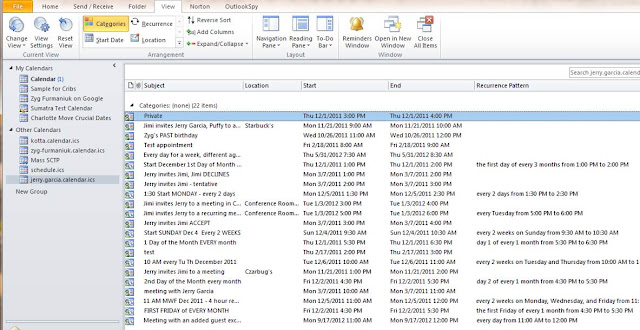
Our previous modus operandi required a full calendar insertion (meaning significant computer lab resources and expertise) and a PST export. But after noodling on this we thought -- let's use our tool that we originally built for Zimbra insertions! It produces ICS files which we inserted into Zimbra but are also readable in Outlook and as text!
Here's how it works:
We convert Meeting Maker export into our intermediate Access format and run zinsert (either for one user or the entire server of users if you prefer).
If you use a text editor to look at them they look like this (readable, but let's face it, geeky):

If you list them as an external file in Outlook (which does not involve IMPORTING them) - they look a lot more like calendars:

and can even be searched and displayed as a list:
If you use a text editor to look at them they look like this (readable, but let's face it, geeky):

If you list them as an external file in Outlook (which does not involve IMPORTING them) - they look a lot more like calendars:

and can even be searched and displayed as a list:

Wednesday, July 27, 2011
First Field Migration into Zimbra 7 Accomplished
We ran our first field migration into Zimbra 7 this weekend (out of a Meeting Maker legacy system).
We had early reports of problems with recurring meetings in Z7 migrations, but tested well in advance to make sure that did not happen. All is well.
We had early reports of problems with recurring meetings in Z7 migrations, but tested well in advance to make sure that did not happen. All is well.
Thursday, April 28, 2011
Progress on migrations to Google Calendar
We're kind of psyched because we've made the first real progress on Oracle Calendar / Meeting Maker / Zimbra full-state migration to (*shudder*) Google Calendar.
Check out this screenshot from our latest tech:

The important thing is the yellow highlighting. Yep -- we got attendees in with their responses.
Now we're working on the mappings and recurrences. So those of you out there stay tuned -- there is light at the end of the tunnel
Check out this screenshot from our latest tech:
The important thing is the yellow highlighting. Yep -- we got attendees in with their responses.
Now we're working on the mappings and recurrences. So those of you out there stay tuned -- there is light at the end of the tunnel
Tuesday, March 01, 2011
New Mantra
Kudos to Russ for our newest mantra:
Hear it once, it's a trick.
Twice it's a special project.
Three times it's a new Sumatra product.
So the topic on the table here is Meeting Maker to Google Calendar migration (with link preservation).
We've had two requests in the last week. Is there anyone else out there?
Hear it once, it's a trick.
Twice it's a special project.
Three times it's a new Sumatra product.
So the topic on the table here is Meeting Maker to Google Calendar migration (with link preservation).
We've had two requests in the last week. Is there anyone else out there?
Friday, March 19, 2010
Migrating by department. BION, somoene's doing it.
In the several hundred migrations we've done over the last decade we've adopted as an article of faith that the right way to move meetings is as a Big Bang. It preserves the connections among all the users you migrate and it's not hard to explain to end users. A win-win for the community, an intense time for the administrators, but they get the win-win for the community.
We've always told you though that if your user community mainly consisted of "islands" who tend to only meet internally you could get away with migrating a department (or island) at a time.
But nobody took us up on it.
UNTIL a university in upstate New York said "OK -- we'll try that."
Russ and Zyg sucked in their breath and said "All right then. But if things are not going well after the first few we're going to re-evaluate this, right?"
THREE separate group migrations into it, they seem to be going all right.
There's a few more to go and we're still looking at it, but the results so far are good and we want to give you a preliminary read on how they did it and what's making it work. We're also giving them the opportunity to add anything they want to share in this post.
We've always told you though that if your user community mainly consisted of "islands" who tend to only meet internally you could get away with migrating a department (or island) at a time.
But nobody took us up on it.
UNTIL a university in upstate New York said "OK -- we'll try that."
Russ and Zyg sucked in their breath and said "All right then. But if things are not going well after the first few we're going to re-evaluate this, right?"
THREE separate group migrations into it, they seem to be going all right.
There's a few more to go and we're still looking at it, but the results so far are good and we want to give you a preliminary read on how they did it and what's making it work. We're also giving them the opportunity to add anything they want to share in this post.
- It's relatively small (about 500 users).
- They are able to identify very specific groups that meet together. The MM / Exchange administration team are doing this on their own without intense database analysis from us (which has helped keep their costs down).
- Once the island is migrated those users are removed from the Meeting Maker user list. Since they're islands, this isn't usually a problem. As Russ put it, "They burned their bridges after they crossed over."
- The migration team at the university gained experience early on in mapping users and after a proof of concept migrating their internal team they then proceeded to two other islands. Again, their motivation and competence here was key in keeping costs in control.
- After three separate island migrations things are looking good to complete the rest on a staggered schedule.
- The university adds that advance testing and end-user expectation communication made things go better.
- We at Sumatra are happy to give credit whenever our clients are more clever than we are.
So our moral: It is possible, but start small and keep an eye on it as you move forward.
What's this look like from an end-user's perspective? The same as it would in a full migration. They walk in one morning and user Meeting Maker. They walk in the next morning and they're on Exchange. BUT: Any MM users not in the migrated group are now not on their guest lists. That's the price you pay for this staggered approach. In the immortal acronym of Robert Heinlein as morphed by Milton Friedman, TANSTAAFL.
Monday, March 15, 2010
Blast from the past
 Look what Zyg found in the basement.
Meeting Maker 1.5 diskettes (DISKETTES!), back when it was Macintosh only. The video comes from a few years later after a bunch of est-heads (no joke) bought the company and decided to align themselves to the up-and-coming software powerhouse -- Novell.
Thursday, February 25, 2010
Meeting Maker / Oracle to Google Calendar
The calendar elves have been working on a few things to move data from Meeting Maker into Google Calendar, and we thought we'd update you. It's not perfect yet, but it's well within striking distance. This will work for Oracle as well of course.
First let's take a look at a typical Meeting Maker 7 calendar (sorry, the company really won't sell us version 8 anytime soon so we're left with the trial version we've been using since 2001).
 And here, using our current zinsert to create ICS files is what this looks like via an import in Google Calendar.

On MAJOR ICS datafiles (in this case 2.5 Mb), we've been getting this warning:

But all the data seems to go in. Our test was simple: is the last object in the file inserted? If so, we're fine, and it was.
First let's take a look at a typical Meeting Maker 7 calendar (sorry, the company really won't sell us version 8 anytime soon so we're left with the trial version we've been using since 2001).
 And here, using our current zinsert to create ICS files is what this looks like via an import in Google Calendar.
 First thing to notice: the old MM DST code causes a shift (which if you update your server or get us to rebase your data will not happen), and banners are a little off (we can fix this).
But the good news is that it involves WAY less work than our previous versions.
This does work client-side (we're working on the XML for server-side, but we've gotten no pressure for it yet so it's just simmering away).

On MAJOR ICS datafiles (in this case 2.5 Mb), we've been getting this warning:

But all the data seems to go in. Our test was simple: is the last object in the file inserted? If so, we're fine, and it was.
Monday, September 21, 2009
Oracle Calendar / Meeting Maker to Google Calendar Migration
OK, for street cred, we did a Meeting Maker (it will work with Oracle or Sun Java Calendar as well) to Google Calendar migration extension.
Keep in mind, we'll morph this as it makes contact with the real world. Here's how it currently works.
We use our tools to produce ICS files. Not a problem for appointments, but for meetings the idea is to make them live.
Here's how we do it. We insert the emails of the attendees into the OWNER's agenda.


Keep in mind, we'll morph this as it makes contact with the real world. Here's how it currently works.
We use our tools to produce ICS files. Not a problem for appointments, but for meetings the idea is to make them live.
Here's how we do it. We insert the emails of the attendees into the OWNER's agenda.
She or he can find these really easily after inserting into Google by searching for "(re-propose)" Open it and highlight the emails, copy / drag them into "Guests"

 SAVE it and SEND it:
 Voila, live meetings, simple, inexpensive, and done.
Open it and highlight the emails, copy / drag them into "Guests"SAVE it and SEND it: Voila, live meetings, simple, inexpensive, and done.There's a few issues: I think we'll load all the To-Dos into an All-Day Event on the day of the migration (since Google doesn't have an import/export capability for Tasks yet).
We migrate Contacts via CSV files.
We looked at automated ways of uploading, but the Google Calendar API does not support uploading via ICS. So we're sitting on XML uploads via cURL until we have a corporate customer (which means we are not holding our breath).
We think it's more likely a corporate customer is going to want to get OUT of Google Calendar and into Exchange (you listening, Roche?).
NB: We only handle "re-propose" for meetings which have not yet ENDED -- any other meetings get turned into appointments in everyone's calendar.
Friday, August 14, 2009
Meeting Maker to Google Calendar field test results
 It's been a productive few weeks.
We just used our existing iCalendar tools to export a few Meeting Maker calendars for a site that wanted to go into Google Calendar.
With a little surgery (removing our Time Zone DST definitions) and using the Zulu time option, the data actually imports pretty well. The above example is real-world data.
Now there's a couple of things it doesn't do right out of the box: banners are currently off kilter (this is an easy fix), and we're not sure it's worth replicating the full set of state data for guests (because nobody else does it and everybody going into Google Calendar is price-constrained), but it's not that hard to at least put the guest list into the Description field.
As you know, we actively solicit your feedback.
Saturday, August 01, 2009
Migrating to/from Lotus Notes/Domino Calendar from/to something else?
It was a glorious summer day in Boston and of course I could think only of calendars.
Having come off installing Yellow Dog Linux on my PS3, I thought "How much geekier can I make the day?" OK, I actually thought "how soon can I fire up the grill?" but the lack of high-quality Chilean sea bass caused me to re-think my plans.
So given that one of the development guys warned me that there was no way I could possibly set up a Lotus Domino configuration on Linux by my own self, I had to prove him absolutely correct and generate this sample calendar. (BTW: If you try doing this on Fedora, remember to shutdown sendmail or Domino won't come up due to a port conflict.)
 Needless to say - yes, this means we're looking at full-state migrations out of Lotus Notes and into other less "legacy" environments. Our first impetus is someone who wants to take a few thousand Meeting Maker seats and put them INTO Lotus Notes, but we can work in stages.
More later.
Having come off installing Yellow Dog Linux on my PS3, I thought "How much geekier can I make the day?" OK, I actually thought "how soon can I fire up the grill?" but the lack of high-quality Chilean sea bass caused me to re-think my plans.
So given that one of the development guys warned me that there was no way I could possibly set up a Lotus Domino configuration on Linux by my own self, I had to prove him absolutely correct and generate this sample calendar. (BTW: If you try doing this on Fedora, remember to shutdown sendmail or Domino won't come up due to a port conflict.)
 Needless to say - yes, this means we're looking at full-state migrations out of Lotus Notes and into other less "legacy" environments. Our first impetus is someone who wants to take a few thousand Meeting Maker seats and put them INTO Lotus Notes, but we can work in stages.
More later.
Thursday, July 02, 2009
Bulk Move Meeting Maker to Oracle Calendar?
Keeping an eye on keyword searches that bring folks to our site usually has few surprises.
Then last month this one showed up: "bulk move meeting maker oracle calendar" (right in there with "calendar migration oracle to exchange" and "meeting maker exchange calendar convert").
Yes, Oracle does have a process to convert Meeting Maker into Oracle Calendar.
They smartly used the Meeting Maker export DAT format (just as we do - it's independent of operating system so it's the most natural format and live Meeting Maker data is a horror show of complexity).
Cornell did this nice guide when they migrated out of Meeting Maker into OCS and Penn State apparently moved last year.
If you want a real geek instance of calendar comedy, check out their Troubleshooting Calendar Migration Guide for their Microsoft Exchange migration consisting largely of the equivalent of "Step 2: Discard remainder of killer whale carcass" making success seem as accessible as Larry Ellison's yacht habit.
We are surprised that anybody nowadays is considering leaving one waning calendar-only product for another waning calendar-only product.
If it works for you, that's all the matters.
As always our message is: try it out for yourself beforehand and follow Reagan's maxim of "trust but verify."
But also be prepared to migrate again in a few years.
Then last month this one showed up: "bulk move meeting maker oracle calendar" (right in there with "calendar migration oracle to exchange" and "meeting maker exchange calendar convert").
Yes, Oracle does have a process to convert Meeting Maker into Oracle Calendar.
They smartly used the Meeting Maker export DAT format (just as we do - it's independent of operating system so it's the most natural format and live Meeting Maker data is a horror show of complexity).
BUT when we ran the MM to OCS conversion (a ways back when we were figuring out how to convert Oracle Calendar to Exchange), we discovered they had missed several key attributes and in general failed to impress us with their solution (we did try licensing our tech to them but they were not interested). Since their own published report example consists mainly of "Nothing to import" messages, you should be appropriately wary.Sidebar: Turnabout fair play with an "X" to Paul Lynde. That's the same
strategy we use to move data OUT of OCS, using the utilities Oracle provides for moving calendar data between servers.
Cornell did this nice guide when they migrated out of Meeting Maker into OCS and Penn State apparently moved last year.
If you want a real geek instance of calendar comedy, check out their Troubleshooting Calendar Migration Guide for their Microsoft Exchange migration consisting largely of the equivalent of "Step 2: Discard remainder of killer whale carcass" making success seem as accessible as Larry Ellison's yacht habit.
We are surprised that anybody nowadays is considering leaving one waning calendar-only product for another waning calendar-only product.
If it works for you, that's all the matters.
As always our message is: try it out for yourself beforehand and follow Reagan's maxim of "trust but verify."
But also be prepared to migrate again in a few years.
Wednesday, May 13, 2009
Is there anybody out there? In a word: No.
So our article Corporate Microsoft Exchange to Google Calendar migrations: Is there anybody out there? generated lots of feedback -- all of it confidential.
We're used to this by now.
But here are the high-level conclusions:
We're used to this by now.
But here are the high-level conclusions:
- CORPORATE Google Calendar? Fuggedaboutit. Does not exist at the enterprise level. Actually it doesn't seem to exist in business beyond the "Mom and Pop started this store and needed some calendaring" level. There is one exception in Europe via an SAP consultancy we're too curious to let drop.
- Educational: Sure - but we've been put off by free not being a viable business model for us.
So don't wait up for us to do a full state calendar migration from Exchange / Oracle Calendar / Meeting Maker to Google.
Tuesday, April 21, 2009
Best Practices when Migrating Calendar Data
We've noticed the current economic climate has encouraged a passel of folks to evaluate their options.
And these same folks tend to call us to outline their options.
Now, we like to be as chatty on the phone as the next guys, but going over the same stuff does get to be a little repetitive. So in Sumatra fashion we stuck everything in a document and are encouraging you to read it.
It's way shorter than the tech documentation, and maybe even some managers would be able to digest it.
Click to download the PDF: Eight Best Practices when Migrating Calendar Data.
As always, we encourage feedback.
And these same folks tend to call us to outline their options.
Now, we like to be as chatty on the phone as the next guys, but going over the same stuff does get to be a little repetitive. So in Sumatra fashion we stuck everything in a document and are encouraging you to read it.
It's way shorter than the tech documentation, and maybe even some managers would be able to digest it.
Click to download the PDF: Eight Best Practices when Migrating Calendar Data.
As always, we encourage feedback.
Friday, April 17, 2009
Compliance, legal discovery, and your Meeting Maker data
Remember to look at calendars as part of the legal discovery process.
Last year we migrated a university (sorry, I can't give out the name here). During the migration, the CIO wondered why legal discovery solutions only focus on email (because it’s the only data that can be easily read, and there is a lot of it).
He saw their calendar data in a database and mentioned they might need to revisit their historic calendaring data (via Meeting Maker) for legal discovery or forensic analysis.
We’re calendaring guys. Reading calendar data is what we do, we said, so let us know if you need it.
Last month they asked if we could extract calendar items for a set of users. The caveat: they wanted the output to contain all meetings, agendas, appointments, along with the names of all people they met with in an easy to read format.
The "easy to read format" was the really hard part.
However, we believe in the old virtues of hard work and entrepreneurial solutions. We also noticed that since the Microsoft Exchange base is growing and the Meeting Maker base continues to contract that we'd rather solve this on Exchange.
We had their Meeting Maker data in an Access database. We could have written some code to expand the calendar data. But this method seemed pointless since Sumatra’s insertion into Exchange does most of that work already. So our solution was to take advantage of Exchange - insert their data into our test lab, and then create a tool to read the calendar data directly from Exchange.
The report contains ALL calendar entries (meetings and appointments), showing with organizer, subject, date, attendees, including the agenda.
For current Sumatra clients who can’t wait to try this, here’s the command syntax for a report of Bela Bartok’s calendar in 2008 (it would all go on one command line but we format here for clarity):
Note: If you do not want to see the agenda, you can use the /cmd:report switch. It’s much faster!
Last year we migrated a university (sorry, I can't give out the name here). During the migration, the CIO wondered why legal discovery solutions only focus on email (because it’s the only data that can be easily read, and there is a lot of it).
He saw their calendar data in a database and mentioned they might need to revisit their historic calendaring data (via Meeting Maker) for legal discovery or forensic analysis.
We’re calendaring guys. Reading calendar data is what we do, we said, so let us know if you need it.
Last month they asked if we could extract calendar items for a set of users. The caveat: they wanted the output to contain all meetings, agendas, appointments, along with the names of all people they met with in an easy to read format.
The "easy to read format" was the really hard part.
However, we believe in the old virtues of hard work and entrepreneurial solutions. We also noticed that since the Microsoft Exchange base is growing and the Meeting Maker base continues to contract that we'd rather solve this on Exchange.
We had their Meeting Maker data in an Access database. We could have written some code to expand the calendar data. But this method seemed pointless since Sumatra’s insertion into Exchange does most of that work already. So our solution was to take advantage of Exchange - insert their data into our test lab, and then create a tool to read the calendar data directly from Exchange.
The report contains ALL calendar entries (meetings and appointments), showing with organizer, subject, date, attendees, including the agenda.
For current Sumatra clients who can’t wait to try this, here’s the command syntax for a report of Bela Bartok’s calendar in 2008 (it would all go on one command line but we format here for clarity):
suExchange2007.exe
/usersrc:alias
/user:bela_bartok
/cmd:report_all
/dtstart:”1/1/2008”
/dtend:”12/31/2008”
Note: If you do not want to see the agenda, you can use the /cmd:report switch. It’s much faster!
Subscribe to:
Posts (Atom)