Because this is a calendaring blog and we should be keeping track of stuff like this:
Google Calendar Dies One Hour After Google Tweets About How Great It Is [Update]
The most interesting thing in this article was the link to the G Suite status dashboard which, frankly, I have difficulty finding off the main G Suite "Give us your money NOW" site.
Showing posts with label Google Calendar. Show all posts
Showing posts with label Google Calendar. Show all posts
Tuesday, June 18, 2019


Thursday, November 26, 2015
Make Google Calendar Stop Automatically Adding Events
From today's New York Times a good question and answer:
How do I make Google Calendar stop automatically adding events mentioned in Gmail?
Certainly it is possible but heed this warning: "Google warns that doing so removes all the past events added from Gmail."
This is totally bush-league!
Google should be ashamed they foisted that kind of slipshod capability on the public.
How do I make Google Calendar stop automatically adding events mentioned in Gmail?
Certainly it is possible but heed this warning: "Google warns that doing so removes all the past events added from Gmail."
This is totally bush-league!
Google should be ashamed they foisted that kind of slipshod capability on the public.
Tuesday, December 30, 2014
A few miscellaneous useful links and articles to close out the year
Closing out 2014 with a few Exchange / Outlook related tips.
Really good info in Ways to Avoid Email Tracking.
This includes my favorite advice: Don't even click the UNSUBSCRIBE link.
What these guys are looking for is any kind of response. You play into their hands by clicking anything. Best to ignore them.
also --
The Best Command Line Replacements for Bloated Desktop Apps gives you some really good tools that are compact and functional. That we use the exact same philosophy on our calendar migration tools is one of the attractions of this article to me.
and finally --
Adding Sun, Moon, and Stars to Google Calendar.
Really good info in Ways to Avoid Email Tracking.
This includes my favorite advice: Don't even click the UNSUBSCRIBE link.
What these guys are looking for is any kind of response. You play into their hands by clicking anything. Best to ignore them.
also --
The Best Command Line Replacements for Bloated Desktop Apps gives you some really good tools that are compact and functional. That we use the exact same philosophy on our calendar migration tools is one of the attractions of this article to me.
and finally --
Adding Sun, Moon, and Stars to Google Calendar.
Sunday, January 12, 2014
Opting out of Anyone on Google+ Sending you Email
Google has decided it does not have enough exploitable data traffic already and has made it a default for ANYONE on Google+ to send you email.
If you do not want this to happen to you (or your users) the Wall Street Journal published an easy-to-follow tutorial about changing this in your Settings.
Go here.
My two cents: Google’s really pushing to be relevant in social networking. But let us face it, this is a stretch. They changed the whole YouTube comment system to Google+, and even the folks I know on YouTube all the time don’t give a damn.
If you do not want this to happen to you (or your users) the Wall Street Journal published an easy-to-follow tutorial about changing this in your Settings.
Go here.
My two cents: Google’s really pushing to be relevant in social networking. But let us face it, this is a stretch. They changed the whole YouTube comment system to Google+, and even the folks I know on YouTube all the time don’t give a damn.
Sunday, December 22, 2013
Outlook.com makes it easy to switch from Gmail
So Microsoft is talking about how Outlook.com makes it even easier to switch from Gmail.
Their statistics on email dissatisfaction are interesting if not completely compelling. In general we've had little experience of users at the enterprise level who are really happy with Google as an enterprise solution.
As nearly as we can tell the migration Microsoft offers is exclusively email.

If there's any corporate interest in a full-state calendar migration from Google to Exchange -- let us know. One of the only reasons we did a migration INTO Google was with the expectation we'd have bigger opportunities getting people OUT of Google and into Exchange.
Their statistics on email dissatisfaction are interesting if not completely compelling. In general we've had little experience of users at the enterprise level who are really happy with Google as an enterprise solution.
As nearly as we can tell the migration Microsoft offers is exclusively email.

If there's any corporate interest in a full-state calendar migration from Google to Exchange -- let us know. One of the only reasons we did a migration INTO Google was with the expectation we'd have bigger opportunities getting people OUT of Google and into Exchange.
Thursday, May 16, 2013
Interesting Google v. Microsoft in the Enterprise Story
Reading Google Pushed This 4,500-Employee Company Into Microsoft's Arms. Our experience is that this makes sense.
We do not even bother looking at calendar migrations INTO Google anymore (the sites we found that were considering Google were really light on any kind of enterprise expertise in the first place).
Our prediction: we will soon be seeing people looking for full-state calendar migrations OUT of Google and into Exchange.
We do not even bother looking at calendar migrations INTO Google anymore (the sites we found that were considering Google were really light on any kind of enterprise expertise in the first place).
Our prediction: we will soon be seeing people looking for full-state calendar migrations OUT of Google and into Exchange.
Thursday, January 10, 2013
Read "Freedom for Users, Not for Software"
We've been watching the migration to the cloud for a while now -- wondering when everybody was going to wise up that data centers were farming them into cruelty-free meat by-products.
I was recently at a Christmas party with some people from a Redmond-based software corporation that makes Exchange. Their take: Office 365 made their lives and their customers lives much more convoluted. Where they could work solutions in on-premises servers, any changes to Office 365 need to be escalated at the corporate level. And we all know how convenient and easy that is. So they're increasingly seeing combined Office 365 and on-premises Exchange environments, precisely the opposite of what they and the customer predicted or wanted.
SO it's is with great fervor that I suggest you read Freedom for Users, Not for Software by Benjamin Mako Hill.
He hits it right on the money with his analysis of the market confusion initially arising from "free software" which was re-cast as "open software" (goals with which it is hard to disagree! What's so funny about peace, love, and understanding?) and the way this term was used and abused in the industry. The aspect that I suggest you pay closest attention to is the emphasis on users. Focused on the server-side of the client-server model, we at Sumatra would substitute the term "consumers" for "users" to avoid the further linguistic confusion that comes from the distinction between "users" and "administrators" in such environments. Both the admin and the user are consumers, and the user-admin collective together face the "user" conundrum.
After years in this business, I'm pretty sure the dynamics of the industry are never going to allow the ideals of the open software movement to be fully realized in any software that is both marketable and useful. The lure of dollars is too strong. When software remained the exclusive domain of academics and cowboys it was possible. These guys were happy to have a car and an apartment.
But once venture capital and the stock market took hold these ideals were not going to stand up to the motivation of owning a private jet and a McMansion.
What's this have to do with the movement to the cloud? It's all the same dynamic based on much of the same software with the scions of the same corporations promising freedom while actually building feudal digital fiefdoms. Do not go mindlessly with the flow when you hear that your support problems are going to go away and your life is going to be easier. You might luck out, but really look at what your business goals are and how you're going to deal with realistic software disaster scenarios while your business processes are directly under someone else's control.
As we often quote Ronald Reagan: "Trust, but verify."
I was recently at a Christmas party with some people from a Redmond-based software corporation that makes Exchange. Their take: Office 365 made their lives and their customers lives much more convoluted. Where they could work solutions in on-premises servers, any changes to Office 365 need to be escalated at the corporate level. And we all know how convenient and easy that is. So they're increasingly seeing combined Office 365 and on-premises Exchange environments, precisely the opposite of what they and the customer predicted or wanted.
SO it's is with great fervor that I suggest you read Freedom for Users, Not for Software by Benjamin Mako Hill.
He hits it right on the money with his analysis of the market confusion initially arising from "free software" which was re-cast as "open software" (goals with which it is hard to disagree! What's so funny about peace, love, and understanding?) and the way this term was used and abused in the industry. The aspect that I suggest you pay closest attention to is the emphasis on users. Focused on the server-side of the client-server model, we at Sumatra would substitute the term "consumers" for "users" to avoid the further linguistic confusion that comes from the distinction between "users" and "administrators" in such environments. Both the admin and the user are consumers, and the user-admin collective together face the "user" conundrum.
After years in this business, I'm pretty sure the dynamics of the industry are never going to allow the ideals of the open software movement to be fully realized in any software that is both marketable and useful. The lure of dollars is too strong. When software remained the exclusive domain of academics and cowboys it was possible. These guys were happy to have a car and an apartment.
But once venture capital and the stock market took hold these ideals were not going to stand up to the motivation of owning a private jet and a McMansion.
What's this have to do with the movement to the cloud? It's all the same dynamic based on much of the same software with the scions of the same corporations promising freedom while actually building feudal digital fiefdoms. Do not go mindlessly with the flow when you hear that your support problems are going to go away and your life is going to be easier. You might luck out, but really look at what your business goals are and how you're going to deal with realistic software disaster scenarios while your business processes are directly under someone else's control.
As we often quote Ronald Reagan: "Trust, but verify."
Thursday, January 12, 2012
Changing Google Calendar Notifications
The New York Times has a good post today about changing your Google Calendar Notifications.
Monday, September 05, 2011
More Weirdness in an Over-Loaded Google Calendar
While experimenting to see if I could delete calendar items from a calendar and thereby finally clear an over-loaded test account I got this message:

The goal was to see if deleting items would get me below a threshold, or if the threshold was irreversible.
The weird thing is that once I got that message, previously-deleted objects began re-populating the calendar. Calendar zombies had risen from the grave!
Clearly there's a cache of the deleted items. I have no information on when, how often, or if it gets cleared in a single session.
There is also some interesting behavior with old items. To see this, load 10-15 years worth of calendar data and then travel back to some month in the year 2000. The following unobtrusive message will display while the data renders (and it seems to take a while):

Added on September 6, 2011:
A variation of the above: cannot load your data -- come back when it's more convenient for Google....

Wednesday, August 31, 2011
Unable to Delete All Data in a Google Calendar
So let's say you're testing your calendar insertion (a prudent step which we not only endorse but require). You either have a large calendar or run several insertions to put in over 40,000 items. I suspect the problem starts with 32K objects, just because we are so suspiciously close to a magic binary number.
You go into your settings with the hope of deleting all data from your test account (and please make sure it is a test account):


You go into your settings with the hope of deleting all data from your test account (and please make sure it is a test account):

You select Delete giving you this dialog box:

Where you promise you REALLY REALLY DO want to Delete all events, and click the Delete all events button.
Less than 60 seconds later you see the following dialog box and all your data is still in the calendar.

We do not seem to be alone. We posted this on Google Calendar's Help Forum (whose only value has been confirmation from another user with the same problem). None of our current clients are going to hit this limit unless they do multiple insertions without practicing calendar hygiene.
So practice calendar hygiene.
But we do want to get this out as a warning to everyone.
Addition on March 3, 2015: This post is now hugely popular. So if there are folk out there who want to take an entire Exchange server of calendar data (we're talking an enterprise here) into Google calendar, and keep all the meetings live, let us know. We've done Exchange to Exchange that way but will only add the Exchange to Google capability if we have a real customer.
Thursday, August 18, 2011
Preliminary Google Calendar Upload Speed Tests
We've made no secret about the molasses-in-Antarctica upload speed of EWS in Office365 and Live@ Edu.
So for an interesting comparison -- how long does it take to upload calendar data into Google Calendar?
In a test derived from real world data set (legacy Meeting Maker being the organ donor in this case) our current technology uploaded 13,651 appointments to Google Calendar in 9:12 (i.e., 9 minutes and 12 seconds). Just in case I happened to hit a low time for network traffic I ran the test again with additional loads on my PC and got all data inserted in 15:54 (call it 16 minutes).
Using the more conservative figure, this represents an average upload rate of about 853 calendar objects per minute into Google Calendar! The faster result gives 1480 objects per minute, but I doubt that is sustainable over the duration of a migration.
For those of you who do not understand why we get excited by these numbers: this is similar to the peak throughput we see inserting into an on-premises Exchange installation (you always hear us use the figure 850 calendar objects per minute for estimation purposes). Our timings on hosted Exchange come in at about 120 calendar objects per minute.
So Google Calendar is about ten times faster than an upload into Hosted Exchange!
Let me repeat that -- our early testing indicates that calendar uploads into Google Calendar execute an order of magnitude faster than an upload into hosted Exchange.
Now, let me point our a few things to beware of: these numbers may vary as our code evolves, but are in accord with the field experience of one of our test sites (which motivated this timing).
I have no idea what Google does right that Microsoft does not, given that both companies are in total control of their data centers, server code, and APIs. I do know that for purposes of migration speed Google Calendar kicks Exchange calendar's buttocks all the way to the curb and then slam dances its corpse into pavement pizza.
Since regular readers will know that your author does not believe in letting ANY of the guilty off without some sentence, I want to point out that as mediocre as Microsoft EWS documentation and support has been, it is light years ahead of Google's documentation of their calendar APIs which our team has taken to completely ignoring because it's led us down too many bad paths already.
And after inserting 40,000+ objects into Google Calendar, the Delete under Settings does not seem to work:

So for an interesting comparison -- how long does it take to upload calendar data into Google Calendar?
In a test derived from real world data set (legacy Meeting Maker being the organ donor in this case) our current technology uploaded 13,651 appointments to Google Calendar in 9:12 (i.e., 9 minutes and 12 seconds). Just in case I happened to hit a low time for network traffic I ran the test again with additional loads on my PC and got all data inserted in 15:54 (call it 16 minutes).
Using the more conservative figure, this represents an average upload rate of about 853 calendar objects per minute into Google Calendar! The faster result gives 1480 objects per minute, but I doubt that is sustainable over the duration of a migration.
For those of you who do not understand why we get excited by these numbers: this is similar to the peak throughput we see inserting into an on-premises Exchange installation (you always hear us use the figure 850 calendar objects per minute for estimation purposes). Our timings on hosted Exchange come in at about 120 calendar objects per minute.
So Google Calendar is about ten times faster than an upload into Hosted Exchange!
Let me repeat that -- our early testing indicates that calendar uploads into Google Calendar execute an order of magnitude faster than an upload into hosted Exchange.
Now, let me point our a few things to beware of: these numbers may vary as our code evolves, but are in accord with the field experience of one of our test sites (which motivated this timing).
I have no idea what Google does right that Microsoft does not, given that both companies are in total control of their data centers, server code, and APIs. I do know that for purposes of migration speed Google Calendar kicks Exchange calendar's buttocks all the way to the curb and then slam dances its corpse into pavement pizza.
Since regular readers will know that your author does not believe in letting ANY of the guilty off without some sentence, I want to point out that as mediocre as Microsoft EWS documentation and support has been, it is light years ahead of Google's documentation of their calendar APIs which our team has taken to completely ignoring because it's led us down too many bad paths already.
And after inserting 40,000+ objects into Google Calendar, the Delete under Settings does not seem to work:
Tuesday, August 09, 2011
iCal Sharing in Exchange 2010 Sp1
Sumatra is about to release a solution to migrate legacy calendar data to Google. A customer asked how his end users could read shared calendars from folks outside the organization (and who use Exchange for calendaring.)
We passed along this article, in which Steve Goodman wrote a superb post describing how Exchange 2010 Sp1 allows users to share calendars with non-Exchange users (e.g., Google, Zimbra) using public or encoded URLs. (And users can be alloweed to do this via OWA!)
And remember, this is calendar SHARING, not cross-server calendar synchronization.
We passed along this article, in which Steve Goodman wrote a superb post describing how Exchange 2010 Sp1 allows users to share calendars with non-Exchange users (e.g., Google, Zimbra) using public or encoded URLs. (And users can be alloweed to do this via OWA!)
And remember, this is calendar SHARING, not cross-server calendar synchronization.
Monday, July 04, 2011
Exchange 2010 to Google Calendar Server-Side Calendar Migrations
You read that right.
Now that we finally have OAuth for Google working (one of our engineers described Google's documentation as having "duplications, contradictions and gaps in between." I describe it as a "mess") we're inserting calendar data server-side to Google with full-fidelity and no end-user intervention.
Yippee!
We've read the handwriting on the wall and see that there are sites out there looking to bring their calendar data from Microsoft Exchange over to Google and are not thrilled about having to use PSTs to do it (we don't blame you).
If you are contemplating such -- drop us a line. We want some feedback on how you'd like it implemented.
Now that we finally have OAuth for Google working (one of our engineers described Google's documentation as having "duplications, contradictions and gaps in between." I describe it as a "mess") we're inserting calendar data server-side to Google with full-fidelity and no end-user intervention.
Yippee!
We've read the handwriting on the wall and see that there are sites out there looking to bring their calendar data from Microsoft Exchange over to Google and are not thrilled about having to use PSTs to do it (we don't blame you).
If you are contemplating such -- drop us a line. We want some feedback on how you'd like it implemented.
Friday, June 17, 2011
International Characters and an OCS to Google Calendar Migration
Short story on International characters migrating into Google Calendar from Oracle Calendar: it works.


Thursday, June 09, 2011
Oracle Calendar to Google Calendar - Server-Side Full-State Migration
Let's say you're using Oracle Calendar and, not happy with your current mega-corp, you opt for another one that is at least producing better graphics and walks the walk about this cloud thing.
Our old friend Jimi Hendrix's calendar in OCS

can now be migrated with full state information into this in Google Calendar:
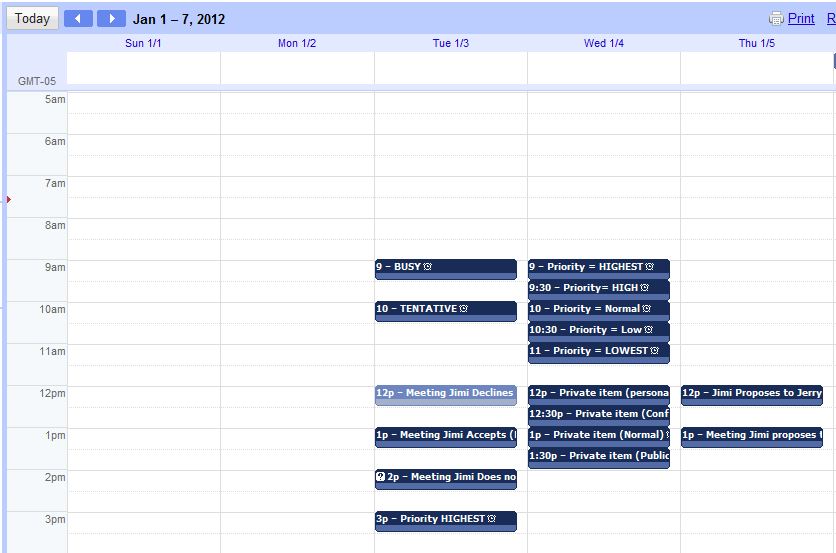
Meetings are meetings with guest lists and status.
This will also work for Zimbra calendaring to Google and Meeting Maker to Google.
We are still working on a few parts of this, but it is now basically completely functional and in two test sites.
One other thing. If you wanted to take all your calendar data from something called Microsoft Exchange and migrate it full-state into Google Calendar, that can be arranged.
June 12: In response to queries. This is all SERVER-SIDE to server-side with no end-user / client-side intervention.
Thursday, April 28, 2011
Progress on migrations to Google Calendar
We're kind of psyched because we've made the first real progress on Oracle Calendar / Meeting Maker / Zimbra full-state migration to (*shudder*) Google Calendar.
Check out this screenshot from our latest tech:

The important thing is the yellow highlighting. Yep -- we got attendees in with their responses.
Now we're working on the mappings and recurrences. So those of you out there stay tuned -- there is light at the end of the tunnel
Check out this screenshot from our latest tech:
The important thing is the yellow highlighting. Yep -- we got attendees in with their responses.
Now we're working on the mappings and recurrences. So those of you out there stay tuned -- there is light at the end of the tunnel
Tuesday, March 01, 2011
New Mantra
Kudos to Russ for our newest mantra:
Hear it once, it's a trick.
Twice it's a special project.
Three times it's a new Sumatra product.
So the topic on the table here is Meeting Maker to Google Calendar migration (with link preservation).
We've had two requests in the last week. Is there anyone else out there?
Hear it once, it's a trick.
Twice it's a special project.
Three times it's a new Sumatra product.
So the topic on the table here is Meeting Maker to Google Calendar migration (with link preservation).
We've had two requests in the last week. Is there anyone else out there?
Thursday, August 05, 2010
Google Wave is gone?
Google Wave is gone?
Darn -- now I'll never be able to figure out what it's good for.
Darn -- now I'll never be able to figure out what it's good for.
Tuesday, May 25, 2010
From the trenches: Exchange to Gmail
Ran into this and thought I'd pass it along.
CEO Of Company With 500 Employees: Here's Why We're Ditching Microsoft Outlook For Gmail
This is a corporation with only 500 users. The number of companies we've seen with enterprise size considering ditching Google is easy to summarize: Zero. There was one pathetic case we know of a company adopting Google then getting bought and having to drop it just as quickly, but my schadenfreude account is overdrawn this week.
Where we see a lot of Google Mail and Calendaring is in education and mainly for schools without a lot of endowment. Note to readers: yes, that word has two meanings.
Updated May 26 to add this link:
Microsoft has a blog posting: Why are Businesses Leaving Google Apps?
Pick your Kool-Aid.
CEO Of Company With 500 Employees: Here's Why We're Ditching Microsoft Outlook For Gmail
This is a corporation with only 500 users. The number of companies we've seen with enterprise size considering ditching Google is easy to summarize: Zero. There was one pathetic case we know of a company adopting Google then getting bought and having to drop it just as quickly, but my schadenfreude account is overdrawn this week.
Where we see a lot of Google Mail and Calendaring is in education and mainly for schools without a lot of endowment. Note to readers: yes, that word has two meanings.
Updated May 26 to add this link:
Microsoft has a blog posting: Why are Businesses Leaving Google Apps?
Pick your Kool-Aid.
Thursday, February 25, 2010
Meeting Maker / Oracle to Google Calendar
The calendar elves have been working on a few things to move data from Meeting Maker into Google Calendar, and we thought we'd update you. It's not perfect yet, but it's well within striking distance. This will work for Oracle as well of course.
First let's take a look at a typical Meeting Maker 7 calendar (sorry, the company really won't sell us version 8 anytime soon so we're left with the trial version we've been using since 2001).
 And here, using our current zinsert to create ICS files is what this looks like via an import in Google Calendar.

On MAJOR ICS datafiles (in this case 2.5 Mb), we've been getting this warning:

But all the data seems to go in. Our test was simple: is the last object in the file inserted? If so, we're fine, and it was.
First let's take a look at a typical Meeting Maker 7 calendar (sorry, the company really won't sell us version 8 anytime soon so we're left with the trial version we've been using since 2001).
 And here, using our current zinsert to create ICS files is what this looks like via an import in Google Calendar.
 First thing to notice: the old MM DST code causes a shift (which if you update your server or get us to rebase your data will not happen), and banners are a little off (we can fix this).
But the good news is that it involves WAY less work than our previous versions.
This does work client-side (we're working on the XML for server-side, but we've gotten no pressure for it yet so it's just simmering away).

On MAJOR ICS datafiles (in this case 2.5 Mb), we've been getting this warning:

But all the data seems to go in. Our test was simple: is the last object in the file inserted? If so, we're fine, and it was.
Subscribe to:
Comments (Atom)