Tuesday, October 14, 2014

New #Oracle Calendar Server to #MSExchange #Office365 migration tools

Lately we have been getting lots of folks (mainly medium businesses and small universities) contacting us looking to migrate their Oracle Calendar Server data into Exchange better than the current crop of low-end solutions can accomplish.  This means three things:
  1. Give us recurring meetings and appointments
  2. Please please please make the meetings live post-migration
  3. We want to choose solutions that reflect our budgets and business goals (i.e., we do not have a lot of money or time)
OK -- we've heard you and we can do all of that.  You could try to write this at home, but we have years of experience that keep us safe.  

So we've created three new options, the first of which we'll let you download and run if you contact us with your work email and size of the migration.

The application allows you to try out what we refer to as our FREE insertion, we think of it as a trial, but if all you need is the next 30 days worth of calendar data from your OCS, hey -- go ahead and use it in production.

The Free version does not re-create recurrence patterns.  You need to license that in what we call the Flat option, which will also include the attendees in the meeting agenda, like this:


The Partial version will actually RE-PROPOSE all current meetings (i.e., not meetings in the past) so that the meetings are real MEETINGS, not static entries in your calendar.  Post-migration your users will need to respond to these meeting invitations (this is part of the deal for lower cost).  But they're live, functioning meetings.  Like this:

Note that now "Attendees" is active because Jimi Hendrix has invited Janis.Joplin to the meeting and that it is remapped to their new domain.

Clicking Attendees shows us that Janis is Required but we have no response from her yet.

Got questions, feel free to contact us.

This also comes with our selective UNDO which will remove ONLY the data we've inserted.

You can see the current version in action in this video:

Want a convenient summary?  Here you go:

If you want your OCS calendar migration…
Choose this Sumatra OCS Migration option
Free, fast, no frills
no live meetings, no recurrence patterns.  No history and only 30 days into the future.
FREE -- Inserts ICS export as-is
Inexpensive, fast
recurrence patterns and guests in agendas but no live meetings
Flat-- Generates Recurring meetings. Add guests to agendas
Reasonably priced, fast
recurrence patterns and current meetings re-proposed (but not responded to automatically)
Partial -- Generates Recurring meetings. Add guests to meetings & sends out proposals
White glove full state-recreation for an enterprise
Full – Recreates Full calendar state recreation for all accounts

Looking to migrate your email as well?

We have found imapsync is an excellent product for email migrations.

Please see our blog postings MDaemon Mail to Exchange via imapsync and imapsync vs PST: Tonnage and Speed (spoiler alert: PSTs are incredibly slow and inefficient) as well as any other recent email migration postings on our blog to give you an idea how easy and fast it is to use imapsync.

Monday, October 13, 2014

Russian Time Zone Changes and Exchange

The title says it all:  Be aware: October 26, 2014 Russian Time Zone Changes and Exchange

Daylight savings time changes -- the gift that kept on giving.  We only tell stories of the great 2007 US DST shift with fermented beverages in our hands.

Buona fortuna aux nos amis les russes !

Tuesday, September 23, 2014

Metrics for an #Oracle #Beehive Migration to #Office365


Our latest Oracle Beehive to Microsoft Exchange migration tool brings back the "Use Report" capability that allows you to generate an HTML summary of how much data your Beehive server contains.

Clicking the highlighted button....


Will generate a report called beehivemetrics.htm that looks like this:


Yes, we had some fun with how we referred to the top volume users.

This is great information for determining how to do a segmented migration across multiple CPU instances (not that we had to enable exactly this over the last weekend or anything....).


Saturday, September 20, 2014

#MeetingMaker User Password Recovery

Meeting Maker 7x / 8x User Password Recovery

First get comfortable with reading binary data.

Second, open up a Meeting Maker Server Export in said binary file viewer.

Third, figure out how to turn all this gobbledygook into something semi-useful (as we have done below), but barring that, search for your USER NAME or USER LOGIN, in the example below we use “Adam Ant” with User Login “adam”

Adam’s password is encrypted in the line beginning with “OVNI 0103” (which will ALWAYS immediately follow his USER LOGIN)

The first digit “1” tells me the password is 1-byte long.  In this example I know his password is “b” but it is encrypted in the export file as “c”


You should start to suspect a pattern.

If the clear password is “aa” (61 61h) the hex string is “63 8C”

The pattern holds.  The first encrypted character = character + LENGTH of password

Now we proceed to the next digits in turn and build a table (a, aa, aaa, aaaa, b, bb, bbb...) you get the idea) which we will leave as an exercise for the reader. 

Going down the column is less clear than going across the rows.  Going from “a” to “b” everything augments by one (and this has held across a range of experimentation), meaning we can in a pinch use each “a” length cipher as a base to figure out anything of that length.

So the algorithm:
1.       Find a user
2.       Read the password length
3.       Subtract length from the first digit to get the hex of the first character
4.       Use the “a” column in your table as an offset for all the other letters in the password sequence. 
5.       Do not ask for any more information you script kiddies in India – this is more than adequate.
So the 7 digit string “7B 96 BA E9 04 38 26” deciphers as “theman5”
7 letter “50 A4 B6 EA 04 FD 24” deciphers as “Ivana33”
5 letter “70 8F D0 E1 14” is “kayak”
Go wild.

Wednesday, September 17, 2014

Hacking Canon Firmware -- Use This on Meeting Maker

With Meeting Maker in the final throes of its extended swan song, I'd like to point folks who still want to roll their own server-side migration to Hacking Canon Pixma Printers.  Aside from being an excellent tutorial on reverse engineering, it's pretty much the same method we used (all those years ago) in breaking the Meeting Maker export format. 

Keep in mind, the issue there is not getting at the encryption key (since except for the user passwords there isn't one and you can break those in a few minutes), but establishing the encoding scheme for individual data records.  After you run this for the first few you'll have the wash-rinse-repeat cycle for the entire data set.

You'll then have to assemble object-oriented database elements into something like a coherent whole, but if you get this far into the process that should not be a barrier to success.

Only other hint I need to give you: work on the server export file not the live server data.  The live server data is a hot mess horror show.

Friday, September 12, 2014

Messages stuck in OWA's DRAFTS folder (Post Exchange 2013 CU6 update)

I updated our Exchange servers to CU6 over the US Labor Day weekend and hit a few head-banging errors.

First, CU6 failed on the mailbox role. The solution: remove the Discovery mailbox.  Then setup successfully completed.  (Remember to recreate the discovery mailbox!)

After I restarted the Exchange servers, mail was stuck in the drafts folder.  I tested mailflow using the "test-mailflow" cmdlet, and saw it failed (not that stuck messages in OWA weren't enough):


A quick search pointed to DNS or Security policy problems. Not in our case. Next check, were all services running...."Test-ServiceHealth"


No...Two  services were disabled:  MS Exchange Transport Delivery (MSExchangeDelivery) and MS Exchange Transport Submission (MSExchangeSubmission.) Restarting those services made the mail flow once more!

Tuesday, September 09, 2014

Sumatra Holiday cmdlet for Microsoft Exchange - Download

Holidays.

Our server-side holiday cmdlet for Microsoft Exchange simply works and has more functionality than the client-side holiday capability Microsoft built into Outlook.  And of course an admin runs this server-side rather than hoping users run use Outlook to add holidays client-side.

When we offered it up as a "pay what you want" we got thousands of downloads, and a number of people who actually paid of the "use your fingers" magnitude.

But people keep asking for it, so we're going to let you download it under our advertising model meaning every item inserted will be stamped "Courtesy of Sumatra" in the agenda.

So you may download it here. 

If you want to suggest additions or modifications, contact us.

And check this blog or  to see what we'll support in the future. 

Friday, September 05, 2014

Disappearing Contact/Calendar item body fixed in Exchange 2013 CU6

We blogged about clients reporting problems with notes after inserting contacts and calendar items from Beehive and MDaemon migrations April, '14.)


KB 2975003 confirmed this was a problem! The KB says: "...compose or edit a Calendar item by using Outlook Web App...and then save the item. When you open the item in Microsoft Outlook 2013 or Outlook 2010 in online mode, the body of the item disappears."  We scrambled and updated our code to set MAPI codes to fix the problem in our code.  But they reported their end users were still having the same problem on NEW items.


Now there is a fix: install Cumulative Update 6 for Exchange Server 2013: 2961810

Tuesday, August 19, 2014

Western Australia Holidays with the cmdlet

We've had some requests from Western Australia lately, so here's the cmdlet working with holidays in OZ.


September 16, 2014 update.  Read this post to download the cmdlet.
February 23, 2015:  Folks, please leave us some feedback about what you like in the cmdlet and what you'd like changed.  We see how many of you are downloading it.  We'd love some feedback.

Tuesday, August 12, 2014

Server-side cmdlet for Holiday Insertion into Microsoft Exchange

Preliminary video of our server-side holiday insertion cmdlet.

It doesn't look good in full screen mode but you get the idea how it works.

Sunday, July 20, 2014

What the heck are all you guys in Turkey doing reading this blog?

Dear Turkish Readers,

I get why the USA and Western Europe read this blog.  

I get why India, China, and Russia read this blog.

I get why South America and Africa do not read this blog.


What I do not get is why we have so many hits lately from Turkey.

Can any of you guys please enlighten me?

Thursday, July 17, 2014

Human Resource Conference Room Bookings as Indicators of Impending Doom

If you follow this blog you probably also know as the New York Times puts it, A Large Round of Layoffs Is Expected at Microsoft.

This is the key sentence "Human resources managers have begun reserving conference rooms for most of Thursday, most likely a sign that they will be used to meet with laid-off employees..."

Now HR and Conference Rooms is almost never a good combination. I flash back to my days at Lotus (pre-IBM), when the only thing worse than a group meeting with HR was a group meeting with HR with a few dozen donuts -- translation: "re-organization time!".

What I find interesting is that the conference room bookings are the most direct and compelling evidence.

Microsoft folk, if you wanted to get really subtle in your analysis of your future chances, just use Outlook to look for free time in the conference room YOUR corporate mouthpiece.... er.... Human Resources Manager... uses.

Tuesday, June 24, 2014

#Oracle Beehive to #MSExchange through a proxy -- alternate strategy

We never shy away from saying that migrations are hard.

We also never shy away from saying "Nope -- you're in over your head."

And we thought both of these were going to come to bite us as we looked at migrating Oracle Beehive from behind a proxy server.  

A set of test data we would normally expect to migrate in a few minutes was taking hours.

And there was no way to remove the proxy.

Running the calculations told us the full set of users would take four days on a single instance.  We could not put someone through that and maintain anything like guilt-free sleep patterns.  We put on our thinking caps and came up with the idea of exporting the data into a format we could use (Oracle Beehive IS a SQL database after all), taking that outside the firewall, importing it into an Oracle database, and then inserting the data (the final step herewith shown):


Problem solved.

If it's applicable to you we'll take you through it in your trial phase.

Tuesday, June 17, 2014

Oracle Beehive to Microsoft Exchange Calendar Migration: Beehive-Buddy

Oracle Beehive seems to be the legacy system folks are replacing at record pace these days.

So we've been burnishing some of the features.

Latest one: Beehive Buddy Lists.  
Any contacts tagged as Beehive-Buddy will not migrate.  This reduces the number of duplicate contacts.


Thursday, June 12, 2014

How to Stop Facebook From Using Your Browsing History

This is not about calendaring.

But let's face it, none of us democracy-loving folk want to live with the Thought Police looking at our every move.

How to Stop Facebook From Using Your Browsing History is a REALLY useful link.

Remember: if you're not paying for the product, you ARE the product (see:Season 1, Episode 11: To Heck and Back) .

Tuesday, June 10, 2014

Migrating #MDaemon Public Distribution Lists to #MSExchange

To Migrate MDaemon Public Distribution Lists to Microsoft Exchange using our tools, follow this procedure:

  1. Create a new directory to hold the processed group files.
  2. Launch the mCalReader_ParseGroupFiles application.  Browse to the MDaemon server directory for the group files (these all have an extension of *.grp and the format NAME@Yourcompany.com.grp), and the output directory from Step 1.  Ensure the file extension pattern matches your group files (Note: it defaults to @YOURCOMPANY.com.grp)
  3. Press “Go.” The processing should happen quickly. Then exit the program.  In the directory from Step 1 you should have a file called Distributionlists.csv.
  4. Move the files and the shell cmdlet “DistGroupCmdlet.ps1”  to the Exchange server (or any shared/accessible directory)
  5. Edit DistGroupCmdlet.ps1:
a. Modify $MyDistFileList to point to the Distributionlists.csv file.
                              i. Note:  the shell will create distribution lists for all entries in this file.  Remove entries that you do not want migrated/created.
b.   Modify $myMigratedOU to point to the OU that will contain the distribution lists.  Note this is a PATH to the OU, and not a typical OU identifier (e.g., ou=xxx,dc=my,dc=com),  Sample OU:, $myMigratedOU = "orca.sumatra.local/Clients/YOURCOMPANY/Lists"
6.Launch Exchange PowerShell, change directory to the location of the script and distribution list files, then run the script: .\ DistGroupCmdlet.ps1.
Notes:                                     
·         If you want to test a few distribution lists:
o   Run the EXE to parse all of the GRP files.  The EXE produces the file  Distributionlists.csv. 
o   Edit that file, and leave the first line (header) and only those groups you want to test.  Then,
o   Copy the Distributionlists.csv, the supporting group CSV export files, and the PowerShell script to Exchange
·         Accounts:
o   Since there is a possibility that users might not exist in Exchange, the script creates the distribution list first, then adds users to the list one user at a time. 
o   If the user does not exist in Exchange, the cmdlet throws an error but continues.
o   Also, the tool does not change any of the SMTP address domains, e.g., email addresses such as “@YOURCOMPANYmail.YOURCOMPANY.com” will be migrated as “@YOURCOMPANYmail.YOURCOMPANY.com”, and not “@YOURCOMPANY.com.”

By the way, this was field-proven as the last stage of a migration at a 300 user site over this past weekend.

Tuesday, May 27, 2014

#CalDAV to #MSExchange calendar migration tool

A quick gut-check from our loyal readers: do you guys want a CalDAV to Microsoft Exchange migration tool?

UPDATE December 2016:  Folks: We did this.

Tuesday, May 06, 2014

The Cookbook Version of Exchange 2013 Migration Rights

Gentle reader,

No matter what you want to do with calendars server-side in Exchange, you are going to need to become conversant in Exchange permissions.  It's the devil's bargain: if you want to migrate all your calendar data and preserve its utility with guest lists and responses, then you need to be able to manage Permissions on your Exchange users.  

So here we're putting out our best effort at a cookbook guide to Exchange 2013 permissions for migrations.  Even though full-state calendar migrations will never be a purely cookbook operation we think this will get you there (and we have some field experience taking a couple of novices through it this way),

First:  GLOBAL ADMINISTRATOR rights are NOT enough.  These rights give you administration rights over Exchange / Active Directory, but they do not give you the rights to access mailboxes – which is what you will need to move in data and re-create state.

We’re going to take this in stages.

Background. Your ADMINISTRATOR account needs to be able to:
  • Use REMOTE POWERSHELL to Log into Office 365
  • Create a separate service account (this keeps your ADMIN function separate from your MIGRATION function)
    • We call the Service Account EXSU.  When you create it, make sure it is mailbox-enabled (you will be sending email on behalf of this account
    • Grant EXSU three rights:
      • Impersonation
      • No throttling.  This is relevant (i.e., in your control) only for on-premises Exchange.  For Office 365 you will need to contact your Microsoft rep and explain what you are doing and ask throttling turned off for the duration of your migration.
      • FULL ACCESS to mailboxes (this makes it easy to use OWA with this account to check the results for individual users in testing and migration)
Execution.  To do this – use the various Exchange PowerShell cmdlets which execute the appropriate actions.

Start POWERSHELL.

REMOTE to your OFFICE365 account

IMPERSONATION: You’re creating a ROLE called “_suImp8” that allows Impersonation and then assigning it to EXSU


THROTTLING: You’re creating a policy called SuThrottling Policy and then assigning it to EXSU.  (Otherwise Exchange 2013 might shut you off mid-migration)


FULL ACCESS:  this grants access to ALL MAILBOXES in your domain to EXSU.


Test.  Can you put the EWS URL in a BROWSER and when prompted for credentials get this?

Log in with your EXSU credentials.
You should see this:


This example shows access to Office 365.  Obviously if you are going into your on-premises or your own hosted domain, your URL and service name will be different.
Now to test FULLACCESS go to the URL box and modify it as I have with a user on your domain:

Hit ENTER
Now you will be prompted for your end user mailbox credentials.   Use the service account (EXSU) and the password to access to the mailbox.  This is where FullAccess comes in – you don’t have to crack all of your end users' passwords!
NOW it should display your test users’ mailboxes in OWA

If all of these are successful, now you can do a test insertion!
Congratulate yourself.  Permissions are historically the worst learning curve in a migration.


Thursday, May 01, 2014

Hosted Oracle Beehive to Office 365 Field-Proven

We had an informal bet, Zyg taking the side that Hosted Beehive to Office 365 was not going to work the first time out and Russ figuring that it was.

Russ won. 

Data goes in like a champ in the current version of the Beehive migration code.

Since we're having to go through a proxy server performance is much lower than we see in on-premises migrations -- but that is what multiple instances are for.  Stay tuned for more news.

Thursday, April 24, 2014

Burt's Bees calendar Advertising

From the New York Times, Burt's Bees is promoting a new line of anti-aging products via opt-in calendar events.


I first saw calendar spam in Yahoo calendar in 2008.  This at least is an active opt-in which I have no problems with.

Going to be interesting to see if it catches on.

Tuesday, April 22, 2014

The Curious Case of the Outlook 2013 Contact Notes

UPDATE 9/4/14: Microsoft released a fix for this issue. See our Disappearing Contact/Calendar item body fixed in Exchange 2013 CU6 blog post


Found something weird with Outlook 2013.

This showed up in our Beehive to Exchange migration but it would not be limited to that particular situation.

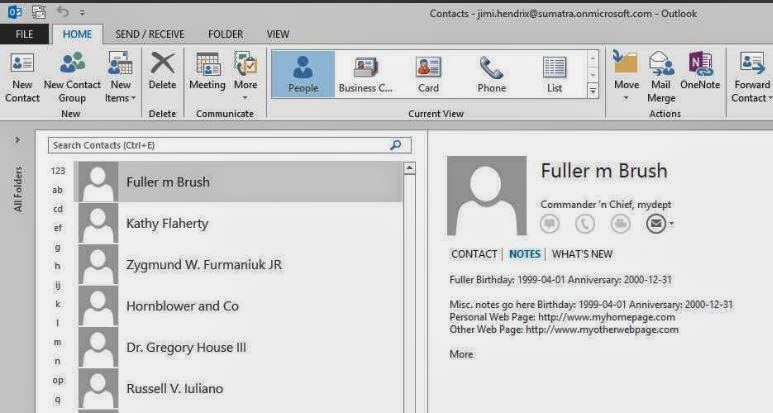
Let's look at the results first.  All of these clients were accessing the exact same contact record on our Office 365 test system, though we have confirmed the same behavior with Exchange on-premises as well (no surprise there since this looks to be an Outlook 2013 bug).


Contacts and Notes (including some data we capture to the contact notes either because of EWS bugs or there's no other place to put it) show up fine in Outlook 2007 post-migration.


And they show up fine in Outlook 2010.


OWA and the Surface are no problem.


THEN we get to Outlook 2013:


PROBLEM!  Where did the Notes go?  The situation seems to only show up if you have a contact created using EWS.

This gets weirder because you can CREATE a contact with notes in either OWA or Outlook 2013 and it will properly display and edit in either.

This gets EVEN WEIRDER because in Outlook 2013 you get Notes displayed correctly in the PEOPLE view....
but not in any other view (Business Cards for example):

We think this is fairly definitive proof that Outlook 2013 has a bug in it.

Tuesday, April 15, 2014

Exporting Contacts to a CSV file using the EWS Managed API and Powershell

Exporting Contacts to a CSV file using the EWS Managed API and Powershell by Glen Scales will show you how to get this information OUT of Exchange server-side if you want to.

Normally we see people wanting to put this information INTO Exchange server-side, but there are legit reasons for wanting this capability:  archiving crucial customer data from former employees, saving vital contact data, legal discovery, migrating to Google, etc.

For the same reasons you will want to check out his scripts in Export the GAL or Address list with EWS to Vcards in 2013 MEC sample 1.

Arm yourselves with knowledge.


Tuesday, April 08, 2014

Mailbox Migration to Microsoft Exchange Performance Analysis

Microsoft recently gave guidelines on Mailbox Migration Performance Analysis.  

The article is a perfect example of how to drown in data before you come up with any concrete solutions -- if you ever come up with solutions.

Basically, read the article BACKWARDS to have it make more sense.

Look at all the reasons Office 365 can be slow (and there are a lot of them)

Then look at the reasons YOUR side might be slow (the suggestion of "get closer to our data center" is REALLY useful, thanks for that, guys!).

THEN consider putting (more of) this in YOUR OWN control with imapsync.  Might as well be frank, the Microsoft data center is a black box and will stay that way.  But you can seize more control over how your data is processed on your side of the wall.  Read our posts on email migrations to see how this works out in the real world.

And OF COURSE the Microsoft analysis and migration tools ignore calendars, tasks, and contacts, but we've all come to expect that from Microsoft.  That is why you have us at Sumatra.

Wednesday, April 02, 2014

Distribution Lists Now Working in MDaemon Calendar Migration

We've been on a mission to completely automate an MDaemon to Exchange migration.  Email, contacts, calendars, the works.  We'll tell you more about that later after it's fully field-proven.

In this case "the works" also means MDaemon private distribution lists (which in the language of Exchange/Outlook are called "groups") which we have added to our calendar migration application since (as glorified contacts) that is where they belong.

Post-migration in Office 365, it'll look like this:


We do the smart thing in this case:  if a contact on the list is on the legacy domain and needs to be mapped to a new domain or a different email, we automatically do that.  Users outside the legacy domain we leave alone.

Please note: In Exchange, users create distribution groups by linking to existing contacts (or contacts from Active Directory). This way, when a contact name/email address changes, the distribution group gets updated.  However, in the case of this migration, MDaemon does not provide any  indicator if the entry is an existing contact.  We don’t want to automatically create contacts because if they do exist, the user will see double contacts – something that will confuse them.  So communicate to your users that if an email address changes in the private group mailing lists, they will have to either manually edit and fix the name, or delete the name and link it to a previously created contact.

Thursday, March 27, 2014

Fully automating an #MDaemon to #MSExchange 2013 migration

One of our customers wanted to migrate from MDaemon to Exchange in stages (vs our typical "big bang".)  A staged migration is more delicate.  It requires you configure (and then re-configure) active directory accounts and Exchange mailboxes pre- and post- migration.  It's not hard, just a lot of steps. This called for a script!  And so, we did.

We have successfully field-proven that an MDaemon to Exchange 2013 on-premises migration can be fully scripted.

We're going to outline our approach:

First some background on the main show: email and calendars: 
  • For email we used and recommend imapsync.  It's an excellent, effective, and efficient product.
  • For calendars, tasks, contacts, and distribution lists we wrote our own application.
But a full migration methodology has to include more than just moving the data.

So before any email or calendars are migrated we take care of:
  • Reading the MDaemon user list (and passwords)
  • Provisioning users -- first as Exchange contacts, then as mail-enabled users
  • Re-configuring Outlook to point to your Exchange server and removing the MDaemon Outlook Sync. (Note: there are publicly available scripts.  But we found they don't work. After hours of debugging, we gave up and wrote our own.)
  • Pre- and Post-cut over scripting so that legacy emails are moved to the target system, and new emails redirected to the target system.
If you have a few dozen users, it's difficult to make this cost-effective and you might as well do it on your own  (Hint:  you can export PSTs from MDaemon, then import those PSTs into Exchange.)  Tedious and time-consuming, yes, but free.  This assumes your time is worth less than the cost of third-party migration tools.  If it takes as long to just DO it (apologies to Nike) as it does to deploy a third-party customized method, just do it.

If you have several hundred users and want to license our tools and methods, you can contact us.

Thursday, March 20, 2014

Transferring Palm Desktop Calendar and Contacts Data

Palm Pilots.  

There's nostalgia for you.  

But apparently the data can live on in their Desktop app.

The New York Times had an article on Transferring Old Palm Desktop Data (to Outlook) that is worth having around in case you find yourself in that situation.

Needless to say this is client-to-client.


Tuesday, March 18, 2014

Why Room 222?

Why we get asked, are our example resources called Room 222?

Millennials....jeesh.

Well, Orwell's Room 101 is a little too downbeat.

But a 1970's-era show that took place in an American public school has some positive connotations. You might recognize Michael Constantine (the principal) from My Big Fat Greek Wedding.


Please nobody ask us who this "Jimi Hendrix" guy is that we also use an example.  


Tuesday, March 11, 2014

Scripting Sumatra's MDaemon to Exchange calendar migration tool

We've turned the mCalReader application for migrating calendars from MDaemon to Exchange into a scriptable application.

So from the Command Prompt or PowerShell you can issue the commands

mCalReader /usersrc:  /userex:  /cfg: /undo

What each of these mean:
  • /usersrc:  the full email address of your source user on MDaemon.  e.g., zyg@sumatra.local
  • /userex:  the full email target address on Exchange.  e.g., zyg-furmaniuk@sumatra.onmicrosoft.com
  • /cfg:  the full path to the configuration file
  • /undo:  remove the data mCalReader inserted for this user.
So a typical scripted insertion for a user would be:
mcalreader 
  /usersrc:zyg@sumatra.local 
  /userex:zyg-furmaniuk@sumatra.onmicrosoft.com 
  /cfg:"C:\Docs and Sets\Administrator\Desktop\mCalReader\_Config_bCalReader.xml"

To remove Sumatra-inserted data:
mcalreader 
  /usersrc:zyg@sumatra.local 
  /userex:zyg-furmaniuk@sumatra.onmicrosoft.com 
  /cfg:"C:\Docs and Sets\Administrator\Desktop\mCalReader\_Config_bCalReader.xml"
  /undo

Each individual user using this method will get their own individual log file:

How do you set the Configuration file?  Simple: Via the user interface to the tool.  You CAN edit the XML if you want, it's pretty straightforward, but the interface exists to make it as simple as possible to test that access to Microsoft Exchange is working.


Tuesday, March 04, 2014

Create a Company Shared Contacts Folder in Office 365

We got asked to look into shared contacts folders in Office 365.

It turns out we did not need to do anything because some folks at Cogmotive have already done it.

Check out their article Create a company Shared Contacts folder in Office 365.  It's very detailed and thorough.