Saturday, May 02, 2009

Broken E2K7 Meetings Part 2: Getting rid of them.

So you have some broken meetings, eh?

It's easy for your users to just delete them -- but your conference rooms have a certain inflexible uncreative temperament that means some biological entity capable of passing the Turing test needs to be looking over their collective shoulders.

Or you could use software.

Specifically our software.

First let's revisit the broken meetings in Conference Room 222 of our previous post. The 10:00 AM meeting is broken, and should not be in the calendar.
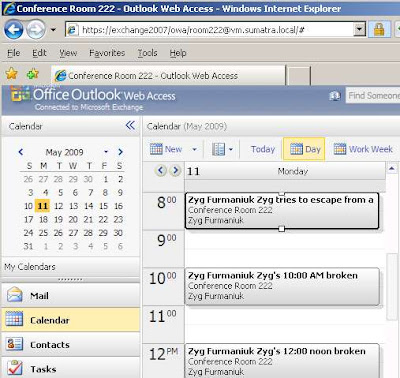
How do we have the audacity to call it "broken?"

Well it's not in the owner's calendar, and he tried to cancel it. I'd argue it's pretty clear it should not be in the resource calendar.

So now we probably want to divide this into two steps: Finding the broken meetings and removing the broken meetings.

Those of you with experience with SuExchange2007 will be aware of the little "test" button in the corner. This is where we send you to test that you really do have adequate permissions for the calendar insertion we're about to do.


This is also where we're headed to get this menu:
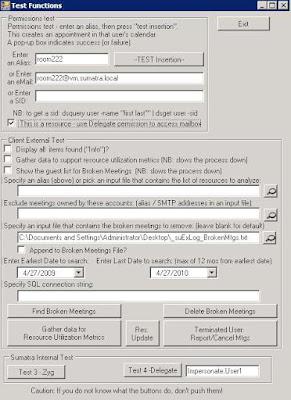
I've taken the liberty of filling in Conference Room 222's alias: "room222" and indicating that it is a resource.

Now, click this button:

And it will create a text file called "_suExLog_BrokenMtgs.txt" which includes our test subject:



Pressing "Delete Broken Meetings" will remove them and log that to a report.


This is scriptable so if you're interested let us know.

Sorry, folks, this one only works for Exchange 2007.

Thursday, April 30, 2009

Corporate Microsoft Exchange to Google Calendar migrations: Is there anybody out there?

One of my favorite lines from Pink Floyd's The Wall: Is there anybody out there?

In this case, corporate users going from Microsoft Exchange to Google Calendar who want to move corporate calendars.

We've gotten asked about this several times in the past few weeks. But no requests have been from actual corporate customers wanting to preserve calendar data. All requests so far have been theoretical discussions or from universities adopting the free Google Apps ride and wanting full-state migration to be free while they're riding.

I mean it's not hard for me to believe that most corporation would not be really psyched about putting their data in the hands of a third party.

McKinsey & Co learned the hard way: Corporate data slips out via Google calendar.

Since free Google Apps for Education is an easy sell to most cash-strapped universities, we've mainly been hearing about this from the education sector. And I've not seen any company with more than 1000 users even considering Google.

Or am I just thinking about this wrong and have not yet realized that the real corporate market is something that keeps Exchange data completely out of the hands of Google Calendar?

Anybody have any feedback?

Tuesday, April 28, 2009

New Means of Creating Broken Meetings in E2K7. Part 1: Getting them

Broken meetings used to be relatively simple to create with Outlook 2003.

Outlook 2007 did a good job of correcting some of the problems by tightening the behavior when an owner deletes a meeting.

BUT in Exchange 2007 using Outlook Web Access (OWA) it turns out to (still) be relatively simple to create broken meetings to clog up your resource calendars.

I'll admit this is slightly convoluted AND bad user behavior, but we can do this using standard, completely legitimate commands. This makes us leery about what other methods remain to be discovered.

So first let's look at my calendar:

Three meetings each with Conference Room 222 already reserved.

Highlight the one at 10:00 AM and press DELETE. This dialogue box displays:


NOW for the deviltry. If you press "Send" right now everything will be hunky-dory and the meeting will be cancelled cleanly. But let's not.

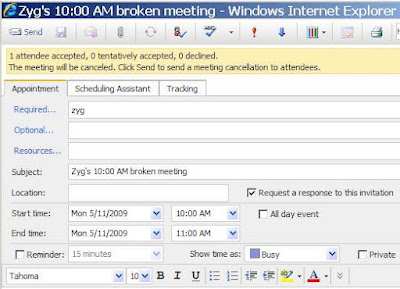
Instead, let's say that you DELETE the conference room AND add "zyg" as a required guest:

THEN hit SEND. In Zyg's calendar we see the meeting has been cleanly deleted.


Aside: Adding "zyg" is a crucial step. If you try to send without a Required user you get an appropriate warning.


Anybody care to guess what the calendar for Conference Room 222 looks like? Right. The meeting is still in there.

Kudos go to Russ and the insertion team for discovering this.

So ends Part I: Creating the broken meeting. Watch this space to see how you can find and remove the broken meetings.

Note that KB 954284 Outlook 2007 does not send out meeting cancellations if you remove all invited attendees from a previously created appointment describes a similar situation using Outlook 2007 rather than OWA.

Saturday, April 25, 2009

When your self-signed E2K7 certificate expires

We worked with a client who saw a self-signed certificate error (mismatch, expiration) in their lab. It took a while to figure out how to update the self-signed cert. You have to create/update the certificate, enable it, and restart IIS. Here are the steps we took (using Exchange Management Shell):

There are two ways to generate a new cert. One is to add another year to the existing cert, the other is to create a new cert.

1) a) Add one year to the existing (expired) cert:

Get the thumbprint of the expired certificate:

Get-ExchangeCertificate -DomainName fl NotAfter,Thumbprint,certificatedomains

Then use that cert's thumbprint to generate a new cert

Get-ExchangeCertificate -Thumbprint xxx New-ExchangeCertificate


1) b) --or--Create a new cert:

New-ExchangeCertificate -PrivateKeyExportable $True -Services "IMAP, POP, IIS, SMTP" -SubjectName "cn=yourOutlookAnyWhereExternalDomainName"

Once you create the cert, you'll be given a thumbprint. Use that to enable the cert:

2) Enable-ExchangeCertificate -Thumbprint [thethumbprint] -services:"IMAP, POP, IIS, SMTP"

3) Stop/Start IIS:

i.e., iisrestart /start
--or--
net stop "World Wide Web Publishing Service"

net start "World Wide Web Publishing Service"

net stop "FTP Publishing Service"net start "FTP Publishing Service"

net stop "Simple Mail Transport Protocol (SMTP)"

net start "Simple Mail Transport Protocol (SMTP)"


Install the certificate on your client Windows machine via Internet Explorer:

4) Tools / Internet Options / Content / Certificates / Trusted Root Certificate Authorities / Import


-RVI

Tuesday, April 21, 2009

Best Practices when Migrating Calendar Data

We've noticed the current economic climate has encouraged a passel of folks to evaluate their options.

And these same folks tend to call us to outline their options.

Now, we like to be as chatty on the phone as the next guys, but going over the same stuff does get to be a little repetitive. So in Sumatra fashion we stuck everything in a document and are encouraging you to read it.

It's way shorter than the tech documentation, and maybe even some managers would be able to digest it.

Click to download the PDF: Eight Best Practices when Migrating Calendar Data.

As always, we encourage feedback.

Friday, April 17, 2009

Compliance, legal discovery, and your Meeting Maker data

Remember to look at calendars as part of the legal discovery process.

Last year we migrated a university (sorry, I can't give out the name here). During the migration, the CIO wondered why legal discovery solutions only focus on email (because it’s the only data that can be easily read, and there is a lot of it).

He saw their calendar data in a database and mentioned they might need to revisit their historic calendaring data (via Meeting Maker) for legal discovery or forensic analysis.

We’re calendaring guys. Reading calendar data is what we do, we said, so let us know if you need it.

Last month they asked if we could extract calendar items for a set of users. The caveat: they wanted the output to contain all meetings, agendas, appointments, along with the names of all people they met with in an easy to read format.

The "easy to read format" was the really hard part.

However, we believe in the old virtues of hard work and entrepreneurial solutions. We also noticed that since the Microsoft Exchange base is growing and the Meeting Maker base continues to contract that we'd rather solve this on Exchange.

We had their Meeting Maker data in an Access database. We could have written some code to expand the calendar data. But this method seemed pointless since Sumatra’s insertion into Exchange does most of that work already. So our solution was to take advantage of Exchange - insert their data into our test lab, and then create a tool to read the calendar data directly from Exchange.

The report contains ALL calendar entries (meetings and appointments), showing with organizer, subject, date, attendees, including the agenda.

For current Sumatra clients who can’t wait to try this, here’s the command syntax for a report of Bela Bartok’s calendar in 2008 (it would all go on one command line but we format here for clarity):

suExchange2007.exe
/usersrc:alias
/user:bela_bartok
/cmd:report_all
/dtstart:”1/1/2008”
/dtend:”12/31/2008”


Note: If you do not want to see the agenda, you can use the /cmd:report switch. It’s much faster!

Sunday, April 12, 2009

True Inquiry Stories Part 2: "Which one is easier to migrate into?"

Most times people have decided where they're going on vacation before they get in the car and start driving.

What this has to do with calendaring migrations is that in the past month we've gotten questions from two separate sites: Which is easier to migrate calendar data into -- Exchange or Zimbra?

Short answer: Zimbra.

Hands down. No question about it. It is much, much simpler to completely migrate calendar data into Zimbra than it is to migrate into Exchange. Please remember I'm talking about the kind of migrations we do: keeping meetings and guest lists live, preserving recurrence patterns, and maintaining guest responses. If you are content to just do a Palm synch you're wasting your time reading this blog.

Exchange's bugaboos in permissions alone vault it to a different scale. Then we start adding things like BES servers, backup strategies, forest trust architecture, yadda yadda yadda.... The documentation we have on Exchange migrations is about 150 pages total. The documentation we have for a Zimbra migration is about 50.

However, we really do not think this should be your criteria for deciding which one to migrate to.

But why do we say that?

Because we should really be the last part of your decision - not anywhere near the first.

Your calendar migration will take either several hours or a possible weekend when you go into production. Your user community on the other hand is going to be living with the decision for years. Focus on what is going to work for your users, not on whether you're in the lab overnight watching a migration.

Let's go back to the vacation analogy. Say you're in New York. You could go to Paris in 6 hours or Hawaii in 12. BOTH are very desirable destinations. You should not make your decision based on how long the flight is -- you should make your decision based on what you want to do when you get there.

Thursday, April 09, 2009

True Inquiry Stories Part 1 "We want it all, but one user at a time"

Recently we got a set of requirements from a government agency that read like this:


We're looking to migrate our existing Meeting Maker 8.5.3 user, resource
account and conference room calendars to an existing Exchange 2007 server. Here
are the requirements from our customers:

1. Preserving as much of the meetings, activities, tasks, category information and contacts as possible....

2. If possible, we'd like to be able to import the Meeting Maker information on a per-account basis.

3. For the most part, our Meeting Maker server is actively used by only about 40 users at this point. However, because of a requirement from our customers, we have not deleted many older accounts from Meeting Maker to help maintain a historical record of meetings and activities. ....


The main problem with this is that 2. and 3. contradict 1.

Those of you who have been through the process or even the evaluation have heard us talk about the "spider web" that calendaring represents: Moving email is relatively easy since the data is static. But migrating calendar data while preserving guest lists and responses is harder -- you are literally picking up a spider web and moving it from one proprietary environment to another.

So moving one user at a time destroys the links between other users. Move all your users at once and you can preserve the links and associated information.

The corollary to this is also no surprise, keeping users on your original server for historical purposes works fine -- but you'll need to decide what to do when the time comes to migrate them. Not taking old users to Exchange is the same as removing them from your original system: their data disappears. Think of it this way: if a user does not exist - how does Exchange react when you put them on a live guest list?

Since we have gone through an intermediate database in our migration technology (a very wise design if I do say so myself) we do have options to reformat data on its way into the eventual target system, but this does require time and expertise. There really is no such thing as a free lunch.

After their initial inquiry they went out and tried to write their own tools (our recession-era tax dollars at work).

I leave the results to your imagination.

Keep an eye on this blog: we're working on a guide for evaluating calendar migration solutions. You don't have to go with us, but whatever solution you choose you should choose with open eyes.

Thursday, March 26, 2009

Error executing child request for ChartImg.axd

We are using Asp.Net Chart Controls to create a series of charts from a csv data stream that a user uploads to the server. Until we hit this error "Error executing child request for ChartImg.axd." Since uploading the file is a post-back, we had to change the charting HTTPHandlers.

The solution: open the 'web.config' file, find the line
<add path="ChartImg.axd" verb="GET,HEAD" ...
and add a "POST" verb:
<add path="ChartImg.axd" verb="GET,HEAD,POST" .....

Tuesday, March 24, 2009

Exchange Server 2007 SP1 Update Rollup 7 due 3/24/09

Microsoft is scheduled to release Update Rollup 7 for Exchange 2007 SP1 today (3/24/09). Based on our review of what's fixed, if you have Entourage clients, expect to do a migration in the next month, or use calendaring, then you should apply this. We will apply this and let you k now if we find anything (if you find anything please post comments!)

Here are some of the calendar-related fixes in the update:
  • OWA and Exchange Web Services (EWS) do not correctly display a monthly/yearly recurring meeting or appointment (KB# 960291)
  • Customized properties of a recipient's calendar are removed (KB# 949464)
  • Can't read calendar items when some IMAP4/POP3 clients (esp. mobile devices) connect to exchange (KB# 951341)
  • Messages Queued for Submission performance counter increases when Domino meeting requests are delivered (KB# 953094)
  • You do not receive an NDR after a meeting request was sent after a change to the recipient's LegacyDN (KB# 957124)

And for Entourage:

  • The Info store may crash when Entourage client synchs (KB# 957947)
  • Unexpected modified instances of recurring meeting (KB# 949113)
  • Duplicate Calendar entries (KB# 949114)

Again, this is just a few of the fixes in the update. Read the full KB 960384

Russ

Thursday, March 12, 2009

International Characters and your Migration into Zimbra

We have someone in Switzerland migrating into Zimbra. In this case they're migrating from Meeting Maker.

The appointment at 17h00 should read "Jürg":


Quick, immediate, and cost-effective means of correcting: UNIFIER, available from here.
Our prospect ran with these options:

After which his character set conversion issues were no more.

Just to cure your insomnia if it is not already: Meeting Maker server data is stored internally in a Macintosh character set (regardless of what platform you are running on). When we convert Meeting Maker into the intermediate database we convert it into Windows Code Page 1252, Microsoft's default Western European character set (We mainly go to Exchange, after all).

The lower 8 bits with French and German characters should be OK -- but our friends in Switzerland were running with Macintosh clients.

We'll add a UTF-8 option if we get more European demand.

Saturday, March 07, 2009

Mirapoint Calendar migration to Exchange 2007

We've gotten a couple of inquiries out of academe for migrating calendar data out of Mirapoint and into Exchange.

Since we'd done the rough sketch on running Meeting Maker data INTO Mirapoint (though the people who asked for that are now lost at sea), pulling it out and putting it into Exchange did not seem so difficult.


Actually, when we brought it up at our Friday development meeting the Decryption team at Sumatra already had the full spec, and the Insertion team began modifying the existing Oracle Calendar conversion code and... (don't try this at home, kids, we have years of experience that keep us safe from the occasional software fire hazard)... it was basically running by the end of the day.

So we're reading VCS files and converting them into our common intermediate format, and prepping to do all the sorts of things you've come to expect from a Sumatra migration:

  • Preserve the recurrence patterns,
  • Guest lists
  • Guest responses
  • Keep meetings "live"
  • Avoid conference room anarchy
  • Avoid conference room land grabs
  • Whatever else you need
If anybody else out there wants to migrate calendars out of Mirapoint and into Exchange 2007 -- drop us a line. Mirapoint claims to have 120 Million mailboxes installed, so we'll be happy with a few hundred thousand or so.

Thursday, March 05, 2009

Why would an enterprise user want to print a Silverlight page?

Sumatra is working on a tool to analyze conference room use in Exchange 2007. Sumatra's tool helps facilities managers understand resoure use patterns through 25+ charts and tables. We picked Silverlight as our display engine because it produces the most amazing charts and tables (see below)!

We were days away from a beta-launch, when our QA team decided to print out the entire collection charts. We were stunned when only the first page printed. Looks like Microsoft decided not to include printing in the first two releases of Silverlight. The work-arounds aren't pretty.

Yah, it was nice to see our President's inaugration speech via Silverlight. But does this mean that the only line-of-business apps available to Silverlight are going to be consumer gaming and video-watching apps? Maybe this is the way to make corporate America greener -- prevent enterprise users from printing Silverlight-generated page via the browser?


-RVI

Wednesday, February 25, 2009

Gmail outage. So why put corporate calendars there?

So we run on Exchange and have been leery of entrusting our infrastructure to a company that not only makes the software but hosts, updates, runs, and (pretty much) controls everything that has to do with it except what data we choose to put in and if we want more in this endless fraternity hazing-like ritual of submission and humiliation.

But when GMail was down and Google's response could be summarized as "yep it is" we looked on it with a certain schadenfreude. We've not been encouraging corporations to go to Google Calendar, and we're now less likely to encourage it anytime soon.

Does Exchange ever go down and strand a corporation for hours? Oh yeah -- believe me it does -- and we have the stories. But one Exchange installation going down doesn't bring EVERYBODY ELSE down with it.

To be fair, if you were using Outlook as a client Gmail seems to have worked through the storm, but that's got to be cold comfort to the crew coordinated out of California: "If you used our hated competitor as a front end interface you'd have been fine."

Cloud computing is just not yet a player for serious corporate infrastructure.

Monday, February 23, 2009

Sumatra at NERCOMP March 10, 2009 in Providence, RI

Normally we let the quality of our code and migrations speak for themselves but one of our clients at Wesleyan convinced us to do a talk with them at NERCOMP (The Northeast Regional Computing Program) in Providence, RI in March.

Not surprisingly, the title of our piece of it is: "Migrate your Calendar Data into Microsoft Exchange" on Tuesday morning.

You can see the agenda for the entire conference here.

If you've been wanting to meet Russ (known almost universally among Sumatra clients as "the calm polite one") that would be a good time.

Maybe you can convince him to talk a little bit about what we're doing with conference rooms in Exchange 2007.

Wednesday, February 18, 2009

Oracle Connector for Outlook differences from Oracle client and your migration

We take the Oracle Calendar Server export as the definitive source for data that is to be migrated.

Sounds pretty reasonable, right?
But now and then Oracle has the same sort of acquired inconsistency syndrome we're used to from Microsoft.
Case in point: in OCS create an appointment
and say you're not going to it:


As you see above, it keeps on ticking in the OCS client (and will show up in a UNICPOUTU export), but will not be displayed in Oracle Connector for Outlook, as this side-by-side comparison shows:


Just so you know.
In these cases our modus operandi is to take the data and display it, since it's a lot easier to remove something you do not want than it is to create all over something you do.

Tuesday, February 10, 2009

Meeting Maker to Apple iCal via Zinsert Field-Proven

We got a call a from a medical school in Silicon Valley asking if we could migrate 2 users out of a Meeting Maker server of 40 into ICS format.

This is not usually cost effective but they just wanted iCalendar files and they were very polite about the request.

Most times this would not be worth mentioning, but they had a novel approach -- they wanted to obsolete their legacy Meeting Maker server ASAP and move on so they took their data from Meeting Maker into Apple iCal before planning on putting it into Zimbra.

The good news: Seems to have worked fine!

To quote their plan:

...for now it will reside in iCal until Yahoo gets done with the updates that
(we) asked for. Then we will be able to sync iCal to Zimbra.

I really have to give them points for creativity.

Friday, February 06, 2009

Changing your Exchange 2007 resource behavior post-migration

So what happens when you migrate into Exchange 2007 with resources that are scheduled on an on-going basis?

Sumatra Development dogma on this is to have your resource AutoAccept turned OFF (i.e., in E2K7 terms to "AutoUpdate"):


This allows us to control how data gets migrated into Exchange. That is, we reproduce your Meeting Maker data as closely as we can (NB: this is mainly a Meeting Maker migration discussion, Oracle Calendar Server already wisely placed limits on how far ahead in time you can schedule). Interesting trivia: In Meeting Maker you can book a resource into the year 2039, which is an act of either supreme optimism or hubris, take your pick.
In Exchange Management Shell the command (broken here for clarity) is:

[PS] C:\Documents and Settings\Administrator>

Set-MailboxCalendarSettings cr_testres_1

-AutomateProcessing AutoUpdate

-AllowConflicts $TRUE

-EnforceSchedulingHorizon $FALSE

-ForwardRequestsToDelegates $FALSE

-DeleteSubject $FALSE

-AddOrganizerToSubject $TRUE

-RemoveForwardedMeetingNotifications $FALSE


So you put your data in and then you want to establish some limits, like only allowing conference rooms to be booked 18 months ahead, and to have them manage themselves to avoid conflicts.


What happens then?

It depends on what happens to the meetings. If you have an ongoing meeting and it does not change, nothing, it will stay there quite happily in everyone's calendar.

If like us you live in the real world and you use the dynamic capability that this gives you, the first major update to an ongoing recurring meeting will cause it to be removed from the resource calendar until you give it an appropriate end date:


Now to proleptically answer the question "Hey, you guys know the start and end dates of all this data -- why don't you set this for us ahead of time?"

It's a fair question. The short answer is because there's so much else going on in a migration that hewing to the line of keeping the data we insert as faithful to what we pulled out is invariably the best course. Letting users learn to deal with the situations they're going to encounter in their new environment is better all around.

Sunday, February 01, 2009

Google Calendaring and Imports

I have got to give Google Calendar some credit.

Since we got asked by a 4,000 user account about moving users into Google Calendar (there's a lesson for you, sinners, you want to get our attention have a 4,000 user migration base), we started looking at moving into Google via iCalendar files.

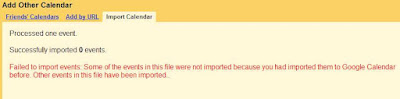
Most import mechanisms provide the kind of intelligence Geico likes to claim cavemen have, but Google Calendar actually did some checking and gave me the following error message:

Coolness.

But the cool factor is moderated by my noticing that the interest we've heard is decidedly not from the corporate market. I found 3 Critical Reasons Why Hosted Google Apps Won’t Work for Your Business a really interesting read. Though 10 Reasons Enterprises Aren’t Ready to Trust the Cloud does a good job expanding on it.

I also started looking at the issue of making meetings live when we migrate them over. Moving Gmail calendar to Google Apps For your Domain Calendar goes through the single user procedure, but for a few hundred or more users it would be tedious.

I also can't currently get the meetings to come over with guest lists and responses intact.

Friday, January 30, 2009

Perl script for breaking apart large ICS files for a Zimbra migration

A migration can be really confusing and time-constrained. Since we look at the world through the soda straw of converting calendar data it's easy to sometimes forget there's this whole business of bringing in a new system on (possibly) new hardware, configuring it, provisioning users, training users.... You get the idea.

Sometimes your system is not perfectly tuned and you need to simply get the data in.

Michigan Technical University was having time-outs when trying to load large ICS files into their Zimbra calendars. By large we mean 130,000 to 150,000 lines of iCalendar data.

For a quick fix they produced a Perl script to break the ICS files into smaller chunks. Thanks to Cynthia at MTU we can publish this here for those of you who may need it.

The "splitics.pl" script:
  • Splits large calendar ICS files into smaller parts.

  • Adds a tag (mm) to all meetings.
To run this:
Step 1 - collect the files
Make the ICS files and the zcs script. Some of the ICS files are large.
Put the ics files into a directory, perhaps called "calendar-migration"

Step 2 - Use the splitics.pl script
cd calendar-migration
for i in *.ics; do ../splitics.pl $i; done

Step 3 - create the zcs file to use later
cat *.zcs > /tmp/whole.zcs

Step 4 -
move the "whole.zcs" file to the Zimbra server
suppress resource responses with this command:
zmprov mcr zimbraCalResAutoAcceptDecline FALSE
zmprov -f whole.zcs

Step 5 - undo the suppress responses when ready

NOTE: This script also inserts the tag "mm" to all migrated appointments and meetings.


#!/usr/bin/perl

# for i in *.ics; do ../splitics.pl $i; done

# cat *.zcs > TODO

$base_name=$ARGV[0];

$base_name =~ s/.ics$//;
print "$base_name.zcs\n";

open(ZCS,">$base_name.zcs") die "Couldn't open $base_name.zcs : $!\n";
print ZCS "SelectMailbox $base_name\n";

print ZCS "emptyFolder Calendar\n";
open(ICS,"<$ARGV[0]") die "Couldn't open $ARGV[0] : $!\n"; while () {

last if (/BEGIN:VEVENT/);

$headers .= $_;

}
$event_count=0;

$file_number=1;

$event=$_;

while() {

if (/BEGIN:VEVENT/) { # It's a new event! Yay!

if ($event_count > 50) { # See if we should dump the output

open(OUTPUT,">$ARGV[0].$file_number") die "Couldn't open $ARGV[0].$file_number for output : $!\n";

print OUTPUT $headers;

print OUTPUT $event;

print OUTPUT "END:VCALENDAR\n";

close(OUTPUT);
print ZCS "importURLIntoFolder Calendar http://yourserver/ZIMBRA/USERID/$ARGV[0].$file_number/n";

# print ZCS "postRestURL Calendar $ARGV[0].$file_number\n";

$file_number++;

$event_count=0;

$event="BEGIN:VEVENT\n";

} else { # Just keep adding it on

$event .= $_;

$event_count++;

}

} else { # It's either the end, or it's another line

if (/^SUMMARY:/) { # Tag so we know it's a mm meeting

$_ =~ s/$/ \(MM\)/;

}

$event .= $_;

}

}

# We're at the end of our run... dump what is left over

open(OUTPUT,">$ARGV[0].$file_number") die "Couldn't open $ARGV[0].$file_number for output : $!\n";

print OUTPUT $headers;

print OUTPUT $event;

close(OUTPUT);

#print ZCS "postRestURL Calendar $ARGV[0].$file_number\n";

print ZCS "importURLIntoFolder Calendar http://yourserver/ZIMBRA/USERID/$ARGV[0].$file_number/n";

print ZCS "\n";

close(ZCS);

Sunday, January 25, 2009

Unresponded meeting invitations and your migration

We get this question often enough (at least three separate times from a recent client) that we thought we'd blog on it. They put the statement better than we do:

Will meetings that you have received proposals for, but not responded to
migrate? In other words, if I have been invited to a meeting in Meeting Maker but
not accepted or declined yet will that meeting be migrated?

Short answer: yes.

For completeness, I’ll describe all of the permutations.

If you are a guest, MM records your response.

There are four possible responses to meeting proposals: Accept, Decline, Decide Later, or do nothing.

  • If you accept, the meeting WILL appear in your calendar. The meeting request will be removed from your inbox.
  • If you decline, the meeting WILL NOT appear in your calendar. The meeting request will be removed from your inbox.
  • If you decide later, the meeting WILL appear in your calendar as tentative, and the meeting request WILL remain in your inbox.
  • If you do not decide (do nothing), the meeting MAY appear in your calendar as tentative, and the meeting request WILL remain in your inbox. The Sumatra tool does not apply ANY response to the proposal (the tool does not know what your intention was!) However, once you read a meeting proposal, MS Exchange actually forces the meeting to appear in your calendar as tentatively accepted. SO yes, it ‘migrates’.

    By the way, there could be instances were the MM exports reports an invalid guest response!! In that case, Sumatra assumes that you have ‘not decided’, and thus leaves the meeting request in the inbox.

    The Sumatra rule: Preserve as much information possible. It’s easier for the user to delete something after the migration, than it is to create it.

All of this is for meetings from today forward. In the interests of keeping sanity any unresponded invitations from BEFORE the date of your migration are dropped. If you haven't responded for past meetings by the time of your migration you probably don't want to take it along.

Tuesday, January 20, 2009

Setting the Outlook Delegate Tab Entries in a Migration

As of January 2009 it is possible to set the Delegates in the Outlook Delegate Tab in a calendar migration. This will work for both an Oracle Calendar migration and a Meeting Maker migration. As is our practice for Delegate / Designate / Proxy migrations, we've built it off existing Microsoft-released and supported utilities.

Follow the procedure for PFDAVAdmin as we have previously documented (this sets Permissions on the appropriate folders).

1. Export your Active Directory data using CSVDE
csvde -f ad.csv -s SERVER -d "OU=Clients,DC=ex2007,DC=sumatra,DC=local" -l "dn,cn,displayname,sn,givenname,objectcategory,mailnickname,mail,homeMDB,distinguishedname,altRecipient,targetAddress"
Note: change the -s and the -d to represent your server and your AD

2. Import the data into the Database table AD_ExportUserList (if you have not already)
NOTES: The CSVDE output will:
· Have more columns of data than is used in the table
· A different order of columns. You must move columns in the output file so that the data align with the table

3. Run the macro M_OutputProxyForLDIFDE

4. Open a command window (i.e., DOS) , and run LDIFDE:
ldifde.exe -f proxy_delegates.ldf -i -s SERVER -k

where -s is the name of your server.

Result will be as follows for your Delegates (In Outlook menus via Tools-Options-Delegates Tab):


For more information on using LDIFDE see:
Using LDIFDE to import and export directory objects to Active Directory

Please note: this will set READ-WRITE (MM Term) permissions only. In Outlook terms it is "Editor."

Why? Because LDIFDE does not let us set READ-ONLY (Outlook term: "Reviewer").

We do the best we can with the Proxy migration tools. In general for setting Delegates we really really really want to be using off-the-shelf Microsoft tools (less chance of an update that makes them obsolete).

Thursday, January 15, 2009

Calendar-only Exchange via a server-side rule

We sometimes get asked about running Exchange in calendar-only mode.

Why would you WANT calendar-only Exchange for some users?

Let's say your legacy calendar-only system is on its way out and you need to get with the times (after Exchange, Zimbra, and Google, are there any other options?). It's easier these days to agree on a unified calendar, but there are departments who will give up their legacy email only when pried from their unconscious fingers.

There's no means in Exchange itself of using only the calendar, but some folks at Illinois State University created a server-side rule for calendar-only Exchange.

See http://www.helpdesk.ilstu.edu/downloads/dl.phtml?id=1042
and http://www.helpdesk.ilstu.edu/kb/index.phtml?kbid=1255

Once I found this I found a variety of other universities had solved the same problem.

Virginia Tech's description goes into how to do this on your own (but they kept it client-side).

And UMichigan produced an entire guide for Exchange administrators.

Kudos to all three (and the others I undoubtedly did not find)!

By the way, [MS-OXORULE]: E-Mail Rules Protocol Specification documents as much as you're likely to need to know at the low level about Rules.

The Big Idea

In general, the idea is to Delete any mail not involved with calendaring AND (this is where things get tricky) have your Exchange configured to copy-forward all email to your non-Exchange account.

Since we find enough folks looking to do this, here's our take on the methodology, with screen shots and everything.

I'm going to take you through how to do this using Outlook Web Access. This has a couple of advantages to it: it's simpler for an end-user to do if they're already Linux-enabled and it automatically makes the rule server-side (which is what you want).

  1. Start Outlook Web Access, Click Options and select Rules.

  2. Create a New Rule for Arriving Messages


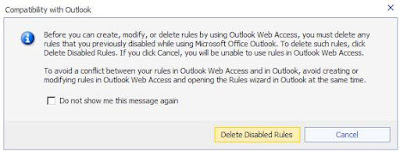
  3. You will see a warning. Since you want to be calendar-only I cannot see a reason you would want other rules in Outlook -- so nuke away!

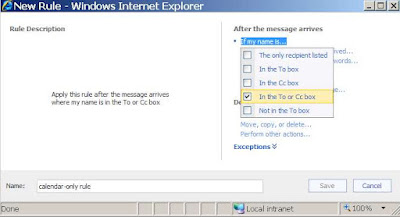
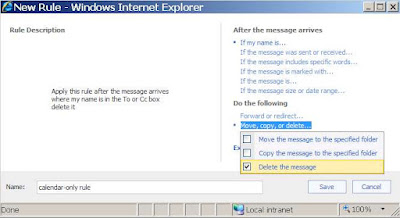
  4. Let's give this an obvious name like "calendar-only rule" and have it apply if the message is TO you or CC'ing you (you with me so far?):


  5. If any message comes in -- we want to DELETE it


  6. EXCEPT if it is a meeting invitation or update to a meeting.
  7. Save it and we are done! (With this part at least -- remember, you need to be configured server-side to copy your email where you want it)
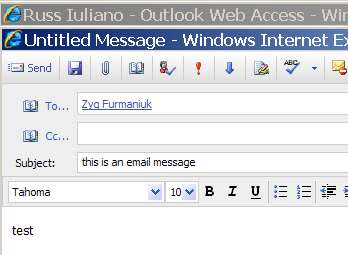
  8. So NOW let's TEST THIS OUT! Let's have another user (call him "Russ") send email to the poor fellow we modified above (call him "Zyg").

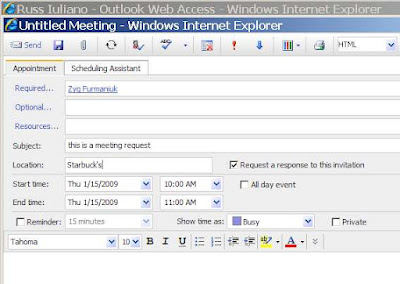
  9. At the same time let's have Russ send Zyg a meeting invitation:

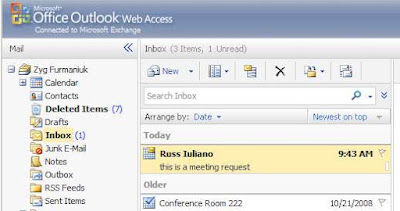
  10. Logging into OWA as "Zyg" we see that Zyg has the meeting request in his inbox,


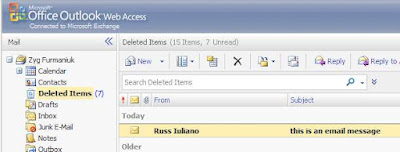
and the email is in Deleted Items. It works.


WHAT REMAINS TO BE DONE
  • You still need to have your Exchange ID set up to copy all email to where you really want it. Given the variability in configurations, which is obvious even from the university solutions given above, we do not want to start documenting how to do this in general. There are simply too many ways to skin that cat.
  • You can also create a rule client-side using Outlook and then distribute it (we toyed with using Illinois State University's rule, and they kindly sent it to us and would have allowed us to put it up for downloading -- many, many thanks, Randy!). We had not seen a solution involving OWA and wanted to add some knowledge to the discussion rather than refer to someone else's.

Wednesday, January 07, 2009

Setting Default Permissions for Exchange Resources

December, 2008. The subject is migrating proxies from Meeting Maker. Among our clients in December were two sites each with 1000 users, about 100 of which were resources. One had 90,000 proxy objects, the other had 5,000.

Why the 1:18 ratio on what were otherwise similar data sets?

The one with 90,000 proxy objects in Meeting Maker wanted to give everybody in Outlook Delegate access to each resource. In round figures 100 resources times 900 people gives you 90,000 Delegates.

So we were looking at using our usual method for setting Delegates (which would take a long time).

But it's actually simpler than that.

Meeting Maker does not have a default level for giving EVERYONE access to a resource.

BUT Outlook DOES!

And PFDAVAdmin makes it easy to propagate these permissions centrally (so long as you have an Exchange Admin who's willing). In this case it's criminal not to use it.

You can set up an import file as we've documented before, using

\Everyone Reviewer

to provide read-only access.

Or (quoting liberally from the documentation for PFDAVAdmin),

The Set Calendar Permissions option enables you to perform a bulk edit specifically to change permissions of the Calendar folder so that a single operation can modify the settings of thousands of users on a server. This is useful for changing the default permissions setting of the Calendar folder of all or many users, so that team members can view other member's calendars. Using Microsoft Office Outlook® enables changing only one user at a time, so the Set Calendar Permissions option is a good solution for this kind of task. In addition to changing the permissions of the Calendar folder, by using this option, a bulk-change also occurs on the permissions of the FreeBusy Data folder (hidden folder) of all the users on a server. If the FreeBusy Data folder permissions were not changed, the users will not be able to access another user's calendar.

I was going to start taking screen shots of how to do this exactly, when I said to myself, "Self, someone must have already done this."

And so they had. Thank Amit Tank whose FAQ: Give Calendar Read Permission on all Mailboxes - PFDavAdmin admirably takes you through this.

For international users, Set calendar permissions with PFDAVADMIN goes over how to filter for translated "Calendar" folders.

Monday, January 05, 2009

CorporateTime versions and migration to Exchange / Zimbra

Usually we see Oracle Calendar Server 9.0.4 ("Coca Cola Classic") but one account in the Boston area is running an older CorporateTime server (looks like version 7) to migrate into Zimbra.

Our new version of the conversion code supports this with the following modifications (they're running on a *nix platform):

uniuser -ls -format %s\:%g\:\:%id\:%no -n 588 -p xxxx > /var/tmp/users.txt
unires -ls -n 588 -p xxxx > /var/tmp/resources.txt
unicpoutu "S=LASTNAME/G=FIRSTNAME" -f exp-lastname.txt 588

unires is the older method for getting resource lists. The format is different from OCS 9.0.4, but we've redone the logic in the OraCalReader to take care of it.

Friday, January 02, 2009

Migrating to Exchange: One Summary from the Trenches

In December 2008 we migrated the school of Veterinary Medicine at the University of Illinois.

Craig there sent us a very gracious thank you note (a rare but welcome occurrence in our line of work) that was also a good summary of what to expect in migrating into Exchange from either Meeting Maker or Oracle Calendar.

He has prepared this version for us to publish here:

With the services of Sumatra Development LLC, Illinois Veterinary Medicine has
successfully migrated 150 accounts from a local Meeting Maker server to a shared
campus-wide Exchange resource.

Interwoven scheduling among administrators and researchers elevates the data to a critical level of importance for the organization. Migrating data from one proprietary package to another, neither of which is governed by a standards protocol, is unbelievably tricky. Yet we were able to accomplish this migration in a transparent manner that our end users expected. They just wanted it to work and it just worked for us.

Looking back, I'd say the hardest parts were organizing our calendaring accounts and training our user base on Outlook. Not coincidentally, these parts took the longest. I started this project a little apprehensive about working with two organizations (outside vendors from my perspective) with me in the middle.

Sumatra was converting our data and a central campus IT unit was inserting the
data into the Exchange service. I am pleased to say it worked wonderfully. The
Sumatra instructions and data sets were easily managed by the campus Exchange
service managers. A little extra communication on the side and things worked
seamlessly. When we needed people to be there for us, they were there. My
compliments go Sumatra for their care and dedication at what they do.

For our part, the role of tirelessly training, establishing resource sharing and
answering the countless questions users come up with when they skip the training
sessions was something we were prepared to handle. The arrangement let us handle
the part we do best and let the calendaring and Exchange experts do their thing.

Friday, December 12, 2008

Meeting Maker Discussion List Closed

The Meeting Maker Discussion List hosted for years at Emory is shut down as of today (not that it's had many postings for the last year or so). They sent out this announcement earlier this week:

Dear MMXP subscribers,
Over the years, this list was a great asset to
those of us who ran Meeting Maker. Over time, the company(s) made
advancements in the support offerings. Thus, we have not needed this list
as much.

Emory has changed direction in how we use calendaring, and
have migrated away from Meeting Maker.
This is to serve notice that this
list
is to be shutdown effective 12/12/08.

Thank you.

Since the world is running ever lower on Meeting Maker, we're very glad that Oracle Calendar migration has stepped in to take its place.

Wednesday, December 10, 2008

Migrating Oracle Calendar Permissions to Exchange Part 2 DIY

So you want to migrate from OCS to Exchange and you can handle your own data migration (i.e., you don't want live meetings or recreated recurrence patterns) but you still want to migrate permissions.

We'll tell you how you can accomplish that using free off-the-shelf tools from Oracle and Microsoft.

The process proceeds in two phases:

  1. EXTRACT the permissions data from Oracle

  2. INSERT the permissions into Exchange

You may need to modify your user names between the first and second step, but if you're handling your own data migration this should not be too difficult. You're also going to have to write your own script to convert the output from the Extract phase to the input for the Insert phase. Since we get these requests from universities and they have lots of undergraduate computer talent that programs in between beer blasts we don't think this will be too difficult.

Extracting permissions data from Oracle Calendar Server

This is done using the OCS tool UNIACCESSRIGHTS. See the Oracle Calendar Reference Manual for your full set of options.

Let's take the example of John Lennon giving permissions to Jerry Garcia.

Running UNIACCESSRIGHTS to get the Designate data for Lennon is simple:

uniaccessrights -ls -grantor "S=Lennon/G=Johnny" -grantee "S=*" -n 1 -p PASSWORD

This results in the following output (which you can redirect to a text file), split here for clarity:

Grantee: S=Garcia/G=Jerry/UID=Jerry.Garcia/ID=256/NODE-ID=1

Designate Right: CONFIDENTIALEVENT=REPLY

/CONFIDENTIALTASK=NONE

/NORMALEVENT=MODIFY

/NORMALTASK=NONE

/PERSONALEVENT=VIEWTIME

/PERSONALTASK=MODIFY

/PUBLICEVENT=MODIFY

/PUBLICTASK=MODIFY

The connections between the OCS User Interface and the output are pretty clear.


You have now successfully extracted the data. Part 1 is complete.


Inserting permissions data into Exchange


This is done using PFDAVAdmin, whose formal name is the Exchange Public Folder DAV-based Administration Tool. You should check out our earlier postings on PFDAVAdmin. First let's say that on Exchange in Active Directory we already have a John Lennon who has created the same Calendar permissions for his co-worker Jerry Garcia. What would those look like in Exchange saved with PFDAVAdmin?


So glad you asked. Running our friend PFDAVAdmin and looking at John Lennon,


we first EXPORT his permissions to see what our end goal is:

Pick the easiest format to read,


We get a LOT of data for folders. I invite you to look at your own output.

However, we can comfortably reduce it to the data we need for Calendars and Tasks:

SETACL Mailboxes\john.lennon\Freebusy Data SUMATRA\jerry.garcia Editor NO

SETACL Mailboxes\john.lennon\TopofInformationStore\Calendar SUMATRA\jerry.garcia Editor NO

SETACL Mailboxes\john.lennon\TopofInformationStore\Tasks SUMATRA\jerry.garcia Reviewer NO


Your step is to turn your UNIACCESSRIGHTS export into a file of this format that you can IMPORT into PFDAVADMIN to set the ACLs for Exchange. This is not very hard.

Of course it's in our test domain so everything is "SUMATRA," and "TopofInformationStore" should be "Top of Information Store" (but it breaks oddly in Blogger). You might also want to set the INBOX and OUTBOX permissions if you want them to respond to meeting requests for you.

NOTE: Be careful making any modifications to this file – it is very important that it be tab-delimited.

But you get the idea and there is enough information here for you to fly on your own now should you so choose.

Note the key things about this:
  • With your own scripting the cost to you is zero for additional tools
  • It puts the permissions part of the migration entirely within your hands

Monday, December 08, 2008

Migrating Oracle Calendar Permissions to Exchange

Exchange and Oracle Calendar Server (OCS) are different in how they assign their Delegate / Designate permissions, but it’s less an apple vs. orange difference as a grapefruit vs. orange difference: both are noticeable more for their similarities than their pronounced differences relative to other calendaring systems.

There are two levels of permissions relevant to this discussion:

  • Object level permissions (for individual calendar entries and tasks)
  • User level permissions (e.g., to an administrative assistant or co-worker)

Object Level Permissions

Let’s deal with Object Level Permissions first since it’s a simpler comparison.

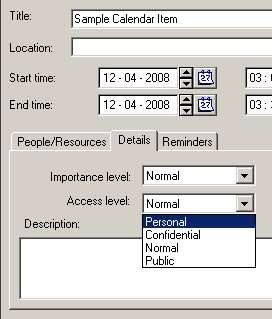
Oracle has four different permission levels for Calendar and Task objects:


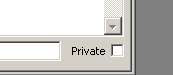
Outlook and Exchange have only a “Private” option:


Translating these during a migration is pretty simple: “Personal” and “Confidential” in OCS map to “Private” in Outlook/Exchange. In the case of a Sumatra migration this happens as the data is being converted from OCS export format into our intermediate database.


User Level Permissions
OCS starts with object permissions and then allows the calendar owner to set permissions for other users based on those object permissions. Where OCS is Data-oriented in its permissions model, Exchange is Folder/User oriented. This leads us into the User Level Permissions.

Let’s take a look at the Oracle Calendar Server side.

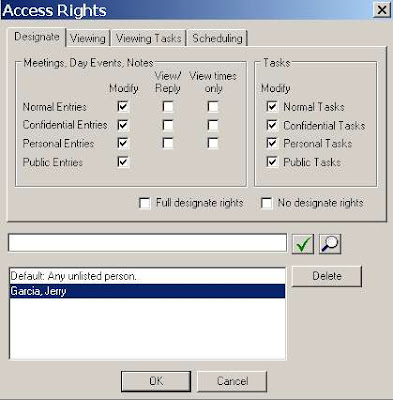
John Lennon makes Jerry Garcia his Designate in Oracle Calendar:

Here you have the only options relevant to a migration being: “Modify” and “View.”

Why is “View times only” not relevant for a discussion of calendar designate rights migration into Exchange? Because Exchange has no mechanism to deny access to free/busy information on a user basis.

Also note that in OCS a user has the option of specifying different access for different object types. That is – you can be more stringent with Confidential as opposed to Public data. This capability does not exist in Exchange. At all. So we’re going to revisit this issue later when we’re trying to decide how to migrate these permissions from OCS to Exchange.

So let’s turn our attention to Exchange and see what options there are when Zyg Furmaniuk makes Judy Morrison a Delegate via Outlook:

You basically have three levels of access (other than the trivial case of None) you can grant:

Reviewer
Author
Editor

And the scope of these is pretty much on an Outlook Folder level (though in the case of Calendar you need to also grant access to the Calendar and the Free-Busy information). I.e., You can selectively grant access to the Calendar or the Email Inbox.

So you can think of “Modify” in OCS mapping to “Editor” and “View” mapping to “Reviewer” pretty easily.

Oracle Permission "Modify" maps to Exchange Permission "Editor"

Oracle Permission "View/Reply" maps to Exchange Permission "Reviewer"

Oracle Permission "View Times Only" is irrelevant in Exchange Permissions

But there remains a question: Given that OCS users have several gradations not available in Exchange – how do we do a mapping?

We at Sumatra at this point broke it down to as simple a question as we could put to the Administrators: “Do you want to give the maximum rights or the minimum rights?”

The way this manifests itself on our OraCalReader utility is the choice between ALL designate access rights set to Modify or ANY set to Modify.


Since the only other option is “Reviewer” in the target Exchange any rights not set to Modify are set to Reviewer.

Any View rights are automatically set to “Reviewer” rights since the object level access in OCS does not come into play in Exchange.

We do not set “Delegate can see my private items” on the Exchange side. Why? Because there’s enough else going on in a migration – folks can forget that they don’t want some information shared post-migration. Keeping private on means maximum security and you can always dial it to where you want it post-migration.

Other Exchange Delegate notes:

  • Exchange has several possible clients (Outlook, Entourage, Outlook Web Access) at several different release levels with varying degrees of cross-platform and cross-version capability. Be sure to examine your own environment carefully.

  • The Sumatra process only handles Calendar permissions, not Task permissions. Could we do Tasks? Yes. But you’d need to convince us it’s a valid business case.

  • Regardless of the level of Delegate access set by the end user in Outlook, Delegate rights in OWA are read-only. See http://calendarservermigration.blogspot.com/2008/11/seeing-delegated-calendar-in-outlook.html
  • MOST IMPORTANTLY: Using these methods to set Delegates in Exchange will overwrite any delegate rights a user has set prior to migration. Consider yourself warned.

The User Perspective

What does the user GETTING permission experience?

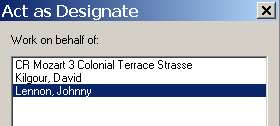
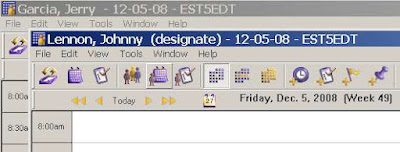
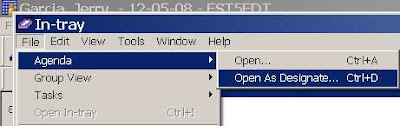
In OCS, Jerry Garcia as Designate of John Lennon simply selects File-Agenda-Open As Designate and sees the following:

Jerry gets a convenient list of everyone he has permissions for:

And it is very simple to orient yourself:

This user experience is VERY DIFFERENT in Microsoft Outlook. Here we use Outlook 2007 as our example. Zyg has given Judy permission to view his calendar.

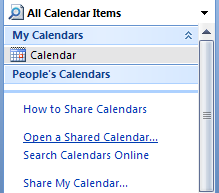
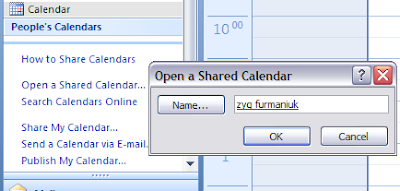
In Judy’s calendar, she has no indication of this (except for a possible email notice from Zyg). In order to set up her client to see Zyg’s calendar she must first explicitly open it and select “Zyg” from the directory list:


Once selected once the option to view is a check box.

Tuesday, December 02, 2008

More Calendar Weirdness in Exchange 2003

We keep hearing about calendar bugs in Exchange 2003.

Cases in point:

A meeting update does not appear in Outlook Web Access after a meeting organizer updates the time of one meeting occurrence in an Exchange Server 2003 environment

When you use a CDO-based application to manage calendar items in Exchange Server 2003, the application crashes intermittently

Keep in mind: None of this has anything to do with a calendar migration. It's what seeps into Microsoft products when the Redmond Belle tries to "encourage" you to "upgrade." Both of these are related to CDO and the most prominent CDO-based application is the Blackberry Enterprise Server.

Wednesday, November 26, 2008

ActiveSync bug in Exchange 2003 - Warning warning!

November looks like ActiveSync month. First I dropped my Sprint HTC SmartPhone because as a phone it was unusable (despite the fact that sync with Outlook was passable).

But Chris Quinn, one of our pals in the calendaring community, alerts us to a Microsoft KB Article 958781:

Some recurring calendar items disappear from the "Day/Week/Month" view in Outlook when a user uses Exchange ActiveSync on a mobile device to modify a recurring meeting in an Exchange 2003 environment

Much like Snakes on a Plane the title says it all.

But unlike SoaP there's more here to worry about (aside from whether you want the extended edition DVD).

The list of affected files for the fix to this problem includes pretty much all of CDO's associated files PLUS MADFB (the main Free-Busy updater).

This is a scary bunch of sensitive code to be changing all at once. And anything that relies on CDO (Anybody out there have BlackBerry Servers?) could get caught in the backwash.

So our warning to you still on Exchange 2003 is to test this HotFix BEFORE you deploy it if you have anything other than a vanilla Exchange 2003 environment

Wednesday, November 19, 2008

Seeing a Delegated Calendar in Outlook Web Access

It's really easy to get to another person's calendar in Outlook or even Entourage if they've given you delegate access.

But if you want to view that same schedule via Outlook Web Access (OWA) you need to know a few things.

Check out this article: How to Use Outlook Web Access Web Parts.

You want user interface? Fuggedaboutit.

If "Russ" is Delegate of "Zyg" via Outlook on the "VM" Exchange 2007 server he needs to use this URL:

https://VM/OWA/zyg@sumatra.local/?cmd=contents&f=calendar

Then he gets to view Zyg's calendar (NB: Regardless of level of delegate access it's read only).

Monday, November 17, 2008

Remove "TargetAddress" in Exchange 2007

Forwarding meeting requests is a really bad practice.

See Outlook Meeting Requests: Essential Do's and Don'ts if you want the Microsoft dogma on it.

This is especially true in calendar migrations when you're creating more meeting invitations at once than you probably ever will again.

It is especially true when Exchange is forwarding automatically by defining TargetAddress (as could be done via an identity-management tool).

Such is the lead in to why you want to turn off TargetAddress before a migration.

To turn this attribute off where it is set, you simply need to follow this three step program:

1. ) EXPORT your directory data using LDIFDE

ldifde -s YOURSERVER -r "(targetaddress=*)" -l "dn" -f exportldf.ldf

This produces a file whose records look like this:

dn: CN=Adam Ant,OU=Client85,OU=Clients,DC=ex2007,DC=sumatra,DC=local
changetype: add

-

2. Edit the LDIFDE file "exportldf.ldf"
Replace "changetype: add" with "changetype: modify\ndelete: targetaddress\n\-\n\n"

i.e., the file should look like this:
dn: CN=Adam Ant,OU=Client85,OU=Clients,DC=ex2007,DC=sumatra,DC=local
changetype: modify
delete: targetaddress
-

Notes:

  • If you want to restore the attribute after the migration, make a copy of the exportldf.ldf file before editing it!

  • The editing works best if you have a text editor that supports regular expressions. We recommend TextPad.

  • There must be a dash and a blank line between each command.

3. Re-run (import) your file
ldifde -s YOURSERVER -f exportldf.ldf –i


Why are we not doing this using either PowerShell or some of the other GUI-based management tools in Exchange 2007? Simply because we haven't yet figured out how to or if it's even possible.


Flashback: Those of you who have been through a migration into Exchange 2000/2003 will recognize the exact same worry with AltRecipient.

Sunday, November 16, 2008

New option for Oracle Calendar Migration


You asked for it -- so we did it.
As the screenshot shows, OraCalReader will now give the admin the option of converting historic meetings into appointments on everyone's calendar or inserting them as live meetings.
Beware: As we warn folks over and over - live meetings take longer to insert into Microsoft Exchange than appointments (which is why we made this an automatic default in Oracle Migrations).

Friday, November 07, 2008

So if you're migrating to Zimbra and using Palms....

We just moved a site from Meeting Maker into Zimbra and everything was ducky until we got an email stating:

"After taking our Meeting Maker Database and getting it imported into Zimbra,
our Palm OS devices that are receiving over-the-air syncs to their Zimbra
calendars lock up and head into an infinite reboot cycle when they try to
access their calendar data. It appears that something in the formatting of
the calendar data now pretty much just causes the brain of the Palm devices
to explode... because the problem does not extend to Blackberry devices."

Being the responsible guys we are, we freaked. Then we read that the problem doesn't happen with BlackBerry devices. In calendar migrations if we do something really wrong we expect it to fail everywhere. Since they used Notify for both Palm and BlackBerry sync from Zimbra we started looking at Palm. I think I have an old VIIx sitting on my discarded electronics drawer from the days a decade ago when we started this company.

Being exceedingly motivated, however, our client managed to come up with a solution before us. Their significantly greater knowledge of the Palm probably also had a lot to do with this.

Seems to be related to recurring meetings on the Palm, which interpreted some instance as "Zero" and didn't like it -- but didn't gracefully recover either.

They suggest other users with this problem (which I really hope there never are any, but know there will be some out there)

  1. Go to http://www.pimlicosoftware.com/datebk5.htm
  2. Download the zipped Windows EXE.
  3. In Advanced Apps there is a file called 'dbscan'
  4. Open this on your PC
  5. It should set itself up to install on your next sync. Read the instructions! It is a database integrity checker.
  6. It will advise of the corrupt files and give you the opportunity to delete them from your handheld.
  7. Run a sync again - but set the options for **handheld to overwrite pc** - this will sort out the problem.

I would really like to thank the folks at Pimlico Software for their really good application for Palms!