Thursday, September 27, 2007

Inserting Oracle Calendar Server / Meeting Maker into Zimbra

By this point the idea is to make the actual insertion into Zimbra a boring anti-climax.

We have the same goal inserting legacy data into Microsoft Exchange, but because of Exchange architecture this is a little more intricate than Zimbra (So we deal with it separately).

Your primary tool is called zinsert.exe, which you invoke from the Command Prompt (which those of us of a certain age refer to as "DOS").

Simply typing zinsert (-Enter-) will give you a brief summary of functionality.

First off, use ODBC (available under Control Panel) to point to the conversion database. Let's call your ODBC connection "Zimbra."

To create a series of ICS files with appropriate cross-linked GUIDs, use this command:

zinsert -fo -cs DSN=ZIMBRA -tf_utc_to_timezone

In general, converting for the appropriate time zone, use the -tf_utc_to_timezone option unless we determine another one is better (not likely, but we keep them there in case -- you never know what the US Congress is going to do with Daylight Savings Time).

Inserting into Zimbra

That's what the -post command is for, which as of this date we haven't actually had to use (also it will require knowing each user's password which is a pain)

You can use curl, or (thanks to a college in New Jersey), you can use this method.

This solution doesn't require an admin to know the user's password.

It does require a configured web server and assumes there is a separate ICS for each user calendar.

1. The ICS files need to be placed on a web server that the Zimbra server will be able to access via http (or https). I'll assume a base of http://YOURDOMAIN/migrate/.

2. Create a file (e.g. /tmp/importcals.zcs) that will be fed to zmprov with contents like this:

selectMailbox USERID1

emptyFolder Calendar <--- optional command

importURLIntoFolder Calendar http://YOURDOMAIN/migrate/USERID1.ics

selectMailbox USERID2

emptyFolder Calendar <--- optional command

importURLIntoFolder Calendar http://YOURDOMAIN/migrate/USERID2.ics

3. Run that through zmprov.

zmprov -f /tmp/importcals.zcs

Wednesday, September 26, 2007

So we revised the Oracle Calendar Converter User Interface

We think it's easier to follow. If you're working with us it's in your FTP account.

Mapping Oracle Calendar/ Meeting Maker users for a Zimbra insertion

NB: This is for migration into Zimbra. Migration into Exchange is a whole different issue which we deal with separately.


You have your Oracle Calendar Server data, you've converted it into an Access database -- now you just need to map your users for Zimbra.

Why? Usually there's at least a handful of users who have changed their names through marriage, divorce, or the witness protection program.

Also since you're migrating anyway many sites use the opportunity to standardize their naming conventions.

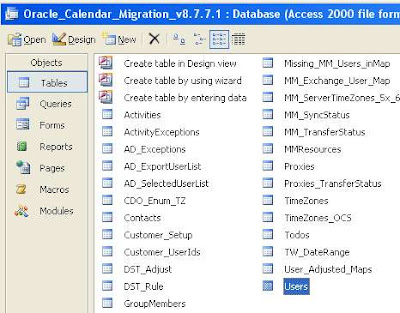
Step 1: Open the database and go to the Users Table:


There's a lot going on here, but don't let it scare you.

In the Email column just put your new Zimbra email

Note that even though the login for "Adam Ant" is "aant" we can substitute "adam_ant" or anything else we need so long as it matches the Zimbra address.

This simple Query will duplicate your login IDs to the Email field, appending the appropriate domain name (which you'll need or else guests will not be notified of meeting updates). Of course, this is generally modifiable into anything that makes sense for your environment.


Next step: inserting your data!

Tuesday, September 25, 2007

Converting your OCS exports to migration format

So you've gotten your calendar data out of Oracle Calendar Server and now you wonder "What ELSE do I have to do with it?"

Well, you have to convert it into a (new) relational database so that we can reassemble any attributes not exported from OCS.

Like what you ask? Guest lists, guest responses, recurrence patterns, all the sorts of things you want.

Do you need to go through this? Well, if you want to do this all server-side and keep all the information that makes schedulers valuable, yes.

The tool that takes your exports runs in Windows and looks like this: How do I use this?

While the design reminds you of an early farm tractor (which we are very proud of) - it's designed with the same single-minded focus: get the job done as quickly as possible and the heck with how it looks (you're tossing it out after this is done anyway).

The idea here is to take in the files you got from UNICPOUTU, and match them with users and resources from USERS.TXT and RESOURCES.TXT.

Specifically this will:

  • Match export data to users and resources (the users and resources will be mapped to your new calendar system)
  • Add guests to your meeting
  • Group one-time instances into “recurring meetings” (makes the insertion run faster)
  • Remove old items you do not intend to insert (makes the insertion run faster)
  • Reformat OCS-specific items to calendar-neutral terms (e.g. map Daily Notes and Daily Events to All Day Events)

Note that if you're planning on multiple test insertions you only need to read the users and resources into the database once. It is possible to parallelize conversions, e.g., convert A-L on one machine, M-Z on another and join them together to get the job done in half the time (but please talk with us before you do that).

This also includes a blank template database (MS Access format), which we recommend you rename a copy of to something descriptive, like "December 1 migration test." Please preserve the database version in the file name; it really helps when debugging.

Let's go into some details on the specifics.

Time Zone: Select the Time Zone of your OCS node. This is really crucial otherwise everything will be off on your insertion by some multiple of hours. If you have users outside of the default time zone you can modify the USERS.TXT file for them (see earlier post).

Drop Items Prior to this Date: You can selectively export items from certain date ranges -- but in case you have a data set with everything and want to pare it down for a test insertion, you have that option here.

Threshold for recurrence patterns: When we get the events from OCS they are all individual events rather than a series. We reconstruct the series, but (as a little thinking will show you) with exceptions to recurrences this can get a little dicey. Our software analyzes the sequence and comes up with its best guess of the recurrence pattern, taking account the threshold you set.

A couple of quick things to note:

  • Historical events (i.e., any events before the date you convert them) all go in as individual events (it's faster this way) with meeting guest list in the Agenda field (except for BCC guest whom only the meeting proposer sees)
  • There needs to be at least five recurring events before we attempt to re-create the sequence. (Quick math -- at an 80% threshold, one exception to a five event pattern puts you at the threshold)
  • If we can't match a pattern all events will go in as individual instances. So worst case scenario is that a recurring meeting or event comes in as a series of individual instances. (But as opposed to an ics RDATEs list these will display properly in Outlook clients).
  • If you migrate only a subset of users, meetings to and from users outside that subset will not show up. Think about this one: if the meeting owner or guest is not in the system you're migrating to -- how can they be on a meeting in your new system? This is the main reason we're always advocating "Big Bang" migrations for meeting-centric corporate cultures.

How does this work?

In two phases: the first phase reads the OCS exports and turns them into an intermediate file. The second phase reads the intermediate file into the database template.

Why not just put everything into the database as we're going along? It's faster this way.

Everything in a calendar server migration is a trade-off between time and convenience.

It's certainly easier for the average admin to work with an Access file. But the overhead of constant transactions at the volume we need is huge. Saving them for the end makes the system much faster.

Monday, September 24, 2007

How to Extract Data from Oracle Calendar Server for a migration into Exchange or Zimbra

This is Part I of a three-part series. Part II will be about converting this output and Part III is about inserting it into your target system.

So you've seen your future and it no longer involves Oracle Calendar Server (OCS).

We're there with you.

The problem we deal with now is: How to get the Data OUT of OCS.

As usual, we like to rely on the native tool set of the legacy system (less code on the legacy system implies easier to maintain the migration process as a whole).

Let’s say you run a single Oracle Calendar Server node (number 1) with administrative password “jimmorrison” and have users John Lennon, Jerry Garcia, Jimmy Page, Puffy Amiumi, and Walter Liberace. As well as the Mozart Conference Room and Shea Stadium. The following command lines will pull all data Sumatra requires:


uniuser -ls -format "%s%:%g%:%uid%:%id%:%node-id%:" -n 1 -p jimmorrison >users.txt
uniuser -resource -ls "S=*" -n 1 -p jimmorrison >resources.txt
unicpoutu -u "S=Liberace/G=Walter" -f exp-liberace.txt -n 1 -p jimmorrison
unicpoutu -u "S=Garcia/G=Jerry" -f exp-garcia.txt -n 1 -p jimmorrison
unicpoutu -u "S=Lennon/G=John" -f exp-lennon.txt -n 1 -p jimmorrison
unicpoutu -u "S=Amiumi/G=Puffy" -f exp-amiumi.txt -n 1 -p jimmorrison
unicpoutu -u "S=Page/G=Jimmy" -f exp-page.txt -n 1 -p jimmorrison

Execute this batch file to extract these data files, and place them in a convenient directory.

How this is organized, and what we do with it.

The first two lines extract the names of all users and all resources in a standard format.

Sumatra Development LLC reads these two files in first to establish the list of users and resources being migrated. These become really important to make sure the connections among users is maintained when we insert into either Exchange or Zimbra (Notes 8 coming if we get sufficient interest). The programmers among you will recognize this is crucial to maintain GUID integrity.

THEN, all user calendar data in the exp-(name).txt files are read in, and matched against these users and resources.

The users.txt file looks something like this:

Garcia:Jerry:Jerry.Garcia:256:1:
Lennon:John:John.Lennon:257:1:
Amiumi:Puffy:Puffy.Amiumi:258:1:
Liberace:Walter:Walter.Liberace:260:1:
Page:Jimmy:Jimmy.Page:262:1:

NB: It is certainly possible to script these so that the output from the initial users export can be the input for a script that automatically exports all user data/

For users with a different default Time Zone from the node time zone, manually add the Oracle Time Zone code following them in the user.txt file.

Let’s say Puffy Amiumi is based in Japan and therefore uses JST.

The resulting users.txt file would be the following:

Garcia:Jerry:Jerry.Garcia:256:1:
Lennon:John:John.Lennon:257:1:
Amiumi:Puffy:Puffy.Amiumi:258:1:JST
Liberace:Walter:Walter.Liberace:260:1:
Page:Jimmy:Jimmy.Page:262:1:


The resources.txt file looks like this:

. R=Shea Stadium/N=ResNum0000/CA=200,000/S=Steinbrenner/G=George/
+ LOC=Da Bronx\r\nNew York/PHONE=617-555-1212/FAX=617-555-1213/ID=259/
+ EMAIL=shea@sumatra.local/UID=Shea Stadium/ALLOW-CONFLICT=NO/ENABLE=TRUE/
+ LANG=en/NODE-ID=1

. R=CR Mozart/N=ResNum0002/CA=10/S=Mozart/G=Wolfgang/
+ LOC=3 Colonial Terrace Strasse\r\nWien, Ostereich/PHONE=617-555-1212/
+ FAX=617-555-1213/ID=261/EMAIL=crmozart@sumatra.com/UID=CR Mozart/
+ ALLOW-CONFLICT=NO/ENABLE=TRUE/LANG=en/NODE-ID=1/PUBLISHEDTYPE=PUBLISHED

More on OCS Calendar Data
Our recommended method for extracting Oracle data is to use the off-the-shelf Oracle utility:

UNICPOUTU

This is typically found in the directory:

C:\ocsinfra\ocal\bin on Windows servers
ORACLE_HOME$/ocal/bin on UNIX/Linux servers

The command:

UNICPOUTU –u “S=Garcia/G=Jerry” –f output.txt –n 1

will export Jerry Garcia’s entire calendar from OCS Node 1 to the output file output.txt.

You will be asked for the calendar administrator password (or alternately can pass it with the –p parameter).

This is also configurable for different start and end dates, depending on how much data you wish to transfer.


So if you only wanted to take data since January 1, 2006, you would use:
UNICPOUTU –u “S=Garcia/G=Jerry” –f output.txt -start 1 jan 2006 –n 1


NB: Dates can only be in "day month year" format.


Resources
If resources are only guests and do not have their own non-meeting events, you do not need to export them. If however you have reason to, we include the information here.

The command:

UNICPOUTR –u “R=CR Mozart” –f output.txt –n 1
Will export the Conference Room “CR Mozart” on OCS Node 1 to output.txt

Users for a node
The following command will export all of the users on Oracle Calendar Server node 1:

UNIUSER –user –ls “S=*” –n 1

The following command will export all of the resources on Oracle Calendar Server node 1:

UNIUSER –resource –ls “S=*” –n 1

Designate Access Rights
What in Outlook / Exchange are called the Delegate rights are in Oracle called Designate rights. To extract these use:

UNIACCESSRIGHTS –ls
More detail on this can be found in your Oracle Calendar Server Reference manual.
Sumatra does not currently insert Designate Access Rights into Exchange or Zimbra from OCS – but if this is a requirement for you please consult with us (the issue is more about trade-offs on the Exchange 2003 side than the Oracle side or the Zimbra).

Why not UNIICAL?
If you're asking this question you probably already know the answers:
  • It does not export ATTENDEES
  • It does not export ATTENDEE responses
  • It exports RDATEs rather than RRULEs (which will cause you trouble down the line, not least of which because it really does a number on Outlook if you use that as a client for any target systems)

Still with me? Wait a few days for Part II: Converting and Mapping your OCS data.

Monday, September 17, 2007

So Yahoo acquired Zimbra?

So Yahoo acquired Zimbra?

Good.

I was never impressed with Yahoo's calendaring.

Here's hoping it improves.

Thursday, September 13, 2007

Migrating Data from Resource Scheduler to Exchange 2007 Resources

A typical week here at Sumatra involved at least one request to take data from one system we've never seen before and put it into one we know (or vice-versa).

A few weeks ago it involved a request to migrate data from Resource Scheduler for Exchange from PeopleCube.


The idea was that they wanted to start using the native room and resource scheduling capability in Exchange 2007 instead additional software.


This presents some interesting problems.

Before we coded anything, we thought we'd ask our reading public if there was anyone else out there who wanted to migrate Resource Scheduler data, because it's only worth doing this if there's more than one site.

Thursday, September 06, 2007

Oracle Calendar Server -- Multiple User Names and Migration

We were astounded to discover in customer data that it was possible to have non-unique user names in Oracle Calendar Server.
However, as the screenshots show, it was very easy for us in our test lab to create two "Jerry Garcia" users:
Despite the fact that I entered a valid password for only one of them I get the following screen on log-in asking me to select the one I mean (as though there's a way to tell them apart?)


This is bad enough -- but we then took the next step and invited them both to the same meeting.

Using the standard UNICPOUTU output this is the resulting data:

S 8780430
D 30
T Meeting with the two Jerrys
I 0
R N2
M Lennon John
W Lennon John
A TRUE 3 10
C [ .+] Garcia Jerry
C [ .-] Garcia Jerry
O

... making it impossible to tell which Jerry is which.

SO we've just added the capability to detect this in the USERS.TXT file before we get too far into a migration. If this situation arises, an error will pop up:

Wednesday, September 05, 2007

Yet another significant Entourage / Outlook discrepancy

If some of your users have Entourage clients and create recurring meeting requests (and if they're not creating recurring meeting requests what are they doing with an Exchange account anyway?), then please check out this recent KB article (number 933093):

You receive a message that states that your meeting request was declined when you use Entourage for Mac to send a recurring meeting request to an Exchange 2003 resource mailbox

Saturday, September 01, 2007

Oracle Calendar Server to Zimbra and Exchange

Yep, we've got Oracle Calendar Server to Zimbra migration working.

John's calendar in OCS 9.0.4 looks like this, note the Declined meeting (in red) and the Tentative meeting (in blue):


In Zimbra it converts to this (with the Tentative and Declined acting as they should in Zimbra):

As we've told some of you, the tool that we used to take the OCS exports and re-create recurrence patterns (ICS as RRULES) is being re-worked for field use (as opposed to the way we used to do it in Sumatra labs). It looks like this:


with our trademark "as few buttons as possible but make all of them useful" design philosophy.

In Outlook / Exchange 2007, the same calendar looks like this (Declined and Tentative are dealt with in the Outlook INBOX rather than directly on the calendar):


Note also that the OCS Day Event becomes an All Day Event in both Outlook/Exchange and Zimbra.

Thursday, August 30, 2007

Exchange 2007 Impersonation - Debugging Protocol

We've hit on many different reasons why service account fail to have Impersonation and Send-As, Receive-As rights set correctly. Here are some areas to check as you create a service-account and grant it Impersonation rights:

  1. Create a service account (in this example: Ex2007)
    The Ex2007 account should NOT be a member of any of the Exchange Administrative Groups. Set your permissions in Default Domain Security Settings-User Rights Assignment-"Allow logon locally" for this user
    Note: Exchange explicitly denies Impersonation for all accounts in those groups
  2. All Exchange Servers should be members of Windows Authorization Access Group
  3. Determine if your users SMTP address is alias@FQDN. If it isn’t, you’ll have to impersonate using the User Principal Name (UPN). This should be defined as alias@FQDN.
  4. Set these five rights by running these commands in Exchange Management Shell

    Add-ADPermission -Identity (get-exchangeserver).DistinguishedName -User (Get-User -Identity Ex2007 ¦ select-object).identity -AccessRights GenericAll -InheritanceType Descendents
    Add-ADPermission -Identity (get-exchangeserver).DistinguishedName - User (Get-User -Identity Ex2007 ¦ select-object).identity -ExtendedRight ms-Exch-EPI-Impersonation
    Add-ADPermission -Identity (get-exchangeserver).DistinguishedName - User (Get-User -Identity Ex2007 ¦ select-object).identity -ExtendedRight ms-Exch-EPI-May-Impersonate
    Add-ADPermission -Identity (get-exchangeserver).DistinguishedName - User (Get-User -Identity Ex2007 ¦ select-object).identity -ExtendedRights Send-As
    Add-ADPermission -Identity (get-exchangeserver).DistinguishedName - User (Get-User -Identity Ex2007 ¦ select-object).identity -ExtendedRights Receive-As

    Note One: These grant permissions at the SERVER level. You can also grant permissions at the database, user, and contact-levels.

    Note Two: If you have multiple servers, you must grant Impersonation at each server (or database). Exchange 2007 does not have any system-wide Impersonation permission capability.
  5. If your CAS server sits behind a load-balancer, give the ms-Exch-EPI-Impersonation rights to the Ex2007 account for ALL CAS boxes behind the load-balancer. If your mailbox servers are on a machine other than the CAS servers, give ms-Exch-EPI-Impersonation rights for the Ex2007 account for ALL mailbox servers.
  6. Verify that the Ex2007 account has rights you've just granted:
    Open Active Directory Sites and Services.
    In the console tree, right-click Active Directory Sites and Services, point to View, and then click Show Services Node.
    Expand the service node (e.g. Services/MS Exchange/First Organization/Admin Group/Exchange Admin Group/Servers.
    You should see your CAS server(s) there. View “properties” for each CAS server, ensuring your service account is there, and under the privileges exchange Impersonation is checked (and not grayed out). See Figure 1.
    If the permissions or account is not present, add it, and make sure the Impersonation, and Send-As, Receive-As boxes are checked.

    Figure 1-Exchange service account impersonation properties

    (Source: http://technet2.microsoft.com/windowsserver/en/library/d4e342bc-2e26-4bd1-ba9b-b5bf58b562081033.mspx?mfr=true)
  7. Make sure you do not have accounts where permissions are not inherited (this often happens for accounts that are members of the "IT" group). If so, you’re going to need to explicitly grant permissions to members of that group or OU.)
  8. Strange things happen if you are trying to impersonate cross-forest. This suggests that the account doesn’t have sufficient rights to read AD.
  9. Verify that the service account (e.g., Ex2007) has those permissions set (Allow impersonation to Exchange Personal Information, send-as, receive-as) on the storage group and the mailbox store (see Figure 2 below.)

    Figure 2– Verify permissions at the Mailbox store
  10. If you are on a test-server and are using the default security certificate, is that certificate put in the 'trusted root'?
    Launch any secure page: e.g. for the server striper: https://striper/ews/exchange.asmx. When the certificate warning page appears, "Trust" the certificate, "View" the certificate, and use the "Install Certificate" wizard to "Place all certificates in the following store" (the store is the Trusted Root Certification Authorities). See Figure 2.


    Figure 3–Placing the Certificate in the Trusted Root Cert Authority

    Most sane human beings would try to verify all these permissions using Outlook Web Access. If you try this and get an error "You do not have permission to open this mailbox" check out KB Article 940846.
Need some Exchange Calendar applications or utilities developed for your enterprise-sized organization?  Contact us.

Wednesday, August 29, 2007

Outlook and Entourage in Exchange 2007

Quick note on the difference between Entourage and Outlook in Exchange 2007 environments:

Outlook clients need to point to the CAS. See: The Exchange 2007 Client Access Server (CAS) role

Entourage clients need to point at the back end 2007 servers. See: Using Entourage with Exchange 2007

Sunday, August 26, 2007

Setting Permissions for Migration into Exchange 2007

If you've been through a migration into Exchange or just reading up on the intricacies of the process, you've seen a recurring theme: Permissions.


In both Exchange 2003 and 2007 the first problem you're likely to run into is setting permissions properly to insert calendar server data during a migration. The necessary permissions have changed in the past with various roll-ups and service packs and will undoubtedly change in the future.


As of the current Exchange 2007 release, you must set GenericAll, Send-As, Receive-As, and Impersonation using the Exchange Management Shell.

The following examples will create an account called ex2007@lab.sumatra.local with appropriate permissions on server “myServerName.” Of course you can create your own service account and must use your lab or production domain name.

Add-ADPermission -Identity "CN=myServerName,CN=Servers,CN=Exchange Administrative Group (FYDIBOHF23SPDLT),CN=Administrative Groups,CN=First Organization,CN=Microsoft Exchange,CN=Services,CN=Configuration,DC=lab,DC=sumatra,DC=local" -User ex2007@lab.sumatra.local -AccessRights GenericAll -InheritanceType Descendents

Add-ADPermission -Identity "CN=myServerName,CN=Servers,CN=Exchange Administrative Group (FYDIBOHF23SPDLT),CN=Administrative Groups,CN=First Organization,CN=Microsoft Exchange,CN=Services,CN=Configuration,DC=lab,DC=sumatra,DC=local" -User ex2007@lab.sumatra.local -ExtendedRights Send-As

Add-ADPermission -Identity "CN=myServerName,CN=Servers,CN=Exchange Administrative Group (FYDIBOHF23SPDLT),CN=Administrative Groups,CN=First Organization,CN=Microsoft Exchange,CN=Services,CN=Configuration,DC=lab,DC=sumatra,DC=local" -User ex2007@lab.sumatra.local -ExtendedRights Receive-As

Add-ADPermission -Identity "CN=myServerName,CN=Servers,CN=Exchange Administrative Group (FYDIBOHF23SPDLT),CN=Administrative Groups,CN=First Organization,CN=Microsoft Exchange,CN=Services,CN=Configuration,DC=lab,DC=sumatra,DC=local" -User ex2007@lab.sumatra.local -extendedRight ms-Exch-EPI-May-Impersonate

Add-ADPermission -Identity "CN=myServerName,CN=Servers,CN=Exchange Administrative Group (FYDIBOHF23SPDLT),CN=Administrative Groups,CN=First Organization,CN=Microsoft Exchange,CN=Services,CN=Configuration,DC=lab,DC=sumatra,DC=local" -User ex2007@lab.sumatra.local -extendedRight ms-Exch-EPI-Impersonation.

You could also execute the commands this way:

Add-ADPermission -Identity "myServerName" -User ex2007@lab.sumatra.local -AccessRights GenericAll -InheritanceType Descendents

We add GenericAll because sometimes the service account needs additional permissions.

You should not add this account to any administrative groups, e.g., administrators, domain administrators, etc.

Impersonation in particular seems to be the source of a huge amount of problems.

Tuesday, August 07, 2007

Create user and resource accounts in your Exchange 2007 lab with Exchange Management Shell

Sumatra runs client data through a series of rigorous tests as part of our QA process. We insert client calendar into Exchange in our “sandbox” test lab during one phase of testing. This requires we build user and resource accounts in bulk. Our prior home-grown tools do not work in Exchange 2007 because Microsoft killed CDOEX in Exchange 2007. This gave us a chance to learn Exchange Management Shell (EMS) and rework our tools for public use.

The EMS vocabulary is obtuse, but not hard.

To create the accounts, you only need two steps:


  1. Export the account list (do resources and user accounts separately)

  2. Build the mailboxes.

First, create two CSV (export) files - one for resources, one for users.

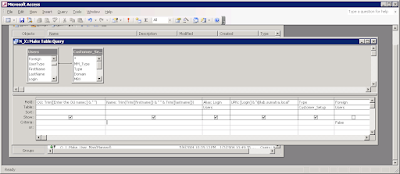
The script we wrote requires five columns of data – the OU, the descriptive name, the alias, the UPN, and the account type. You can build this file in Excel, or Sumatra customers can use data from the Users table. (If you’ve got a database v8.7.5.2+ from Sumatra, the query you can start with is called “N_X”.)

Here’s how each of the columns are defined:

  1. OU: “Users”
    Note : If you have different OUs for your users and resources, remember to change them here.
  2. Name: Trim(Trim([firstname]) & " " & Trim([lastname]))
  3. Alias: Login
  4. UPN: [Login] & "@lab.sumatra.local"
    Note : Remember to change the lab.sumatra.local to your test lab domain
  5. Type
    Note : The criteria will be Individual OR Resource
  6. Foreign (uncheck the show box, and apply a criteria of false)

    Here’s a screen shot of the query:


If you are running MS Access, save the query, then right-hand click on the query name, and Export. (If you are running the N_X query, it produces a table because it “prompts” you for information. Export that table.) You want to export:

  1. As type “Text”,
  2. Enter the file name with an extension of .CSV. Select the export button.
  3. Output the fields as “Delimited”,
  4. The delimiter is a comma,
  5. Check “Include field Names on the First Row”, and
  6. Select the Text Qualifier as {none} - not quote (“)
  7. Select “Finish”

Modify the query, and repeat the export process for “resources”.

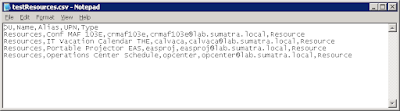
Here’s a sample export of resource account information


Now, run Exchange Management Shell, and “cut and paste” these three commands:

Create a variable “Temp” that contains a password (if you want one)

$Temp = ConvertTo-SecureString "N0Pwd4U" -asPlainText –Force


Import the users. Remember that you will have to make at least three changes:


  1. The “path” to the CSV file

  2. The Organizational Unit

  3. The Database Name

  4. (optional) The Password

    Import-CSV "C:\Sumatra\UserExport\tmp_UserList.csv" ForEach-Object -Process {New-Mailbox -Name $_.Name -Alias $_.Alias -UserPrincipalName $_.UPN -OrganizationalUnit "lab.sumatra.local/client/Test" -DisplayName $_.Name -Database "Striper\First Storage Group\FSG_MBX_DB1" -Password $Temp -ResetPasswordOnNextLogon $false}

Import the resources. As above, remember to change the path, the OU, the DB Name.

Import-CSV "C:\Sumatra\UserExport\tmpResList.csv" ForEach-Object -Process {New-Mailbox -Name $_.Name -Alias $_.Alias -UserPrincipalName $_.UPN -OrganizationalUnit "lab.sumatra.local/resources" -DisplayName $_.Name -Database "Striper\First Storage Group\FSG_MBX_DB2" -Password $Temp -ResetPasswordOnNextLogon $false -Room:$True}

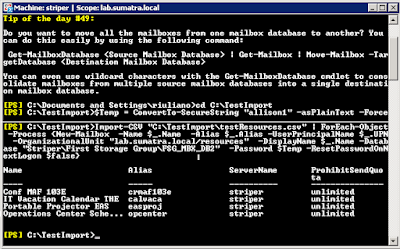
Here’s a screen shot of the results:


Finally, please note that in Exchange 2007 resources are disabled by default. Remember to enable the accounts. Also, for the test lab (and for the insertion), you should NOT set automatic processing of meeting requests (i.e. -automateprocessing:AutoAccept).

THANKS to sharp-eyed reader Vince for pointing out an error in one of our lines (corrected Oct. 4, 2007)!

Thursday, July 12, 2007

Migrating to Exchange 2007

Things are really busy here in Sumatra (which is not in Asia but is rather an autonomous people's republic just outside of Cambridge, Massachusetts). Currently the user count of clients waiting to migrate to Exchange 2007 from Meeting Maker and Oracle Calendar is over 50,000 (the user count of prospects waiting on Zimbra is less than a tenth of that so we budget our time accordingly).

And we have good news!

On Monday we released the Exchange 2007 insertion code to a client with 3000 users for their test environment.


As with our other migrations this runs server-to-server, reproduces meeting guest lists, responses, and recurrence patterns as closely as possible, and includes the famous Sumatra "Undo" capability.

Preliminary field results are good and we'll update you as we proceed.

Thursday, June 21, 2007

How many Recurring Appointments Does it Take to Screw Up Outlook in E2K7?

Editor's note: Yipee! As of 2/28/2008 Microsoft found and fixed this in the "Update Rollup 1 for Exchange Server 2007 Service Pack 1" (see: http://support.microsoft.com/kb/943371/)


The answer: 1300 (not 1301, we mean 1300)

While debugging our insertion technology for migrations from legacy calendaring systems into Exchange 2007, Russ decided to insert 23,000 appointments into a single calendar (which is not as rare a real-world occurrence as you might think).

When we narrowed th einsertion to just recurring items we found a hard limit at 1300:


Interesting variation on this: even with this error we have no problem adding one-time meetings or appointments -- but the second we try to make them recurring the error pops up.

We were really surprised to be getting CDO errors server-side, especially since CDOEXM is obsoleted and CDOEX is denigrated in 2007, and our new insertion code is based on EWS and has had all CDO-specific code ripped out of it with the diligence of a vegan removing meat and dairy products from their diet.

The specific Outlook error message: "There is not enough memory available to perform the operation." led us to some server-side errors that looked like this:

Exception type: Microsoft.Mapi.MapiExceptionNotEnoughMemory
Exception message: MapiExceptionNotEnoughMemory:
Unable to save changes. (hr=0x8007000e, ec=-2147024882) Diagnostic context
The event logs are EXCDO errors
Event Type: Error
Event Source: EXCDO
Event Category: General
Event ID: 8199
User: N/A
Description:
Calendaring agent failed in message save notification with error 0x8007000e on judy@lab.sumatra.local: /Calendar/test5.EML

We didn't find anything on specific 2007 problems, but this does sound very similar to an existing 2003 problem: You cannot save or delete a recurring appointment from a Calendar that is maintained on an Exchange Server 2003 computer, aka KB 892524.

So we wanted to put this up to let folks know and see if anyone else had been experiencing this problem.

Friday, June 01, 2007

Meeting Maker to Zimbra Migration

So given the fact that Zimbra is an open source calendaring system and Meeting Maker is the definition of legacy proprietary -- what can come over and what cannot?

Let's deal with the limitations first of all.


Meeting Maker calendar attributes that we do not transfer to Zimbra:

  • Private activities: We're taking this attribute along so that when Zimbra supports Private appointments (This is coming in their next version 5.0) it will be there -- but the current version has no way of (not) displaying them.

  • "Weekend move": Zimbra does not have this functionality so affected meetings will not move.

  • Comments: We've been dropping these for five years in Exchange migrations and there's been no complaints.

  • Colors / Labels: The Zimbra palette is very different from the primary colors of Meeting Maker so we don't even try to match colors.

  • Proxies: We extract them from Meeting Maker we'll look at what we can do to insert the same proxy rights (thank you to KevinH who with amazing speed pointed out Zimbra DOES have the ability to Share calendars - I just wasn't looking hard enough)

  • To-Dos: Zimbra has capability for to-dos in the user interface after version 5.0. So only supported for 5.0.

  • Optional / CC / BCC guests: Zimbra hdoes not have this functionality so we make all guests Required guests except for BCC (which would defeat the original purpose of a BCC) and respond appropriately. BCC guests get the meeting put in their calendar separately from the rest of the distribution list.

Meeting Maker calendar attributes that transfer to Zimbra:


  • Recurrence patterns (we even think we have a chance of solving the infamous "Refrigerator Bug" we always warn you about)
  • Meeting Agendas
  • Guest lists
  • Guest responses
  • Meeting Exceptions
  • Guest exceptions
  • Contacts
  • To-Dos in Version 5.0.
  • Banners
  • Holidays (we can insert into each calendar separately since Zimbra does not have server-wide holidays)
  • Conference Rooms
  • Resources
  • Time Zones

Please keep in mind this is a fluid list and we're likely to change a few things over time as new functions are added, as we get more clever in our migration implementation, or as we discover "gotchas" that are currently hidden to us.

Keep in mind we're doing all this server-side with no end user intervention.

The one functionality we're striving to add is the one that many of you have found so useful for testing in the past: UNDO.

We'll keep you informed as this migration technology develops.


Thursday, May 24, 2007

Meeting Maker to Zimbra Migration Function Mapping

Based on requests from the field we've begun creating a full-function migration path from Meeting Maker to Zimbra calendar. As with our other migrations this method preserves recurrence patterns, guest responses, and the live nature of meetings. We have a prototype running in our lab the results from which are shown in the screen shots below.


Let's say Adam invites Claudette to three meetings, which in Meeting Maker she Accepts, Declines, and Decides Later.

Adam's calendar looks like this in Meeting Maker:


And after migration Adam's calendar looks like this in Zimbra:


Claudette's looks like this in Meeting Maker:


And after migration Claudette's calendar looks like this in Zimbra:


Note that the model for display of calendar state information is completely opposite between the two products. In Meeting Maker, the proposer / owner of a meeting is the one who sees an instant display of guest response status. In Zimbra, it is the guest who has the "one glance" view of her response status. In going from Meeting Maker to Zimbra this radically simplifies things for the guest (especially compared with the clunky "proposals box" in Meeting Maker). However, it does make it harder for those used to the symbols Meeting Maker uses to manage meetings to see them at a glance. This information does display very handily in the proposer's mail Inbox as guests make decisions.

Note that we are opting to map "Decide Later" as "New" in Zimbra rather than "Tentative" to highlight the need to make a decision on the meeting.

Wednesday, May 16, 2007

E2K3 to E2K7 Upgrade Problem: Exchange Resource Manager

Two of our favorite people on the planet, Nancy and Yoly at Qualcomm, report problems with Exchange Resource Manager resources when going from Exchange 2003 to Exchange 2007.

Symptoms
Meeting invitations/updates sent to conference rooms that have been moved from Exchange 2003 with ERM to Exchange 2007 with resource calendar assistant are ignored and/or deleted without being processed.

The Problem
ERM has a bug that causes mailbox attribute 0x8217 to be set to 1 (organizer) when it places meetings on the calendar.

In OutlookSpy you would see this:


A Microsoft representative was able to confirm via testing that when 0x8217 is altered prior to the resource mailbox being moved from Exchange 2003 to Exchange 2007 the E2k7 Resource Calendar Assistant is unable to act on the meeting invitation/update and treats it as a non-meeting message (deletes it).

The fix is to set 0x8217 to 3 (invitee), with potentially 1000s of meetings with this issue it would be very time consuming to do it manually, so we wrote one to fix it.

Not surprisingly we put it into the Sumatra Utilities.

The latest version has the following additional flags:

/ERM:fix

This can change all calendar items with x8217=1 (from ERM) and set the value to 3.

If the /ERM switch is used without the :fix then the tool will run and produce counts.

If the ":fix" qualifier is used, then the appointments will be updated.

Can also be used with /e (show all) and /s (summary)

So for example, looking at the resource "LCD":

su /ERM /u:lcd /e

Gives the following REPORT in outfile.txt

User:lcd
Resource Mtg Organizer Mtg Name MtgStart MtgEnd Meeting Type
Validated lcd lcd - test test test - - Appointment
1 Resources processed.
1 Total meetings read.
1 meetings with ERM flag=1
0 meetings skipped (didn't have flag=1)
ReadFrom:
WroteTo: outfile.txt

su /ERM:fix /u:lcd /e

Will fix and record which ERM-managed meetings are repaired.

Saturday, April 21, 2007

Been working with the Zimbra calendaring functions

Just because we get asked about everything we've started taking apart the Zimbra calendaring functions. In general -- it's not up to Exchange / Outlook standards (so far), but truthfully it's not bad (i.e., a corporation would take it over giving all its calendaring data to Google any day).


Things I really like about it -- the way accepted, declined, and tentative meetings show up with varying degrees of transparency. Very intuitive, very elegant:


There's also a fairly decent schema for resources.


On the other hand there's zero concept of private activities or degrees of delegate access.


Calendar migration from Outlook via PST is better than we typically see with most packages. Zimbra manages to preserve the recurrence pattern of meetings and exceptions, and there is an option to change your email address on meetings from your former email to your new one if you're changing.

On the downside, it doesn't change guests' email so when I brought it up in our test lab (changing domains) I had outdated guest lists. Migration is also done on a single user basis (making it a pain if you have a large base you're migrating).


I didn't bother with the Domino or GroupWise migrators.

Friday, April 06, 2007

We've noticed everyone else with a blog is into visuals

We've noticed that everyone else with a blog has visuals to publish and since we're calendar server wonks this puts us in a rather difficult position (calendars looking so boring and all) -- but we do have this image:

of a T-shirt from a migration we did into Exchange of a legacy calendar system called "Meeting Maker."

We moved 9,900 users and resources that weekend.

Thursday, April 05, 2007

Update to Sumatra Utilities - current version 2.3.25

Kudos to Shabana at Marfic who found a bug in holiday insertion with the Sumatra Utilities.

We had to rev the code so that holidays would insert correctly with the new CDO that Microsoft issued to cause fix the DST fiasco.

If you're trying to insert Holidays please use version 2.3.25.

Monday, April 02, 2007

Exchange 2007 Installation for 2003 Coexistence -- Beware of this....

We were trying to install Exchange 2007 on one of our lab servers so we could continue to coexist with an existing Exchange 2003 domain.

If you are trying to do this:

Make sure you are running the install as Domain Admin and Schema Admin (and for good measure also an Enterprise Admin).

We neglected to do this and found intermittent problems throughout our initial configuration.

Yes -- it's obvious in hindsight -- but it was not obvious to us on Thursday afternoon when we were considering taking sledgehammers to our hardware.

Had we done this using VMware's 64 bit emulator we could have rolled back Exchange and tried again. Instead, we'll be reformatting and trying again.
We're hoping someone else will benefit from our experience.

Thursday, March 22, 2007

Migrating iPlanet Calendar to Exchange via SuPump

Over the last five years of doing calendar migrations we've heard of pretty much every legacy calendar system out there. One that comes up now and again is iPlanet, once bundled with Netscape (remember them?).

iPlanet has a tool: csexport.

The file extension of the OUTPUT file (.ics or .xml) determines the format it will export to: ither iCalendar or XML

So since suPump.exe takes an XML file as input for incorporation into Exchange, this gives a quick way of server-side migration.

You use it as follows:

csexport -c jsmithcal calendar jsmith.xml

then

suPump.exe /k /AT:UserID /u:jsmith /DT:A /file:"jsmith.xml"
Will add appointment data for a UserID where the XML data is in file “calendar.xml”. This command does not clear the calendar calendar before inserting data.

Tuesday, March 20, 2007

Sumatra Pump Contact Schema

SuPump.exe uses the following fields for inserting contacts. Size limits are up to available limits in Outlook.


ContactID: alpha numeric identifier (can be left blank)
ContactNum: Contact Number
OwnerUserID: UserID or mailboxAlias
FirstName:
LastName:
Title:
Dept:
Room:
Company:
Address:
City:
State:
Zip: XXXXX-XXXX
Country:
Email:
HomePhone: XXXXXXXXXX
WorkPhone: XXXXXXXXXX x XXXXX
Fax: XXXXXXXXXX
MobilePhone: XXXXXXXXXX
Pager: XXXXXXXXXX
OtherPhone1: XXXXXXXXXX
OtherPhone2: XXXXXXXXXX
OtherPhone3: XXXXXXXXXX
Custom1
Custom2
Custom3
Custom4
NoteInfo :additional information

Sunday, March 18, 2007

If an attendee to an occurrence of a recurring meeting is removed then the series is updated, the removed attendee is re-invited.

Chris Quinn from Milwaukee writes that:

If an attendee to an occurrence of a recurring series is removed.

Then the series is updated.

The removed attendee is re-invited and the meeting shows back up on their calendar.

The following steps can be followed to reproduce the error.

1. Create a recurring meeting with “Organizer 1” and “Attendee 1” for at least 2 days.
2. Open any occurrence of the meeting and remove “Attendee 1” and send the update
3. Open the series and make any modification(e.g., Add a note to the details) send the update.

You should notice that “Attendee 1” still has the meeting on their calendar, however when you open the occurrence of the meeting that had “Attendee 1” removed, you will notice that “Attendee 1” is not in the meeting.

Chris further adds:
This is not a problem in CDO 1.21 .... This is a problem in Outlook. When a recurring series is updated it does not send the correct updates for the occurrences.
This is similar to a problem Microsoft has acknowledged with resources of which we had written earlier:


We've had reports of meeting locations being overwritten to exceptions to
recurring meetings. As Microsoft KB Article 916108 shows, it is an acknowledged bug in Exchange.

Saturday, March 17, 2007

Sample Syntax for Exchange Insertion with the Sumatra Pump

To read and insert a file contacts.xml into “Sumatra.com”. Tags the items with the default keyword
supump.exe /dn:Sumatra.com /file:contacts.xml /k

Insert one appointment for USERID=37238L. Remove data prior to insertion. Read source data from http (oracle server).
supump.exe /UNDO /k /AT:userID /u:37238L /DT:A /http:"http://oracle-dev.site.edu/dart/harpo/" /PKG:"EXCHANGESYNC_PKG.run_calendar?userid="

Appends one appointment for ExchangeAlias T_L to existing data (missing /undo)/ Read data from http.
supump.exe /k /AT:Exchange /u:T_L /DT:A /http:"http://oracle-dev.site.edu/dart/harpo/" /PKG:"EXCHANGESYNC_PKG.run_calendar?userid="

Remove user’s 37238L’s Appointment data that is tagged with the default keyword
supump.exe /dn:Sumatra.com /undo /k /u:37238L

Insert appointments for USERIDs in a text file. Remove appointment data prior to insertion. Read data from http.
suPump.exe /UNDO /k /AT:UserID /in:"F:\Sumatra\Clients\UserIds.txt" /DT:A /http:"http://oracle-dev.site.edu/dart/harpo/" /PKG:"EXCHANGESYNC_PKG.run_calendar?userid="

Insert appointments for ALL exchange users with USERIDs in a text file. Read data from http. Remove appointment data prior to insertion
suPump.exe /UNDO /k /AT:Exchange /ALL /DT:A /http:"http://oracle-dev.site.edu/dart/harpo/" /PKG:"EXCHANGESYNC_PKG.run_calendar?userid="

Add appointment data for one UserID where XML data is in file “calendar.xml”. Clear calendar before inserting data.
suPump.exe /undo /k /AT:UserID /u:37238L /DT:A /file:"F:\Sumatra\Clients\calendar.xml"

Insert contact data for ALL User IDs. Clear contacts before insertion. Read data from http.
supump.exe /UNDO /k /AT:Exchange /ALL /DT:C /http:"http://oracle-dev.site.edu/dart/harpo/" /PKG:"EXCHANGESYNC_PKG.run_contact?userid="

Insert Task data for User IDs in a file. Clear task data before insertion. Read data from http.
supump.exe /UNDO /k /AT:UserID /in:"F:\Sumatra\Clients\UserIds.txt" /DT:T /http:"http://oracle-dev.site.edu/dart/harpo/" /PKG:"EXCHANGESYNC_PKG.run_task?userid="

Insert all data into the domain name “lab.sumatra.com” for aliases defined in the file IT_Test.txt. Obtain the data from the web, and tag it with keyword testrun4
Suxml /dn:lab.sumatra.com /k:testrun /u:37238L /k:testrun4
/HTTP:"http://oracle-dev.site.edu/dart/harpo”
/pkg:"EXCHANGESYNC_PKG.run_calendar”

Friday, March 16, 2007

Reports of problems with solution to KB 932511

Chris Quinn, one of our brethren calendar and scheduling wonks, has reported an additional problem with the solution to KB article 932511: Exception meeting requests are deleted from the calendar in Outlook 2003 when recipients use a CDO 1.21 application to accept the master meeting request


This of course comes up because of the DST issue in North America, in his case he had an exception to a meeting that had been scheduled to another resource. The fix on 932511 and the Rebaser put the exception back on the ORIGINAL resource.

We'll keep you updated on if there is a fix to the fix to the fix (we think the recursion only goes that far, but after three we just lose interest and move on to other projects).

Chris also reports that:
Because we forced all the updates we also found out about another
problem. We found that OWA views can differ significantly from the Outlook
views. So we found another article that was quite interesting.
I thought you'd get a kick out of it. Now we can all POOF our calendars…
http://blogs.msdn.com/stephen_griffin/archive/2007/02/21/poof-your-calender-really.aspx
NB: To all of your looking to migrate Proxies and Designates from legacy calendar servers to Delegates in Exchange -- we need to use CDO 1.21 to accomplish this and the acknowledged memory leaks (see KnowledgeBase Article 891509 A memory leak condition occurs when you create a CDO program or a MAPI32 program to log on or log off many mailboxes in Exchange Server 2003 SP1) are one reason we treat this very carefully. See also KBs 901014 and 913643.

Syntax for SuPump.exe

The Sumatra Pump (which on occasion we pronounce "SumPump") uses the following syntax (which will be familiar to all of you using the Sumatra Utilities):

suPump /dn:domain /sn:servername /k:kwd /all /u:usr /in:infile /at:acct_type /dt:data_type
/out:outfile /undo /v:file /http:url /pkg:p
where:

/dn:domainname =Run on this "domain name"

/sn:serverName =The server name

User
/at:acct_type=Account type (acct_type=Specific or Exchange) default is Exchange alias.
/all=Retrieve ALL Aliases with SpecificIDs (employeeID)
/in:infile=user INput file, one Exchange Alias or SpecificID per record (default infile.txt)
/u:user =process this Alias or SpecificID User (supersedes /in:)
SpecificID in this case means anything you want to define, an account number or employee ID for example.

/dt:data_type=Data type = Activities, Tasks, Contacts (default is Activities)

/k:kwdstem = Assigns a category during an insert. E.g., /k=holiday2006; Also limits mtgs/appts/contacts/todos tagged with Keyword stem e.g. /k:ca finds ca,car,cat (/k default:mmconv102659080256Z).

/out:outfile=Output file (default outfile.txt)

/undo=remove items from calendar (tagged w/ keyword). Items to be removed is a function of the /dt

Data Location
/file:filestring=passes an XML file (path included) to be processed
/HTTP:URL=Obtain a file to be processed from HTTP address using this URL root. Note, the URL must be enclosed in quotes
/PKG:Pkgname=defines the package name to extract the data. The package will be appended to the URL root to retrieve the data. The package name must be enclosed in quotes.

Monday, March 12, 2007

Sumatra Pump: The Third Way to get Calendar Data into specific accounts

In Exchange there are two ways to get data into a user calendar:


  1. Invite the user to a meeting which they accept
  2. The user or their delegate types an entry themselves
This was too restrictive for a major graduate business school in the Northeast. There was no way for users to "subscribe" to calendar events relevant to their needs, such as course schedules and assignments, on-campus recruiting, and then have those events appear on their calendars.

They asked Sumatra to develop an Exchange server-based tool we refer to as the Sumatra Pump, suPump.exe.

A bit of background

This school built a web-based calendaring solution that offers its students, faculty, and staff a single source to access all academic calendars and schedules including the academic calendar, class schedules, club events, and one-on-one meetings such as the interview calendar. The web-based solution also provided users with a list of contacts and tasks. Users can personalize the solution by setting preferences to select the calendar data they wish to receive. End users wanted the calendar data in Outlook, so the school built an Outlook add-in that allowed users to merge selected calendar data into their Outlook calendar.

Fine and good, but this was manual -- the user had to initiate the command sequence. The school’s IT department wanted a solution that could be scheduled each night to push the requested data into Outlook.

Sumatra automated the calendar data merge process by implementing a server-based “Push” product on Exchange. The goal of this Push product is to deliver calendar, task, and contact updates to Outlook end users on both a scheduled basis and an on-demand basis.
This solution had the following results:

  • Consolidated scheduling data delivery at the Exchange server level;
  • Reduced system maintenance and management costs;
  • Minimized the negative productivity impact of requiring users to initiate the calendar merge sequence, or by re-keying calendar data into Outlook;
  • Extended support to all Exchange clients on-site not served by the client-side VB macro then in use (including, for example, OWA and Entourage users);

The suPump takes as input an XML file. For Activities the file has the following structure:

ActivityID: alpha numeric identifier (can be left blank)
UserID: SchoolID or mailboxAlias
Name: Activity name
Location:Activity location
Banner:True/False - Is this an all day event
Private:True/False - Should this be marked as private
Label:What color label (0-11) corresponds to Outlook labels
Duration:Duration in minutes
ActivityTime:Activity start date and time
LastTime:Activity end date and time
TimeZone:timezone (see below)
FreeBusy:"Free", "Busy", "Tent","OOF"
RecurType: Not implemented for this client
Ongoing:Not implemented for this client
DaysMask:Not implemented for this client
WeeksMask:Not implemented for this client
DaysFromEndOfMonth:Not implemented for this client
Period:Not implemented for this client
Exceptions: Not implemented for this client
Reminder: number of minutes
NoteInfo: additional information

Contacts and Tasks have similar formats.

We've been thinking of using this for simple calendar / contact / task migrations for formats we do not currently handle (iPlanet calendar migration is one of the cases occasionally requested).

This is also something we've looked at as part of a co-existence strategy for alternate calendar servers and Exchange.

Monday, March 05, 2007

Using the Sumatra Utilities to archive appointments

In our continuing effort to make sure you don't think of the Utilities as something just to use to fix the looming Exchange DST crisis, we have a new feature to blog about:

archiving

Aside: you multinational companies shouldn't think it's almost over! I've gotten at least two inquiries from Europeans who are wondering about using the Utilities when the European Union reviews DST for its member nations. And "just move to Exchange 2007" is not the clear answer for everybody.

So why use the Utilities to archive? You could use automatic archiving to a PST file -- which will reduce the size of your local data and speed things. BUT if you want easy access to this data and still want to speed your calendar display, you can use the utilities to move all appointments before a certain date to a specified archive folder.

This gives you the best of both worlds: Better speed AND easy access (if you need it).

So to move all of user “riuliano”'s one-time (non-recurring) appointments before 8/2/2006 to a folder called “My Old Cal Items” use this command:

Su /u:riuliano /dt:8/2/2006 /mc /fn:"my old cal items"

If you do not have your aliases as SMTP addresses, use this syntax:

Su /fn:”my old cal items” /mc /dt /smtp /dn:lab.sumatra.com /u:russ_iuliano@lab.sumatra.com

to move appointments for user russ_iuliano@lab.sumatra.com (identified by SMTP address, /smtp) one-time (non-recurring) appointments before yesterday to a folder called “my old cal items”.

Wednesday, February 28, 2007

Not sending Updates? Check for meeting corruption with the /x flag.

It's easy to understand why you might find the Update storm a hassle. And you've probably made sure your Microsoft reps have heard this.

So the latest Microsoft Time Zone Update tool lets you suppress Updates.

But, after you've read the warnings about what could happen if you suppress Updates in KB 933146, you should also check out some other warnings about this being contraindicated behavior in the following other Microsoft articles:

As always -- our credo is "test the snot out of software in your lab before you deploy to your production environment." If you have no problems in your lab then odds are in your favor when you move to production.

Quick Test for Corrupt Meetings

In the course of various post-migration follow ups we've heard of corrupt / damaged meetings (and improper updates is only one of the possible vectors of infection). So the Utilities have a /x flag to check:

su /u:exec_cr /x

Will look for mis-matches (i.e., a meeting in the OWNER's calendar that is in a different time / place from the entry in the calendar for the Executive Conference Room (exec_cr).

This particular flag got most of its use early on in smaller Exchange installations, so it currently might not scale to large organizations very well (but neither did some of the other flags until a few weeks ago).

Options for Oracle Calendar to Exchange Migration

There are three good options for administrators looking to solve the problem of moving Oracle Calendars to Exchange. We are restricting this to methods that can be accomplished mainly server-side.

  1. Use Oracle Connector for Outlook, save the data to a PST and then Exmerge into Exchange. This is simple, inexpensive, and off-the-shelf, but OCFO is slow (excuse me, performance impaired) and this method does not preserve state information (i.e., guest lists and responses)
  2. Middle path: Oracle Calendar tools allow server-side export of calendar information (unicpoutu.exe). It is a fairly straight-forward format to read and with some programming can readily be inserted into Exchange for the appropriate user (Sumatra has tools which do this at about 600 calendar objects per minute). This does not preserve recurrence patterns, but can preserve guest lists. Guest responses are not preserved with this method.
  3. Optimum fidelity: This also requires exporting using the existing Oracle Calendar tools. What it further involves is some proprietary technology which goes through the calendars and re-creates the recurrence patterns of meetings and appointments. This gets done in Sumatra's labs and then is turned into a database that can be inserted into Exchange with our tools. This method is more involved, but it maps all former OCS users tinto Exchange users and preserves all guest responses.

Big Bang vs. Phased Migrations:

Need for an OCS-Exchange Free Busy Connector?

Most calendar migrations we see have been "Big Bang" (i.e., all users at once -- which makes it really easy to preserve all the guest lists and responses). Since December 2006, we've had several inquiries from users about connectors for Exchange calendaring and OCS, specifically for Free Busy queries. We put some brainpower on this and think we have a solution. Come back in a bit for more info.

Thursday, February 22, 2007

Migrating Exchange Calendar to Google?

Those folks at Google could not have picked a better time to bundle their email, calendaring, spreadsheets, and word processing into the Google Apps-Premier Edition package. For one thing I haven't heard the word "Rebaser" used in conjunction with any of their calendaring apps ever. On the other hand, last time I looked at Google their resource manager strategy was non-existent.

So if any of you folks out there are interested in migrating your Exchange calendar data into Google and keeping all the info you need (like recurrence patterns, guest lists, responses, exceptions, all the stuff that makes calendars useful) drop us a line.

And please keep in mind - we are not talking about moving one user account at a time -- our solutions move entire servers of calendar data at once with no user intervention.

We clearly know our way around Exchange calendaring.

Wednesday, February 21, 2007

The /debug flag

Along with the revised /SMTP flag we added a /DEBUG flag to version 2.3.20.

Actually we re-added /debug since it was in previous versions. Before this whole Exchange DST fiasco from Microsoft the Utilities did not run into a lot of widely different organizations so we didn't really need it.

Invoking /debug adds additional information to the error.log file.

If your SMTP addresses do not include Alias@domainname you need the /SMTP flag

In the hundreds of calendar server migrations we've done we've run into just about everything at least once. When we run into them twice we put it into the software so the third time is no problem.

Such it the case with the new, improved /SMTP flag.

You can thank Femi and Ron from T Rowe Price for giving us the concrete example of why we should make it more general. Originally we only dealt with SMTP addresses rather than aliases for automatic meeting archiving. (Keep in mind, the Utilities are one of those Swiss pocket knife tools that does more than DST.)

Why do you want this? If your SMTP addresses do NOT include the address Alias@yourdomain i.e., Joebob.Exchangeadmin@yourdomain.com instead of joebob2321 which is the Alias / Logon ID / directory name which your data is stored under in backofficestorage.

So the NEW version of the Utilities allows you to profile and act on IDs as SMTP addresses using the following syntax:

su /u:joebobexchangeadmin@yourdomain.com /DST /SMTP

You can also use this syntax with SMTP addresses in an input file.

Main symptom of the need for this syntax:

  • You are able to "drill down" in backofficestorage using the subst command and see calendar items
  • BUT you are still getting -13 errors

February 25, 2006: We're adding this capability to the /a and /db flags (which we have done and are testing now). Owing to some very bad behavior by a major company founded by H Ross Perot we're deciding whether to release this to the public or not.

Tuesday, February 20, 2007

Permissions - Your most likely error

Let's say you have the Sumatra Utilities installed and are getting an error with one of your users (typically -13 User Does not Exist on this server). And your error.log file looks something like this:

Debug: Commandline: /u:riuliano /DST:ALLDATA /DN:lab.sumatra.local riuliano WAS NOT Validated (User Does not Exist on this server) url:file://./backofficestorage/lab.sumatra.local/MBX/riuliano/-13NOT Validated:

Easiest way to make absolutely sure of permissions is to walk the tree using the account you're using to get to this:

  • Shell into DOS
  • Use the command subst o: \\.\backofficestorage
  • You should be able to drill down to the mailbox you want to profile (if you cannot you either do not have permissions and need to fix it, or the user is not on that Back End server)
  • See the following screen shot example

NOTE: please remember to remove the temporary drive when you are done (and BEFORE you close the DOS window) by entering

  • subst /d o:

Why do the Utilities require .NET Framework 2.0?

We have just gotten our second contact from a user who was wondering "Why are the Sumatra Utilities built with .NET 2.0?"

A fair question - a few of us here at Sumatra have been frustrated by the additional overhead and complexity that .NET 2.0 entails and yearn for the old version of the Sumatra Utilities which did not require 2.0 (and can be downloaded here). Remember it's a year old, so there is NO /DST switch but the /a for Accepting invitations and the /db for double-booking are there (but in the old version /db only looks 15 days ahead).

So why do we require it?

Security.

As the article New and Improved Security in the .NET Framework 2.0 shows, .NET 2.0 has a much stronger security model, and that was a very hard argument to refute.

Saturday, February 17, 2007

/DST:alldata -- you can get even MORE info from Exchange

Suppose totals are not enough and you really need to be able to get a log of ALL meetings and appointments that are in the DST interval. Is there a way to do that in the Sumatra Utilities?

Absolutely, and it does not even require you download a new version.

The command

su /u:zyg /DST:alldata

will put into outfile.txt all of the meeting and appointment titles in the DST interval for user "zyg", with the Start Times, End Times, what it thinks the Rebased Time Zone will be, the organizer, pretty much all the information you want to have if you need to have a safety net for your critical schedule users.

The output file is very easy to parse:

User:zyg
Alias MtgStartTime(UTC) MtgEndTime(UTC) Timezone Rebased TZ? Mtg Name Organizer Meeting Type
zyg 3/10/2007 5:00:00 PM 3/11/2007 1:00:00 PM (GMT-05:00) Eastern Time (US & Canada) 10 Appointment crossing new DST boundary 5:00 PM Sat to 11:00 AM Sun zyg@sumatra.local Appointment
zyg 3/12/2007 10:00:00 AM 3/12/2007 10:30:00 AM (GMT-05:00) Eastern Time (US & Canada) Test recurring - zyg has client zyg@sumatra.local Recurring
zyg 3/12/2007 10:00:00 AM 3/12/2007 10:30:00 AM (GMT) Greenwich Mean Time : Dublin, Edinburgh, Lisbon, London Recurring Outlook meeting in GMT passing through Delta jam@sumatra.local Recurring
zyg 3/12/2007 10:00:00 AM 3/12/2007 10:30:00 AM GMT -0500 (Standard) / GMT -0400 (Daylight) OWA Recurring meeting - GMT jam@sumatra.local Recurring
zyg 3/12/2007 1:00:00 PM 3/12/2007 1:30:00 PM (GMT-05:00) Eastern Time (US & Canada) Every Monday 10:00 AM zyg@sumatra.local Recurring (Exception)
zyg 3/12/2007 5:30:00 PM 3/12/2007 6:00:00 PM (GMT-05:00) Eastern Time (US & Canada) 10 Tentative zyg@sumatra.local

The most successful strategy we've heard of is to do a "before Rebaser" and "after Rebaser" snapshot of the data most crucial to you.

We apologize for constantly using the examples of "zyg" and "russ", but when we used "ben" and "jerry" we used to get stern letters.

Wednesday, February 14, 2007

"Correct Accept" for the Coming DST Update Storm: Call for Betas

In one of those crazy "Aha!" moments that strike Russ and Zyg every so often (in this case while Russ was on a train back from NYC on the cellphone with Zyg snowed in in Boston discussing the dreaded DST Update Storm) we think we have an implementable solution based on Rhino that holds the promise of:
  • Responding correctly to Updates based on what a guest had responded to begin with (so if the guest DECLINED originally or hasn't responded yet it won't put it back in her calendar)
  • Be easy to install and configure (I.e., you won't see large parts of the Rhino configuration interface for those of you who find it daunting)
  • Be easy to remove once you're done
  • Touch ONLY "Update:"s (With mainstream Rhino installed you will get automatic acceptances for ALL invitations while Rhino is active)
  • Given all the above we think it'll work well for Conference Rooms so long as you turn off your various resource managers, but that you should test in your lab.
  • English-language Exchange only (unless someone comes up with a good reason for adding another language)

If there's interest out there in taking this for a spin after we're done with it and put it through some test cycles drop an email to "zyg AT sumatra DOT com"

Keep in mind -- we've been doing this a while but we've never seen perfect code (and we're still amazed at some of the cases you folks can come up with). So we're talking test labs and safe software habits (anybody putting this in production before talking with us is not getting support).

Sunday, February 11, 2007

SU /a Flag -- What order does it use in accepting pending calendar items?

The Sumatra Utilities /a flag does the oldest email invitation first and proceeds to the newest. Think of it as First-Come First-Served.

This helps it to avoid accepting something that is out of date and replaced by a newer item.

It doesn't look at the time of the actual event -- it looks at the time of the event invitation.

Friday, February 09, 2007

Troubleshooting tips for users and FAQ for the Microsoft Calendar DST update tool

Gentle Reader,

Miss Meeting Manners received the following FAQ from our absolutely most knowledgeable and capable client, Nancy from Qualcomm. A soul intrepid beyond imagining she has undertaken this weekend to update all of her 10,000+ Exchange users with the Microsoft DST patches. She sent us this FAQ and invited us to share it with others in the same situation as she is. If you use it please credit her, she deserves it.


Why am I getting spammed with calendar items? Can I delete them all?
Since Outlook uses email to manage calendar updates, the only way to update a meeting and fix the time is to send out the change to all the invitees. Unfortunately the tool does not differentiate between Accepts and Declines so even if you declined the meeting before you will once again have the opportunity to decline the update again. Updates are ONLY going out for meetings that fall between 3/11 and 3/31. It is NOT for every single meeting on your calendar.

What order should a user accept the meetings in?
Accept them in the same order that you would normally. Generally we recommend from oldest to newest, deleting the items that show up as “Out of Date”. Since the Calendar update tool will only be sending 1 update out for each meeting – you should not run into any issues with conflicting updates to the same meeting

My meetings are showing up in a different time zone!
This may happen if the tool has incorrectly determined what time zone your calendar should be in. Contact your Exchange Administrator with the name of the user, what time zone their meetings SHOULD be in – and they can do a one off adjustment if necessary. If the user does not want to wait for a ticket to be escalated – the Help Desk should be able to walk them through running the Outlook Time zone tool – more info located here : http://support.microsoft.com/kb/931667/en-us

Some of my meetings did not get updated- what do I do now?
While we do our best to identify every affected meeting there may be instances where a meeting is missed. Have the user wait until after their Windows machine is patched point – then all they will need to do to fix the meeting is send out an update, moving the meeting to the correct time if necessary. The update will put the meeting back onto their calendar at the corrected time.

Some of my meetings that I created over the weekend were moved back an hour and they shouldn’t have been!
The tool is unable to differentiate between meetings that have the right DST stamp and the wrong DST stamp. We are trying to minimize the number of “good” meetings that get moved by the tool by running it over the weekend and warning people not to create new meetings until Monday. If a user finds a good meeting was moved – please help them send out an update and move it back to the corrected time.

How do I know my meetings are OK?
Put the time of the meeting into the subject. This gives your invitees a very easy way to determine what time the meeting is supposed to be at – even if there are DST display problems.

Now that my meetings have been “fixed” - there is a double booking with the conference room – what do I do now?
We will be running reports before and after the tool is run to identify any double booking problems that may be caused and will assist users to resolve them on a case by case basis in the week after, well before the actual DST change.

Monday, February 05, 2007

Managing your Coming Calendar DST Update Storm: Using Rhino to Auto-Accept

If you are not worried about Meeting Updates for the coming DST change in Exchange, please skip to some other blog.


You can use the Sumatra Utilities /a flag to accept updates (though we'd recommend this mainly for conference rooms and resources).


The Rhino Event Sink can automatically accept for all users on your back end servers. As an event sink it operates as the meeting updates arrive server-side on the user's inbox. This means updates can be accepted or tentatively accepted with NO USER INTERVENTION.

It differs from the Microsoft Auto-Accept Agent in that the AAA is asynchronous and must be registered on each mailbox. Rhino is a synchronous event sink and needs to be registered only once on each back-end server. Rhino also gracefully handles the situation where users have Delegates to respond to calendar invitations.


You can use Rhino with some caveats:
  1. Rhino can Accept or Tentatively Accept -- but it does not recreate the original response if it were a Decline. We do not have this restriction during a calendar server migration but we have complete control over that situation and we got the same advance notice you all did of the Microsoft DST Update method.

  2. If you are running Cached Exchange Mode do not enable "Replies" processing, that will result in users getting conflict messages due to an Incremental Change System (ICS) issue in Exchange 2003 sp2

  3. You can limit Rhino processing to a defined Group.
  4. Exchange 2003 only (Sorry Exchange 2000 users but the Sumatra Utilities will happily work in that environment).

DST Updating in Exchange: What the Heck Happened to my Managed Resources?

So let's say you've successfully modified the Time Zones for your Exchange Server, Outlook clients, and run the Time Zone Update Utility.

Your users haven't spontaneously burst into flame, but they are really curious what's happened to the conference rooms.

Accepting invitations for resources

First off: If you needed to turn off your Auto-Accept agent -- or resource management software, and are not running with an event sink that automatically accepts for you, you may have some meeting invitations in your resource Inboxes. Microsoft AAA you should be OK with as long as you set the Depth to "3" as per Microsoft's instructions -- where we've seen issues it's been with the Third-Party Resource Managers (Who shall remain diplomatically nameless).

The Sumatra Utilities can automatically accept all of these.

Use the following syntax:

su /a /u:conf_room

to accept ALL of the invitations in a given Resource mailbox.

Note you can also use the /in:file.txt command to deal with a group (one line per resource alias).

After doing this of course, it is very reasonable to assume that you may have double-bookings.

Determining Double-Booking

You could open each resource and scan the calendars one day at a time, but enterprise calendaring software is supposed to make your life easier not harder.

To produce an output file highlighting double bookings, enter the following:

su.exe /u:conf_room /DB /ND:45

NOTE – for double bookings, the MAX DAYS (ND) is 45 days from today (you cannot change the start date).

Also this will take the /in:filename.txt parameter.

What if the resource is Triple (or more!) booked?

How much functionality do you want in free utilities? Seriously, we handle that -- but it will do all the cross-pairs of double-booking, i.e., if you have triple--booked meetings "1", "2" and "3" it reports in the outfile.txt report that "1" and "2" conflict, "1" and "3" conflict, "2" and "3" conflict .... you get the idea.

But the good thing is that you've got it in one local place from a relatively speedy method.

An example of part of the output file follows for a quadruple-booked case in room "cr222":

--------------------------------------------------------------------------------
Timer: Start=2/5/2007 5:40:30 AM (ver v2.3.18)
--------------------------------------------------------------------------------

User:cr222Resource Mtg Organizer Mtg Name MtgStart MtgEnd IsDblBooked Meeting Type

Validated cr222
cr222 cr222@sumatra.local 4 2/5/2007 9:30:00 AM 2/5/2007 3:00:00 PM Double Booked with 3 Appointment
cr222 cr222@sumatra.local 3 2/5/2007 10:30:00 AM 2/5/2007 2:00:00 PM Double Booked with 4 Appointment
cr222 cr222@sumatra.local 4 2/5/2007 9:30:00 AM 2/5/2007 3:00:00 PM Double Booked with 2 Appointment
cr222 cr222@sumatra.local 2 2/5/2007 11:30:00 AM 2/5/2007 1:00:00 PM Double Booked with 4 Appointment
cr222 cr222@sumatra.local 3 2/5/2007 10:30:00 AM 2/5/2007 2:00:00 PM Double Booked with 2 Appointment
cr222 cr222@sumatra.local 2 2/5/2007 11:30:00 AM 2/5/2007 1:00:00 PM Double Booked with 3 Appointment
cr222 cr222@sumatra.local 4 2/5/2007 9:30:00 AM 2/5/2007 3:00:00 PM Double Booked with 1 Appointment
cr222 cr222@sumatra.local 1 2/5/2007 12:00:00 PM 2/5/2007 12:30:00 PM Double Booked with 4 Appointment

DST Updating in Exchange - How Big is Your Coming Email Update Storm?

The Microsoft methods for updating Time Zones for the coming DST shift will require that meetings in the relevant time delta be re-proposed.

It does not take a lot of head scratching to realize that this will potentially result in a lot of email traffic on your servers. It's also reminiscent of how the dentist tells you an X-ray only gives you the same amount of radiation you'd get during a day on the beach (conveniently ignoring the fact that she's giving you the same dose in a few milliseconds instead of eight hours).

So your first question is probably: How much traffic can I expect to have?

The Sumatra Utilities (available for free) can give you the answer.

At the command prompt run:

su /u:jsmith /DST

To get a count of all "jsmith"'s meetings and appointments in the relevant region.

The output looks like this:

Alias Num Appts Num Recur Master Num Recur Instances Num Recur Exceptions Total Items Total Cross Check
jsmith 12 2 19 1 34 34

The final number is the total of all affected calendar entries (meetings and appointments) in the area.

If you choose to do only recurring meetings, look at the third number form the left: Number of Recurring instances. Each of those will require two emails: one coming IN to that guest and one going OUT from that guest as a response.

The totals of these for all your users is a close approximation of the total amount of email traffic you can expect. Why is it not exact? Two reasons:
  1. If guests have DECLINED the meetings previously then they're not on the calendar so don't count in the totals but they will receive updates
  2. Users who have been invited but have not yet responded may not have this calendar object on their calendars yet.
A quick look at the output file will show you it's tab-delimited so easy to load into a spreadsheet for analysis.

This will work on resource accounts as well.

Our next topics: How to use Rhino Event Sink to automatically accept all updates and how to use the Utilities to deal with managed resources and discover double-bookings without opening all your resource calendars.