I updated our Exchange servers to CU6 over the US Labor Day weekend and hit a few head-banging errors.
First, CU6 failed on the mailbox role. The solution: remove the Discovery mailbox. Then setup successfully completed. (Remember to recreate the discovery mailbox!)
After I restarted the Exchange servers, mail was stuck in the drafts folder. I tested mailflow using the "test-mailflow" cmdlet, and saw it failed (not that stuck messages in OWA weren't enough):
A quick search pointed to DNS or Security policy problems. Not in our case. Next check, were all services running...."Test-ServiceHealth"
No...Two services were disabled: MS Exchange Transport Delivery (MSExchangeDelivery) and MS Exchange Transport Submission (MSExchangeSubmission.) Restarting those services made the mail flow once more!
Friday, September 12, 2014
Tuesday, September 09, 2014
Sumatra Holiday cmdlet for Microsoft Exchange - Download
Holidays.
Our server-side holiday cmdlet for Microsoft Exchange simply works and has more functionality than the client-side holiday capability Microsoft built into Outlook. And of course an admin runs this server-side rather than hoping users run use Outlook to add holidays client-side.
When we offered it up as a "pay what you want" we got thousands of downloads, and a number of people who actually paid of the "use your fingers" magnitude.
But people keep asking for it, so we're going to let you download it under our advertising model meaning every item inserted will be stamped "Courtesy of Sumatra" in the agenda.
So you may download it here.
If you want to suggest additions or modifications, contact us.
And check this blog or Follow @sumatra_dev to see what we'll support in the future.
If you want to suggest additions or modifications, contact us.
And check this blog or Follow @sumatra_dev to see what we'll support in the future.
Labels:
cmdlet,
Exchange 2013,
holidays,
Office 365,
SuHoliday
Friday, September 05, 2014
Disappearing Contact/Calendar item body fixed in Exchange 2013 CU6
We blogged about clients reporting problems with notes after inserting contacts and calendar items from Beehive and MDaemon migrations April, '14.)
KB 2975003 confirmed this was a problem! The KB says: "...compose or edit a Calendar item by using Outlook Web App...and then save the item. When you open the item in Microsoft Outlook 2013 or Outlook 2010 in online mode, the body of the item disappears." We scrambled and updated our code to set MAPI codes to fix the problem in our code. But they reported their end users were still having the same problem on NEW items.
Now there is a fix: install Cumulative Update 6 for Exchange Server 2013: 2961810
KB 2975003 confirmed this was a problem! The KB says: "...compose or edit a Calendar item by using Outlook Web App...and then save the item. When you open the item in Microsoft Outlook 2013 or Outlook 2010 in online mode, the body of the item disappears." We scrambled and updated our code to set MAPI codes to fix the problem in our code. But they reported their end users were still having the same problem on NEW items.
Now there is a fix: install Cumulative Update 6 for Exchange Server 2013: 2961810
BTW, for customers with legacy tools, CU6 fixes the problem MAPI/CDO clients cannot connect to Exchange Server 2013.
Tuesday, August 19, 2014
Western Australia Holidays with the cmdlet
We've had some requests from Western Australia lately, so here's the cmdlet working with holidays in OZ.
September 16, 2014 update. Read this post to download the cmdlet.
February 23, 2015: Folks, please leave us some feedback about what you like in the cmdlet and what you'd like changed. We see how many of you are downloading it. We'd love some feedback.
September 16, 2014 update. Read this post to download the cmdlet.
February 23, 2015: Folks, please leave us some feedback about what you like in the cmdlet and what you'd like changed. We see how many of you are downloading it. We'd love some feedback.
Wednesday, August 13, 2014
KB28810011 will mess with your Outlook 2013
From Tony Redmond: Update causes Outlook 2013 to fail to open archive mailboxes.
Arm yourselves with knowledge.
Tuesday, August 12, 2014
Server-side cmdlet for Holiday Insertion into Microsoft Exchange
Preliminary video of our server-side holiday insertion cmdlet.
It doesn't look good in full screen mode but you get the idea how it works.
Sunday, July 20, 2014
What the heck are all you guys in Turkey doing reading this blog?
Dear Turkish Readers,
I get why the USA and Western Europe read this blog.
I get why India, China, and Russia read this blog.
I get why South America and Africa do not read this blog.
What I do not get is why we have so many hits lately from Turkey.
Can any of you guys please enlighten me?
I get why the USA and Western Europe read this blog.
I get why India, China, and Russia read this blog.
I get why South America and Africa do not read this blog.
What I do not get is why we have so many hits lately from Turkey.
Can any of you guys please enlighten me?
Thursday, July 17, 2014
Human Resource Conference Room Bookings as Indicators of Impending Doom
If you follow this blog you probably also know as the New York Times puts it, A Large Round of Layoffs Is Expected at Microsoft.
This is the key sentence "Human resources managers have begun reserving conference rooms for most of Thursday, most likely a sign that they will be used to meet with laid-off employees..."
Now HR and Conference Rooms is almost never a good combination. I flash back to my days at Lotus (pre-IBM), when the only thing worse than a group meeting with HR was a group meeting with HR with a few dozen donuts -- translation: "re-organization time!".
What I find interesting is that the conference room bookings are the most direct and compelling evidence.
Microsoft folk, if you wanted to get really subtle in your analysis of your future chances, just use Outlook to look for free time in the conference room YOUR corporate mouthpiece.... er.... Human Resources Manager... uses.
This is the key sentence "Human resources managers have begun reserving conference rooms for most of Thursday, most likely a sign that they will be used to meet with laid-off employees..."
Now HR and Conference Rooms is almost never a good combination. I flash back to my days at Lotus (pre-IBM), when the only thing worse than a group meeting with HR was a group meeting with HR with a few dozen donuts -- translation: "re-organization time!".
What I find interesting is that the conference room bookings are the most direct and compelling evidence.
Microsoft folk, if you wanted to get really subtle in your analysis of your future chances, just use Outlook to look for free time in the conference room YOUR corporate mouthpiece.... er.... Human Resources Manager... uses.
Tuesday, June 24, 2014
#Oracle Beehive to #MSExchange through a proxy -- alternate strategy
We never shy away from saying that migrations are hard.
We also never shy away from saying "Nope -- you're in over your head."
And we thought both of these were going to come to bite us as we looked at migrating Oracle Beehive from behind a proxy server.
A set of test data we would normally expect to migrate in a few minutes was taking hours.
And there was no way to remove the proxy.
Running the calculations told us the full set of users would take four days on a single instance. We could not put someone through that and maintain anything like guilt-free sleep patterns. We put on our thinking caps and came up with the idea of exporting the data into a format we could use (Oracle Beehive IS a SQL database after all), taking that outside the firewall, importing it into an Oracle database, and then inserting the data (the final step herewith shown):
Problem solved.
If it's applicable to you we'll take you through it in your trial phase.
Tuesday, June 17, 2014
Oracle Beehive to Microsoft Exchange Calendar Migration: Beehive-Buddy
Oracle Beehive seems to be the legacy system folks are replacing at record pace these days.
So we've been burnishing some of the features.
Latest one: Beehive Buddy Lists.
So we've been burnishing some of the features.
Latest one: Beehive Buddy Lists.
Any contacts tagged as Beehive-Buddy will not migrate. This reduces the number of duplicate contacts.
Thursday, June 12, 2014
How to Stop Facebook From Using Your Browsing History
This is not about calendaring.
But let's face it, none of us democracy-loving folk want to live with the Thought Police looking at our every move.
How to Stop Facebook From Using Your Browsing History is a REALLY useful link.
Remember: if you're not paying for the product, you ARE the product (see:Season 1, Episode 11: To Heck and Back) .
But let's face it, none of us democracy-loving folk want to live with the Thought Police looking at our every move.
How to Stop Facebook From Using Your Browsing History is a REALLY useful link.
Remember: if you're not paying for the product, you ARE the product (see:Season 1, Episode 11: To Heck and Back) .
Tuesday, June 10, 2014
Migrating #MDaemon Public Distribution Lists to #MSExchange
To Migrate MDaemon Public Distribution Lists to Microsoft Exchange using our tools, follow this procedure:
- Create a new directory to hold the processed group files.
- Launch the mCalReader_ParseGroupFiles application. Browse to the MDaemon server directory for the group files (these all have an extension of *.grp and the format NAME@Yourcompany.com.grp), and the output directory from Step 1. Ensure the file extension pattern matches your group files (Note: it defaults to @YOURCOMPANY.com.grp)
- Press “Go.” The processing should happen quickly. Then exit the program. In the directory from Step 1 you should have a file called Distributionlists.csv.
- Move the files and the shell cmdlet “DistGroupCmdlet.ps1” to the Exchange server (or any shared/accessible directory)
- Edit DistGroupCmdlet.ps1:
a. Modify $MyDistFileList to point to the
Distributionlists.csv file.
i. Note: the
shell will create distribution lists for all entries in this file. Remove entries that you do not want
migrated/created.
b. Modify $myMigratedOU to point to the OU that
will contain the distribution lists.
Note this is a PATH to the OU, and not a typical OU identifier (e.g.,
ou=xxx,dc=my,dc=com), Sample OU:,
$myMigratedOU = "orca.sumatra.local/Clients/YOURCOMPANY/Lists"
6.Launch Exchange PowerShell, change directory to the location of the script and distribution list files, then run the script: .\ DistGroupCmdlet.ps1.
Notes:
·
If you want to test a few distribution lists:
o Run
the EXE to parse all of the GRP files.
The EXE produces the file Distributionlists.csv.
o Copy
the Distributionlists.csv, the supporting group CSV export files, and the PowerShell script to Exchange
·
Accounts:
o Since
there is a possibility that users might not exist in Exchange, the script
creates the distribution list first, then adds users to the list one user at a
time.
o If
the user does not exist in Exchange, the cmdlet throws an error but continues.
o Also,
the tool does not change any of the SMTP address domains, e.g., email addresses
such as “@YOURCOMPANYmail.YOURCOMPANY.com” will be migrated as “@YOURCOMPANYmail.YOURCOMPANY.com”,
and not “@YOURCOMPANY.com.”
By the way, this was field-proven as the last stage of a migration at a 300 user site over this past weekend.
Tuesday, May 27, 2014
#CalDAV to #MSExchange calendar migration tool
A quick gut-check from our loyal readers: do you guys want a CalDAV to Microsoft Exchange migration tool?
UPDATE December 2016: Folks: We did this.
Tuesday, May 06, 2014
The Cookbook Version of Exchange 2013 Migration Rights
Gentle reader,
No matter what you want to do with calendars server-side in Exchange, you are going to need to become conversant in Exchange permissions. It's the devil's bargain: if you want to migrate all your calendar data and preserve its utility with guest lists and responses, then you need to be able to manage Permissions on your Exchange users.
So here we're putting out our best effort at a cookbook guide to Exchange 2013 permissions for migrations. Even though full-state calendar migrations will never be a purely cookbook operation we think this will get you there (and we have some field experience taking a couple of novices through it this way),
First: GLOBAL ADMINISTRATOR rights are NOT enough. These rights give you administration rights over Exchange / Active Directory, but they do not give you the rights to access mailboxes – which is what you will need to move in data and re-create state.
No matter what you want to do with calendars server-side in Exchange, you are going to need to become conversant in Exchange permissions. It's the devil's bargain: if you want to migrate all your calendar data and preserve its utility with guest lists and responses, then you need to be able to manage Permissions on your Exchange users.
So here we're putting out our best effort at a cookbook guide to Exchange 2013 permissions for migrations. Even though full-state calendar migrations will never be a purely cookbook operation we think this will get you there (and we have some field experience taking a couple of novices through it this way),
First: GLOBAL ADMINISTRATOR rights are NOT enough. These rights give you administration rights over Exchange / Active Directory, but they do not give you the rights to access mailboxes – which is what you will need to move in data and re-create state.
We’re going to take this in stages.
Background. Your ADMINISTRATOR account needs to be able to:
- Use REMOTE POWERSHELL to Log into Office 365
- Create a separate service account (this keeps your ADMIN function separate from your MIGRATION function)
- We call the Service Account EXSU. When you create it, make sure it is mailbox-enabled (you will be sending email on behalf of this account
- Grant EXSU three rights:
- Impersonation
- No throttling. This is relevant (i.e., in your control) only for on-premises Exchange. For Office 365 you will need to contact your Microsoft rep and explain what you are doing and ask throttling turned off for the duration of your migration.
- FULL ACCESS to mailboxes (this makes it easy to use OWA with this account to check the results for individual users in testing and migration)
Start POWERSHELL.
IMPERSONATION: You’re creating a ROLE called “_suImp8” that allows Impersonation and then assigning it to EXSU
THROTTLING: You’re creating a policy called SuThrottling Policy and then assigning
it to EXSU. (Otherwise Exchange 2013 might shut you off mid-migration)
FULL ACCESS: this grants access to ALL MAILBOXES in
your domain to EXSU.
Log in with your EXSU credentials.
You should see this:
This example shows access to Office
365. Obviously if you are going into
your on-premises or your own hosted domain, your URL and service name will be
different.
Now to test FULLACCESS go
to the URL box and modify it as I have with a user on your domain:
Hit ENTER
Now you will be prompted for your end user
mailbox credentials. Use the service
account (EXSU) and the password to access to the mailbox. This is where FullAccess comes in – you don’t
have to crack all of your end users' passwords!
NOW it should display your test users’
mailboxes in OWA
If all of these are successful, now you
can do a test insertion!
Congratulate yourself. Permissions are historically the worst learning curve in a migration.
Thursday, May 01, 2014
Hosted Oracle Beehive to Office 365 Field-Proven
We had an informal bet, Zyg taking the side that Hosted Beehive to Office 365 was not going to work the first time out and Russ figuring that it was.
Russ won.
Data goes in like a champ in the current version of the Beehive migration code.
Since we're having to go through a proxy server performance is much lower than we see in on-premises migrations -- but that is what multiple instances are for. Stay tuned for more news.
Russ won.
Data goes in like a champ in the current version of the Beehive migration code.
Since we're having to go through a proxy server performance is much lower than we see in on-premises migrations -- but that is what multiple instances are for. Stay tuned for more news.
Thursday, April 24, 2014
Burt's Bees calendar Advertising
From the New York Times, Burt's Bees is promoting a new line of anti-aging products via opt-in calendar events.
I first saw calendar spam in Yahoo calendar in 2008. This at least is an active opt-in which I have no problems with.
Going to be interesting to see if it catches on.
I first saw calendar spam in Yahoo calendar in 2008. This at least is an active opt-in which I have no problems with.
Going to be interesting to see if it catches on.
Tuesday, April 22, 2014
The Curious Case of the Outlook 2013 Contact Notes
UPDATE 9/4/14: Microsoft released a fix for this issue. See our Disappearing Contact/Calendar item body fixed in Exchange 2013 CU6 blog post
Found something weird with Outlook 2013.
This showed up in our Beehive to Exchange migration but it would not be limited to that particular situation.
Let's look at the results first. All of these clients were accessing the exact same contact record on our Office 365 test system, though we have confirmed the same behavior with Exchange on-premises as well (no surprise there since this looks to be an Outlook 2013 bug).
Contacts and Notes (including some data we capture to the contact notes either because of EWS bugs or there's no other place to put it) show up fine in Outlook 2007 post-migration.
OWA and the Surface are no problem.
THEN we get to Outlook 2013:
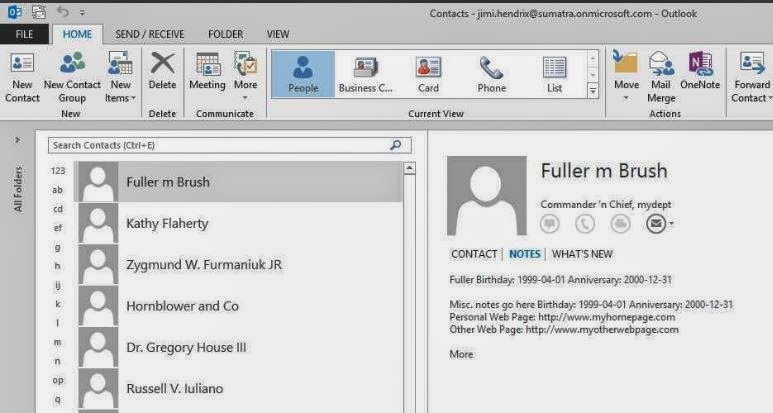
PROBLEM! Where did the Notes go? The situation seems to only show up if you have a contact created using EWS.
This gets weirder because you can CREATE a contact with notes in either OWA or Outlook 2013 and it will properly display and edit in either.
This gets EVEN WEIRDER because in Outlook 2013 you get Notes displayed correctly in the PEOPLE view....
but not in any other view (Business Cards for example):
We think this is fairly definitive proof that Outlook 2013 has a bug in it.
Found something weird with Outlook 2013.
This showed up in our Beehive to Exchange migration but it would not be limited to that particular situation.
Let's look at the results first. All of these clients were accessing the exact same contact record on our Office 365 test system, though we have confirmed the same behavior with Exchange on-premises as well (no surprise there since this looks to be an Outlook 2013 bug).
Contacts and Notes (including some data we capture to the contact notes either because of EWS bugs or there's no other place to put it) show up fine in Outlook 2007 post-migration.
And they show up fine in Outlook 2010.
OWA and the Surface are no problem.
THEN we get to Outlook 2013:
PROBLEM! Where did the Notes go? The situation seems to only show up if you have a contact created using EWS.
This gets EVEN WEIRDER because in Outlook 2013 you get Notes displayed correctly in the PEOPLE view....
but not in any other view (Business Cards for example):
We think this is fairly definitive proof that Outlook 2013 has a bug in it.
Tuesday, April 15, 2014
Exporting Contacts to a CSV file using the EWS Managed API and Powershell
Exporting Contacts to a CSV file using the EWS Managed API and Powershell by Glen Scales will show you how to get this information OUT of Exchange server-side if you want to.
Normally we see people wanting to put this information INTO Exchange server-side, but there are legit reasons for wanting this capability: archiving crucial customer data from former employees, saving vital contact data, legal discovery, migrating to Google, etc.
For the same reasons you will want to check out his scripts in Export the GAL or Address list with EWS to Vcards in 2013 MEC sample 1.
Arm yourselves with knowledge.
Normally we see people wanting to put this information INTO Exchange server-side, but there are legit reasons for wanting this capability: archiving crucial customer data from former employees, saving vital contact data, legal discovery, migrating to Google, etc.
For the same reasons you will want to check out his scripts in Export the GAL or Address list with EWS to Vcards in 2013 MEC sample 1.
Arm yourselves with knowledge.
Tuesday, April 08, 2014
Mailbox Migration to Microsoft Exchange Performance Analysis
Microsoft recently gave guidelines on Mailbox Migration Performance Analysis.
The article is a perfect example of how to drown in data before you come up with any concrete solutions -- if you ever come up with solutions.
Basically, read the article BACKWARDS to have it make more sense.
Look at all the reasons Office 365 can be slow (and there are a lot of them)
Then look at the reasons YOUR side might be slow (the suggestion of "get closer to our data center" is REALLY useful, thanks for that, guys!).
THEN consider putting (more of) this in YOUR OWN control with imapsync. Might as well be frank, the Microsoft data center is a black box and will stay that way. But you can seize more control over how your data is processed on your side of the wall. Read our posts on email migrations to see how this works out in the real world.
And OF COURSE the Microsoft analysis and migration tools ignore calendars, tasks, and contacts, but we've all come to expect that from Microsoft. That is why you have us at Sumatra.
The article is a perfect example of how to drown in data before you come up with any concrete solutions -- if you ever come up with solutions.
Basically, read the article BACKWARDS to have it make more sense.
Look at all the reasons Office 365 can be slow (and there are a lot of them)
Then look at the reasons YOUR side might be slow (the suggestion of "get closer to our data center" is REALLY useful, thanks for that, guys!).
THEN consider putting (more of) this in YOUR OWN control with imapsync. Might as well be frank, the Microsoft data center is a black box and will stay that way. But you can seize more control over how your data is processed on your side of the wall. Read our posts on email migrations to see how this works out in the real world.
And OF COURSE the Microsoft analysis and migration tools ignore calendars, tasks, and contacts, but we've all come to expect that from Microsoft. That is why you have us at Sumatra.
Wednesday, April 02, 2014
Distribution Lists Now Working in MDaemon Calendar Migration
We've been on a mission to completely automate an MDaemon to Exchange migration. Email, contacts, calendars, the works. We'll tell you more about that later after it's fully field-proven.
In this case "the works" also means MDaemon private distribution lists (which in the language of Exchange/Outlook are called "groups") which we have added to our calendar migration application since (as glorified contacts) that is where they belong.
Post-migration in Office 365, it'll look like this:
We do the smart thing in this case: if a contact on the list is on the legacy domain and needs to be mapped to a new domain or a different email, we automatically do that. Users outside the legacy domain we leave alone.
Please note: In Exchange, users create distribution groups by linking to existing contacts (or contacts from Active Directory). This way, when a contact name/email address changes, the distribution group gets updated. However, in the case of this migration, MDaemon does not provide any indicator if the entry is an existing contact. We don’t want to automatically create contacts because if they do exist, the user will see double contacts – something that will confuse them. So communicate to your users that if an email address changes in the private group mailing lists, they will have to either manually edit and fix the name, or delete the name and link it to a previously created contact.
In this case "the works" also means MDaemon private distribution lists (which in the language of Exchange/Outlook are called "groups") which we have added to our calendar migration application since (as glorified contacts) that is where they belong.
Post-migration in Office 365, it'll look like this:
We do the smart thing in this case: if a contact on the list is on the legacy domain and needs to be mapped to a new domain or a different email, we automatically do that. Users outside the legacy domain we leave alone.
Please note: In Exchange, users create distribution groups by linking to existing contacts (or contacts from Active Directory). This way, when a contact name/email address changes, the distribution group gets updated. However, in the case of this migration, MDaemon does not provide any indicator if the entry is an existing contact. We don’t want to automatically create contacts because if they do exist, the user will see double contacts – something that will confuse them. So communicate to your users that if an email address changes in the private group mailing lists, they will have to either manually edit and fix the name, or delete the name and link it to a previously created contact.
Subscribe to:
Posts (Atom)