Thursday, January 15, 2009

Calendar-only Exchange via a server-side rule

We sometimes get asked about running Exchange in calendar-only mode.

Why would you WANT calendar-only Exchange for some users?

Let's say your legacy calendar-only system is on its way out and you need to get with the times (after Exchange, Zimbra, and Google, are there any other options?). It's easier these days to agree on a unified calendar, but there are departments who will give up their legacy email only when pried from their unconscious fingers.

There's no means in Exchange itself of using only the calendar, but some folks at Illinois State University created a server-side rule for calendar-only Exchange.

See http://www.helpdesk.ilstu.edu/downloads/dl.phtml?id=1042
and http://www.helpdesk.ilstu.edu/kb/index.phtml?kbid=1255

Once I found this I found a variety of other universities had solved the same problem.

Virginia Tech's description goes into how to do this on your own (but they kept it client-side).

And UMichigan produced an entire guide for Exchange administrators.

Kudos to all three (and the others I undoubtedly did not find)!

By the way, [MS-OXORULE]: E-Mail Rules Protocol Specification documents as much as you're likely to need to know at the low level about Rules.

The Big Idea

In general, the idea is to Delete any mail not involved with calendaring AND (this is where things get tricky) have your Exchange configured to copy-forward all email to your non-Exchange account.

Since we find enough folks looking to do this, here's our take on the methodology, with screen shots and everything.

I'm going to take you through how to do this using Outlook Web Access. This has a couple of advantages to it: it's simpler for an end-user to do if they're already Linux-enabled and it automatically makes the rule server-side (which is what you want).

  1. Start Outlook Web Access, Click Options and select Rules.

  2. Create a New Rule for Arriving Messages


  3. You will see a warning. Since you want to be calendar-only I cannot see a reason you would want other rules in Outlook -- so nuke away!

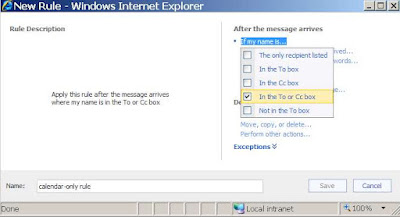
  4. Let's give this an obvious name like "calendar-only rule" and have it apply if the message is TO you or CC'ing you (you with me so far?):


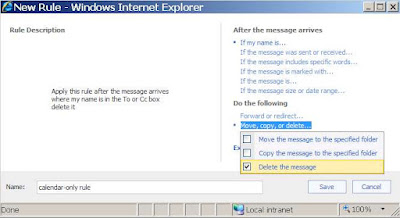
  5. If any message comes in -- we want to DELETE it


  6. EXCEPT if it is a meeting invitation or update to a meeting.
  7. Save it and we are done! (With this part at least -- remember, you need to be configured server-side to copy your email where you want it)
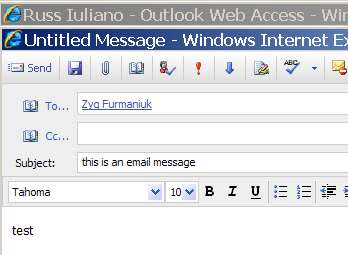
  8. So NOW let's TEST THIS OUT! Let's have another user (call him "Russ") send email to the poor fellow we modified above (call him "Zyg").

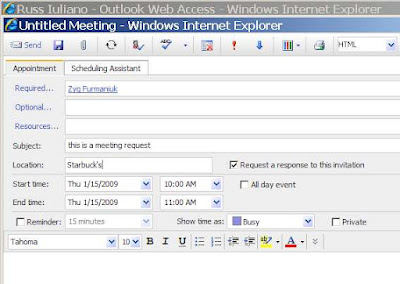
  9. At the same time let's have Russ send Zyg a meeting invitation:

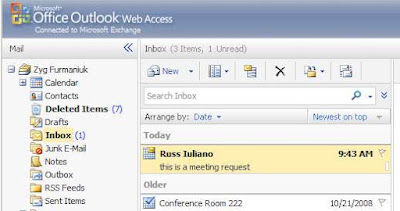
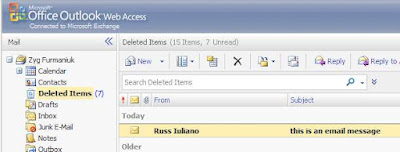
  10. Logging into OWA as "Zyg" we see that Zyg has the meeting request in his inbox,
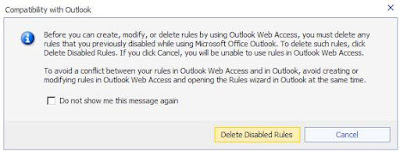

and the email is in Deleted Items. It works.


WHAT REMAINS TO BE DONE
  • You still need to have your Exchange ID set up to copy all email to where you really want it. Given the variability in configurations, which is obvious even from the university solutions given above, we do not want to start documenting how to do this in general. There are simply too many ways to skin that cat.
  • You can also create a rule client-side using Outlook and then distribute it (we toyed with using Illinois State University's rule, and they kindly sent it to us and would have allowed us to put it up for downloading -- many, many thanks, Randy!). We had not seen a solution involving OWA and wanted to add some knowledge to the discussion rather than refer to someone else's.

Wednesday, January 07, 2009

Setting Default Permissions for Exchange Resources

December, 2008. The subject is migrating proxies from Meeting Maker. Among our clients in December were two sites each with 1000 users, about 100 of which were resources. One had 90,000 proxy objects, the other had 5,000.

Why the 1:18 ratio on what were otherwise similar data sets?

The one with 90,000 proxy objects in Meeting Maker wanted to give everybody in Outlook Delegate access to each resource. In round figures 100 resources times 900 people gives you 90,000 Delegates.

So we were looking at using our usual method for setting Delegates (which would take a long time).

But it's actually simpler than that.

Meeting Maker does not have a default level for giving EVERYONE access to a resource.

BUT Outlook DOES!

And PFDAVAdmin makes it easy to propagate these permissions centrally (so long as you have an Exchange Admin who's willing). In this case it's criminal not to use it.

You can set up an import file as we've documented before, using

\Everyone Reviewer

to provide read-only access.

Or (quoting liberally from the documentation for PFDAVAdmin),

The Set Calendar Permissions option enables you to perform a bulk edit specifically to change permissions of the Calendar folder so that a single operation can modify the settings of thousands of users on a server. This is useful for changing the default permissions setting of the Calendar folder of all or many users, so that team members can view other member's calendars. Using Microsoft Office Outlook® enables changing only one user at a time, so the Set Calendar Permissions option is a good solution for this kind of task. In addition to changing the permissions of the Calendar folder, by using this option, a bulk-change also occurs on the permissions of the FreeBusy Data folder (hidden folder) of all the users on a server. If the FreeBusy Data folder permissions were not changed, the users will not be able to access another user's calendar.

I was going to start taking screen shots of how to do this exactly, when I said to myself, "Self, someone must have already done this."

And so they had. Thank Amit Tank whose FAQ: Give Calendar Read Permission on all Mailboxes - PFDavAdmin admirably takes you through this.

For international users, Set calendar permissions with PFDAVADMIN goes over how to filter for translated "Calendar" folders.

Monday, January 05, 2009

CorporateTime versions and migration to Exchange / Zimbra

Usually we see Oracle Calendar Server 9.0.4 ("Coca Cola Classic") but one account in the Boston area is running an older CorporateTime server (looks like version 7) to migrate into Zimbra.

Our new version of the conversion code supports this with the following modifications (they're running on a *nix platform):

uniuser -ls -format %s\:%g\:\:%id\:%no -n 588 -p xxxx > /var/tmp/users.txt
unires -ls -n 588 -p xxxx > /var/tmp/resources.txt
unicpoutu "S=LASTNAME/G=FIRSTNAME" -f exp-lastname.txt 588

unires is the older method for getting resource lists. The format is different from OCS 9.0.4, but we've redone the logic in the OraCalReader to take care of it.

Friday, January 02, 2009

Migrating to Exchange: One Summary from the Trenches

In December 2008 we migrated the school of Veterinary Medicine at the University of Illinois.

Craig there sent us a very gracious thank you note (a rare but welcome occurrence in our line of work) that was also a good summary of what to expect in migrating into Exchange from either Meeting Maker or Oracle Calendar.

He has prepared this version for us to publish here:

With the services of Sumatra Development LLC, Illinois Veterinary Medicine has
successfully migrated 150 accounts from a local Meeting Maker server to a shared
campus-wide Exchange resource.

Interwoven scheduling among administrators and researchers elevates the data to a critical level of importance for the organization. Migrating data from one proprietary package to another, neither of which is governed by a standards protocol, is unbelievably tricky. Yet we were able to accomplish this migration in a transparent manner that our end users expected. They just wanted it to work and it just worked for us.

Looking back, I'd say the hardest parts were organizing our calendaring accounts and training our user base on Outlook. Not coincidentally, these parts took the longest. I started this project a little apprehensive about working with two organizations (outside vendors from my perspective) with me in the middle.

Sumatra was converting our data and a central campus IT unit was inserting the
data into the Exchange service. I am pleased to say it worked wonderfully. The
Sumatra instructions and data sets were easily managed by the campus Exchange
service managers. A little extra communication on the side and things worked
seamlessly. When we needed people to be there for us, they were there. My
compliments go Sumatra for their care and dedication at what they do.

For our part, the role of tirelessly training, establishing resource sharing and
answering the countless questions users come up with when they skip the training
sessions was something we were prepared to handle. The arrangement let us handle
the part we do best and let the calendaring and Exchange experts do their thing.

Friday, December 12, 2008

Meeting Maker Discussion List Closed

The Meeting Maker Discussion List hosted for years at Emory is shut down as of today (not that it's had many postings for the last year or so). They sent out this announcement earlier this week:

Dear MMXP subscribers,
Over the years, this list was a great asset to
those of us who ran Meeting Maker. Over time, the company(s) made
advancements in the support offerings. Thus, we have not needed this list
as much.

Emory has changed direction in how we use calendaring, and
have migrated away from Meeting Maker.
This is to serve notice that this
list
is to be shutdown effective 12/12/08.

Thank you.

Since the world is running ever lower on Meeting Maker, we're very glad that Oracle Calendar migration has stepped in to take its place.

Wednesday, December 10, 2008

Migrating Oracle Calendar Permissions to Exchange Part 2 DIY

So you want to migrate from OCS to Exchange and you can handle your own data migration (i.e., you don't want live meetings or recreated recurrence patterns) but you still want to migrate permissions.

We'll tell you how you can accomplish that using free off-the-shelf tools from Oracle and Microsoft.

The process proceeds in two phases:

  1. EXTRACT the permissions data from Oracle

  2. INSERT the permissions into Exchange

You may need to modify your user names between the first and second step, but if you're handling your own data migration this should not be too difficult. You're also going to have to write your own script to convert the output from the Extract phase to the input for the Insert phase. Since we get these requests from universities and they have lots of undergraduate computer talent that programs in between beer blasts we don't think this will be too difficult.

Extracting permissions data from Oracle Calendar Server

This is done using the OCS tool UNIACCESSRIGHTS. See the Oracle Calendar Reference Manual for your full set of options.

Let's take the example of John Lennon giving permissions to Jerry Garcia.

Running UNIACCESSRIGHTS to get the Designate data for Lennon is simple:

uniaccessrights -ls -grantor "S=Lennon/G=Johnny" -grantee "S=*" -n 1 -p PASSWORD

This results in the following output (which you can redirect to a text file), split here for clarity:

Grantee: S=Garcia/G=Jerry/UID=Jerry.Garcia/ID=256/NODE-ID=1

Designate Right: CONFIDENTIALEVENT=REPLY

/CONFIDENTIALTASK=NONE

/NORMALEVENT=MODIFY

/NORMALTASK=NONE

/PERSONALEVENT=VIEWTIME

/PERSONALTASK=MODIFY

/PUBLICEVENT=MODIFY

/PUBLICTASK=MODIFY

The connections between the OCS User Interface and the output are pretty clear.


You have now successfully extracted the data. Part 1 is complete.


Inserting permissions data into Exchange


This is done using PFDAVAdmin, whose formal name is the Exchange Public Folder DAV-based Administration Tool. You should check out our earlier postings on PFDAVAdmin. First let's say that on Exchange in Active Directory we already have a John Lennon who has created the same Calendar permissions for his co-worker Jerry Garcia. What would those look like in Exchange saved with PFDAVAdmin?


So glad you asked. Running our friend PFDAVAdmin and looking at John Lennon,


we first EXPORT his permissions to see what our end goal is:

Pick the easiest format to read,


We get a LOT of data for folders. I invite you to look at your own output.

However, we can comfortably reduce it to the data we need for Calendars and Tasks:

SETACL Mailboxes\john.lennon\Freebusy Data SUMATRA\jerry.garcia Editor NO

SETACL Mailboxes\john.lennon\TopofInformationStore\Calendar SUMATRA\jerry.garcia Editor NO

SETACL Mailboxes\john.lennon\TopofInformationStore\Tasks SUMATRA\jerry.garcia Reviewer NO


Your step is to turn your UNIACCESSRIGHTS export into a file of this format that you can IMPORT into PFDAVADMIN to set the ACLs for Exchange. This is not very hard.

Of course it's in our test domain so everything is "SUMATRA," and "TopofInformationStore" should be "Top of Information Store" (but it breaks oddly in Blogger). You might also want to set the INBOX and OUTBOX permissions if you want them to respond to meeting requests for you.

NOTE: Be careful making any modifications to this file – it is very important that it be tab-delimited.

But you get the idea and there is enough information here for you to fly on your own now should you so choose.

Note the key things about this:
  • With your own scripting the cost to you is zero for additional tools
  • It puts the permissions part of the migration entirely within your hands

Monday, December 08, 2008

Migrating Oracle Calendar Permissions to Exchange

Exchange and Oracle Calendar Server (OCS) are different in how they assign their Delegate / Designate permissions, but it’s less an apple vs. orange difference as a grapefruit vs. orange difference: both are noticeable more for their similarities than their pronounced differences relative to other calendaring systems.

There are two levels of permissions relevant to this discussion:

  • Object level permissions (for individual calendar entries and tasks)
  • User level permissions (e.g., to an administrative assistant or co-worker)

Object Level Permissions

Let’s deal with Object Level Permissions first since it’s a simpler comparison.

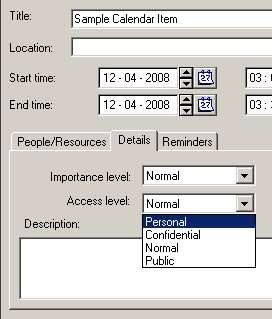
Oracle has four different permission levels for Calendar and Task objects:


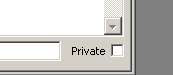
Outlook and Exchange have only a “Private” option:


Translating these during a migration is pretty simple: “Personal” and “Confidential” in OCS map to “Private” in Outlook/Exchange. In the case of a Sumatra migration this happens as the data is being converted from OCS export format into our intermediate database.


User Level Permissions
OCS starts with object permissions and then allows the calendar owner to set permissions for other users based on those object permissions. Where OCS is Data-oriented in its permissions model, Exchange is Folder/User oriented. This leads us into the User Level Permissions.

Let’s take a look at the Oracle Calendar Server side.

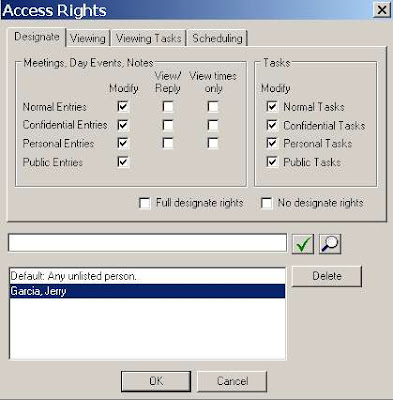
John Lennon makes Jerry Garcia his Designate in Oracle Calendar:

Here you have the only options relevant to a migration being: “Modify” and “View.”

Why is “View times only” not relevant for a discussion of calendar designate rights migration into Exchange? Because Exchange has no mechanism to deny access to free/busy information on a user basis.

Also note that in OCS a user has the option of specifying different access for different object types. That is – you can be more stringent with Confidential as opposed to Public data. This capability does not exist in Exchange. At all. So we’re going to revisit this issue later when we’re trying to decide how to migrate these permissions from OCS to Exchange.

So let’s turn our attention to Exchange and see what options there are when Zyg Furmaniuk makes Judy Morrison a Delegate via Outlook:

You basically have three levels of access (other than the trivial case of None) you can grant:

Reviewer
Author
Editor

And the scope of these is pretty much on an Outlook Folder level (though in the case of Calendar you need to also grant access to the Calendar and the Free-Busy information). I.e., You can selectively grant access to the Calendar or the Email Inbox.

So you can think of “Modify” in OCS mapping to “Editor” and “View” mapping to “Reviewer” pretty easily.

Oracle Permission "Modify" maps to Exchange Permission "Editor"

Oracle Permission "View/Reply" maps to Exchange Permission "Reviewer"

Oracle Permission "View Times Only" is irrelevant in Exchange Permissions

But there remains a question: Given that OCS users have several gradations not available in Exchange – how do we do a mapping?

We at Sumatra at this point broke it down to as simple a question as we could put to the Administrators: “Do you want to give the maximum rights or the minimum rights?”

The way this manifests itself on our OraCalReader utility is the choice between ALL designate access rights set to Modify or ANY set to Modify.


Since the only other option is “Reviewer” in the target Exchange any rights not set to Modify are set to Reviewer.

Any View rights are automatically set to “Reviewer” rights since the object level access in OCS does not come into play in Exchange.

We do not set “Delegate can see my private items” on the Exchange side. Why? Because there’s enough else going on in a migration – folks can forget that they don’t want some information shared post-migration. Keeping private on means maximum security and you can always dial it to where you want it post-migration.

Other Exchange Delegate notes:

  • Exchange has several possible clients (Outlook, Entourage, Outlook Web Access) at several different release levels with varying degrees of cross-platform and cross-version capability. Be sure to examine your own environment carefully.

  • The Sumatra process only handles Calendar permissions, not Task permissions. Could we do Tasks? Yes. But you’d need to convince us it’s a valid business case.

  • Regardless of the level of Delegate access set by the end user in Outlook, Delegate rights in OWA are read-only. See http://calendarservermigration.blogspot.com/2008/11/seeing-delegated-calendar-in-outlook.html
  • MOST IMPORTANTLY: Using these methods to set Delegates in Exchange will overwrite any delegate rights a user has set prior to migration. Consider yourself warned.

The User Perspective

What does the user GETTING permission experience?

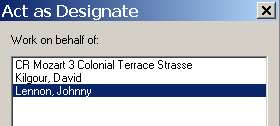
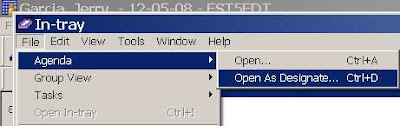
In OCS, Jerry Garcia as Designate of John Lennon simply selects File-Agenda-Open As Designate and sees the following:

Jerry gets a convenient list of everyone he has permissions for:

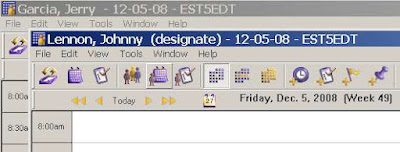
And it is very simple to orient yourself:

This user experience is VERY DIFFERENT in Microsoft Outlook. Here we use Outlook 2007 as our example. Zyg has given Judy permission to view his calendar.

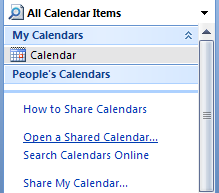
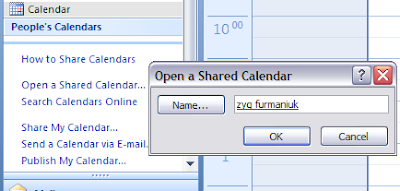
In Judy’s calendar, she has no indication of this (except for a possible email notice from Zyg). In order to set up her client to see Zyg’s calendar she must first explicitly open it and select “Zyg” from the directory list:


Once selected once the option to view is a check box.

Tuesday, December 02, 2008

More Calendar Weirdness in Exchange 2003

We keep hearing about calendar bugs in Exchange 2003.

Cases in point:

A meeting update does not appear in Outlook Web Access after a meeting organizer updates the time of one meeting occurrence in an Exchange Server 2003 environment

When you use a CDO-based application to manage calendar items in Exchange Server 2003, the application crashes intermittently

Keep in mind: None of this has anything to do with a calendar migration. It's what seeps into Microsoft products when the Redmond Belle tries to "encourage" you to "upgrade." Both of these are related to CDO and the most prominent CDO-based application is the Blackberry Enterprise Server.

Wednesday, November 26, 2008

ActiveSync bug in Exchange 2003 - Warning warning!

November looks like ActiveSync month. First I dropped my Sprint HTC SmartPhone because as a phone it was unusable (despite the fact that sync with Outlook was passable).

But Chris Quinn, one of our pals in the calendaring community, alerts us to a Microsoft KB Article 958781:

Some recurring calendar items disappear from the "Day/Week/Month" view in Outlook when a user uses Exchange ActiveSync on a mobile device to modify a recurring meeting in an Exchange 2003 environment

Much like Snakes on a Plane the title says it all.

But unlike SoaP there's more here to worry about (aside from whether you want the extended edition DVD).

The list of affected files for the fix to this problem includes pretty much all of CDO's associated files PLUS MADFB (the main Free-Busy updater).

This is a scary bunch of sensitive code to be changing all at once. And anything that relies on CDO (Anybody out there have BlackBerry Servers?) could get caught in the backwash.

So our warning to you still on Exchange 2003 is to test this HotFix BEFORE you deploy it if you have anything other than a vanilla Exchange 2003 environment

Wednesday, November 19, 2008

Seeing a Delegated Calendar in Outlook Web Access

It's really easy to get to another person's calendar in Outlook or even Entourage if they've given you delegate access.

But if you want to view that same schedule via Outlook Web Access (OWA) you need to know a few things.

Check out this article: How to Use Outlook Web Access Web Parts.

You want user interface? Fuggedaboutit.

If "Russ" is Delegate of "Zyg" via Outlook on the "VM" Exchange 2007 server he needs to use this URL:

https://VM/OWA/zyg@sumatra.local/?cmd=contents&f=calendar

Then he gets to view Zyg's calendar (NB: Regardless of level of delegate access it's read only).

Monday, November 17, 2008

Remove "TargetAddress" in Exchange 2007

Forwarding meeting requests is a really bad practice.

See Outlook Meeting Requests: Essential Do's and Don'ts if you want the Microsoft dogma on it.

This is especially true in calendar migrations when you're creating more meeting invitations at once than you probably ever will again.

It is especially true when Exchange is forwarding automatically by defining TargetAddress (as could be done via an identity-management tool).

Such is the lead in to why you want to turn off TargetAddress before a migration.

To turn this attribute off where it is set, you simply need to follow this three step program:

1. ) EXPORT your directory data using LDIFDE

ldifde -s YOURSERVER -r "(targetaddress=*)" -l "dn" -f exportldf.ldf

This produces a file whose records look like this:

dn: CN=Adam Ant,OU=Client85,OU=Clients,DC=ex2007,DC=sumatra,DC=local
changetype: add

-

2. Edit the LDIFDE file "exportldf.ldf"
Replace "changetype: add" with "changetype: modify\ndelete: targetaddress\n\-\n\n"

i.e., the file should look like this:
dn: CN=Adam Ant,OU=Client85,OU=Clients,DC=ex2007,DC=sumatra,DC=local
changetype: modify
delete: targetaddress
-

Notes:

  • If you want to restore the attribute after the migration, make a copy of the exportldf.ldf file before editing it!

  • The editing works best if you have a text editor that supports regular expressions. We recommend TextPad.

  • There must be a dash and a blank line between each command.

3. Re-run (import) your file
ldifde -s YOURSERVER -f exportldf.ldf –i


Why are we not doing this using either PowerShell or some of the other GUI-based management tools in Exchange 2007? Simply because we haven't yet figured out how to or if it's even possible.


Flashback: Those of you who have been through a migration into Exchange 2000/2003 will recognize the exact same worry with AltRecipient.

Sunday, November 16, 2008

New option for Oracle Calendar Migration


You asked for it -- so we did it.
As the screenshot shows, OraCalReader will now give the admin the option of converting historic meetings into appointments on everyone's calendar or inserting them as live meetings.
Beware: As we warn folks over and over - live meetings take longer to insert into Microsoft Exchange than appointments (which is why we made this an automatic default in Oracle Migrations).

Friday, November 07, 2008

So if you're migrating to Zimbra and using Palms....

We just moved a site from Meeting Maker into Zimbra and everything was ducky until we got an email stating:

"After taking our Meeting Maker Database and getting it imported into Zimbra,
our Palm OS devices that are receiving over-the-air syncs to their Zimbra
calendars lock up and head into an infinite reboot cycle when they try to
access their calendar data. It appears that something in the formatting of
the calendar data now pretty much just causes the brain of the Palm devices
to explode... because the problem does not extend to Blackberry devices."

Being the responsible guys we are, we freaked. Then we read that the problem doesn't happen with BlackBerry devices. In calendar migrations if we do something really wrong we expect it to fail everywhere. Since they used Notify for both Palm and BlackBerry sync from Zimbra we started looking at Palm. I think I have an old VIIx sitting on my discarded electronics drawer from the days a decade ago when we started this company.

Being exceedingly motivated, however, our client managed to come up with a solution before us. Their significantly greater knowledge of the Palm probably also had a lot to do with this.

Seems to be related to recurring meetings on the Palm, which interpreted some instance as "Zero" and didn't like it -- but didn't gracefully recover either.

They suggest other users with this problem (which I really hope there never are any, but know there will be some out there)

  1. Go to http://www.pimlicosoftware.com/datebk5.htm
  2. Download the zipped Windows EXE.
  3. In Advanced Apps there is a file called 'dbscan'
  4. Open this on your PC
  5. It should set itself up to install on your next sync. Read the instructions! It is a database integrity checker.
  6. It will advise of the corrupt files and give you the opportunity to delete them from your handheld.
  7. Run a sync again - but set the options for **handheld to overwrite pc** - this will sort out the problem.

I would really like to thank the folks at Pimlico Software for their really good application for Palms!

Thursday, October 30, 2008

IMAP to Exchange 2007 email migration

We get asked about email migration fairly frequently. In Exchange 2003 we tried doing it but truth be told there were some adequate free solutions. And "free" is tough to sell against. Then 2007 came out and NOBODY initially had solutions (even Microsoft) but we resisted the temptation to develop our own solutions (and we are still glad).


In general we find that Microsoft Transporter Suite is ... lacking (I'm trying to be polite here). But I know it is tough to ignore because it's from Microsoft and your boss knows it's free. Try it yourself and look through the fora before you commit to using this.


Glen did a great article on EML migration into Exchange 2007 using Exchange Web Services. If you're comfortable scripting this will get you through the hard part of inserting email into Exchange 2007.


We think you should also look into using imap2exchange which you can download at http://tp.its.yale.edu/confluence/display/EXCH/imap2exchange+Conversion+Utility. We worked on their calendar migration over the summer and the crew at Yale impressed us as a sharp bunch of folks. Please keep in mind these complements come without any grudging or reticence from a Harvard graduate.

Tuesday, October 28, 2008

Mirapoint behaviour and your calendar migration

First, we'd like to thank the IT team at a liberal arts college in Massachusetts for making their Mirapoint system available to us for migration testing.

Now we'd like to ask some hard questions about the preferred way to migrate data INTO Mirapoint from (say) Meeting Maker or Oracle Calendar Server.

Let's take a look at a typical meeting invitation on the Guest's side. "zygf" invites "russi" to a meeting and Mirapoint puts it on russi's calendar. So far so good. From within the calendar russi now has some options (also so far so good)

He "Accepts" and the meeting remains in his calendar (I do not notice any color or state change here -- does anyone know if this is normal?).

What happens if russi DECLINES the meeting?


The short answer (and it's kind of a weird one) is that it STAYS in his calendar!
The response IS updated on the Meeting Organizer's calendar:

This brings us to our conundrum: Declining a meeting will automatically remove it from a Meeting Maker calendar, and declining will change color state on an Oracle Calendar.

So the question: Is the right thing to do to try to replicate the legacy calendar or to insert data in the New World Order of the Mirapoint system the organization is migrating into? If we delete declines meeting then users do not have the option of going back and re-accepting them. But if we KEEP the declines in the calendar we run the risk of user confusion during the crucial post-migration period.

Since we've decided we're lousy at making decisions for other people we figured we'd ask and then listen to the responses.

Other issues in the Mirapoint user interface:

  • There are no Optional Guests or CC / BCC for meetings
  • There is no "Weekend move" functionality so we would need to nail meetings / appointments to the specific date of the month
  • The "By week of month" option is in the interface limited to one instance (e.g., the SECOND Tuesday of the month) but on inserting a properly formatted VCS file we can create a "Clean Refrigerator" appointment on the FIRST and THIRD Friday of the month. Only problem arises when the owner tries to modify the series as opposed to separate instances.
  • No “Last day of the month” capability – e.g., in Meeting Maker I can have a meeting “the Nth day from the end of the month” – usually it’s the Last day – but Mirapoint has odd behavior if I try scheduling a monthly meeting on the 31st – it leaves it completely OUT of months with 30 or fewer days. This is just plain goofy.
  • Master exceptions: via EXDATE. This might cause problems with Outlook as a client to Mirapoint. It did in early Zimbra migrations – we need to investigate some more.
  • Resources: Looks like Mirapoint has just a single category “Resources” as opposed to the MM distinction of “Location” and “Resources”
  • Final note: I have to give Mirapoint kudos for their interface for calendar sharing. It's very simple and very clear (something most other vendors have not figured out how to do yet):

Thursday, October 23, 2008

Calendar migration into Zarafa

So we got a request over the transom to see if we could migrate Meeting Maker data into Zarafa.

Their online demo bears a really close resemblance to OWA. This part I do not get: If you want to choose to not be part of the Microsoft Global Co-Prosperity Sphere, why on earth do you want the interface to be exactly the same? It's like not wanting to watch Seinfeld itself, only a high school acting troupe doing the exact same gags and plots. If that's what you want in front of you the original is much better.

However, short answer is NO. Mainly their mechanism to put in data is via PSTs (using ExMerge), with some scripts to migrate contacts via CSV. We don't produce PSTs (it is a real pain and we do not get much call for it). We can go into Exchange via CDO and EWS, and we can produce ICS, but none of the mechanisms we see in their Wiki will let us put in calendar data with the fidelity we are known for.
Wednesday, October 22, 2008

Dude -- Here's My Contacts

Thanks go out to our Kiwi friends for this information.

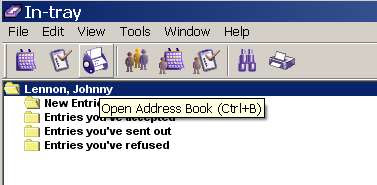
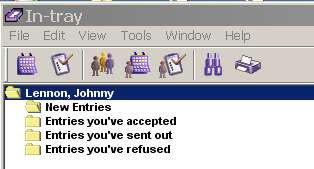
Let's say you want access to your Oracle Connector for Outlook contacts from within an Oracle client. Notice the lack of a "Contacts" icon in the Oracle In-tray:

Go to your UNISON.INI file under C:\Documents and Settings\USERID\Application Data\Oracle\Calendar

Find the [GENPREFS] section.

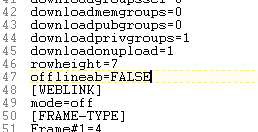
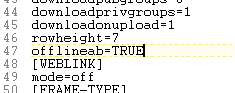
Change:

offlineab=FALSE to offlineab=TRUE


Restart your Oracle client (not OCFO), and you have access to your Contacts.

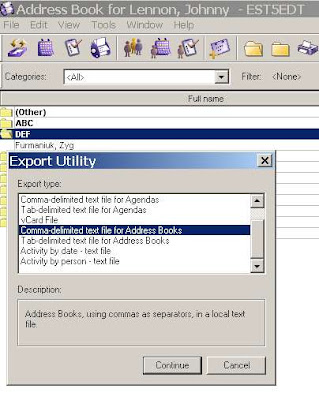
You even have options to EXPORT them (from which you can also take them into Outlook).
Tuesday, October 21, 2008

Real World Exchange Broken Meeting Statistic

We recently got an export of a real world conference room schedule in Exchange 2007 from January 1, 2008 to December 31, 2008 and did some analysis on it.

That one room hosted 2,450 individual instances of meetings (i.e., we count each recurring instance).

Figuring that there are 260 work days in a year, this means on average there are 9 meetings a day in that conference room (which sounds pretty close to full capacity, though there are occurrences on weekends).

What was also interesting was that there were 288 broken meetings in it (clogging the availability), or on average 1 broken meeting per work day.

Now given that this is from ONE conference room are we drawing big conclusions from it? No.

We were really astounded to see it anywhere near 1 per work day, though.

Friday, October 10, 2008

Oracle Connector for Outlook: Dude, Where's My Contacts?

So we just helped several thousand folks in New Zealand migrate their calendars from OCS to Exchange 2007 and they called us across the Pacific (Side bar: Across the Pacific is a WAY better movie than Dude, Where's My Car?) for some insight into how to migrate their contact data using Oracle Connector for Outlook and PSTs.


They tried the obvious method of just opening the local PSTs and the contact data from OCS was not there. This sounding like the kind of spooky weirdness that intrigues us in the calendar migration business we needed to dust off and install Oracle Connector for Outlook, look into this, and discover that it indeed is the case.

Initially we thought it might be that Offline Use needed to be enabled (we got that hare-brained idea from one of Oracle's architectural diagrams of OCFO), so we set that.


And we followed through on the Offline Folders Setting:


There is indeed a PST file there (which is usually a good sign)


but when I opened this PST in Outlook on a different machine there were no contacts.

In OCFO I see this:


In "New" Outlook I see this (we had no doubt our friends in New Zealand were correct about this, but we love the phrase "trust but verify"):

We did manage to extract the contact data and what we had to do was make it all REALLY EXPLICIT. Note that I also used two different versions of Outlook (2002 vs. 2003) just to keep the locations straight.

To start in OCFO select File-Import and Export:


You're exporting to a file


In fact a PST


And all we want right now is the Contacts:


Pick a location where you can save it (I picked next to the standard Outlook.PST file, because the size difference 48 vs 64 KB between the two is interesting).


And voila.

Now on the Exchange side, you can run the process in reverse, or you can use Data File Management


Add a new PST, Point to your contacts.pst file,


And the end result is that you've got your contacts over:

So for the really curious calendar person: What the heck is going on here?

Let's take a look at the file structure of OCFO. Almost all the files under the /Outlook/Oracle Connector... directory are pretty small, except for the one I found called "mdb" which being within the same order of magnitude as the PST files we found makes it a good candidate for the location where OCFO data gets stored.


In fact there are several of these throughout this directory structure. Those of you who ever had the pleasure of working in 1980's era dBase will feel deja-vu. I started doing correlations between GUIDs for the contacts in Outlook/OCFO and the data here using a binary viewer, but that got to be a hassle very quickly. Russ looked at running SOAP requests for contact data using the OCS API, which he rapidly decided was "obscure and painful."

We know the contact data is in there (somewhere), but the method we sketch above has the advantages of being simple, fast, and actionable without coding.