Gentle readers,
Ms. Migrations recommends upgrading to Zimbra 4.5.10 if you are migrating from either of the legacy systems Oracle Calendar Server or Meeting Maker.
Version 4.5.10 fixes this problem:
http://bugzilla.zimbra.com/long_list.cgi?buglist=20684 which you are likely to encounter in a migration.
Friday, November 30, 2007


Thursday, November 29, 2007
Exchange 2007 Permissions
In Exchange 2003 permissions were by far the biggest headache for folks wanting to migrate.
Exchange 2007 is shaping up to be a bigger headache. Think migraine. Think migraine with sinusitis. Then double it. You know what I mean. We have had to create an entire Label for permissions.
However, we would really like to thank Rohit from Extreme Networks for coming up with the following variation on setting permissions.
He was looking to migrate Resource Scheduler, but it's just as viable for general calendar migrations.
If you're using Ex2007 as the service account to run our code, execute this command:
Get-OrganizationConfig Add-AdPermission -user ex2007 -accessRights GenericAll -extendedrights "Receive as","Send as", "ms-Exch-EPI-May-Impersonate", "ms-Exch-EPI-Impersonation" -InheritanceType All
1) Added '-InheritanceType All' to the commandlet. Sometimes permission inheritance issues prevent access to calendars.
2) Remember that RESOURCE accounts must be ENABLED (via ADU&C)
3) If you want to look at calendars via OWA, you need fullaccess. This commandlet grants 'exsu' full access to all accounts in the domain:
Get-Mailbox -resultsize unlimited add-mailboxpermission -user exsu -accessrights: fullaccess -InheritanceType: All
--Russ
Exchange 2007 is shaping up to be a bigger headache. Think migraine. Think migraine with sinusitis. Then double it. You know what I mean. We have had to create an entire Label for permissions.
However, we would really like to thank Rohit from Extreme Networks for coming up with the following variation on setting permissions.
He was looking to migrate Resource Scheduler, but it's just as viable for general calendar migrations.
If you're using Ex2007 as the service account to run our code, execute this command:
Get-OrganizationConfig Add-AdPermission -user ex2007 -accessRights GenericAll -extendedrights "Receive as","Send as", "ms-Exch-EPI-May-Impersonate", "ms-Exch-EPI-Impersonation" -InheritanceType All
Takes care of all necessary permissions with one swoop.
(Note: Revised 2/15/2008 -- a pipe ("") should be place between get-organizationconfig and add-adpermission. It was stripped when pasting the command line in this blog)
Update 11/11/2010:1) Added '-InheritanceType All' to the commandlet. Sometimes permission inheritance issues prevent access to calendars.
2) Remember that RESOURCE accounts must be ENABLED (via ADU&C)
3) If you want to look at calendars via OWA, you need fullaccess. This commandlet grants 'exsu' full access to all accounts in the domain:
Get-Mailbox -resultsize unlimited add-mailboxpermission -user exsu -accessrights: fullaccess -InheritanceType: All
--Russ
Tuesday, November 20, 2007
Migrating RSOE (Resource Scheduler for Exchange) data into Exchange 2007
A few months ago we got asked if we could extract data out of Resource Scheduler for Exchange (RSOE) from PeopleCube and insert it into Exchange 2007.
Well, because of a request from the West Coast we went ahead and did it. They mainly use RSOE for straight-forward room reservations and are looking to simply transition to the resource reservation features in Exchange 2007. So all we're interested in is moving the reservations in as few steps as possible into Exchange. We make no effort to recreate most of the other features of RSOE (prep time, cleanup times, etc.), all we're doing is transitioning the resource management over.
There are two ways to reserve a resource in RSOE:
Well, because of a request from the West Coast we went ahead and did it. They mainly use RSOE for straight-forward room reservations and are looking to simply transition to the resource reservation features in Exchange 2007. So all we're interested in is moving the reservations in as few steps as possible into Exchange. We make no effort to recreate most of the other features of RSOE (prep time, cleanup times, etc.), all we're doing is transitioning the resource management over.
Here's how it works.
There are two ways to reserve a resource in RSOE:
- Via a from in Outlook
- Directly from a web browser
So we deal with each of these cases differently.
From Outlook
This is the easy case. Resource Scheduler puts a MAPI flag and an RSOE identification number in the meeting.
Technical background: Those of you who know how to use OutlookSpy (an invaluable tool for the Exchange developer) can look for RSOCEntryID.
We read this from the RSOE SQL database into an Access database and (since we know the meeting organizer and can uniquely identify the meeting via the MAPI tag), we add the E2K7 resource to the meeting and update it.
The code relies on Outlook 2007/Exchange 2007 to automatically apply meeting updates if an end user has already accepted that meeting. e.g. a time or location change to the meeting is received, the meeting will be automatically updated and the old invitation marked out of date so users will not accidentally accept it. See the TechNet article:
http://www.microsoft.com/technet/technetmag/issues/2006/12/outlook/default.aspx
DONE.
From the Web
This is a more interesting case and we took the most general way of solving it.
Since there is no unambiguous link between the meeting reservation in RSOE and any existing data in Outlook (and a quick look at real world data will convince you that just being at the same time and date is not enough), we just create one meeting owned by the resource owner, with the resource in E2K7.
E2K7 books it and then the meeting organizer can add users or modify as they see fit.
PROCESS ASSUMPTIONS
- Resource accounts MUST:
a) exist and be mail-enabled in Exchange 2007, Active Directory
b) be configured to process meeting requests
c) Client must provide a map between RSOE resource name and Exchange Resource alias/email address - Testing and Use:
a) Service Account defined with Impersonate and Send-As permissions
b) Test in a lab prior to running in production!!
c) Sumatra code runs on a 32-bit machine (NOT on a 64-bit Exchange server)
d) Code uses Exchange Web Services through an Exchange 2007 CAS - End Users use Outlook 2007
- Meeting updates:
a) accepted as part of Exchange 2007 features,
b) might remain in all end user’ inbox post-update and will not be removed by our code (up to the end user). - The Sumatra process:
a) does not check for resource double-booking or conflicts
b) works on CURRENT meetings only – it will skip expired/completed meetings as determined by RSOE’s meeting end date
Wednesday, November 07, 2007
Oracle Calendar Command Line Conversion
As usual the best ideas come from our clients, and in this case kudos go to Steve in Georgia.
For an Oracle Calendar to Zimbra migration he suggested "Why not make the OCS conversion command-line driven? Then we can script the entire process end to end."
Not a bad idea -- so we went ahead and did it.
OraCalReader.exe is our tool that takes OCS Export files from UNICPOUTU and turns them into our intermediate format (from here they can go into Exchange or Zimbra).
So now to run this on the DOS command line:
OraCalReader /ALL /TZ:tzValue /TH:xx /DROPDT:"dt" /EXPDIR:pp /OUTDB:ppdb
Notes:
/TZ:tz Timezone.
Acceptable values are: EST5EDT CST6CDT MST-3MDT PST8PDT
NAST9NADT MST7MDT GMT0BST MET-1METDST MEZ-1MESZ
CIST-12:45CIDT IST-2IDT MST-3MDT UCT-5:30 UCT-7 CST-8 UCT-8
JST EST-10EDT UCT6 UCT4 UCT EST5EDT
/Th:xx Threshold xx is a percent, ranging from 1 to 100, Default is 80
This is a number, not a decimal. Exclude the percent sign
/DROPDT:dt DROP/Cutoff Date Where dt is any valid date format in US format time, e.g., mm/dd/yyyy, mm-dd-yyyy
One year from today
/EXPDIR:pa OCS export file directory (path) Where: Pa is any path, e.g.:“f:\data\ocsout”
Defaults to the current path. The path should be enclosed in quotes. Do not include a trailing "\"
/OUTDB:db MS Access Output database Where db is the name of the database, including the path NO DEFAULT You must specify this parameter!
So the following would be a real world example:
oracalreader /all /TH:80 /TZ:"EST5EDT" /EXPDIR:"C:\Documents and Settings\Zyg\Desktop\Tech Data" /OUTDB:"C:\Documents and Settings\Zyg\Desktop\Tech Data\gt3-prime.mdb" /DROPDT:"11/1/2006"
The above command specifies an 80% recurrence threshold, Oracle's Eastern Standard Time, directories and database as shown, and to only take calendar data AFTER November 1, 2006.
For an Oracle Calendar to Zimbra migration he suggested "Why not make the OCS conversion command-line driven? Then we can script the entire process end to end."
Not a bad idea -- so we went ahead and did it.
OraCalReader.exe is our tool that takes OCS Export files from UNICPOUTU and turns them into our intermediate format (from here they can go into Exchange or Zimbra).
So now to run this on the DOS command line:
OraCalReader /ALL /TZ:tzValue /TH:xx /DROPDT:"dt" /EXPDIR:pp /OUTDB:ppdb
Notes:
- If you run /ALL without any other command line parameters, the code takes the DEFAULT settings saved in the UI preferences. UI preferences are visible by running the application without any switches on the command line
- The code will read the export files and insert them into the database.
- The code's default behavior is to delete ALL existing data in the database prior to insertion.
- Two Logfiles are generated: _OraCalReader_log.log, and _OraCalReader_Error.log
/TZ:tz Timezone.
Acceptable values are: EST5EDT CST6CDT MST-3MDT PST8PDT
NAST9NADT MST7MDT GMT0BST MET-1METDST MEZ-1MESZ
CIST-12:45CIDT IST-2IDT MST-3MDT UCT-5:30 UCT-7 CST-8 UCT-8
JST EST-10EDT UCT6 UCT4 UCT EST5EDT
/Th:xx Threshold xx is a percent, ranging from 1 to 100, Default is 80
This is a number, not a decimal. Exclude the percent sign
/DROPDT:dt DROP/Cutoff Date Where dt is any valid date format in US format time, e.g., mm/dd/yyyy, mm-dd-yyyy
One year from today
/EXPDIR:pa OCS export file directory (path) Where: Pa is any path, e.g.:“f:\data\ocsout”
Defaults to the current path. The path should be enclosed in quotes. Do not include a trailing "\"
/OUTDB:db MS Access Output database Where db is the name of the database, including the path NO DEFAULT You must specify this parameter!
So the following would be a real world example:
oracalreader /all /TH:80 /TZ:"EST5EDT" /EXPDIR:"C:\Documents and Settings\Zyg\Desktop\Tech Data" /OUTDB:"C:\Documents and Settings\Zyg\Desktop\Tech Data\gt3-prime.mdb" /DROPDT:"11/1/2006"
The above command specifies an 80% recurrence threshold, Oracle's Eastern Standard Time, directories and database as shown, and to only take calendar data AFTER November 1, 2006.
Wednesday, October 31, 2007
Zimbra Insertion: Suppress Resource Responses
So you're migrating all your calendar data into Zimbra and you're not forgetting the all important resources.
BUT you notice that the INBOXes of meeting organizers is full of responses from the resources post-migration.
Not to worry -- you can turn that off with:
zmprov mcrzimbraCalResAutoAcceptDecline FALSE
Just don't forget to turn it on again when you go live.
Many thanks to the folks at Zimbra for cluing me in and to Jennifer who field tested it!
BUT you notice that the INBOXes of meeting organizers is full of responses from the resources post-migration.
Not to worry -- you can turn that off with:
zmprov mcr
Just don't forget to turn it on again when you go live.
Many thanks to the folks at Zimbra for cluing me in and to Jennifer who field tested it!
Tuesday, October 30, 2007
Free-Busy lookups from Oracle Calendar into Zimbra or Outlook
Oracle Calendar users yearning to break free, what do you see that's unusual about this picture of the Oracle Windows Client?
 Right! It's the little button that says "Z-Conflicts" just underneath "Remind Me" and "Tentative."
Oh, we have no doubt this will not be supported by Oracle, but hey, you're looking to get out of that suite anyway.
 Right! It's the little button that says "Z-Conflicts" just underneath "Remind Me" and "Tentative."
Why have we hacked our way into the OCS client? (Windows only for now, sorry Mac and *nix users.)
Because some of you have been asking for free-busy look ups from OCS into Outlook/Exchange and Zimbra, and this is how we can do it. Your reasons are usually that you must do a phased migration from OCS rather than a "Big Bang" and the problem just seemed so perfectly up our alley.
Right now you click it and it just brings up our internal web page -- but the next step is to click it and have it offer a list of non-OCS users to check free-busy status on. When you select a time it'll drop those into the OCS external email calendar invitation interface so you can more easily customize your invitation.
We're working on the interface between migrations. Stay tuned.Oh, we have no doubt this will not be supported by Oracle, but hey, you're looking to get out of that suite anyway.
Monday, October 29, 2007
Automatic insertion into Zimbra
Users moving from Oracle Calendar Server or Meeting Maker to Zimbra:
The Sumatra application that takes your intermediate format database and converts it to ICS files can now also automatically post to Zimbra (saving you a crucial step).
The Sumatra application that takes your intermediate format database and converts it to ICS files can now also automatically post to Zimbra (saving you a crucial step).
 The format is the same as you are used to:
zinsert -fo -tf_utc_to_timezone -cs DSN=Zimbra -post http://YOURSERVER/home/[login]/Calendar?fmt=ics -loginpwdb
will auto insert, reading the User ID and Passwords from the Users table of the database.
In the example above you see that user "Puffy Amiumi" gave the error "No TZID for TimeZone" because we had not yet mapped the Japanese OCS Time Zone to Zimbra format.
Wednesday, October 24, 2007
When Exchange aliases are the same as Meeting Maker aliases
All our best improvements come from users, and this one is no exception.
Current migration uses can use conversion database version 8.7.7.3 or above to achieve these ends.
Scenario:
Let's say “Most” of your Exchange aliases are similar to Meeting Maker Logins, so you built the list of Exchange aliases from the MM user table. Now you have to update accounts that have a different Exchange alias:
New Approach:
Current migration uses can use conversion database version 8.7.7.3 or above to achieve these ends.
Scenario:
Let's say “Most” of your Exchange aliases are similar to Meeting Maker Logins, so you built the list of Exchange aliases from the MM user table. Now you have to update accounts that have a different Exchange alias:
New Approach:
- Add your domain name to the “customer_setup” table
- Run a query “Q_Build_CustIDs_From_MMUserids” to build the “customer_setup” table from the MM “Users” table
- Add entries to the “User_Adjusted_Maps” table to “remap” MM Logins to Exchange aliases. Please remember to include both the MM Login and UserID
- Run the query “Q_Build_CustIDs_AdjustExchangeAliases” to update the customer_setup with the correct exchange aliases
- Run the query “Q_1_Make_User_Map” to build the mm_exchange_user_map table.
We haven't tried this with Oracle Calendar Server conversions yet but the logic should work exactly the same.
Exchange 2007: Running Parallel Insertions
Let's say that you have 5000 or more users, or 2000 users with lots of history (5 or 6 years), and you are migrating into Exchange 2007. You are a likely candidate for running multiple instances of the insertion code. Multiple instances leverages the speed of the 64-bit server processors and the speed of the SAN as you push simultaneous transactions at your CAS server.
Step 7: For all instances, select the Lower Limit and the Upper Limit by alpha that you want to run. You want to make these roughly equal. For example, you might select:
A to J (Or you can set the upper alpha limit to "J")
K to R
S to Z (or set the lower alpha limit to "S")
Step 8: Start running all instances
Step 9: Wait. Actually we're not trying to be funny here -- the application is going is to pause before steps 6 and 10. When all instances show the same pop-up box, you can resume all instances. (We've taken you through the reasons for this -- but if you have any questions, please ask.)
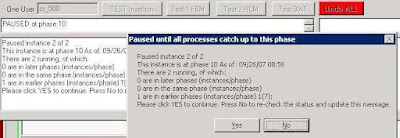 Next step: Analyzing your data and doing QA on the insertion.
If you're running multiple instances follow this procedure:
Step 1 VALIDATE your main conversion database, fix any validation issues and re-validate. You've been taken through this multiple times if you've been in the lab with Sumatra for anything beyond an hour.
Step 2 MAKE COPIES of your validated conversion database and name them something OBVIOUS, like Instance1_YourCompany_28Dec07_DB_v8.7.7.7.mdb, Instance2_..... etc.
Step 3 DISTRIBUTE accordingly to separate client machines (remember, this is Exchange 2007 and you can't run on the 2007 server)
Step 4: EXECUTE SuExchange2007.exe (aka the Sumatra 2007 Insertion Code)
Step 5: SELECT Run Multiple Instance at the "Single Instance" prompt, enter the instance number. You should clear the stats table if you've run multiple instances before. Here's a screen shot:
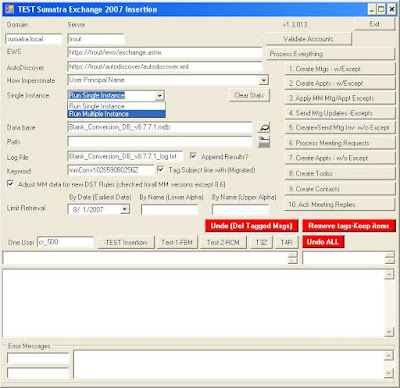
Background: You'll need a separate database to track the progress of each instance. We call this the "sync database", which you can think of as the traffic cop keeping all the instances running smoothly. It's usually called SyncStats.mdb.
Step 6: Point to SyncStats.mdb in the InstanceDB box.Step 7: For all instances, select the Lower Limit and the Upper Limit by alpha that you want to run. You want to make these roughly equal. For example, you might select:
A to J (Or you can set the upper alpha limit to "J")
K to R
S to Z (or set the lower alpha limit to "S")
SET UNIQUE Instance Numbers for each of these before executing.
Anything preceeded by numbers (e.g., 3rdFloor Conf Rm) will automatically come at the beginning of the alphabet with A.
Keep track of these so you do not forget letters. This HAS happened in test cases in the field and it became really obvious really fast.Step 8: Start running all instances
Step 9: Wait. Actually we're not trying to be funny here -- the application is going is to pause before steps 6 and 10. When all instances show the same pop-up box, you can resume all instances. (We've taken you through the reasons for this -- but if you have any questions, please ask.)
Next step: Analyzing your data and doing QA on the insertion.
Saturday, October 13, 2007
E2K7 Adding Delegates to Other Users' Accounts
For a migration into Exchange 2003/2007 we recommend you not have set Delegates. Those of you who have left your Delegates on in your lab and migated a few years worth of data have seen why: very full delegate inboxes, and very irate delegates.
The problem still remains: What's the best way to set Delegates AFTER a migration? You could use this as a learning opportunity for your users: let THEM set their own darn delegates, thank you very much.
But sometimes your user community is more demanding and wants (nay, NEEDS) this all done for them.
We have an account in Connecticut (thank you, Vince) who wrote up this account of how to set Delegates for calendars in Exchange 2007 (do not attempt on E2K3). This assumes your Exchange Admin account with adequate permissions to execute (and you know that is its own separate issue) is called "sumatra"
The problem still remains: What's the best way to set Delegates AFTER a migration? You could use this as a learning opportunity for your users: let THEM set their own darn delegates, thank you very much.
But sometimes your user community is more demanding and wants (nay, NEEDS) this all done for them.
We have an account in Connecticut (thank you, Vince) who wrote up this account of how to set Delegates for calendars in Exchange 2007 (do not attempt on E2K3). This assumes your Exchange Admin account with adequate permissions to execute (and you know that is its own separate issue) is called "sumatra"
- Logon to Windows box as yourself.
- Delete the "sumatra" account if it is in C:\documents and setting. If it is not there then it will be after this first account adjustment. You are good for the 1st run.
- Locate the Outlook app and "Run as..." and run as the Domain Administrator
- Setup the user you want to add Delegates to
- Once done you will be asked to logon, again. This time logon as "sumatra"
- The account will then be setup in the app.
- Set your Delegates.
- When done close Outlook
- Delete the sumatra account (as mentioned in step 2) and the administrator account.
- Repeat steps 3-9 until you are done with your account setup.
All bets are off once sp1 hits the street -- we can almost guarantee this process will change.
Thursday, September 27, 2007
Inserting Oracle Calendar Server / Meeting Maker into Zimbra
By this point the idea is to make the actual insertion into Zimbra a boring anti-climax.
We have the same goal inserting legacy data into Microsoft Exchange, but because of Exchange architecture this is a little more intricate than Zimbra (So we deal with it separately).
Your primary tool is called zinsert.exe, which you invoke from the Command Prompt (which those of us of a certain age refer to as "DOS").
Simply typing zinsert (-Enter-) will give you a brief summary of functionality.
We have the same goal inserting legacy data into Microsoft Exchange, but because of Exchange architecture this is a little more intricate than Zimbra (So we deal with it separately).
Your primary tool is called zinsert.exe, which you invoke from the Command Prompt (which those of us of a certain age refer to as "DOS").
Simply typing zinsert (-Enter-) will give you a brief summary of functionality.
 First off, use ODBC (available under Control Panel) to point to the conversion database. Let's call your ODBC connection "Zimbra."
To create a series of ICS files with appropriate cross-linked GUIDs, use this command:
zinsert -fo -cs DSN=ZIMBRA -tf_utc_to_timezone
In general, converting for the appropriate time zone, use the -tf_utc_to_timezone option unless we determine another one is better (not likely, but we keep them there in case -- you never know what the US Congress is going to do with Daylight Savings Time).
Inserting into Zimbra
That's what the -post command is for, which as of this date we haven't actually had to use (also it will require knowing each user's password which is a pain)
You can use curl, or (thanks to a college in New Jersey), you can use this method.
This solution doesn't require an admin to know the user's password.
It does require a configured web server and assumes there is a separate ICS for each user calendar.
1. The ICS files need to be placed on a web server that the Zimbra server will be able to access via http (or https). I'll assume a base of http://YOURDOMAIN/migrate/.
2. Create a file (e.g. /tmp/importcals.zcs) that will be fed to zmprov with contents like this:
selectMailbox USERID1
emptyFolder Calendar <--- optional command
importURLIntoFolder Calendar http://YOURDOMAIN/migrate/USERID1.ics
selectMailbox USERID2
emptyFolder Calendar <--- optional command
importURLIntoFolder Calendar http://YOURDOMAIN/migrate/USERID2.ics
3. Run that through zmprov.
zmprov -f /tmp/importcals.zcs
Wednesday, September 26, 2007
So we revised the Oracle Calendar Converter User Interface
 We think it's easier to follow. If you're working with us it's in your FTP account.
Mapping Oracle Calendar/ Meeting Maker users for a Zimbra insertion
NB: This is for migration into Zimbra. Migration into Exchange is a whole different issue which we deal with separately.
You have your Oracle Calendar Server data, you've converted it into an Access database -- now you just need to map your users for Zimbra.
You have your Oracle Calendar Server data, you've converted it into an Access database -- now you just need to map your users for Zimbra.
Why? Usually there's at least a handful of users who have changed their names through marriage, divorce, or the witness protection program.
Also since you're migrating anyway many sites use the opportunity to standardize their naming conventions.
Step 1: Open the database and go to the Users Table: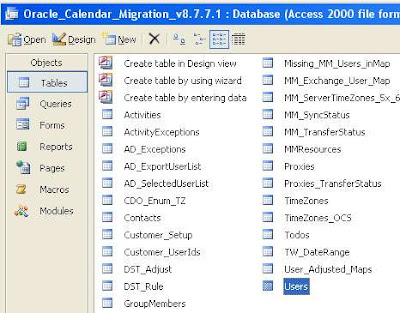
There's a lot going on here, but don't let it scare you.
In the Email column just put your new Zimbra email

Note that even though the login for "Adam Ant" is "aant" we can substitute "adam_ant" or anything else we need so long as it matches the Zimbra address.
This simple Query will duplicate your login IDs to the Email field, appending the appropriate domain name (which you'll need or else guests will not be notified of meeting updates). Of course, this is generally modifiable into anything that makes sense for your environment.

Next step: inserting your data!
Tuesday, September 25, 2007
Converting your OCS exports to migration format
So you've gotten your calendar data out of Oracle Calendar Server and now you wonder "What ELSE do I have to do with it?"
Well, you have to convert it into a (new) relational database so that we can reassemble any attributes not exported from OCS.
Like what you ask? Guest lists, guest responses, recurrence patterns, all the sorts of things you want.
Do you need to go through this? Well, if you want to do this all server-side and keep all the information that makes schedulers valuable, yes.
Well, you have to convert it into a (new) relational database so that we can reassemble any attributes not exported from OCS.
Like what you ask? Guest lists, guest responses, recurrence patterns, all the sorts of things you want.
Do you need to go through this? Well, if you want to do this all server-side and keep all the information that makes schedulers valuable, yes.
The tool that takes your exports runs in Windows and looks like this: How do I use this?
While the design reminds you of an early farm tractor (which we are very proud of) - it's designed with the same single-minded focus: get the job done as quickly as possible and the heck with how it looks (you're tossing it out after this is done anyway).
The idea here is to take in the files you got from UNICPOUTU, and match them with users and resources from USERS.TXT and RESOURCES.TXT.
Specifically this will:
- Match export data to users and resources (the users and resources will be mapped to your new calendar system)
- Add guests to your meeting
- Group one-time instances into “recurring meetings” (makes the insertion run faster)
- Remove old items you do not intend to insert (makes the insertion run faster)
- Reformat OCS-specific items to calendar-neutral terms (e.g. map Daily Notes and Daily Events to All Day Events)
Note that if you're planning on multiple test insertions you only need to read the users and resources into the database once. It is possible to parallelize conversions, e.g., convert A-L on one machine, M-Z on another and join them together to get the job done in half the time (but please talk with us before you do that).
This also includes a blank template database (MS Access format), which we recommend you rename a copy of to something descriptive, like "December 1 migration test." Please preserve the database version in the file name; it really helps when debugging.
Let's go into some details on the specifics.
Time Zone: Select the Time Zone of your OCS node. This is really crucial otherwise everything will be off on your insertion by some multiple of hours. If you have users outside of the default time zone you can modify the USERS.TXT file for them (see earlier post).
Drop Items Prior to this Date: You can selectively export items from certain date ranges -- but in case you have a data set with everything and want to pare it down for a test insertion, you have that option here.
Threshold for recurrence patterns: When we get the events from OCS they are all individual events rather than a series. We reconstruct the series, but (as a little thinking will show you) with exceptions to recurrences this can get a little dicey. Our software analyzes the sequence and comes up with its best guess of the recurrence pattern, taking account the threshold you set.
A couple of quick things to note:
- Historical events (i.e., any events before the date you convert them) all go in as individual events (it's faster this way) with meeting guest list in the Agenda field (except for BCC guest whom only the meeting proposer sees)
- There needs to be at least five recurring events before we attempt to re-create the sequence. (Quick math -- at an 80% threshold, one exception to a five event pattern puts you at the threshold)
- If we can't match a pattern all events will go in as individual instances. So worst case scenario is that a recurring meeting or event comes in as a series of individual instances. (But as opposed to an ics RDATEs list these will display properly in Outlook clients).
- If you migrate only a subset of users, meetings to and from users outside that subset will not show up. Think about this one: if the meeting owner or guest is not in the system you're migrating to -- how can they be on a meeting in your new system? This is the main reason we're always advocating "Big Bang" migrations for meeting-centric corporate cultures.
How does this work?
In two phases: the first phase reads the OCS exports and turns them into an intermediate file. The second phase reads the intermediate file into the database template.
Why not just put everything into the database as we're going along? It's faster this way.
Everything in a calendar server migration is a trade-off between time and convenience.
It's certainly easier for the average admin to work with an Access file. But the overhead of constant transactions at the volume we need is huge. Saving them for the end makes the system much faster.
Monday, September 24, 2007
How to Extract Data from Oracle Calendar Server for a migration into Exchange or Zimbra
This is Part I of a three-part series. Part II will be about converting this output and Part III is about inserting it into your target system.
So you've seen your future and it no longer involves Oracle Calendar Server (OCS).
We're there with you.
The problem we deal with now is: How to get the Data OUT of OCS.
As usual, we like to rely on the native tool set of the legacy system (less code on the legacy system implies easier to maintain the migration process as a whole).
Let’s say you run a single Oracle Calendar Server node (number 1) with administrative password “jimmorrison” and have users John Lennon, Jerry Garcia, Jimmy Page, Puffy Amiumi, and Walter Liberace. As well as the Mozart Conference Room and Shea Stadium. The following command lines will pull all data Sumatra requires:
uniuser -ls -format "%s%:%g%:%uid%:%id%:%node-id%:" -n 1 -p jimmorrison >users.txt
uniuser -resource -ls "S=*" -n 1 -p jimmorrison >resources.txt
unicpoutu -u "S=Liberace/G=Walter" -f exp-liberace.txt -n 1 -p jimmorrison
unicpoutu -u "S=Garcia/G=Jerry" -f exp-garcia.txt -n 1 -p jimmorrison
unicpoutu -u "S=Lennon/G=John" -f exp-lennon.txt -n 1 -p jimmorrison
unicpoutu -u "S=Amiumi/G=Puffy" -f exp-amiumi.txt -n 1 -p jimmorrison
unicpoutu -u "S=Page/G=Jimmy" -f exp-page.txt -n 1 -p jimmorrison
Execute this batch file to extract these data files, and place them in a convenient directory.
How this is organized, and what we do with it.
The first two lines extract the names of all users and all resources in a standard format.
Sumatra Development LLC reads these two files in first to establish the list of users and resources being migrated. These become really important to make sure the connections among users is maintained when we insert into either Exchange or Zimbra (Notes 8 coming if we get sufficient interest). The programmers among you will recognize this is crucial to maintain GUID integrity.
THEN, all user calendar data in the exp-(name).txt files are read in, and matched against these users and resources.
The users.txt file looks something like this:
Garcia:Jerry:Jerry.Garcia:256:1:
Lennon:John:John.Lennon:257:1:
Amiumi:Puffy:Puffy.Amiumi:258:1:
Liberace:Walter:Walter.Liberace:260:1:
Page:Jimmy:Jimmy.Page:262:1:
NB: It is certainly possible to script these so that the output from the initial users export can be the input for a script that automatically exports all user data/
For users with a different default Time Zone from the node time zone, manually add the Oracle Time Zone code following them in the user.txt file.
Let’s say Puffy Amiumi is based in Japan and therefore uses JST.
The resulting users.txt file would be the following:
Garcia:Jerry:Jerry.Garcia:256:1:
Lennon:John:John.Lennon:257:1:
Amiumi:Puffy:Puffy.Amiumi:258:1:JST
Liberace:Walter:Walter.Liberace:260:1:
Page:Jimmy:Jimmy.Page:262:1:
The resources.txt file looks like this:
. R=Shea Stadium/N=ResNum0000/CA=200,000/S=Steinbrenner/G=George/
+ LOC=Da Bronx\r\nNew York/PHONE=617-555-1212/FAX=617-555-1213/ID=259/
+ EMAIL=shea@sumatra.local/UID=Shea Stadium/ALLOW-CONFLICT=NO/ENABLE=TRUE/
+ LANG=en/NODE-ID=1
. R=CR Mozart/N=ResNum0002/CA=10/S=Mozart/G=Wolfgang/
+ LOC=3 Colonial Terrace Strasse\r\nWien, Ostereich/PHONE=617-555-1212/
+ FAX=617-555-1213/ID=261/EMAIL=crmozart@sumatra.com/UID=CR Mozart/
+ ALLOW-CONFLICT=NO/ENABLE=TRUE/LANG=en/NODE-ID=1/PUBLISHEDTYPE=PUBLISHED
More on OCS Calendar Data
Our recommended method for extracting Oracle data is to use the off-the-shelf Oracle utility:
UNICPOUTU
This is typically found in the directory:
C:\ocsinfra\ocal\bin on Windows servers
ORACLE_HOME$/ocal/bin on UNIX/Linux servers
The command:
UNICPOUTU –u “S=Garcia/G=Jerry” –f output.txt –n 1
will export Jerry Garcia’s entire calendar from OCS Node 1 to the output file output.txt.
You will be asked for the calendar administrator password (or alternately can pass it with the –p parameter).
This is also configurable for different start and end dates, depending on how much data you wish to transfer.
So if you only wanted to take data since January 1, 2006, you would use:
UNICPOUTU –u “S=Garcia/G=Jerry” –f output.txt -start 1 jan 2006 –n 1
NB: Dates can only be in "day month year" format.
Resources
If resources are only guests and do not have their own non-meeting events, you do not need to export them. If however you have reason to, we include the information here.
The command:
UNICPOUTR –u “R=CR Mozart” –f output.txt –n 1
Will export the Conference Room “CR Mozart” on OCS Node 1 to output.txt
Users for a node
The following command will export all of the users on Oracle Calendar Server node 1:
UNIUSER –user –ls “S=*” –n 1
The following command will export all of the resources on Oracle Calendar Server node 1:
UNIUSER –resource –ls “S=*” –n 1
Designate Access Rights
What in Outlook / Exchange are called the Delegate rights are in Oracle called Designate rights. To extract these use:
UNIACCESSRIGHTS –ls
More detail on this can be found in your Oracle Calendar Server Reference manual.
Sumatra does not currently insert Designate Access Rights into Exchange or Zimbra from OCS – but if this is a requirement for you please consult with us (the issue is more about trade-offs on the Exchange 2003 side than the Oracle side or the Zimbra).
Why not UNIICAL?
If you're asking this question you probably already know the answers:
So you've seen your future and it no longer involves Oracle Calendar Server (OCS).
We're there with you.
The problem we deal with now is: How to get the Data OUT of OCS.
As usual, we like to rely on the native tool set of the legacy system (less code on the legacy system implies easier to maintain the migration process as a whole).
Let’s say you run a single Oracle Calendar Server node (number 1) with administrative password “jimmorrison” and have users John Lennon, Jerry Garcia, Jimmy Page, Puffy Amiumi, and Walter Liberace. As well as the Mozart Conference Room and Shea Stadium. The following command lines will pull all data Sumatra requires:
uniuser -ls -format "%s%:%g%:%uid%:%id%:%node-id%:" -n 1 -p jimmorrison >users.txt
uniuser -resource -ls "S=*" -n 1 -p jimmorrison >resources.txt
unicpoutu -u "S=Liberace/G=Walter" -f exp-liberace.txt -n 1 -p jimmorrison
unicpoutu -u "S=Garcia/G=Jerry" -f exp-garcia.txt -n 1 -p jimmorrison
unicpoutu -u "S=Lennon/G=John" -f exp-lennon.txt -n 1 -p jimmorrison
unicpoutu -u "S=Amiumi/G=Puffy" -f exp-amiumi.txt -n 1 -p jimmorrison
unicpoutu -u "S=Page/G=Jimmy" -f exp-page.txt -n 1 -p jimmorrison
Execute this batch file to extract these data files, and place them in a convenient directory.
How this is organized, and what we do with it.
The first two lines extract the names of all users and all resources in a standard format.
Sumatra Development LLC reads these two files in first to establish the list of users and resources being migrated. These become really important to make sure the connections among users is maintained when we insert into either Exchange or Zimbra (Notes 8 coming if we get sufficient interest). The programmers among you will recognize this is crucial to maintain GUID integrity.
THEN, all user calendar data in the exp-(name).txt files are read in, and matched against these users and resources.
The users.txt file looks something like this:
Garcia:Jerry:Jerry.Garcia:256:1:
Lennon:John:John.Lennon:257:1:
Amiumi:Puffy:Puffy.Amiumi:258:1:
Liberace:Walter:Walter.Liberace:260:1:
Page:Jimmy:Jimmy.Page:262:1:
NB: It is certainly possible to script these so that the output from the initial users export can be the input for a script that automatically exports all user data/
For users with a different default Time Zone from the node time zone, manually add the Oracle Time Zone code following them in the user.txt file.
Let’s say Puffy Amiumi is based in Japan and therefore uses JST.
The resulting users.txt file would be the following:
Garcia:Jerry:Jerry.Garcia:256:1:
Lennon:John:John.Lennon:257:1:
Amiumi:Puffy:Puffy.Amiumi:258:1:JST
Liberace:Walter:Walter.Liberace:260:1:
Page:Jimmy:Jimmy.Page:262:1:
The resources.txt file looks like this:
. R=Shea Stadium/N=ResNum0000/CA=200,000/S=Steinbrenner/G=George/
+ LOC=Da Bronx\r\nNew York/PHONE=617-555-1212/FAX=617-555-1213/ID=259/
+ EMAIL=shea@sumatra.local/UID=Shea Stadium/ALLOW-CONFLICT=NO/ENABLE=TRUE/
+ LANG=en/NODE-ID=1
. R=CR Mozart/N=ResNum0002/CA=10/S=Mozart/G=Wolfgang/
+ LOC=3 Colonial Terrace Strasse\r\nWien, Ostereich/PHONE=617-555-1212/
+ FAX=617-555-1213/ID=261/EMAIL=crmozart@sumatra.com/UID=CR Mozart/
+ ALLOW-CONFLICT=NO/ENABLE=TRUE/LANG=en/NODE-ID=1/PUBLISHEDTYPE=PUBLISHED
More on OCS Calendar Data
Our recommended method for extracting Oracle data is to use the off-the-shelf Oracle utility:
UNICPOUTU
This is typically found in the directory:
C:\ocsinfra\ocal\bin on Windows servers
ORACLE_HOME$/ocal/bin on UNIX/Linux servers
The command:
UNICPOUTU –u “S=Garcia/G=Jerry” –f output.txt –n 1
will export Jerry Garcia’s entire calendar from OCS Node 1 to the output file output.txt.
You will be asked for the calendar administrator password (or alternately can pass it with the –p parameter).
This is also configurable for different start and end dates, depending on how much data you wish to transfer.
So if you only wanted to take data since January 1, 2006, you would use:
UNICPOUTU –u “S=Garcia/G=Jerry” –f output.txt -start 1 jan 2006 –n 1
NB: Dates can only be in "day month year" format.
Resources
If resources are only guests and do not have their own non-meeting events, you do not need to export them. If however you have reason to, we include the information here.
The command:
UNICPOUTR –u “R=CR Mozart” –f output.txt –n 1
Will export the Conference Room “CR Mozart” on OCS Node 1 to output.txt
Users for a node
The following command will export all of the users on Oracle Calendar Server node 1:
UNIUSER –user –ls “S=*” –n 1
The following command will export all of the resources on Oracle Calendar Server node 1:
UNIUSER –resource –ls “S=*” –n 1
Designate Access Rights
What in Outlook / Exchange are called the Delegate rights are in Oracle called Designate rights. To extract these use:
UNIACCESSRIGHTS –ls
More detail on this can be found in your Oracle Calendar Server Reference manual.
Sumatra does not currently insert Designate Access Rights into Exchange or Zimbra from OCS – but if this is a requirement for you please consult with us (the issue is more about trade-offs on the Exchange 2003 side than the Oracle side or the Zimbra).
Why not UNIICAL?
If you're asking this question you probably already know the answers:
- It does not export ATTENDEES
- It does not export ATTENDEE responses
- It exports RDATEs rather than RRULEs (which will cause you trouble down the line, not least of which because it really does a number on Outlook if you use that as a client for any target systems)
Still with me? Wait a few days for Part II: Converting and Mapping your OCS data.
Monday, September 17, 2007
So Yahoo acquired Zimbra?
So Yahoo acquired Zimbra?
Good.
I was never impressed with Yahoo's calendaring.
Here's hoping it improves.
Good.
I was never impressed with Yahoo's calendaring.
Here's hoping it improves.
Thursday, September 13, 2007
Migrating Data from Resource Scheduler to Exchange 2007 Resources
A typical week here at Sumatra involved at least one request to take data from one system we've never seen before and put it into one we know (or vice-versa).
A few weeks ago it involved a request to migrate data from Resource Scheduler for Exchange from PeopleCube.
The idea was that they wanted to start using the native room and resource scheduling capability in Exchange 2007 instead additional software.
This presents some interesting problems.
Before we coded anything, we thought we'd ask our reading public if there was anyone else out there who wanted to migrate Resource Scheduler data, because it's only worth doing this if there's more than one site.
A few weeks ago it involved a request to migrate data from Resource Scheduler for Exchange from PeopleCube.
The idea was that they wanted to start using the native room and resource scheduling capability in Exchange 2007 instead additional software.
This presents some interesting problems.
Before we coded anything, we thought we'd ask our reading public if there was anyone else out there who wanted to migrate Resource Scheduler data, because it's only worth doing this if there's more than one site.
Thursday, September 06, 2007
Oracle Calendar Server -- Multiple User Names and Migration
We were astounded to discover in customer data that it was possible to have non-unique user names in Oracle Calendar Server. 


However, as the screenshots show, it was very easy for us in our test lab to create two "Jerry Garcia" users:
Despite the fact that I entered a valid password for only one of them I get the following screen on log-in asking me to select the one I mean (as though there's a way to tell them apart?)
This is bad enough -- but we then took the next step and invited them both to the same meeting.
Using the standard UNICPOUTU output this is the resulting data:
S 8780430
D 30
T Meeting with the two Jerrys
I 0
R N2
M Lennon John
W Lennon John
A TRUE 3 10
C [ .+] Garcia Jerry
C [ .-] Garcia Jerry
O
... making it impossible to tell which Jerry is which.
SO we've just added the capability to detect this in the USERS.TXT file before we get too far into a migration. If this situation arises, an error will pop up:
Wednesday, September 05, 2007
Yet another significant Entourage / Outlook discrepancy
If some of your users have Entourage clients and create recurring meeting requests (and if they're not creating recurring meeting requests what are they doing with an Exchange account anyway?), then please check out this recent KB article (number 933093):
You receive a message that states that your meeting request was declined when you use Entourage for Mac to send a recurring meeting request to an Exchange 2003 resource mailbox
You receive a message that states that your meeting request was declined when you use Entourage for Mac to send a recurring meeting request to an Exchange 2003 resource mailbox
Saturday, September 01, 2007
Oracle Calendar Server to Zimbra and Exchange
Yep, we've got Oracle Calendar Server to Zimbra migration working.
John's calendar in OCS 9.0.4 looks like this, note the Declined meeting (in red) and the Tentative meeting (in blue):

In Zimbra it converts to this (with the Tentative and Declined acting as they should in Zimbra):


Note also that the OCS Day Event becomes an All Day Event in both Outlook/Exchange and Zimbra.
John's calendar in OCS 9.0.4 looks like this, note the Declined meeting (in red) and the Tentative meeting (in blue):
In Zimbra it converts to this (with the Tentative and Declined acting as they should in Zimbra):
As we've told some of you, the tool that we used to take the OCS exports and re-create recurrence patterns (ICS as RRULES) is being re-worked for field use (as opposed to the way we used to do it in Sumatra labs). It looks like this:
with our trademark "as few buttons as possible but make all of them useful" design philosophy.
In Outlook / Exchange 2007, the same calendar looks like this (Declined and Tentative are dealt with in the Outlook INBOX rather than directly on the calendar):
Note also that the OCS Day Event becomes an All Day Event in both Outlook/Exchange and Zimbra.
Subscribe to:
Posts (Atom)