So we've been pretty good letting our readers know that migration performance into both Live @ Edu and Office 365 is about 14% the performance of on-premises Exchange. And then there's the problems with quotas.
That none of this has changed or been addressed through the beta period of O365 should not be surprising to anybody not under the influence of Prozac or electroshock.
In fact, despite bringing this to Redmond's attention, we've gotten zero feedback, seen zero progress, and expect zero results.
Now that Office 365 is out of beta and in the production, plan on all these nagging "problems" getting re-classified as "features."
Thursday, June 30, 2011


Tuesday, June 28, 2011
Oracle Beehive to Exchange Migration
Zyg was just back from Charlotte, NC and Russ was soon to head out for a while, when we got an inquiry from one of the few third parties we trust to independently run a migration (Kuttig in Germany -- these guys are sharp and efficient, a pleasure to work with).
Turns out that at least one Oracle Beehive site (see: Is Oracle Beehive DBA (Dead Before Arrival)?) wants to migrate to Exchange.
A quick look at the Oracle Beehive Administrator's Reference Guide and our technology convinces me it should be not too difficult to do at the level we do it at: full-state, server-side to server-side.
Summary changes in our usual process:
Use xCalReader's ICS option.
You'll need a USERS.TXT and RESOURCES.TXT, which should come out of the Beehive utilities list_users and list_resources (be careful of format).
And you will need to export the calendars using the export_icalendar function.
Turns out that at least one Oracle Beehive site (see: Is Oracle Beehive DBA (Dead Before Arrival)?) wants to migrate to Exchange.
A quick look at the Oracle Beehive Administrator's Reference Guide and our technology convinces me it should be not too difficult to do at the level we do it at: full-state, server-side to server-side.
Summary changes in our usual process:
Use xCalReader's ICS option.
You'll need a USERS.TXT and RESOURCES.TXT, which should come out of the Beehive utilities list_users and list_resources (be careful of format).
And you will need to export the calendars using the export_icalendar function.
Friday, June 24, 2011
When a user has 15,000+ unread items in the inbox....
We *thought* huge mailboxes (as measured by disk space) could wreak havoc during a migration. Perhaps we are wrong. This is a story about huge inboxes and unread email (the harbinger of problems that plague email systems.)
Last week we moved a client into Exchange 2010 (on-premesis). BUT the Sumatra Exchange insertion tool hung while inserting one user. For hours. Restarting the tool and rebooting boxes didn't help. After much digging we found the problem: that end user had 15,000+ unread emails in her inbox. What was the issue? (no, not why would we migrate a user with 15,000 unread emails in their inbox who probably left the company three years ago....)
The client hit an Exchange threshold. The issue is described in a Microsoft Technet article: Understanding the Performance Impact of High Item Counts and Restricted Views.
The article says: ...In Exchange 2007 ... an acceptable user experience can still be maintained with item counts as high as 20,000 items. We're still researching if that limit changed for Exchange 2010. Our client hit that wall in Exchange 2010.
So who are these big-bad-inbox-boys and girls? Here's a powershell command: (note, I've set a conservative threshold of 10,000 items for just user mailboxes.)
Get-Mailbox -filter {RecipientType -eq "UserMailbox"} -ResultSize unlimited Get-MailboxFolderStatistics where {($_.name -eq "Inbox" -or $_.Name -eq "Calendar") -AND $_.itemsinfolder -ge 10000} sort-object ItemsinFolder -Descending ft Identity,ItemsinFolder,FolderSize
-Russ
Last week we moved a client into Exchange 2010 (on-premesis). BUT the Sumatra Exchange insertion tool hung while inserting one user. For hours. Restarting the tool and rebooting boxes didn't help. After much digging we found the problem: that end user had 15,000+ unread emails in her inbox. What was the issue? (no, not why would we migrate a user with 15,000 unread emails in their inbox who probably left the company three years ago....)
The client hit an Exchange threshold. The issue is described in a Microsoft Technet article: Understanding the Performance Impact of High Item Counts and Restricted Views.
The article says: ...In Exchange 2007 ... an acceptable user experience can still be maintained with item counts as high as 20,000 items. We're still researching if that limit changed for Exchange 2010. Our client hit that wall in Exchange 2010.
So who are these big-bad-inbox-boys and girls? Here's a powershell command: (note, I've set a conservative threshold of 10,000 items for just user mailboxes.)
Get-Mailbox -filter {RecipientType -eq "UserMailbox"} -ResultSize unlimited Get-MailboxFolderStatistics where {($_.name -eq "Inbox" -or $_.Name -eq "Calendar") -AND $_.itemsinfolder -ge 10000} sort-object ItemsinFolder -Descending ft Identity,ItemsinFolder,FolderSize
-Russ
Follow-on to the Headaches of Cloud Migration
As a follow-on to our earlier postings, you might want to check out
http://ferris.com/2011/06/03/moving-to-hosted-exchange-plan-for-hiccups/
There is never a free ride when you move an entire server.
http://ferris.com/2011/06/03/moving-to-hosted-exchange-plan-for-hiccups/
There is never a free ride when you move an entire server.
Friday, June 17, 2011
International Characters and an OCS to Google Calendar Migration
Short story on International characters migrating into Google Calendar from Oracle Calendar: it works.


Thursday, June 09, 2011
Oracle Calendar to Google Calendar - Server-Side Full-State Migration
Let's say you're using Oracle Calendar and, not happy with your current mega-corp, you opt for another one that is at least producing better graphics and walks the walk about this cloud thing.
Our old friend Jimi Hendrix's calendar in OCS

can now be migrated with full state information into this in Google Calendar:
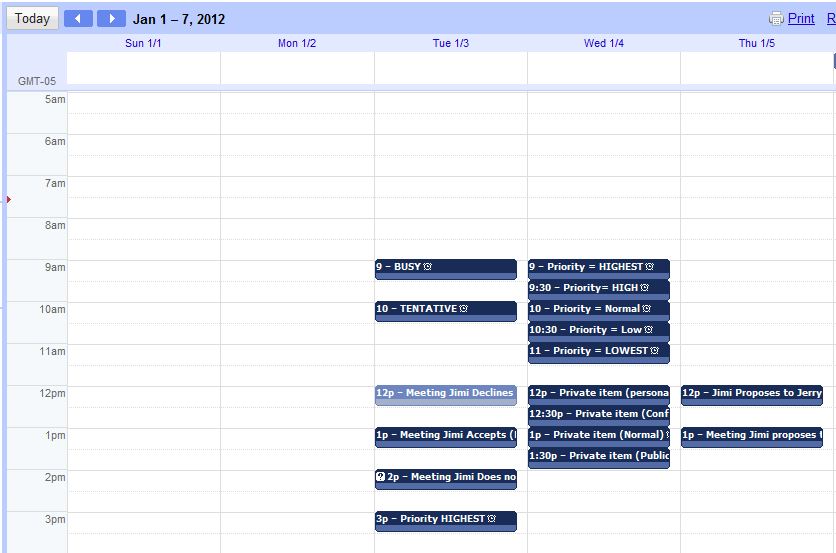
Meetings are meetings with guest lists and status.
This will also work for Zimbra calendaring to Google and Meeting Maker to Google.
We are still working on a few parts of this, but it is now basically completely functional and in two test sites.
One other thing. If you wanted to take all your calendar data from something called Microsoft Exchange and migrate it full-state into Google Calendar, that can be arranged.
June 12: In response to queries. This is all SERVER-SIDE to server-side with no end-user / client-side intervention.
Wednesday, May 25, 2011
Inserting holidays into hosted Exchange without an Outlook client
Holidays.We've been doing them server-side for years now.
So extending Decaf to insert holiday files was not too much of a stretch.
Since we focus on migrating OCS to Exchange, we used the relevant parts of their ICS format for our template.
Create a text file using this template to insert holidays:
This will insert server-side and happen on the given dates, regardless of time zone (!) So a user in the USA or Canada need only put one holiday file together and can use it for all users.
And you go here to insert it. Our usual restrictions apply. Of course UNDO works for this.
As always, any feedback is welcome.
We're debating whether to include an option to insert for all users on a domain -- which is certainly possible but we're a little leery if it's in demand.
So extending Decaf to insert holiday files was not too much of a stretch.
Since we focus on migrating OCS to Exchange, we used the relevant parts of their ICS format for our template.
Create a text file using this template to insert holidays:
| BEGIN:VCALENDAR BEGIN:VEVENT TRANSP:TRANSPARENT SUMMARY:New Year’s Day STATUS:CONFIRMED LOCATION: Any time zone in your system DESCRIPTION: No work day DTSTART;VALUE=DATE:20120101 DTEND;VALUE=DATE:20120101 END:VEVENT END:VCALENDAR BEGIN:VCALENDAR BEGIN:VEVENT TRANSP:TRANSPARENT SUMMARY:Holiday on the 14th STATUS:CONFIRMED LOCATION: Company-Wide DESCRIPTION: Suppose Jan 14 was a holiday in your company DTSTART;VALUE=DATE:20120114 DTEND;VALUE=DATE:20120114 END:VEVENT END:VCALENDAR |
This will insert server-side and happen on the given dates, regardless of time zone (!) So a user in the USA or Canada need only put one holiday file together and can use it for all users.
And you go here to insert it. Our usual restrictions apply. Of course UNDO works for this.
As always, any feedback is welcome.
We're debating whether to include an option to insert for all users on a domain -- which is certainly possible but we're a little leery if it's in demand.
Wednesday, May 18, 2011
Sumatra Decaf: Insert Oracle Calendar ICS into Hosted Exchange
 We made our street cred on full-state migrations server-side to server-side.
But there have been folks who either want to try out just ONE user or go for a simpler migration that trades off full-state migration for something faster and simpler.
This is the reason we've done Sumatra Decaf which we're now happy to open for general inspection at http://www.sumatraresourcewatch.com/decaf
A few things to note:
- This works only for hosted Exchange (e.g., Live at Edu, Office365, BPOS)
- We keep track of the domains that insert and limit it to 5 accounts on that domain by default
- We've geared this to the ICS exports from Oracle Calendar System. Others MIGHT work, but they are a lower priority to us. Each ICS upload is limited to 1 Mb and it inserts only from Today (i.e., the date you are inserting) forward.
- In a few days we'll show you how to use this to insert holidays server-side.
- Read the Help PDF at the site for more information.
Sunday, May 15, 2011
Silverlight web service times out after 60 seconds
For Silverlight apps with web services calls that time out after 60 seconds:
You've set httpRuntime executionTimeout and binding SendTimeout, but your app still times out after 60 seconds. The problem is the CLIENT, not the server, is timing out.
In your Silverlight app, set a timeout after you instantiate your service client. For example, set a 30 min timeout on your service called "mySvc:"
mySvc.ChannelFactory.Endpoint.Binding.SendTimeout = New TimeSpan(0, 30, 0)
You've set httpRuntime executionTimeout and binding SendTimeout, but your app still times out after 60 seconds. The problem is the CLIENT, not the server, is timing out.
In your Silverlight app, set a timeout after you instantiate your service client. For example, set a 30 min timeout on your service called "mySvc:"
mySvc.ChannelFactory.Endpoint.Binding.SendTimeout = New TimeSpan(0, 30, 0)
Friday, May 13, 2011
Creating All Day Events with EWS in Office365
You might remember our recent post:
about the head trip that we went through with migrating all day events into Exchange using EWS and how weirdly the display was different between versions of Outlook and OWA.
Well we're adding this to tell you it's the same head trip in Office365 (no real surprise there but we just feel the need to document it).

Thursday, May 05, 2011
Web-Based, one-step Oracle Calendar to Hosted Exchange migration
This is an early look at something we call Sumatra Decaf and a call for informed consent volunteers.
We've built a really good business out of migrating calendars full-state into Exchange.
But some folks do not need the whole magilla and are just looking for the simplest way of getting data from your legacy system into Exchange in a "good enough" fashion. So we've done that as well.
So yea, we have server-side ICS insertions to Hosted Exchange.
Let's take a look at Puffy Amiumi's calendar in OCS (also in Japanese Standard Time)

Use UNIICAL to export it and then read it into our web-based application (shown here in Alpha):

and in Outlook Web Access on Live at Edu, the results look like this:

Notice we're prefacing them with _TEST_ for the moment to make sure it does not get into the wild before we're ready.
The 5:00 PM Meeting at which Puffy is a guest looks like this in the agenda so that you know who's organized it and who else is supposed to be there.
 Quick, simple, and executable without a lot of prep time.
Now our other option for a migration remains: longer, planned, and full-featured.
We're looking at how we want it to evolve and would welcome some input from you folks.
We're looking at how we want it to evolve and would welcome some input from you folks.
Thursday, April 28, 2011
Progress on migrations to Google Calendar
We're kind of psyched because we've made the first real progress on Oracle Calendar / Meeting Maker / Zimbra full-state migration to (*shudder*) Google Calendar.
Check out this screenshot from our latest tech:

The important thing is the yellow highlighting. Yep -- we got attendees in with their responses.
Now we're working on the mappings and recurrences. So those of you out there stay tuned -- there is light at the end of the tunnel
Check out this screenshot from our latest tech:
The important thing is the yellow highlighting. Yep -- we got attendees in with their responses.
Now we're working on the mappings and recurrences. So those of you out there stay tuned -- there is light at the end of the tunnel
Monday, April 04, 2011
Creating a Room in Office 365 Beta
Working in Office 365 Beta we found it very simple to set up users but a little confusing to set up a Conference Room. So we're documenting the process here. First create the room as though it were a regular old user, like so (you could do all this through PowerShell but I like the simplicity of the Office 365 Admin interface):  Now use PowerShell to set up your session: $LiveCred = Get-Credential This will prompt you for your admin credentials on Office 365. Follow this with the next two commands: $Session = New-PSSession -ConfigurationName Microsoft.Exchange -ConnectionUri https://ps.outlook.com/powershell/ -Credential $LiveCred -Authentication Basic –AllowRedirection and Import-PSSession $Session
  You are now ready to rock and roll by changing your “room” into a ROOM. This PowerShell command will now transform the ID into a Room. Set-Mailbox room222 –Type Room Check this by trying to add it in Outlook:
 And we’re certain that it is now behaving like a room! Since you’re here you might as well also configure the room as you wish. My preference for daily use (though for a calendar migration you’d want to turn OFF AutoAccept): Set-CalendarProcessing -AutomateProcessing:AutoAccept -DeleteSubject:$FALSE -AddOrganizerToSubject:$TRUE -AllowConflicts:$TRUE -EnforceSchedulingHorizon:$FALSE Wash, rinse, and repeat for any other resources you need. When done, be a good doobie and disconnect PowerShell from Office365: Remove-PSSession $Session
Now use PowerShell to set up your session: $LiveCred = Get-Credential This will prompt you for your admin credentials on Office 365. Follow this with the next two commands: $Session = New-PSSession -ConfigurationName Microsoft.Exchange -ConnectionUri https://ps.outlook.com/powershell/ -Credential $LiveCred -Authentication Basic –AllowRedirection and Import-PSSession $Session You are now ready to rock and roll by changing your “room” into a ROOM. This PowerShell command will now transform the ID into a Room. Set-Mailbox room222 –Type Room Check this by trying to add it in Outlook: And we’re certain that it is now behaving like a room! Since you’re here you might as well also configure the room as you wish. My preference for daily use (though for a calendar migration you’d want to turn OFF AutoAccept): Set-CalendarProcessing -AutomateProcessing:AutoAccept -DeleteSubject:$FALSE -AddOrganizerToSubject:$TRUE -AllowConflicts:$TRUE -EnforceSchedulingHorizon:$FALSE Wash, rinse, and repeat for any other resources you need. When done, be a good doobie and disconnect PowerShell from Office365: Remove-PSSession $Session
Monday, March 28, 2011
Oracle Calendar Migrations and Long Resource Names
Kudos to the team at North Dakota State University for finding a bug!
If your Oracle Calendar resource name is longer than 32 characters (and those 32 characters were the same as some OTHER resource's) we weren't handling the error condition gracefully.
That is fixed in version 5.1.01 of xCalReader.
This is probably not an issue for most teams in migration but if you do not have the latest version and want it just contact us.
If your Oracle Calendar resource name is longer than 32 characters (and those 32 characters were the same as some OTHER resource's) we weren't handling the error condition gracefully.
That is fixed in version 5.1.01 of xCalReader.
This is probably not an issue for most teams in migration but if you do not have the latest version and want it just contact us.
Friday, March 25, 2011
Outlook Live URL changes
Quoting from an email Microsoft sent, we want to remind you about upcoming URL requirements for accessing Outlook Live. Due date: June 30, 2011. It's already been extended so now is a good time to get it all done.
URL Changes |
URLs that go directly to Outlook Web App, such as http://outlook.com or http://outlook.com/owa should be changed to go to http://outlook.com/ |
|
If you are using the URL http://outlook.com/ecp to access the Exchange control panel management interface, you will also want to modify that URL to look like this: http://outlook.com/ecp/?realm=contoso.edu. |
Single Sign-On Changes |
Single sign-on solutions using the Live@edu SSO toolkit must make the following changes: |
|
Monday, March 07, 2011
Oracle Calendar / Outlook Free Busy Interchange
Free/Busy Lookups from MS Outlook into Oracle Calendar Server
<><>
Congratulations – you are dropping Oracle Calendar for Exchange. One problem: you need to stage it and you need some kind of connectivity between the two systems. This outlines how you can get Free/Busy lookups in Outlook / Exchange from OCS.
Outlook lets you have Internet Free Busy for Contacts: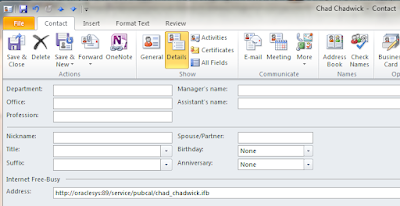
SO: If we can produce IFBs for your OCS users (sorry about all the TLAs here), you can get Free-Busy lookups automatically working for your Outlook users into OCS.
Probably Oracle wanted to avoid exactly what we want in this case.
Not a problem. We can create VFREEBUSY from off the shelf tools in the OCS environment. In particular we will use the utility UNIICAL.
The solution works as follows:
· Select the OCS users you want to have Free-Busy available for in Outlook.
· Set up an internal share that is available to your OCS environment (you will be publishing to it) and your Exchange environment (you will be reading from it)
· One directory call “/…/EXPORT”
· Another directory call “/…/CURRENT”
· A third directory call “/…/IFB”
We’re going to take you through the process for one specific user, who we call Jimi.Hendrix
Create a batch file something like the following:
Uniical –export –u “S=Hendrix/G=Jimi” –f /…/EXPORT/jimi.hendrix.ics -n 1 –end 12/31/2011 –start 10/31/2011 –p PASSWORD |
Notes to this point: The above batch file hardcodes two dates. Obviously we want to make it general to start from TODAY and end at (TODAY + Default F/B Horizon). But let’s start with small ambitions and grow from there.
On a separate computer, we set up a process which interrogates the EXPORT ICS, compares it to the CURRENT ICS (say by comparing the MAX (CREATED) to see if it needs to parse or not), and if so moves it into the CURRENT and parses into an IFB. Practically any scripting language of your choice will work.
So what does ICS look like and what schematic takes it into IFB?
So what does ICS look like and what schematic takes it into IFB?
OCS ICS example
An OCS ICS file has a simple structure with a three-line preface before VEVENTS begin.
WARNING: Experimental evidence has shown that for this to work a contact with Internet Free Busy MUST be in your Contacts folder, not a subfolder, or a folder with any other name. |


Friday, March 04, 2011
New xCalReader for using ICS format to migrate Oracle Calendar
Our latest xCalReader now reads .ics files from Oracle Calendar Server for an Exchange migration:

NB: This is because we've been picking up increasing reports of weirdness with the UNICPOUTU format. We've applied all our usual expertise to the iCal exports: including converting RDATE arrays to real recurrence patterns using RTYPE in Outlook / Exchange.
Also this includes support for Zimbra 6 migration.

NB: This is because we've been picking up increasing reports of weirdness with the UNICPOUTU format. We've applied all our usual expertise to the iCal exports: including converting RDATE arrays to real recurrence patterns using RTYPE in Outlook / Exchange.
Also this includes support for Zimbra 6 migration.
Tuesday, March 01, 2011
New Mantra
Kudos to Russ for our newest mantra:
Hear it once, it's a trick.
Twice it's a special project.
Three times it's a new Sumatra product.
So the topic on the table here is Meeting Maker to Google Calendar migration (with link preservation).
We've had two requests in the last week. Is there anyone else out there?
Hear it once, it's a trick.
Twice it's a special project.
Three times it's a new Sumatra product.
So the topic on the table here is Meeting Maker to Google Calendar migration (with link preservation).
We've had two requests in the last week. Is there anyone else out there?
Sunday, February 20, 2011
More Zimbra 6 to Exchange 2010 / Cloud
So I promised you could see the before and after of contacts and tasks. Here they are.

Migrates to Exchange like this:
 Tasks come over with very few problems. What in Zimbra looks like this

 One thing to keep in mind: Migrating to Live @ Edu is slower than migrating into on-premises Exchange (by a factor of about 7). We're pretty sure it's going to be that way for the foreseeable future.
Migrates to Exchange like this:
 Tasks come over with very few problems. What in Zimbra looks like this
Becomes this in Live @ Edu. It could just as easily be in Outlook -- but we're grooving on someone else keeping an Exchange server running for a change.
 One thing to keep in mind: Migrating to Live @ Edu is slower than migrating into on-premises Exchange (by a factor of about 7). We're pretty sure it's going to be that way for the foreseeable future.
Friday, February 18, 2011
Zimbra 6 to Exchange 2010 calendar migration
It's been a year since Yahoo sold Zimbra to VMware (which reminded me of some of the scenes from prison movies involving cigarettes).
And now is when people are starting to contact us en masse asking if we can move their calendars from Zimbra 6 to Exchange 2010.
Yes, we can.
The way we do it is really convenient. We open the mySQL database and read all the calendar, contact, and task data directly and insert it into Exchange using our usual, field-proven process.
You heard that right: NO user intervention, one spot for an Admin to pull the data and insert the data.


And now is when people are starting to contact us en masse asking if we can move their calendars from Zimbra 6 to Exchange 2010.
Yes, we can.
The way we do it is really convenient. We open the mySQL database and read all the calendar, contact, and task data directly and insert it into Exchange using our usual, field-proven process.
You heard that right: NO user intervention, one spot for an Admin to pull the data and insert the data.
So let's take a look at the BEFORE and AFTER.
Jimi Hendrix's calendar on Zimbra 6.0.7 looks like this:
After extraction and insertion into Live @ Edu it looks as we would expect:
Note, the tentative meeting is tentative, the accepted is accepted, and the declined doesn't appear because that's the way Exchange works. We keep all recurrences and the meetings are completely LIVE on live @ Edu.
But wait -- there's more.
Contacts and Tasks come along for the ride too.
Contacts and Tasks come along for the ride too.
But we'll show you those in a separate posting.
Subscribe to:
Posts (Atom)