We get asked about email migration fairly frequently. In Exchange 2003 we tried doing it but truth be told there were some adequate free solutions. And "free" is tough to sell against. Then 2007 came out and NOBODY initially had solutions (even Microsoft) but we resisted the temptation to develop our own solutions (and we are still glad).
In general we find that Microsoft Transporter Suite is ... lacking (I'm trying to be polite here). But I know it is tough to ignore because it's from Microsoft and your boss knows it's free. Try it yourself and look through the fora before you commit to using this.
Glen did a great article on EML migration into Exchange 2007 using Exchange Web Services. If you're comfortable scripting this will get you through the hard part of inserting email into Exchange 2007.
We think you should also look into using imap2exchange which you can download at http://tp.its.yale.edu/confluence/display/EXCH/imap2exchange+Conversion+Utility. We worked on their calendar migration over the summer and the crew at Yale impressed us as a sharp bunch of folks. Please keep in mind these complements come without any grudging or reticence from a Harvard graduate.
Thursday, October 30, 2008


Tuesday, October 28, 2008
Mirapoint behaviour and your calendar migration
First, we'd like to thank the IT team at a liberal arts college in Massachusetts for making their Mirapoint system available to us for migration testing.
Now we'd like to ask some hard questions about the preferred way to migrate data INTO Mirapoint from (say) Meeting Maker or Oracle Calendar Server.
Let's take a look at a typical meeting invitation on the Guest's side. "zygf" invites "russi" to a meeting and Mirapoint puts it on russi's calendar. So far so good. From within the calendar russi now has some options (also so far so good)
 He "Accepts" and the meeting remains in his calendar (I do not notice any color or state change here -- does anyone know if this is normal?).
What happens if russi DECLINES the meeting?
 The short answer (and it's kind of a weird one) is that it STAYS in his calendar!
 The response IS updated on the Meeting Organizer's calendar:


Now we'd like to ask some hard questions about the preferred way to migrate data INTO Mirapoint from (say) Meeting Maker or Oracle Calendar Server.
Let's take a look at a typical meeting invitation on the Guest's side. "zygf" invites "russi" to a meeting and Mirapoint puts it on russi's calendar. So far so good. From within the calendar russi now has some options (also so far so good)
He "Accepts" and the meeting remains in his calendar (I do not notice any color or state change here -- does anyone know if this is normal?).What happens if russi DECLINES the meeting?
The short answer (and it's kind of a weird one) is that it STAYS in his calendar! The response IS updated on the Meeting Organizer's calendar: This brings us to our conundrum: Declining a meeting will automatically remove it from a Meeting Maker calendar, and declining will change color state on an Oracle Calendar.
So the question: Is the right thing to do to try to replicate the legacy calendar or to insert data in the New World Order of the Mirapoint system the organization is migrating into? If we delete declines meeting then users do not have the option of going back and re-accepting them. But if we KEEP the declines in the calendar we run the risk of user confusion during the crucial post-migration period.
Since we've decided we're lousy at making decisions for other people we figured we'd ask and then listen to the responses.
Other issues in the Mirapoint user interface:
- There are no Optional Guests or CC / BCC for meetings
- There is no "Weekend move" functionality so we would need to nail meetings / appointments to the specific date of the month
- The "By week of month" option is in the interface limited to one instance (e.g., the SECOND Tuesday of the month) but on inserting a properly formatted VCS file we can create a "Clean Refrigerator" appointment on the FIRST and THIRD Friday of the month. Only problem arises when the owner tries to modify the series as opposed to separate instances.
- No “Last day of the month” capability – e.g., in Meeting Maker I can have a meeting “the Nth day from the end of the month” – usually it’s the Last day – but Mirapoint has odd behavior if I try scheduling a monthly meeting on the 31st – it leaves it completely OUT of months with 30 or fewer days. This is just plain goofy.
- Master exceptions: via EXDATE. This might cause problems with Outlook as a client to Mirapoint. It did in early Zimbra migrations – we need to investigate some more.
- Resources: Looks like Mirapoint has just a single category “Resources” as opposed to the MM distinction of “Location” and “Resources”
- Final note: I have to give Mirapoint kudos for their interface for calendar sharing. It's very simple and very clear (something most other vendors have not figured out how to do yet):
Thursday, October 23, 2008
Calendar migration into Zarafa
So we got a request over the transom to see if we could migrate Meeting Maker data into Zarafa.
Their online demo bears a really close resemblance to OWA. This part I do not get: If you want to choose to not be part of the Microsoft Global Co-Prosperity Sphere, why on earth do you want the interface to be exactly the same? It's like not wanting to watch Seinfeld itself, only a high school acting troupe doing the exact same gags and plots. If that's what you want in front of you the original is much better.
 However, short answer is NO. Mainly their mechanism to put in data is via PSTs (using ExMerge), with some scripts to migrate contacts via CSV. We don't produce PSTs (it is a real pain and we do not get much call for it). We can go into Exchange via CDO and EWS, and we can produce ICS, but none of the mechanisms we see in their Wiki will let us put in calendar data with the fidelity we are known for.
Their online demo bears a really close resemblance to OWA. This part I do not get: If you want to choose to not be part of the Microsoft Global Co-Prosperity Sphere, why on earth do you want the interface to be exactly the same? It's like not wanting to watch Seinfeld itself, only a high school acting troupe doing the exact same gags and plots. If that's what you want in front of you the original is much better.
However, short answer is NO. Mainly their mechanism to put in data is via PSTs (using ExMerge), with some scripts to migrate contacts via CSV. We don't produce PSTs (it is a real pain and we do not get much call for it). We can go into Exchange via CDO and EWS, and we can produce ICS, but none of the mechanisms we see in their Wiki will let us put in calendar data with the fidelity we are known for.
Wednesday, October 22, 2008
Dude -- Here's My Contacts
Thanks go out to our Kiwi friends for this information.
 You even have options to EXPORT them (from which you can also take them into Outlook).
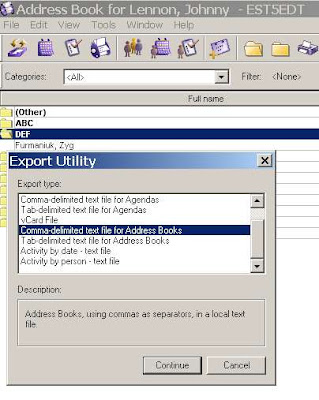
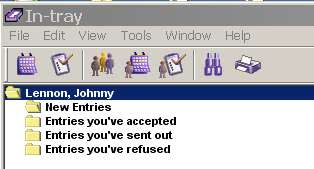
Let's say you want access to your Oracle Connector for Outlook contacts from within an Oracle client. Notice the lack of a "Contacts" icon in the Oracle In-tray:
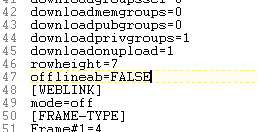
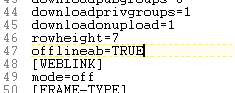
Go to your UNISON.INI file under C:\Documents and Settings\USERID\Application Data\Oracle\Calendar
Find the [GENPREFS] section.
Change:
offlineab=FALSE to offlineab=TRUE
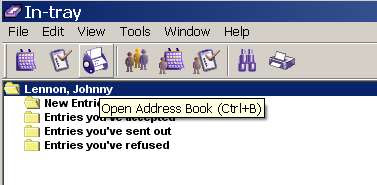
Restart your Oracle client (not OCFO), and you have access to your Contacts.
You even have options to EXPORT them (from which you can also take them into Outlook).Tuesday, October 21, 2008
Real World Exchange Broken Meeting Statistic
We recently got an export of a real world conference room schedule in Exchange 2007 from January 1, 2008 to December 31, 2008 and did some analysis on it.
That one room hosted 2,450 individual instances of meetings (i.e., we count each recurring instance).
Figuring that there are 260 work days in a year, this means on average there are 9 meetings a day in that conference room (which sounds pretty close to full capacity, though there are occurrences on weekends).
What was also interesting was that there were 288 broken meetings in it (clogging the availability), or on average 1 broken meeting per work day.
Now given that this is from ONE conference room are we drawing big conclusions from it? No.
We were really astounded to see it anywhere near 1 per work day, though.
That one room hosted 2,450 individual instances of meetings (i.e., we count each recurring instance).
Figuring that there are 260 work days in a year, this means on average there are 9 meetings a day in that conference room (which sounds pretty close to full capacity, though there are occurrences on weekends).
What was also interesting was that there were 288 broken meetings in it (clogging the availability), or on average 1 broken meeting per work day.
Now given that this is from ONE conference room are we drawing big conclusions from it? No.
We were really astounded to see it anywhere near 1 per work day, though.
Friday, October 10, 2008
Oracle Connector for Outlook: Dude, Where's My Contacts?
So we just helped several thousand folks in New Zealand migrate their calendars from OCS to Exchange 2007 and they called us across the Pacific (Side bar: Across the Pacific is a WAY better movie than Dude, Where's My Car?) for some insight into how to migrate their contact data using Oracle Connector for Outlook and PSTs.


 In "New" Outlook I see this (we had no doubt our friends in New Zealand were correct about this, but we love the phrase "trust but verify"):


In fact a PST

And all we want right now is the Contacts:

Pick a location where you can save it (I picked next to the standard Outlook.PST file, because the size difference 48 vs 64 KB between the two is interesting).


Add a new PST, Point to your contacts.pst file,


They tried the obvious method of just opening the local PSTs and the contact data from OCS was not there. This sounding like the kind of spooky weirdness that intrigues us in the calendar migration business we needed to dust off and install Oracle Connector for Outlook, look into this, and discover that it indeed is the case.
Initially we thought it might be that Offline Use needed to be enabled (we got that hare-brained idea from one of Oracle's architectural diagrams of OCFO), so we set that.
And we followed through on the Offline Folders Setting:
There is indeed a PST file there (which is usually a good sign)
but when I opened this PST in Outlook on a different machine there were no contacts.
In OCFO I see this:
In "New" Outlook I see this (we had no doubt our friends in New Zealand were correct about this, but we love the phrase "trust but verify"):We did manage to extract the contact data and what we had to do was make it all REALLY EXPLICIT. Note that I also used two different versions of Outlook (2002 vs. 2003) just to keep the locations straight.
To start in OCFO select File-Import and Export:

You're exporting to a file
In fact a PST
And all we want right now is the Contacts:
Pick a location where you can save it (I picked next to the standard Outlook.PST file, because the size difference 48 vs 64 KB between the two is interesting).

Now on the Exchange side, you can run the process in reverse, or you can use Data File Management
Add a new PST,
 Point to your contacts.pst file,

And the end result is that you've got your contacts over:
So for the really curious calendar person: What the heck is going on here?
Let's take a look at the file structure of OCFO. Almost all the files under the /Outlook/Oracle Connector... directory are pretty small, except for the one I found called "mdb" which being within the same order of magnitude as the PST files we found makes it a good candidate for the location where OCFO data gets stored.
In fact there are several of these throughout this directory structure. Those of you who ever had the pleasure of working in 1980's era dBase will feel deja-vu. I started doing correlations between GUIDs for the contacts in Outlook/OCFO and the data here using a binary viewer, but that got to be a hassle very quickly. Russ looked at running SOAP requests for contact data using the OCS API, which he rapidly decided was "obscure and painful."
We know the contact data is in there (somewhere), but the method we sketch above has the advantages of being simple, fast, and actionable without coding.
Monday, September 29, 2008
Exchange 2007 - Zimbra Free/Busy: The Magic PowerShell Command
We'd like to thank some folks we really enjoy working with at the University of Pennsylvania. They spent some time last week getting Free-Busy connectivity to work between Exchange 2007 and Zimbra.
I've got to give Zimbra credit for how well they executed Free-Busy connectivity with Exchange, a good summary of which and links pertaining thereunto are here:
http://www.zimbrablog.com/blog/archives/2008/06/are-you-free-or-busy.html
Add-AvailabilityAddressSpace -ForestName [zimbra domain] -AccessMethod PublicFolder
Credit for figuring this out belongs to Eric at Penn. He also used the phrase "Magic PowerShell Command" which I kind of really groove on.
You might also want to check out Microsoft's Implementing Calendar Interoperability (which shows how to do this without lots of coding and judicious use of Exchange Group Policy settings) and Managing Public Folders with the Exchange Management Shell.
Gorier Detail Added September 30, 2008 (again, thanks to Eric at Penn)
To configure Free-Busy from Exchange to Zimbra:
I've got to give Zimbra credit for how well they executed Free-Busy connectivity with Exchange, a good summary of which and links pertaining thereunto are here:
http://www.zimbrablog.com/blog/archives/2008/06/are-you-free-or-busy.html
Penn's problem was that Zimbra is set up to handle Free-Busy data with Exchange 2003 via Public Folders (which are de-emphasized in Exchange 2007).
Exchange looking at Zimbra Free-Busy was no problem, but Zimbra looking at Exchange was generating an error like:
ERROR [EXCHANGE Free/Busy Sync Queue] [] fb - cannot modify resource
However, you can get it to work. The Magic PowerShell Command on the Exchange side is:Add-AvailabilityAddressSpace -ForestName [zimbra domain] -AccessMethod PublicFolder
Credit for figuring this out belongs to Eric at Penn. He also used the phrase "Magic PowerShell Command" which I kind of really groove on.
You might also want to check out Microsoft's Implementing Calendar Interoperability (which shows how to do this without lots of coding and judicious use of Exchange Group Policy settings) and Managing Public Folders with the Exchange Management Shell.
Gorier Detail Added September 30, 2008 (again, thanks to Eric at Penn)
To configure Free-Busy from Exchange to Zimbra:
- Create a Service Account on Exchange. Call it "zimbra" (watch your permissions -- see next section)
- Configure Zimbra to connect to the Public Folder Free/Busy interface via this account. You do this on the Zimbra side.
fydibohf23spdlt)/"# Specify the Service Account
mcf zimbraFreebusyExchangeAuthUsername
zimbramcf zimbraFreebusyExchangeAuthPassword
[password]mcf zimbraFreebusyExchangeAuthScheme form
# Specify the url to Exchange 2007 CAS
servermcf zimbraFreebusyExchangeURL
https://cas.exchange.YOURDOMAIN.com/# Set the legacydn in Exchange 2007
mcf zimbraFreebusyExchangeUserOrg "/o=First
Organization/ou=Exchange Administrative Group (
Linux folk and Arthur C. Clarke fans: fydibohf23spdlt explained here.
To configure Free-Busy from Zimbra to Exchange:
1. Create a "Zimbra" OU in Active Directory. Make sure all your Zimbra users are in it. But let's define some rules for keeping everyone straight:
- User "Elvis" on Zimbra will in this Active Directory Group be known as "Elvis_Zimbra"
2. Set the Service Account ("zimbra") to update the Free-Busy folder. You do this in PowerShell on the Exchange side.
add-publicfolderclientpermission -identity "\NON_IPM_SUBTREE\SCHEDULE+ FREE
BUSY\EX:/o=First Organization/ou=Exchange Administrative Group
(FYDIBOHF23SPDLT)" -user zimbra -accessrights owner
3. Make Exchange 2007 aware of the Public Folders in the Zimbra domain. You do this in PowerShell on the Exchange side:
Add-AvailabilityAddressSpace -forestname zimbra.YOURDOMAIN.COM -accessmethod publicfolder
4. Update Zimbra accounts to be aware of the email accounts on the AD side. You do this in Zimbra.
# add link from elvis to elvis_zimbra mail contact in AD
ma elvis@zimbra.yourdomain.com +zimbraForeignPrincipal ad:elvis_zimbra
# add link to OU
ma zimbraFreeBusyExchangeUserOrg "/o=First Organization/ou=Exchange Administrative Group (FYDIBOHF23SPDLT)"
Monday, September 22, 2008
Calendar Spam via Yahoo
I hadn't seen any Calendar Spam from Google in a while, but since American ingenuity has been globally outsourced like everything else, some script kiddie in some third world Internet cafe has started using Yahoo for it. I don't blame Yahoo, but maybe they should once again play their eternal catch up game with Google and close this breach.

Keep your eyes on your inboxes, folks.
Thursday, September 18, 2008
Now Up-to-Date Full State Migration
Sooner or later we get asked about everything.
We got our first inquiry about Now Up-to-Date (NUTD) a few years back, when I thought they like every other software company who hitched their wagon so tightly to Apple had been rendered into Elmer's and Alpo. Since the inquiry involved all of twenty users, we just ignored it. Turns out Now is still around (though the move from Oregon to Ohio must have been pretty traumatic).
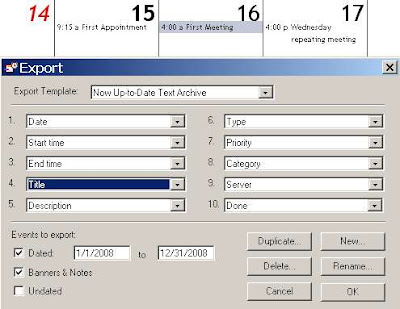 And these are pretty much all the options you've got -- your only choice is order, and whether to take them or ignore them. Let's work with the defaults. An export of 1 standalone appointment, 1 meeting, and 1 repeating appointment (which I erroneously called a meeting in the screenshot) results in the following text file (split for ease of viewing):
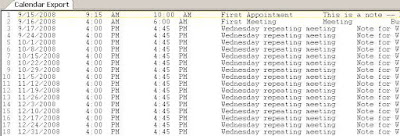
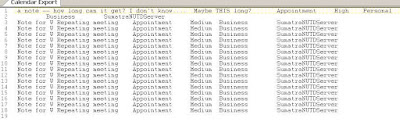 There are very few surprises here. You have the date of the appointment, the start and end times, the title, notes, categories, and priorities. You can clearly read this into any spreadsheet of your choice and order / manipulate the data into something that almost any other client will accept. If you need iCalendar that will require some more work but it's computer science, not rocket science.

 ... who also all exist in this database. I'll leave it as an exercise to the interested reader to determine if the Administrator passwords for these objects are in the clear or weakly encoded.
We got our first inquiry about Now Up-to-Date (NUTD) a few years back, when I thought they like every other software company who hitched their wagon so tightly to Apple had been rendered into Elmer's and Alpo. Since the inquiry involved all of twenty users, we just ignored it. Turns out Now is still around (though the move from Oregon to Ohio must have been pretty traumatic).
Our second inquiry just came in a few weeks ago, and since it's only a few hundred users we're going to ignore it as well. But being as how the decryption team has been itching for something else to do we started wondering "What is so hard about migrating NUTD?"
Our conclusion:
Full-state server-side-only migration is not possible with NUTD.
First, keep in mind, when we say migration we mean a server-side full-state migration, touching the client side not at all: user lists, recurrence patterns, guest responses, basically as much information as it is possible to extract.
Everyone on the fora we see seems to be in a dither just getting client-side to client-side migration to work. We'll show you why that should be simple if you start writing your own scripts.
So here's the quick sketch of client-side data availability in NUTD.
First point: The server contains way less info than other calendar systems (by which I mean Exchange, Oracle, GroupWise, Lotus Notes/Domino, etc.), so look to the client as the most promising avenue.
Client Side Analysis
So client side let's see what kinds of export options we have. Don't get your hopes up. There aren't many. I'm doing this on Window, and I see from the documentation you have a few more template options on the Macintosh, but the data fields are the same.
And these are pretty much all the options you've got -- your only choice is order, and whether to take them or ignore them. Let's work with the defaults. An export of 1 standalone appointment, 1 meeting, and 1 repeating appointment (which I erroneously called a meeting in the screenshot) results in the following text file (split for ease of viewing):There are very few surprises here. You have the date of the appointment, the start and end times, the title, notes, categories, and priorities. You can clearly read this into any spreadsheet of your choice and order / manipulate the data into something that almost any other client will accept. If you need iCalendar that will require some more work but it's computer science, not rocket science.- This format strips all recurrence patterns and leaves recurrences as individual instances - the usual default in client-side exports (in Oracle Calendar migrations we need to re-create those, which we don't recommend you try on your own - it took us a few months to get right)
- This format strips the guest list - which is pretty much the rule in client side-exports, but still fairly unforgivable from an end user / synchronization perspective: WHO you are meeting with is just as important as WHEN.
- Forget meeting locations and resources since the guest list is by all appearances managed server-side. In fact it's kind of goofy the export does not include a "Location" field.
- You need to take direct control of your time zone info
- There's a variety of other info types which you can take or not depending on your target system. Usually banners and tasks will map well, the rest you can assign as your users / constraints dictate
- Going into Outlook/Exchange watch out with Holidays and Banners - these are best dealt with as All-Day Events
- Rooms and Resources - ignore these at your peril. You need to migrate those as well -- and it looks as though the best way is to have the Proxy for the room/resource view it and export it in the same manner and format as their own calendar.
- International users: Keep an eye on the character sets, I wouldn't be surprised if there are issues for accented characters.

Next thing to notice.
Following down the path C:\Program Files\Now Software\Now Up-to-Date
I find that my data file (*.nud) is 62 KB in size, containing a total of three meetings / appointments of various sizes.
Following down the path to my server (C:\Program Files\Now Software\NSM\Servers\SumatraNUTDServer) where I have already created another user, some public categories, a Meeting Room, and a Resource, I find that file to be 4 KB in size. This size disparity between server and client speaks volumes.
Server Side AnalysisLet's look at the options available to us as server admins. Again, do not get your hopes up.
Pretty much the only thing you can do is start it, stop it, add / configure users, resources, and rooms, and a few other things. While there is an automated backup option, noticeable absent is any kind of server-side export capability (which allowed us to migrate Oracle and Meeting Maker wherever they need to go) or any tools for direct manipulation of data server-side.
So let's see what we can grab off the shelf.
First thing we'd notice is that on Windows this server file helpfully has a .DB extension, indicating that it is a database (d'oh), most probably relational (semi d'oh again - there are object-oriented calendar databases) and perhaps built with an off-the-shelf package whose judicious use of import / export and clever analysis might result in the schema and associated data structures.
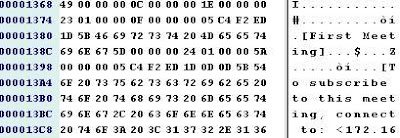
Let's hold that last idea for a bit (because it will be quite a lot of work fumbling about for the right package and I already went through two candidates) and just let our ADHD selves open the server database with a binary file viewer, the curious calendar migrator's best friend. I like BinViewer.
The meeting "First Meeting" is definitely in here. I know on the client side that I associated it with Room222, Resource1, and my co-worked Russ....
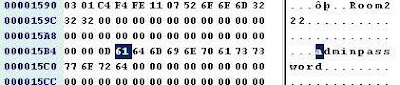
... who also all exist in this database. I'll leave it as an exercise to the interested reader to determine if the Administrator passwords for these objects are in the clear or weakly encoded.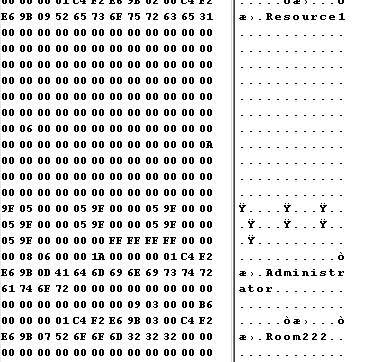
Most notably here where we see the name of the meeting in clear text and the human guest associated with it. A little additional work is required to see the relationship of the associated resource and room. Searching for the name of any appointment you created client-side comes up negative, confirming that the appointments are not present on the server. Notice I have not dug into the issue of recurrence patterns in meeting data server side yet because I already know where this is leading. 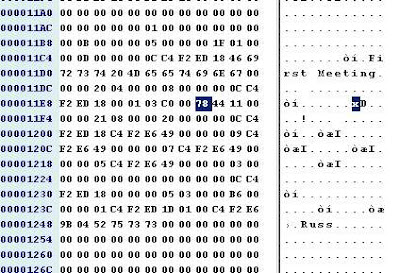
Short answer: we know the relevant meeting data is present server-side, and we know if we start coding into the bit field of a shutdown server database we have very good odds of reconstructing it.
The more important issue is: DO WE WANT TO?
We already know that at the very least we're going to need to touch every client to extract their appointments, banners, tasks, etc. Running another server-side process to get at the live meeting data sounds questionable: it's running two disparate processes where one is almost always far and away preferable, and making sure both processes jibe with each other.
Conclusion
Unless you've got a few thousand NUTD users (which is hard to believe) who all absolutely need their guest lists and recurrence patterns, stay client-side and don't spend a lot other than scripting time when you decide to migrate.
Saturday, September 13, 2008
Terminated with extreme prejudice
You know the scenario -- people in your organization are coming and going all the time. When they come in you have a handle on it. When they go, well, that's a different story.


He's also still in end user calendars.
 Now, if we wanted to cancel all of Elvis's meetings BEFORE we deleted him from Active Directory, that would be easy. Just run our tool and click Test2: Report/CancelMtgs


Let's say we want to cancel them.
 And let everyone know why.
And it tells us what's going on.
Put in the Room ID and click
 It will find all instances of Elvis's recurring meetings in it (as well as any other broken meetings, but I happen to know the only ones in there just now belong to Elvis)
To get rid of them (you can edit the report to remove the ones you want to keep) click

Going into the calendar for Room 222 means it now looks like this, cleaned of the broken meetings Elvis organized.

In particular, Exchange has a nasty habit of letting them leave the building but linger on in broken meetings.
We've been working on the problem and we got asked about it yesterday, so I figured it was a good time for a running commentary.
Let's create a user called Elvis Morrison.
Elvis enters the company sets up a few meetings and, in the way of all flesh, is downsized or leaves for greener pastures. When he leaves this is what his calendar looks like:
We can delete Elvis from Active Directory in a few seconds:

But if we just delete him then his meetings will linger (with no way to cancel them). So in the Conference Room 222 calendar, Elvis is still very much alive!
He's also still in end user calendars.
Now, if we wanted to cancel all of Elvis's meetings BEFORE we deleted him from Active Directory, that would be easy. Just run our tool and click Test2: Report/CancelMtgsYou get options like
Let's say we want to cancel them.
And let everyone know why.
And it tells us what's going on.
 BUT let's say users have been being deleted for a while or we deleted Elvis before removing his meetings. We can STILL clean out the resources (we can do the users, too, but let's focus on the rooms and resources).
Let's say we're looking to clear out the cruft from Conference Room 222.

Put in the Room ID and click
It will find all instances of Elvis's recurring meetings in it (as well as any other broken meetings, but I happen to know the only ones in there just now belong to Elvis)

To get rid of them (you can edit the report to remove the ones you want to keep) click
Going into the calendar for Room 222 means it now looks like this, cleaned of the broken meetings Elvis organized.
The more astute among you will recognize there are some additional subtleties to this, but I'll save those for another blog posting.
Editorial addition (Sept 14, 2008)
The "Export Mailbox" cmdlet will archive all Elvis's data to a PST, but it does NOT cancel his meetings. See this discussion.
Subscribe to:
Posts (Atom)