Monday, March 30, 2015

DIY calendar process to Migrate @MSFTExchange to #Office365 -- here is the application

The situation: you want to move from Exchange on-premises to the cloud aka Office 365.

You were shocked to discover Microsoft does not have a simple migration solution outside of email.  And the email solution is not even as flexible as imapsync.  All the current third-party tools treat calendaring as an afterthought to email leaving half your calendaring data behind (recurring patterns, guest lists, guest responses).

The result is that post-migration your users see what looks to be their same Outlook/OWA mailbox only to discover that their calendar meetings are broken.

We solved that problem.

Inexpensive solution to better calendar data migration
So we created a calendaring / task / contacts migration process for Exchange on-premises to Office 365  that is an improvement over existing methods in that it gives you more information about guests in meetings (it's an improvement over everyone else if we give you ANY information about guests).

On-premises a meeting looks like this:


Migrated to another Exchange server it will look like this in Outlook with our "flat" option:
                   

Note that we can map user names and resource names and preserve information about attendees outside the domain.

And you can download and try it here with documentation here.  The trial version will insert your appointments for a month into the future.  We're licensing it for $299 for one domain for two weeks.  Based on our MDaemon migrations, we've seen under 1000 user migrations easily accomplished in that time.  If you need more time, ask us.

If you manage your own migration you can get your data in for very low cost with imapsync handling email and our tools handling calendars, contacts, and tasks.

For those of you who want fully-functional calendars post-migration, we offer:
Full-state calendar migration for enterprises with full-state sync.


Contact us for additional details on full-state (though the documentation above is a great place to start).


Tuesday, March 17, 2015

Exchange Cumulative Update 8 - Automatic Profile Re-direct

Folks, especially those doing a DIY migration from on-premises Exchange to Office 365, you should look at CU 8.
The automatic profile redirect we'll need to look at but it sounds like it will be a really big help.

Oh yeah, and modern Calendar and Contacts Public Folders are now accessible in OWA.

Added March 24, 2015:  profile redirect is not the big help we thought unless your main worry is Smart Phones.  See: Exchange ActiveSync on-boarding to Office 365

Sunday, March 15, 2015

Time to replace the votive candle....

It comes as no surprise to anyone we've done migrations with that one of us has a superstition about keeping a votive candle burning during a migration.  With a migration this weekend our Misericordia Divina (from a bodega in LA, long story) burned its last.  Now we plan on replacing this with one of these time-oriented secular saints from the Unemployed Philosopher's Guild.


Thursday, March 12, 2015

DIY O365 Migration from Exchange - First Pass

Rarely do we get such an outpouring of "gimme gimme gimme."

So since we're really good at turning out stuff quickly, we've got a first pass at our DIY Guide to Migrating from Exchange to Office 365.  

We have focused on the heavy lifting of migrating email (via imapsync), and calendars, contacts, and tasks (via our tech).

Remember: It's BETA, folks.  You have comments, want additions, think you have something to add, we're really happy to take feedback.  

The other issues: like user provisioning, delegate access, swapping MX records, we've not gone into detail at all since those are pretty well documented on line.  If you need details on how to accomplish this, let us know.

Remember, you'll need to license imapsync.

If you need the calendar, contact, and task migration, drop us a line.

We'll have a simple flat version of our calendar migration software up in a couple of days.

It's simple to run, but unlike everybody else it will tell you who was in your meetings like this:

Tuesday, March 10, 2015

DIY @imapsync to Migrate Email #Exchange to #Office365 -- We'll add a calendaring process

Your direct costs should never exceed 100 Euros (or $110 at the current exchange rate) for an email migration into Office 365 (From Exchange or any other IMAP server).

imapsync is more than capable of handling your Email migration. Buy the software and support.   

Cards on the table here: we do not get any money from imapsync, but we've found it to be a quality product with a great guy behind it and a good support community.  Add to that it's inexpensive nature and liberal software license and you really cannot go wrong.

You will need to make sure you have permissions on the Office 365 side if you wan to do multiple mailboxes without individual passwords. See our earlier posting on using imapsync to migrate email into Exchange

You can also handle migration problems with the wealth of Exchange information in their FAQ:

Pay special attention to the case of read receipts.   Going into Office 365 can re-generate read receipts.  So during your testing if that turns out to be a problem:

imapsync...   --disarmreadreceipts

Other very useful FAQ solutions include what to do when encountering individual attachments over the default limit set by Exchange (10 Mb) and Office 365 (25 Mb), as well as line length issues.

We're working on a DIY document to take you through your own migration.  Frankly, we get lots of questions that could be handled by such a guide.  And we're tired of Microsoft black boxes and over-priced third party offerings.

We'll offer a "flat" calendar migration in an imapsync-like model just so folks can get their migration done if they don't mind a simple calendar migration.  Contacts and tasks are included in this of course.

The goal here is to get your software costs for a migration to Office 365 to under US$1000 with you supplying your own elbow grease.

In rough numbers email, calendars, tasks, and contacts should be about 95% of the data you need to move.

Sunday, March 08, 2015

The Absurd Side of Daylight Savings Time

Put your personal politics aside for a minute and remember that this is SATIRE. I have raw memories of an expository writing class where half the people in it did not realize that A Modest Proposal was NOT serious!  Actually, it was serious, just not in the direction they thought.  Some of those people probably work for the Federal government now.....

But OBAMA PERFORMS ILLUMINATI DAYLIGHT SAVINGS TIME RITUAL TO CAST WORLD INTO LIBERAL DARKNESS, ONE HOUR EARLIER is just darned funny.


Daylight Savings Time is the bane of the calendar server migration expert.   You need to have excruciatingly detailed knowledge about what is happening on both the source and the target server, and sometimes you just need to deal with bad situations.

Addition: March 9, 2015.  Nacho Punch has an entire series of DST-themed comedy.

Wednesday, March 04, 2015

Electronic Road Sign Hacking

Does this have ANYTHING to do with calendar server migration?

Well.... a teeny tiny bit.  In why we do not ever want your system passwords and why we purge any of your data as soon as we can if we need to look at it.

But it's also cool and amusing.  

Besides, I'm pretty sure at least one of the signs they have photos of is on Massachusetts Avenue in the vicinity of MIT, so I need to link to it.

Head over to Jalopnik for How to Hack an Electronic Road Sign.

The method is based on the usual lack of physical padlock security, usual use of default password ("DOTS"), and dirt-simple method of resetting the entire system to default (CTRL+SHIFT+"DIPY").

Moral is left for the reader.

Monday, March 02, 2015

MDaemon Migration European Translations - Thanks are in order

This is a shout out of THANKS to the folks who gave us high-quality translations of German and Dutch for the MDaemon calendar migration interface as well as helping us debug some issues in the European market.  

Christian in Germany,  THANK YOU!!!

In the Netherlands thanks go to Jesper Plass at JP Allaround-ICT.  

Jesper also found us one of the weirdest things we've seen in field data in a while: recurring appointments with end dates in the year 4501 AD.  How that happened in real life we have no idea, but we have already fixed the MDaemon migration code.

Latest version of mCalReader is 4.1.08 and contains the above fixes (as well as one that came out of Canada this weekend).

Thursday, February 26, 2015

Another useful link on #MDaemon migration to #Exchange via Linux

Gentle Soon-to-be-MDaemon-free Migrating Reader,

Ms. Migrations recommends reading MDaemon to Microsoft Exchange migration for real-world experience going from MDaemon on Linux to Exchange. 

This article focuses on email using imapsync (for email, just use imapsync, really) and mentions nothing about calendars, but that of course is what we are here for.


Tuesday, February 24, 2015

Enterprise #Exchange to #Office365 Calendar Migration -- Now with Sync!

Things do not stand still at Sumatra.

With Exchange to Exchange full-state calendar migrations about to hit beta, we added and are testing Sync in our labs.  In the spirit of how things like email sync works, we've added sync to our full-state Microsoft Exchange to Microsoft Exchange calendar migration.  You get contacts and tasks as a by-product.

A few teaser images. starting with the Sync button (We're still discussing how we're going to make this work):

So the SOURCE Exchange server had this:

Which resulted in this on the TARGET Exchange account (note live meetings and recurrence!):

We leave the TARGET system alone while the SOURCE system evolves (1 additional item on the 27th and a modified appointment on the 18th, and a change in meeting response on the 26th).  After hitting SYNC these changes come in:

This capability will not be in this week's beta, but we'll roll it out as necessary when we deem it stable.

Monday, February 23, 2015

Migrating live calendars into #Exchange -- Manage Delegate Forwarding

Those of you who have been diligently following the workings of the mighty Sumatra bullpen know that we're nutcases about making sure migrations go well.

One thing in a full state migration into Exchange is that you need to turn off Delegate forwarding if you want us to recreate the meeting responses.

So to turn off forwarding for an entire domain, you use Set-RemoteDomain, like this: 

Get-RemoteDomain | Set-RemoteDomain -MeetingForwardNotificationEnabled $false


To turn off forwarding for an individual user use set-calendarprocessing:

Set-CalendarProcessing -Identity user email@yourdomain.com  -RemoveForwardMeetingNotifications $true


In the days of Exchange 2007/2010 you would have used set-mailboxcalendarsettings.

Tuesday, February 17, 2015

Enterprise-Level Calendar Migration #Exchange to #Office365

Last week (which is like forever in Sumatra Development time) we showed you the interface to our full state Microsoft Exchange to Microsoft Exchange calendar migration.

This week we'll show it working in a video:


This is showing the full state migration keeping recurrence patterns, guest lists, guest responses.  You know, everything that makes your calendar useful in an enterprise environment.  The stuff Microsoft does NOT do in a migration.  The stuff everyone else who claims to migrate calendars glosses over.

If you do not need or want all that utility we have an option that runs faster but still tells you who is supposed to be in your meetings.  Again, the stuff Microsoft and everyone else does not do.

Next week we'll release it to the sites we've got as early betas.

If you need Microsoft Exchange to Microsoft Exchange calendar migration after that, feel free to contact us.

Wednesday, February 11, 2015

Preview #MSExchange to MSExchange Calendar Configuration

Well  it finally happened,  We got folks realizing that bringing your enterprise calendars from on-premises Exchange to Hosted Exchange was not a trivial matter.

But we at Sumatra have radically simplified it and are giving you a preview of the application.

We are offering options to do a full-state migration or a flat migration which will insert your meetings as appointments in everyone's calendar (it's faster and easier, but it's probably not for your executive level).

Watch this space for more info as it becomes available.

And yes, we could theoretically do a Google Calendar into Exchange / Office 365 migration, but everybody who opted for Google is still too deep into denial to deal with that possibility.

Lone hackers and the calendaring connection

My best Internet read of the last few months has been How a Lone Hacker Shredded the Myth of Crowdsourcing.  

What's the calendar connection in this?  In the lesson that in any sufficiently large group of people (let's say a 1000 user calendar migration) you will see the spectrum of all types of behavior.  And this very much includes destruction for its own sake.

We see things like this in raw calendar data all the time: calendars booked through 2039 (no joke), people who have put birthdays in calendars starting in the 1960's (why?) and of course, during a migration the great conference room attempted land grab.

The lesson: any open door can become an opportunity for malfeasance.

Tuesday, February 10, 2015

#MDaemon Notes migrating into #MSExchange

We got a request from some friends in Canada for MDaemon Notes to migrate into Exchange.

Now there is a small problem with this.  Exchange Web Services does not support creating Notes.

On the other hand over the last fourteen years we all could have gotten doctorates for our work doing the impossible with Microsoft Exchange.  So we insert the Notes into Tasks.


Wednesday, February 04, 2015

European #MDaemon Calendar to #MSExchange Migration: Field Notes

Short answer:  Version   4.0.xx of our MDaemon calendar migration tool works.

A site in Germany (thanks, guys!) did the pioneering field work that resulted in some minor fixes for time zone issues (and will result in a few more changes).

But we have confirmed that European time zones in translation, international characters, and non-US date formats are working fine.

And we've added the capability to work with localized MDaemon folders (so Calendar becomes Kalender in a German language pack).

One of our guys put the extra effort in to translate our screens as well (these will change):


So if you folks in Europe want to migrate your MDaemon calendars drop us a line.

Wednesday, January 21, 2015

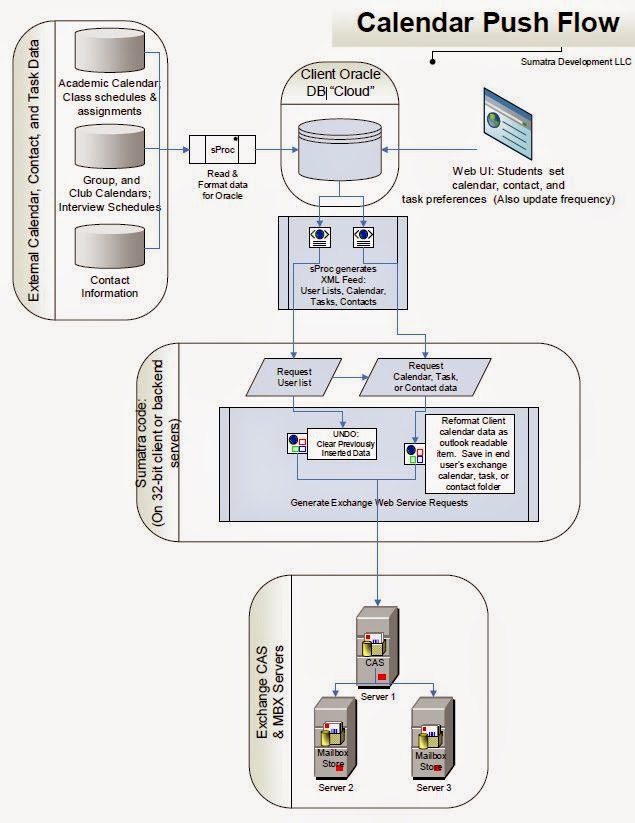
Inserting SQL data into Microsoft Exchange

When we say SQL data being inserted into Microsoft Exchange or Office 365, it's through our soda straw view of the world: calendar items, contacts, and tasks.

You can of course write one-off code in Exchange Web Services to accomplish a specific task – but why reinvent the wheel?  Sumatra has been  inserting calendar, contact, and task items into Exchange from legacy systems for the last fourteen years.  We’ve created a tool-set that allows you to read data from your SQL databases and insert them into Exchange. 

Most of our users of this feature are using Oracle as the SQL of choice, but there's nothing specific to that vendor.


We call this the Sumatra Calendar Pump or just the "Pump" if you hear us referring to it in casual conversation.


Monday, January 12, 2015

BES 12 is out

BlackBerry Enterprise Server 12 is out.

We have a long history with BES in calendar migrations, usually as an indicator of permissions issues.

We're not making any endorsements on upgrading except for the main recommendation we always make in a migration: test the snot out of it beforehand in a lab environment and have a back-out plan.  

You're only dealing with something that has an impact on all of your users here.