We've been having such success with how easily the "faster, simpler" method works with Zimbra and Oracle that we're wondering if there's any demand for any other calendar migrations that have been under-served. The one that comes to our minds is GroupWise.
Anybody want an easy way to migrate their GroupWise calendars to Exchange server-side?
Let us know.
Tuesday, February 14, 2012


Monday, February 13, 2012
Zimbra to Exchange New Functionality
Pretty soon we're going to have migrated more people from Exchange to Zimbra (in a few months) than we migrated from Meeting Maker to Zimbra (in a few years). Cool!!!!
We just added some functionality at the request of a site.
The subject is reading the contacts in the "Suggested Contacts" folder in Zimbra and migrating those to Exchange.
Now it's possible.
The newest zCalReader looks for files named:
Why cannot we load econtacts.vcf into the Outlook/Exchange "Suggested Contacts" folder? Because Exchange Web Services does not currently give us access to that folder.
We actually found in a migration this weekend a 24 Mb exported Suggested Contacts list containing over three hundred thousand contacts. That caused zCalReader to bomb (we just weren't scoped for that many contacts).
We just added some functionality at the request of a site.
The subject is reading the contacts in the "Suggested Contacts" folder in Zimbra and migrating those to Exchange.
Now it's possible.
The newest zCalReader looks for files named:
USER.contacts.vcf
and
USER.econtacts.vcf
and loads them both into “Contacts” in Exchange.
USER.econtacts.vcf
and loads them both into “Contacts” in Exchange.
Why cannot we load econtacts.vcf into the Outlook/Exchange "Suggested Contacts" folder? Because Exchange Web Services does not currently give us access to that folder.
We actually found in a migration this weekend a 24 Mb exported Suggested Contacts list containing over three hundred thousand contacts. That caused zCalReader to bomb (we just weren't scoped for that many contacts).
Saturday, February 04, 2012
Symantec Endpoint Protection running on Exchange Servers: Fool me twice....shame on me
Note to self: Disable all instances of Symantec Endpoint Protection (SEP) on ALL Exchange servers before and during a calendar migration.
Why?
* Insertion throughput dropped 99%: from 750 transactions/minute to four (4) transactions/minute.
* SEP stripped all of the Sumatra strings we associate with calendar items to process messages.
This product bit us two years ago. It just bit us again.
It's your choice to deploy SEP in your Exchange environment (or not.) But do not deploy SEP during a Sumatra calendar migration.
Why?
* Insertion throughput dropped 99%: from 750 transactions/minute to four (4) transactions/minute.
* SEP stripped all of the Sumatra strings we associate with calendar items to process messages.
This product bit us two years ago. It just bit us again.
It's your choice to deploy SEP in your Exchange environment (or not.) But do not deploy SEP during a Sumatra calendar migration.
Wednesday, January 18, 2012
Exchange Transaction logs - capacity planning
Sumatra's enterprise customers ask me how much space they should allocate for transaction logs. I came across Ross Smith's Technet post. Ross suggests a formula to compute the transaction logfile growth:
For ever 100 messages, Exchange generates 20 transation logs.
According to another Technet article, "Understanding Mailbox Database and Log Capacity," each transaction log is 2MB.
All calendaring transactions are messages. Thus, to estimate the logfile size (in MB), sum the total number of transactions (generated through a macro in the Sumatra DB, M_ShowCounts) and multiply by (2/100).
For ever 100 messages, Exchange generates 20 transation logs.
According to another Technet article, "Understanding Mailbox Database and Log Capacity," each transaction log is 2MB.
All calendaring transactions are messages. Thus, to estimate the logfile size (in MB), sum the total number of transactions (generated through a macro in the Sumatra DB, M_ShowCounts) and multiply by (2/100).
Thursday, January 12, 2012
Changing Google Calendar Notifications
The New York Times has a good post today about changing your Google Calendar Notifications.
Wednesday, January 11, 2012
Migrating Group Calendar from Oracle Calendar to Exchange
An interesting case came up the past few days as a site was migrating from Oracle Calendar Server to Live@ Edu.
They maintained a calendar in Oracle for users to post when they were In or Out and wanted to take this to hosted Exchange as a Shared Calendar.
Since the Designate model in OCS is very different from the Delegate model in Exchange, when you're converting the OCS export files, choose this option for the raw data from those calendars and then run an insertion. You'll get the results you desire.

Why this option? When events were added to the calendar by Designates in OCS they were OWNED by the Designates, and not the actual calendar. The above option normalizes that for an Exchange environment by making the events owned by the shared calendar.
They maintained a calendar in Oracle for users to post when they were In or Out and wanted to take this to hosted Exchange as a Shared Calendar.
Since the Designate model in OCS is very different from the Delegate model in Exchange, when you're converting the OCS export files, choose this option for the raw data from those calendars and then run an insertion. You'll get the results you desire.
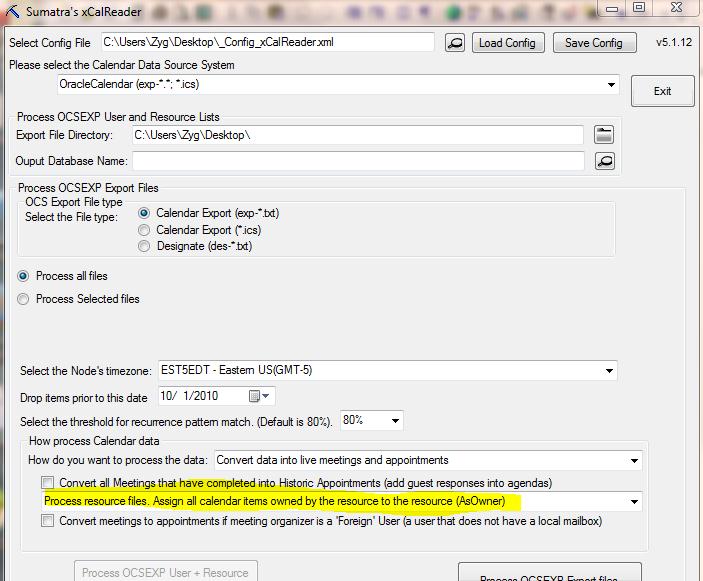
Why this option? When events were added to the calendar by Designates in OCS they were OWNED by the Designates, and not the actual calendar. The above option normalizes that for an Exchange environment by making the events owned by the shared calendar.
Tuesday, December 27, 2011
Add Holidays to Resources in Exchange 2010
Okay, okay. I know we wrote that the SuHoliday cmdlet would not add holidays to resources.
BUT -- if you use FULL ACCESS instead of Impersonate, the current download-able version works like a champ for this.

BUT -- if you use FULL ACCESS instead of Impersonate, the current download-able version works like a champ for this.
To try this out:
· Provision a service
account (say, "exsu") that is NOT an Enterprise Admin
o Set impersonate RBAC for that account
§ new-ManagementRoleAssignment -Name:_suImp8Exsu
-Role:ApplicationImpersonation -User:'exsu@cod.sumatra.local'
o Try to do an insert for a user AND
o For resources "cr101b" or "room 222"
Results should not be good, but NOW....
·
Add fullaccess to
that service account
o Get-Mailbox -filter {isResource -eq $true}
-resultsize unlimited | add-mailboxpermission -user exsu -accessrights
fullaccess -InheritanceType: All
o Add holidays for that room

Friday, December 23, 2011
Holiday Insertions in Live @ Edu
Kudos to Rachel in Georgia for her holiday insertion into Live @ Edu.
She's used SuHoliday on over 8000 users. Thus far we think this is a record but we usually only hear from people when there are problems.
Also based on her experience and feedback we've added capabilities to our most recent version of the cmdlet, including:
We're discussing when and how to roll this out to the main cmdlet download.
She's used SuHoliday on over 8000 users. Thus far we think this is a record but we usually only hear from people when there are problems.
Also based on her experience and feedback we've added capabilities to our most recent version of the cmdlet, including:
- Not setting reminders for holidays
- Better logging
- Default time zone handling
- Memory handling improvements
- Improved resilience when Exchange throttles your insertion
We're discussing when and how to roll this out to the main cmdlet download.
Monday, December 05, 2011
Zimbra to Exchange Migrations Field-Proven
Just got the word from Portland, Oregon that our faster, simpler method for Zimbra to Exchange calendar migrations successfully migrated 800 Zimbra users' calendar, tasks, and contacts into Office 365 this past weekend.
We're considering this a success.
Yippee!
We're considering this a success.
Yippee!
Friday, November 18, 2011
Sumatra Undo in Action
Ever since high school film strips we've been convinced that visual aids are the most effective.
And ever since college we've been convinced that designing a software system without a back out strategy is just darned irresponsible.
So we combined both of these lessons in our video of Sumatra's UNDO capability in action.
And ever since college we've been convinced that designing a software system without a back out strategy is just darned irresponsible.
So we combined both of these lessons in our video of Sumatra's UNDO capability in action.
Wednesday, November 16, 2011
Zimbra to Exchange Calendar Migration - The Video
We've had a good response from one of our test sites on the faster, simpler Zimbra to Exchange calendar migration method so we did a video of the process to show you in real time how it all works.
Enjoy.
And if you want to see the full screen version, you can watch that off our website.
Enjoy.
Monday, November 07, 2011
Faster, easier Zimbra ICS to Exchange migration
One of the developing trends we've seen is sites moving out of Zimbra and into Exchange.
Imapsync is excellent for moving the email, but the calendars, tasks, and contacts are another issue.
While we've have a full-state migration solution for over a year, a lot of the folks who want to move want something simple, but still server-side, and oh, could we PLEASE keep meetings live?
It's a tall order, but as usual we deliver.
This is the basic screen:

In short what you do is export your Zimbra calendars, tasks, and contacts server-side (using either zmmailbox, cURL, or whatever you're comfortable with) in ICS and VCF format, then run this application against the resulting files.
With the proper credentials on your Exchange server (and yes, we have tested it against Office 365 and Live @ Edu), these will upload. Meetings will be re-proposed (so your users will see invitations in their inboxes come the Monday morning post-migration). The alternative is the full-blown Sumatra process which is overkill for many of you moving out of Zimbra.
Rather than our three step process (export, map user IDs in a database, and insert into Exchange), this is a TWO step process (export, import) with no intermediate mapping. So if you're changing a lot of user IDs going from Zimbra to Exchange, this is probably NOT the recommended process for you.
We're in test right now with this at a couple of sites and will let you know when it's ready for prime time. We'll give you the full documentation set and a video then too.
Thursday, October 06, 2011
Get Time Zones for your users via PowerShell
We recently released a cmdlet that bulk-inserts holidays in Exchange 2010 (see the Sumatra website or the Sumatra Blog).
A holiday is a simple all day calendaring event in Outlook. Yet simple calendaring events can be tricky! Consider: when your end users work in different time zones! If you force an all day event into one time zones, all users who are not in that time zone will see their holidays span multiple days. Not a happy scenario. What's the solution?
We wrote a script that uses Exchange 2010 "get-mailboxRegionalConfiguration" cmdlet to find the timezones. If used in conjunction with get-mailbox, you can output a file that has the user information plus the timezone. Problem solved!
This script produces a file that outputs PrimarySMTPAddress + TimeZone:
You can also download getUserTimezones.zip
If you have another way, please share!
-Russ
A holiday is a simple all day calendaring event in Outlook. Yet simple calendaring events can be tricky! Consider: when your end users work in different time zones! If you force an all day event into one time zones, all users who are not in that time zone will see their holidays span multiple days. Not a happy scenario. What's the solution?
We wrote a script that uses Exchange 2010 "get-mailboxRegionalConfiguration" cmdlet to find the timezones. If used in conjunction with get-mailbox, you can output a file that has the user information plus the timezone. Problem solved!
This script produces a file that outputs PrimarySMTPAddress + TimeZone:
#Define your 'default' timezone (if none is set)
$myDefaultTimezone="Eastern Standard Time"

#Define the output file
$myOutputFile="userlist.txt"

#Define the list of User Accounts to process
$myMailboxList = get-mailbox -Filter {RecipientTypeDetails -eq "UserMailbox"}  select-object Identity,PrimarySMTPAddress

#If file exists, delete the file
$fileExists=test-Path $myOutputFile
if ($fileExists -eq "True"){del $myOutputFile}


#Loop through list and get
foreach ($t in $myMailboxList) {
    $priSMTP=$t.PrimarySMTPAddress
    $xi=get-mailboxRegionalConfiguration -Identity $t.Identity
    if ($xi.TimeZone -eq $Null) {$tt=$myDefaultTimezone} Else {$tt=$xi.TimeZone}
    write-output "$priSMTP $tt" >> $myOutputFile
}

write-output "Done!  see the file $myOutputFile"
You can also download getUserTimezones.zip
If you have another way, please share!
-Russ
Monday, October 03, 2011
Holiday cmdlet for Exchange 2010
We've been inserting holidays server-side on Exchange for a while and after some feedback last year we started re-thinking how to accomplish this.
We've written a PowerShell cmdlet we call suHoliday that inserts holidays server-side. We've run it through our internal testing against on-premises Exchange 2010, Live @ Edu, and Office 365, so now we think it's time to let it out into the wild and see what you folks can do with it.
Your inserted holidays will look like this in a user's calendar:
 If you want to download it and run it through its paces in your test lab, you may do so here. We just ask you to answer a few questions so we can keep track of where it's going. If it works for you consider making a donation of US$20 per instance. It'll make it easier for us to consider updates and new features for next year.
What's it do now?
Insert server-specific or user-specific holidays through 2012 with NO user intervention.
Customize for different state or national holidays.
Define Free/Busy status.
Script adding holidays at user provisioning time (e.g., by piping in from get-mailbox).
Support for multiple time zones.
Define All-Day Events or appointments at specific times.
Support international holidays / date formats. For example: 2012 UK Bank Holidays

Try it out and tell your friends.
Limitations (or, what do you want for free / ultra low cost?)
 |
| These are the files in the downloadable ZIP |
We've written a PowerShell cmdlet we call suHoliday that inserts holidays server-side. We've run it through our internal testing against on-premises Exchange 2010, Live @ Edu, and Office 365, so now we think it's time to let it out into the wild and see what you folks can do with it.
 |
| The sample CSV file for US holidays |
Your inserted holidays will look like this in a user's calendar:

What's it do now?

Try it out and tell your friends.
Limitations (or, what do you want for free / ultra low cost?)
- This only inserts holidays for the year 2012 (well, we give you a few weeks into 2013).
- All inserted events have "Inserted courtesy of the Exchange Calendaring experts: Sumatra Development" in the agenda. (yep, even if you license it)
- We support via electronic means, so keep an eye on our blog.
Friday, September 16, 2011
Advance Notice: Sumatra in SF Sept 30, Oct 1
Sumatra (well, Zyg) is going to be in San Francisco on September 30 and October 1, Mainly he's there to go to the Opera, but since that always happens at night and his engaging wife will be working at Wells-Fargo, if any of our calendar-oriented acquaintances in the Bay Area are looking for some guidance, drop a line.
Thursday, September 08, 2011
Propagating Changed SIP URIs to Existing Meetings
One of our favorite sites contacted us about a problem they're anticipating. Knee-deep in solving said problem we at Sumatra wonder if anyone else has the same issue.
They're changing a number of SMTP addresses and want to change the associated Lync SIPs to match. Here's Microsoft's guidance on how to do that for Office 365. And a different take on scripting a solution. See Impact of Changing a User's SIP Address for a full discussion.
Changing the SIPs is not the problem, but the number of existing meetings with the old SIPs that are then left in your users' calendars IS a problem that requires updating.

So in this example of an existing calendar item, let's say riuliano became russ_iuliano, to keep end users from going bug-house you'd want to modify all the LiveMeeting URLs in existing calendar objects server-side and update them.
 And this is the cue for Sumatra's ability to manipulate Exchange calendar data.
Does anyone else out there have the same problem?
They're changing a number of SMTP addresses and want to change the associated Lync SIPs to match. Here's Microsoft's guidance on how to do that for Office 365. And a different take on scripting a solution. See Impact of Changing a User's SIP Address for a full discussion.
Changing the SIPs is not the problem, but the number of existing meetings with the old SIPs that are then left in your users' calendars IS a problem that requires updating.

So in this example of an existing calendar item, let's say riuliano became russ_iuliano, to keep end users from going bug-house you'd want to modify all the LiveMeeting URLs in existing calendar objects server-side and update them.

Does anyone else out there have the same problem?
Monday, September 05, 2011
More Weirdness in an Over-Loaded Google Calendar
While experimenting to see if I could delete calendar items from a calendar and thereby finally clear an over-loaded test account I got this message:

The goal was to see if deleting items would get me below a threshold, or if the threshold was irreversible.
The weird thing is that once I got that message, previously-deleted objects began re-populating the calendar. Calendar zombies had risen from the grave!
Clearly there's a cache of the deleted items. I have no information on when, how often, or if it gets cleared in a single session.
There is also some interesting behavior with old items. To see this, load 10-15 years worth of calendar data and then travel back to some month in the year 2000. The following unobtrusive message will display while the data renders (and it seems to take a while):

Added on September 6, 2011:
A variation of the above: cannot load your data -- come back when it's more convenient for Google....

Wednesday, August 31, 2011
Unable to Delete All Data in a Google Calendar
So let's say you're testing your calendar insertion (a prudent step which we not only endorse but require). You either have a large calendar or run several insertions to put in over 40,000 items. I suspect the problem starts with 32K objects, just because we are so suspiciously close to a magic binary number.
You go into your settings with the hope of deleting all data from your test account (and please make sure it is a test account):


You go into your settings with the hope of deleting all data from your test account (and please make sure it is a test account):

You select Delete giving you this dialog box:

Where you promise you REALLY REALLY DO want to Delete all events, and click the Delete all events button.
Less than 60 seconds later you see the following dialog box and all your data is still in the calendar.

We do not seem to be alone. We posted this on Google Calendar's Help Forum (whose only value has been confirmation from another user with the same problem). None of our current clients are going to hit this limit unless they do multiple insertions without practicing calendar hygiene.
So practice calendar hygiene.
But we do want to get this out as a warning to everyone.
Addition on March 3, 2015: This post is now hugely popular. So if there are folk out there who want to take an entire Exchange server of calendar data (we're talking an enterprise here) into Google calendar, and keep all the meetings live, let us know. We've done Exchange to Exchange that way but will only add the Exchange to Google capability if we have a real customer.
Wednesday, August 24, 2011
Thursday, August 18, 2011
Preliminary Google Calendar Upload Speed Tests
We've made no secret about the molasses-in-Antarctica upload speed of EWS in Office365 and Live@ Edu.
So for an interesting comparison -- how long does it take to upload calendar data into Google Calendar?
In a test derived from real world data set (legacy Meeting Maker being the organ donor in this case) our current technology uploaded 13,651 appointments to Google Calendar in 9:12 (i.e., 9 minutes and 12 seconds). Just in case I happened to hit a low time for network traffic I ran the test again with additional loads on my PC and got all data inserted in 15:54 (call it 16 minutes).
Using the more conservative figure, this represents an average upload rate of about 853 calendar objects per minute into Google Calendar! The faster result gives 1480 objects per minute, but I doubt that is sustainable over the duration of a migration.
For those of you who do not understand why we get excited by these numbers: this is similar to the peak throughput we see inserting into an on-premises Exchange installation (you always hear us use the figure 850 calendar objects per minute for estimation purposes). Our timings on hosted Exchange come in at about 120 calendar objects per minute.
So Google Calendar is about ten times faster than an upload into Hosted Exchange!
Let me repeat that -- our early testing indicates that calendar uploads into Google Calendar execute an order of magnitude faster than an upload into hosted Exchange.
Now, let me point our a few things to beware of: these numbers may vary as our code evolves, but are in accord with the field experience of one of our test sites (which motivated this timing).
I have no idea what Google does right that Microsoft does not, given that both companies are in total control of their data centers, server code, and APIs. I do know that for purposes of migration speed Google Calendar kicks Exchange calendar's buttocks all the way to the curb and then slam dances its corpse into pavement pizza.
Since regular readers will know that your author does not believe in letting ANY of the guilty off without some sentence, I want to point out that as mediocre as Microsoft EWS documentation and support has been, it is light years ahead of Google's documentation of their calendar APIs which our team has taken to completely ignoring because it's led us down too many bad paths already.
And after inserting 40,000+ objects into Google Calendar, the Delete under Settings does not seem to work:

So for an interesting comparison -- how long does it take to upload calendar data into Google Calendar?
In a test derived from real world data set (legacy Meeting Maker being the organ donor in this case) our current technology uploaded 13,651 appointments to Google Calendar in 9:12 (i.e., 9 minutes and 12 seconds). Just in case I happened to hit a low time for network traffic I ran the test again with additional loads on my PC and got all data inserted in 15:54 (call it 16 minutes).
Using the more conservative figure, this represents an average upload rate of about 853 calendar objects per minute into Google Calendar! The faster result gives 1480 objects per minute, but I doubt that is sustainable over the duration of a migration.
For those of you who do not understand why we get excited by these numbers: this is similar to the peak throughput we see inserting into an on-premises Exchange installation (you always hear us use the figure 850 calendar objects per minute for estimation purposes). Our timings on hosted Exchange come in at about 120 calendar objects per minute.
So Google Calendar is about ten times faster than an upload into Hosted Exchange!
Let me repeat that -- our early testing indicates that calendar uploads into Google Calendar execute an order of magnitude faster than an upload into hosted Exchange.
Now, let me point our a few things to beware of: these numbers may vary as our code evolves, but are in accord with the field experience of one of our test sites (which motivated this timing).
I have no idea what Google does right that Microsoft does not, given that both companies are in total control of their data centers, server code, and APIs. I do know that for purposes of migration speed Google Calendar kicks Exchange calendar's buttocks all the way to the curb and then slam dances its corpse into pavement pizza.
Since regular readers will know that your author does not believe in letting ANY of the guilty off without some sentence, I want to point out that as mediocre as Microsoft EWS documentation and support has been, it is light years ahead of Google's documentation of their calendar APIs which our team has taken to completely ignoring because it's led us down too many bad paths already.
And after inserting 40,000+ objects into Google Calendar, the Delete under Settings does not seem to work:
Subscribe to:
Posts (Atom)