Sumatra Development leads the field of migrating entire calendar servers to Exchange. We migrate Oracle Calendar Server, Oracle Beehive, Apple iCalendar, and Zimbra to Microsoft Exchange keeping all meeting information and resource bookings intact. We migrate calendars server-to-server between Exchange and Office 365 while keeping meetings live and doing incremental syncs quicker than any other solution.
An interesting case came up the past few days as a site was migrating from Oracle Calendar Server to Live@ Edu.
They maintained a calendar in Oracle for users to post when they were In or Out and wanted to take this to hosted Exchange as a Shared Calendar.
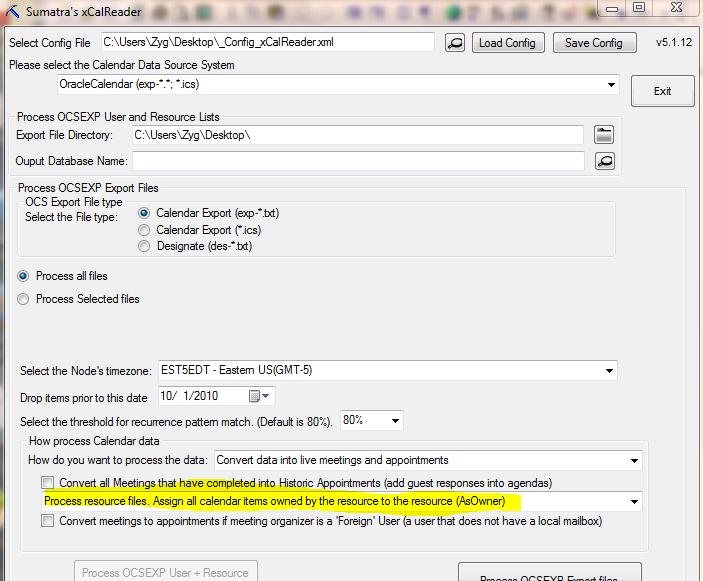
Since the Designate model in OCS is very different from the Delegate model in Exchange, when you're converting the OCS export files, choose this option for the raw data from those calendars and then run an insertion. You'll get the results you desire.
Why this option? When events were added to the calendar by Designates in OCS they were OWNED by the Designates, and not the actual calendar. The above option normalizes that for an Exchange environment by making the events owned by the shared calendar.
Just got the word from Portland, Oregon that our faster, simpler method for Zimbra to Exchange calendar migrations successfully migrated 800 Zimbra users' calendar, tasks, and contacts into Office 365 this past weekend.
We're considering this a success.
Yippee!
We've had a good response from one of our test sites on the faster, simpler Zimbra to Exchange calendar migration method so we did a video of the process to show you in real time how it all works.
Enjoy.
And if you want to see the full screen version, you can watch that off our website.
UPDATE: June 2015. We've modified the faster-simpler ICS method so that it's faster-simpler AND full state (works like aces for Oracle Calendar Server! and in this case Zimbra gives us the recurrences already so we're one step ahead.) We can do it for Zimbra if there is sufficient enterprise-level interest.
One of the developing trends we've seen is sites moving out of Zimbra and into Exchange.
Imapsync is excellent for moving the email, but the calendars, tasks, and contacts are another issue.
While we've have a full-state migration solution for over a year, a lot of the folks who want to move want something simple, but still server-side, and oh, could we PLEASE keep meetings live?
It's a tall order, but as usual we deliver.
This is the basic screen:
In short what you do is export your Zimbra calendars, tasks, and contacts server-side (using either zmmailbox, cURL, or whatever you're comfortable with) in ICS and VCF format, then run this application against the resulting files.
With the proper credentials on your Exchange server (and yes, we have tested it against Office 365 and Live @ Edu), these will upload. Meetings will be re-proposed (so your users will see invitations in their inboxes come the Monday morning post-migration). The alternative is the full-blown Sumatra process which is overkill for many of you moving out of Zimbra.
Rather than our three step process (export, map user IDs in a database, and insert into Exchange), this is a TWO step process (export, import) with no intermediate mapping. So if you're changing a lot of user IDs going from Zimbra to Exchange, this is probably NOT the recommended process for you.
We're in test right now with this at a couple of sites and will let you know when it's ready for prime time. We'll give you the full documentation set and a video then too.
We recently released a cmdlet that bulk-inserts holidays in Exchange 2010 (see the Sumatra website or the Sumatra Blog).
A holiday is a simple all day calendaring event in Outlook. Yet simple calendaring events can be tricky! Consider: when your end users work in different time zones! If you force an all day event into one time zones, all users who are not in that time zone will see their holidays span multiple days. Not a happy scenario. What's the solution?
We wrote a script that uses Exchange 2010 "get-mailboxRegionalConfiguration" cmdlet to find the timezones. If used in conjunction with get-mailbox, you can output a file that has the user information plus the timezone. Problem solved!
This script produces a file that outputs PrimarySMTPAddress + TimeZone:
#Define your 'default' timezone (if none is set)
$myDefaultTimezone="Eastern Standard Time"

#Define the output file
$myOutputFile="userlist.txt"

#Define the list of User Accounts to process
$myMailboxList = get-mailbox -Filter {RecipientTypeDetails -eq "UserMailbox"}  select-object Identity,PrimarySMTPAddress

#If file exists, delete the file
$fileExists=test-Path $myOutputFile
if ($fileExists -eq "True"){del $myOutputFile}


#Loop through list and get
foreach ($t in $myMailboxList) {
    $priSMTP=$t.PrimarySMTPAddress
    $xi=get-mailboxRegionalConfiguration -Identity $t.Identity
    if ($xi.TimeZone -eq $Null) {$tt=$myDefaultTimezone} Else {$tt=$xi.TimeZone}
    write-output "$priSMTP $tt" >> $myOutputFile
}

write-output "Done!  see the file $myOutputFile"
We've been inserting holidays server-side on Exchange for a while and after some feedback last year we started re-thinking how to accomplish this.
These are the files in the downloadable ZIP
We've written a PowerShell cmdlet we call suHoliday that inserts holidays server-side. We've run it through our internal testing against on-premises Exchange 2010, Live @ Edu, and Office 365, so now we think it's time to let it out into the wild and see what you folks can do with it.
The sample CSV file for US holidays
Your inserted holidays will look like this in a user's calendar:
If you want to download it and run it through its paces in your test lab, you may do so here. We just ask you to answer a few questions so we can keep track of where it's going. If it works for you consider making a donation of US$20 per instance. It'll make it easier for us to consider updates and new features for next year.
What's it do now?
Insert server-specific or user-specific holidays through 2012 with NO user intervention.
Customize for different state or national holidays.
Define Free/Busy status.
Script adding holidays at user provisioning time (e.g., by piping in from get-mailbox).
Support for multiple time zones.
Define All-Day Events or appointments at specific times.
Support international holidays / date formats. For example: 2012 UK Bank Holidays
Try it out and tell your friends.
Limitations (or, what do you want for free / ultra low cost?)
This only inserts holidays for the year 2012 (well, we give you a few weeks into 2013).
All inserted events have "Inserted courtesy of the Exchange Calendaring experts: Sumatra Development" in the agenda. (yep, even if you license it)
We support via electronic means, so keep an eye on our blog.
Sumatra (well, Zyg) is going to be in San Francisco on September 30 and October 1, Mainly he's there to go to the Opera, but since that always happens at night and his engaging wife will be working at Wells-Fargo, if any of our calendar-oriented acquaintances in the Bay Area are looking for some guidance, drop a line.
One of our favorite sites contacted us about a problem they're anticipating. Knee-deep in solving said problem we at Sumatra wonder if anyone else has the same issue.
Changing the SIPs is not the problem, but the number of existing meetings with the old SIPs that are then left in your users' calendars IS a problem that requires updating.
So in this example of an existing calendar item, let's say riuliano became russ_iuliano, to keep end users from going bug-house you'd want to modify all the LiveMeeting URLs in existing calendar objects server-side and update them.
And this is the cue for Sumatra's ability to manipulate Exchange calendar data.
While experimenting to see if I could delete calendar items from a calendar and thereby finally clear an over-loaded test account I got this message:
"Oops"? Cute. Too bad I do not know any serious corporations that ask for cute.
The goal was to see if deleting items would get me below a threshold, or if the threshold was irreversible.
The weird thing is that once I got that message, previously-deleted objects began re-populating the calendar. Calendar zombies had risen from the grave!
Clearly there's a cache of the deleted items. I have no information on when, how often, or if it gets cleared in a single session.
There is also some interesting behavior with old items. To see this, load 10-15 years worth of calendar data and then travel back to some month in the year 2000. The following unobtrusive message will display while the data renders (and it seems to take a while):
So there's either some background mechanism shunting historical data into slower, longer-term storage, or the system is not really optimized for rendering arbitrary stretches of time.
Added on September 6, 2011:
A variation of the above: cannot load your data -- come back when it's more convenient for Google....
So let's say you're testing your calendar insertion (a prudent step which we not only endorse but require). You either have a large calendar or run several insertions to put in over 40,000 items. I suspect the problem starts with 32K objects, just because we are so suspiciously close to a magic binary number.
You go into your settings with the hope of deleting all data from your test account (and please make sure it is a test account):
You select Delete giving you this dialog box:
Where you promise you REALLY REALLY DO want to Delete all events, and click the Delete all events button.
Less than 60 seconds later you see the following dialog box and all your data is still in the calendar.
We do not seem to be alone. We posted this on Google Calendar's Help Forum (whose only value has been confirmation from another user with the same problem). None of our current clients are going to hit this limit unless they do multiple insertions without practicing calendar hygiene.
So practice calendar hygiene.
But we do want to get this out as a warning to everyone.
Addition on March 3, 2015: This post is now hugely popular. So if there are folk out there who want to take an entire Exchange server of calendar data (we're talking an enterprise here) into Google calendar, and keep all the meetings live, let us know. We've done Exchange to Exchange that way but will only add the Exchange to Google capability if we have a real customer.
So for an interesting comparison -- how long does it take to upload calendar data into Google Calendar?
In a test derived from real world data set (legacy Meeting Maker being the organ donor in this case) our current technology uploaded 13,651 appointments to Google Calendar in 9:12 (i.e., 9 minutes and 12 seconds). Just in case I happened to hit a low time for network traffic I ran the test again with additional loads on my PC and got all data inserted in 15:54 (call it 16 minutes).
Using the more conservative figure, this represents an average upload rate of about 853 calendar objects per minute into Google Calendar! The faster result gives 1480 objects per minute, but I doubt that is sustainable over the duration of a migration.
For those of you who do not understand why we get excited by these numbers: this is similar to the peak throughput we see inserting into an on-premises Exchange installation (you always hear us use the figure 850 calendar objects per minute for estimation purposes). Our timings on hosted Exchange come in at about 120 calendar objects per minute.
So Google Calendar is about ten times faster than an upload into Hosted Exchange!
Let me repeat that -- our early testing indicates that calendar uploads into Google Calendar execute an order of magnitude faster than an upload into hosted Exchange.
Now, let me point our a few things to beware of: these numbers may vary as our code evolves, but are in accord with the field experience of one of our test sites (which motivated this timing).
I have no idea what Google does right that Microsoft does not, given that both companies are in total control of their data centers, server code, and APIs. I do know that for purposes of migration speed Google Calendar kicks Exchange calendar's buttocks all the way to the curb and then slam dances its corpse into pavement pizza.
Since regular readers will know that your author does not believe in letting ANY of the guilty off without some sentence, I want to point out that as mediocre as Microsoft EWS documentation and support has been, it is light years ahead of Google's documentation of their calendar APIs which our team has taken to completely ignoring because it's led us down too many bad paths already.
And after inserting 40,000+ objects into Google Calendar, the Delete under Settings does not seem to work:
Sumatra is about to release a solution to migrate legacy calendar data to Google. A customer asked how his end users could read shared calendars from folks outside the organization (and who use Exchange for calendaring.)
We passed along this article, in which Steve Goodman wrote a superb post describing how Exchange 2010 Sp1 allows users to share calendars with non-Exchange users (e.g., Google, Zimbra) using public or encoded URLs. (And users can be alloweed to do this via OWA!)
And remember, this is calendar SHARING, not cross-server calendar synchronization.
I was working offiste for the last two weeked and missed the story: Microsoft discovered a problem with Outlook 2010's interaction with Exchange 2010 server, and had to retract Update Rollup 4 for Exchange 2010 they released on June 22,2011. KB251545 described the problem: moving or copying public folders didn't work "as expected."
In this post, I'll outline a process that avoids the ghost delegate problem (by finding and removing delegates BEFORE deleting the terminated user's account.) There are two steps: search AD, and then remove the delegates.
The hard part was finding all users that granted delegate rights to the "soon-to-be-deleted-account." I dredged up two "oldies but goodies:" LDIFDE and CSVDE to do a reverse-lookup for a terminated user using the "public delegate" fields:
PublicDelegates "What mailbox(es) did I give delegate rights to"
PublicDelegatesBL: "What mailbox(es) am I a delegate of"
Note: the LDIFDE command limits the scope of its work to the "OU=TestUsers;" csvde seaches the entire enterprise directory.
Here is an output from LDIFDE, in which we found all of PublicDelegatesBL of "Andre Admin" (it's just Big Boss):
Next, use Glen Scale's powershell code to confirm the terminated user is a delegate, and then remove that user from all accounts he was granted delegate rights. (The following commands were described in a prior post.) Step 7 is where the terminated user is removed as a delegate. I have shown how to display delegates and forwarding rules, just as an FYI.
I've pulled the URLs and commands into a text file that you can download to simplify typing....
--Russ
p.s.: I tried Exchange Management Shell, using a new Exchange 2010 commandlet: "Get-MailboxFolderPermission." But it was difficult to do a reverse-lookup (i.e., find all users who grated the "terminated user" permissions: I had to type that user's display name correctly or got no hits.... Plus, this commandlet isn't available for Exchange 2007 customers.
Here is how to get Big Boss' permissions: Get-MailboxFolderPermission -Identity bigboss:\Calendar
FYI, you can set accessrights, particularly editor rights, between "big boss" and "her admin," that you can't do if your end users access their Exchange calendars via OWA (only):
A Sumatra client called for help - a flood of NDRs were driving their Exchange server to its knees. The problem: a boss granted his admin delegate rights his calendar. Along with that, all calendar-messages were forwarded to to the admin. After the admin left the company, the admin's mailbox was deleted.
All was fine until someone invited the boss to a meeting. The boss received an NDR after the delegate forwarding rule sent that calendar message to the [now deleted] delegate. That NDR calendar message was sent back to the boss which got forwarded to the [still deleted] delegate, which generated another NDR......)
No big deal. They went into the boss' Outlook delegate and tried to remove the delegate, but couldn't -- Outlook reported the delegate was "(not found):"
The delegates are there but you can't delete them. Ghost delegates..... The root cause: they didn't remove the delegate permissions and forwarding rules before they deleted the admin assistant's mailbox.
Create a sub directory, and copy the Microsoft.Exchange.WebServices dll into the directory; Run Exchange Powershell (as administrator), and change to that sub directory.
Set the execution policy, import the module, and create a credential variable (using your service account):
Next, define an exchange profile (as above, we provide our service account with impersonation or full access permissions. See our blog post on impersonation in Exchange 2007 or Exchange 2010), and point to our CAS server directly