Wednesday, October 22, 2008

Dude -- Here's My Contacts

Thanks go out to our Kiwi friends for this information.

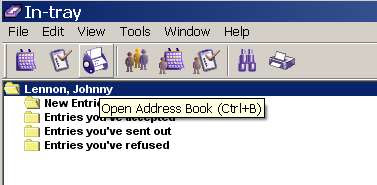
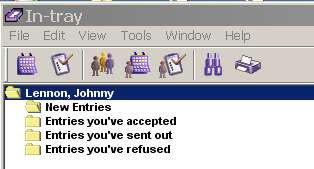
Let's say you want access to your Oracle Connector for Outlook contacts from within an Oracle client. Notice the lack of a "Contacts" icon in the Oracle In-tray:

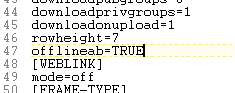
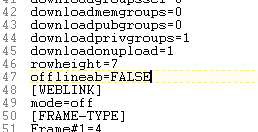
Go to your UNISON.INI file under C:\Documents and Settings\USERID\Application Data\Oracle\Calendar

Find the [GENPREFS] section.

Change:

offlineab=FALSE to offlineab=TRUE


Restart your Oracle client (not OCFO), and you have access to your Contacts.

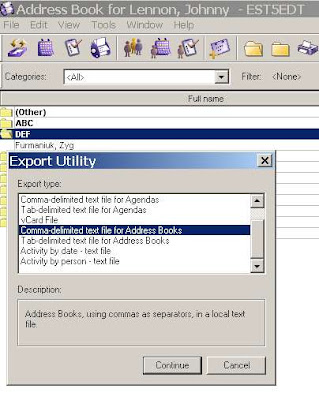
You even have options to EXPORT them (from which you can also take them into Outlook).

Tuesday, October 21, 2008

Real World Exchange Broken Meeting Statistic

We recently got an export of a real world conference room schedule in Exchange 2007 from January 1, 2008 to December 31, 2008 and did some analysis on it.

That one room hosted 2,450 individual instances of meetings (i.e., we count each recurring instance).

Figuring that there are 260 work days in a year, this means on average there are 9 meetings a day in that conference room (which sounds pretty close to full capacity, though there are occurrences on weekends).

What was also interesting was that there were 288 broken meetings in it (clogging the availability), or on average 1 broken meeting per work day.

Now given that this is from ONE conference room are we drawing big conclusions from it? No.

We were really astounded to see it anywhere near 1 per work day, though.

Friday, October 10, 2008

Oracle Connector for Outlook: Dude, Where's My Contacts?

So we just helped several thousand folks in New Zealand migrate their calendars from OCS to Exchange 2007 and they called us across the Pacific (Side bar: Across the Pacific is a WAY better movie than Dude, Where's My Car?) for some insight into how to migrate their contact data using Oracle Connector for Outlook and PSTs.


They tried the obvious method of just opening the local PSTs and the contact data from OCS was not there. This sounding like the kind of spooky weirdness that intrigues us in the calendar migration business we needed to dust off and install Oracle Connector for Outlook, look into this, and discover that it indeed is the case.

Initially we thought it might be that Offline Use needed to be enabled (we got that hare-brained idea from one of Oracle's architectural diagrams of OCFO), so we set that.


And we followed through on the Offline Folders Setting:


There is indeed a PST file there (which is usually a good sign)


but when I opened this PST in Outlook on a different machine there were no contacts.

In OCFO I see this:


In "New" Outlook I see this (we had no doubt our friends in New Zealand were correct about this, but we love the phrase "trust but verify"):

We did manage to extract the contact data and what we had to do was make it all REALLY EXPLICIT. Note that I also used two different versions of Outlook (2002 vs. 2003) just to keep the locations straight.

To start in OCFO select File-Import and Export:


You're exporting to a file


In fact a PST


And all we want right now is the Contacts:


Pick a location where you can save it (I picked next to the standard Outlook.PST file, because the size difference 48 vs 64 KB between the two is interesting).


And voila.

Now on the Exchange side, you can run the process in reverse, or you can use Data File Management


Add a new PST, Point to your contacts.pst file,


And the end result is that you've got your contacts over:

So for the really curious calendar person: What the heck is going on here?

Let's take a look at the file structure of OCFO. Almost all the files under the /Outlook/Oracle Connector... directory are pretty small, except for the one I found called "mdb" which being within the same order of magnitude as the PST files we found makes it a good candidate for the location where OCFO data gets stored.


In fact there are several of these throughout this directory structure. Those of you who ever had the pleasure of working in 1980's era dBase will feel deja-vu. I started doing correlations between GUIDs for the contacts in Outlook/OCFO and the data here using a binary viewer, but that got to be a hassle very quickly. Russ looked at running SOAP requests for contact data using the OCS API, which he rapidly decided was "obscure and painful."

We know the contact data is in there (somewhere), but the method we sketch above has the advantages of being simple, fast, and actionable without coding.

Monday, September 29, 2008

Exchange 2007 - Zimbra Free/Busy: The Magic PowerShell Command

We'd like to thank some folks we really enjoy working with at the University of Pennsylvania. They spent some time last week getting Free-Busy connectivity to work between Exchange 2007 and Zimbra.

I've got to give Zimbra credit for how well they executed Free-Busy connectivity with Exchange, a good summary of which and links pertaining thereunto are here:

http://www.zimbrablog.com/blog/archives/2008/06/are-you-free-or-busy.html


Penn's problem was that Zimbra is set up to handle Free-Busy data with Exchange 2003 via Public Folders (which are de-emphasized in Exchange 2007).

Exchange looking at Zimbra Free-Busy was no problem, but Zimbra looking at Exchange was generating an error like:

ERROR [EXCHANGE Free/Busy Sync Queue] [] fb - cannot modify resource

However, you can get it to work. The Magic PowerShell Command on the Exchange side is:

Add-AvailabilityAddressSpace -ForestName [zimbra domain] -AccessMethod PublicFolder

Credit for figuring this out belongs to Eric at Penn. He also used the phrase "Magic PowerShell Command" which I kind of really groove on.

You might also want to check out Microsoft's Implementing Calendar Interoperability (which shows how to do this without lots of coding and judicious use of Exchange Group Policy settings) and Managing Public Folders with the Exchange Management Shell.

Gorier Detail Added September 30, 2008 (again, thanks to Eric at Penn)

To configure Free-Busy from Exchange to Zimbra:
  1. Create a Service Account on Exchange. Call it "zimbra" (watch your permissions -- see next section)
  2. Configure Zimbra to connect to the Public Folder Free/Busy interface via this account. You do this on the Zimbra side.

# Specify the Service Account

mcf zimbraFreebusyExchangeAuthUsername
zimbra

mcf zimbraFreebusyExchangeAuthPassword
[password]

mcf zimbraFreebusyExchangeAuthScheme form

# Specify the url to Exchange 2007 CAS
server

mcf zimbraFreebusyExchangeURL
https://cas.exchange.YOURDOMAIN.com/

# Set the legacydn in Exchange 2007

mcf zimbraFreebusyExchangeUserOrg "/o=First
Organization/ou=Exchange Administrative Group (

fydibohf23spdlt)/"

Linux folk and Arthur C. Clarke fans: fydibohf23spdlt explained here.

To configure Free-Busy from Zimbra to Exchange:

1. Create a "Zimbra" OU in Active Directory. Make sure all your Zimbra users are in it. But let's define some rules for keeping everyone straight:

  • User "Elvis" on Zimbra will in this Active Directory Group be known as "Elvis_Zimbra"

2. Set the Service Account ("zimbra") to update the Free-Busy folder. You do this in PowerShell on the Exchange side.

add-publicfolderclientpermission -identity "\NON_IPM_SUBTREE\SCHEDULE+ FREE
BUSY\EX:/o=First Organization/ou=Exchange Administrative Group
(FYDIBOHF23SPDLT)" -user zimbra -accessrights owner

3. Make Exchange 2007 aware of the Public Folders in the Zimbra domain. You do this in PowerShell on the Exchange side:

Add-AvailabilityAddressSpace -forestname zimbra.YOURDOMAIN.COM -accessmethod publicfolder

4. Update Zimbra accounts to be aware of the email accounts on the AD side. You do this in Zimbra.

# add link from elvis to elvis_zimbra mail contact in AD
ma elvis
@zimbra.yourdomain.com
+zimbraForeignPrincipal ad:elvis_zimbra
# add link to OU
ma zimbraFreeBusyExchangeUserOrg "/o=First Organization/ou=Exchange Administrative Group (FYDIBOHF23SPDLT)"

Monday, September 22, 2008

Calendar Spam via Yahoo

I hadn't seen any Calendar Spam from Google in a while, but since American ingenuity has been globally outsourced like everything else, some script kiddie in some third world Internet cafe has started using Yahoo for it. I don't blame Yahoo, but maybe they should once again play their eternal catch up game with Google and close this breach.


Keep your eyes on your inboxes, folks.

Thursday, September 18, 2008

Now Up-to-Date Full State Migration

Sooner or later we get asked about everything.

We got our first inquiry about Now Up-to-Date (NUTD) a few years back, when I thought they like every other software company who hitched their wagon so tightly to Apple had been rendered into Elmer's and Alpo. Since the inquiry involved all of twenty users, we just ignored it. Turns out Now is still around (though the move from Oregon to Ohio must have been pretty traumatic).

Our second inquiry just came in a few weeks ago, and since it's only a few hundred users we're going to ignore it as well. But being as how the decryption team has been itching for something else to do we started wondering "What is so hard about migrating NUTD?"

Our conclusion:

Full-state server-side-only migration is not possible with NUTD.

First, keep in mind, when we say migration we mean a server-side full-state migration, touching the client side not at all: user lists, recurrence patterns, guest responses, basically as much information as it is possible to extract.

Everyone on the fora we see seems to be in a dither just getting client-side to client-side migration to work. We'll show you why that should be simple if you start writing your own scripts.

So here's the quick sketch of client-side data availability in NUTD.

First point: The server contains way less info than other calendar systems (by which I mean Exchange, Oracle, GroupWise, Lotus Notes/Domino, etc.), so look to the client as the most promising avenue.

Client Side Analysis

So client side let's see what kinds of export options we have. Don't get your hopes up. There aren't many. I'm doing this on Window, and I see from the documentation you have a few more template options on the Macintosh, but the data fields are the same.
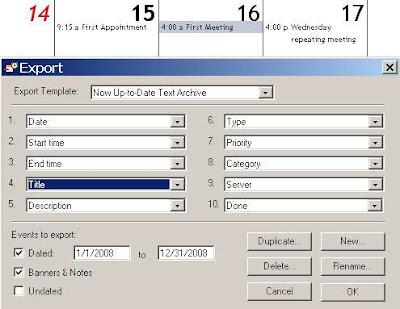
And these are pretty much all the options you've got -- your only choice is order, and whether to take them or ignore them. Let's work with the defaults. An export of 1 standalone appointment, 1 meeting, and 1 repeating appointment (which I erroneously called a meeting in the screenshot) results in the following text file (split for ease of viewing):
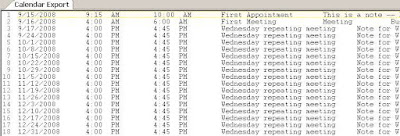
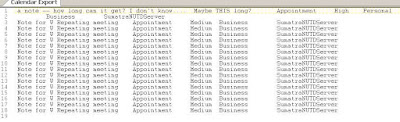
There are very few surprises here. You have the date of the appointment, the start and end times, the title, notes, categories, and priorities. You can clearly read this into any spreadsheet of your choice and order / manipulate the data into something that almost any other client will accept. If you need iCalendar that will require some more work but it's computer science, not rocket science.
  1. This format strips all recurrence patterns and leaves recurrences as individual instances - the usual default in client-side exports (in Oracle Calendar migrations we need to re-create those, which we don't recommend you try on your own - it took us a few months to get right)

  2. This format strips the guest list - which is pretty much the rule in client side-exports, but still fairly unforgivable from an end user / synchronization perspective: WHO you are meeting with is just as important as WHEN.

  3. Forget meeting locations and resources since the guest list is by all appearances managed server-side. In fact it's kind of goofy the export does not include a "Location" field.

  4. You need to take direct control of your time zone info

  5. There's a variety of other info types which you can take or not depending on your target system. Usually banners and tasks will map well, the rest you can assign as your users / constraints dictate


  6. Going into Outlook/Exchange watch out with Holidays and Banners - these are best dealt with as All-Day Events

  7. Rooms and Resources - ignore these at your peril. You need to migrate those as well -- and it looks as though the best way is to have the Proxy for the room/resource view it and export it in the same manner and format as their own calendar.

  8. International users: Keep an eye on the character sets, I wouldn't be surprised if there are issues for accented characters.

Next thing to notice.

Following down the path C:\Program Files\Now Software\Now Up-to-Date

I find that my data file (*.nud) is 62 KB in size, containing a total of three meetings / appointments of various sizes.

Following down the path to my server (C:\Program Files\Now Software\NSM\Servers\SumatraNUTDServer) where I have already created another user, some public categories, a Meeting Room, and a Resource, I find that file to be 4 KB in size. This size disparity between server and client speaks volumes.

Server Side Analysis

Let's look at the options available to us as server admins. Again, do not get your hopes up.


Pretty much the only thing you can do is start it, stop it, add / configure users, resources, and rooms, and a few other things. While there is an automated backup option, noticeable absent is any kind of server-side export capability (which allowed us to migrate Oracle and Meeting Maker wherever they need to go) or any tools for direct manipulation of data server-side.

So let's see what we can grab off the shelf.

First thing we'd notice is that on Windows this server file helpfully has a .DB extension, indicating that it is a database (d'oh), most probably relational (semi d'oh again - there are object-oriented calendar databases) and perhaps built with an off-the-shelf package whose judicious use of import / export and clever analysis might result in the schema and associated data structures.

Let's hold that last idea for a bit (because it will be quite a lot of work fumbling about for the right package and I already went through two candidates) and just let our ADHD selves open the server database with a binary file viewer, the curious calendar migrator's best friend. I like BinViewer.

The meeting "First Meeting" is definitely in here. I know on the client side that I associated it with Room222, Resource1, and my co-worked Russ....
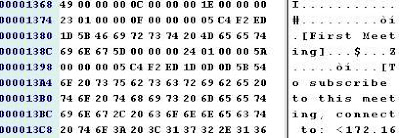
... who also all exist in this database. I'll leave it as an exercise to the interested reader to determine if the Administrator passwords for these objects are in the clear or weakly encoded.
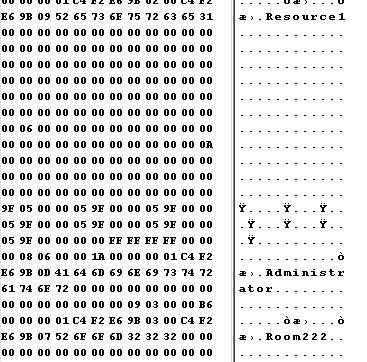
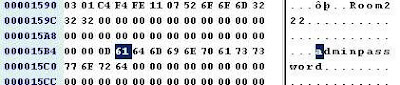


Most notably here where we see the name of the meeting in clear text and the human guest associated with it. A little additional work is required to see the relationship of the associated resource and room. Searching for the name of any appointment you created client-side comes up negative, confirming that the appointments are not present on the server. Notice I have not dug into the issue of recurrence patterns in meeting data server side yet because I already know where this is leading.
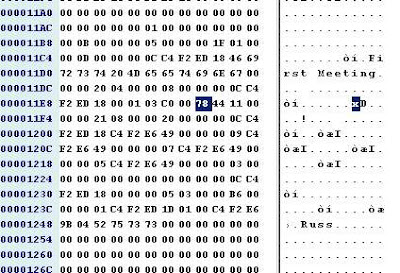
Short answer: we know the relevant meeting data is present server-side, and we know if we start coding into the bit field of a shutdown server database we have very good odds of reconstructing it.

The more important issue is: DO WE WANT TO?

We already know that at the very least we're going to need to touch every client to extract their appointments, banners, tasks, etc. Running another server-side process to get at the live meeting data sounds questionable: it's running two disparate processes where one is almost always far and away preferable, and making sure both processes jibe with each other.

Conclusion

Unless you've got a few thousand NUTD users (which is hard to believe) who all absolutely need their guest lists and recurrence patterns, stay client-side and don't spend a lot other than scripting time when you decide to migrate.
Saturday, September 13, 2008

Terminated with extreme prejudice

You know the scenario -- people in your organization are coming and going all the time. When they come in you have a handle on it. When they go, well, that's a different story.

In particular, Exchange has a nasty habit of letting them leave the building but linger on in broken meetings.

We've been working on the problem and we got asked about it yesterday, so I figured it was a good time for a running commentary.
Let's create a user called Elvis Morrison.

Elvis enters the company sets up a few meetings and, in the way of all flesh, is downsized or leaves for greener pastures. When he leaves this is what his calendar looks like:


We can delete Elvis from Active Directory in a few seconds:

But if we just delete him then his meetings will linger (with no way to cancel them). So in the Conference Room 222 calendar, Elvis is still very much alive!


He's also still in end user calendars.

Now, if we wanted to cancel all of Elvis's meetings BEFORE we deleted him from Active Directory, that would be easy. Just run our tool and click Test2: Report/CancelMtgs


You get options like


Let's say we want to cancel them.

And let everyone know why.


And it tells us what's going on.

BUT let's say users have been being deleted for a while or we deleted Elvis before removing his meetings. We can STILL clean out the resources (we can do the users, too, but let's focus on the rooms and resources).

Let's say we're looking to clear out the cruft from Conference Room 222.


Put in the Room ID and click
It will find all instances of Elvis's recurring meetings in it (as well as any other broken meetings, but I happen to know the only ones in there just now belong to Elvis)

And it creates a separate report


To get rid of them (you can edit the report to remove the ones you want to keep) click


Going into the calendar for Room 222 means it now looks like this, cleaned of the broken meetings Elvis organized.


The more astute among you will recognize there are some additional subtleties to this, but I'll save those for another blog posting.

Editorial addition (Sept 14, 2008)

The "Export Mailbox" cmdlet will archive all Elvis's data to a PST, but it does NOT cancel his meetings. See this discussion.

Wednesday, September 10, 2008

Meeting Maker to Mirapoint

We got contacted a few months ago by a college looking to migrate their Meeting Maker into Mirapoint.

Not that we got a lot of answers from the folks at Mirapoint, but based on the open sources we could read (something called Mirapoint Administration Protocol Reference), we think it goes like this:

  1. Export your MM database t0 a DAT file and ship it to us for conversion
  2. We convert it and give it to you with our tool zinsert that produces iCalendar format files
  3. Run zinsert to convert all your MM data into ICS files for each user
  4. Use the Mirapoint Calendar UPSYNC Subcommand to load the ICS data into each individual calendar file.

Migrate calendar data from Exchange 2003 to iCalendar via the M: drive

We did a little bit on this a while ago and never saw the need to take it much further, but we figured we'd sketch it here in case anybody else wanted to take this as a launch point.

Suppose you want to migrate your calendar data to Zimbra (or some other place that takes in iCalendar format) from Exchange 2000/2003 under your direct control? Note: For Exchange 2007 you are out of luck with this method (no access to the M: drive).

So instead, expose the M: drive. One of our previous posts tells you how.

You'll be able to drill down to the Calendar folder and see all your appointments and meetings as .EML files. Believe it or not embedded in these EMLs is all the ICS data you need to insert into Zimbra (I'm not promising you're not going to have to modify it, but it's there).


So let's look at one of them.


Received: by trout.sumatra.local id <01C894A4.D2E612E0@trout.sumatra.local>; Wed, 2 Apr 2008 05:35:01 -0400


Content-class: urn:content-classes:appointment


Subject: private noon


Date: Wed, 2 Apr 2008 05:35:01 -0400


Message-ID: <F47225046904E34AAA50D7CFB96277FC03AED5@trout.sumatra.local>


X-MS-Has-Attach:


MIME-Version: 1.0


Content-Type: multipart/alternative; boundary="----_=_NextPart_001_01C894A4.D2E612E0"


X-MS-TNEF-Correlator:


Thread-Topic: private noon


Thread-Index: AciUpNLoQOwqLSklRJaoHMVqqUnkhQ==


Sensitivity: Private


x-mimeole: Produced By Microsoft Exchange V6.5


From: "zyg furmaniuk" <zyg@sumatra.local>
This is a multi-part message in MIME format.
------_=_NextPart_001_01C894A4.D2E612E0Content-Type: text/html; charset="iso-8859-1"Content-Transfer-Encoding: binary
------_=_NextPart_001_01C894A4.D2E612E0Content-class: urn:content-classes:appointmentContent-Type: text/calendar; method=REQUEST; charset="utf-8"Content-Transfer-Encoding: 8bit
BEGIN:VCALENDAR


METHOD:REQUEST


PRODID:Microsoft CDO for Microsoft Exchange


VERSION:2.0


BEGIN:VTIMEZONE


TZID:(GMT-05.00) Eastern Time (US & Canada)


X-MICROSOFT-CDO-TZID:10


BEGIN:STANDARDDTSTART:16010101T020000TZOFFSETFROM:-0400TZOFFSETTO:-0500RRULE:FREQ=YEARLY;WKST=MO;INTERVAL=1;BYMONTH=11;BYDAY=1SUEND:STANDARDBEGIN:DAYLIGHTDTSTART:16010101T020000TZOFFSETFROM:-0500TZOFFSETTO:-0400RRULE:FREQ=YEARLY;WKST=MO;INTERVAL=1;BYMONTH=3;BYDAY=2SUEND:DAYLIGHTEND:VTIMEZONEBEGIN:VEVENTDTSTAMP:20080414T173637ZDTSTART;TZID="(GMT-05.00) Eastern Time (US & Canada)":20080402T120000


SUMMARY:private noon


UID:040000008200E00074C5B7101A82E00800000000E072D44B8394C801000000000000000 0100000002D6C78C6FF3E504D8F29FB17733C0F74


ORGANIZER;CN="zyg furmaniuk":MAILTO:zyg@sumatra.local


LOCATION:


DTEND;TZID="(GMT-05.00) Eastern Time (US & Canada)":20080402T130000


SEQUENCE:0


PRIORITY:5


CLASS:Private


CREATED:20080402T093448Z


LAST-MODIFIED:20080402T093501Z


STATUS:TENTATIVE


TRANSP:OPAQUE


X-MICROSOFT-CDO-BUSYSTATUS:BUSY


X-MICROSOFT-CDO-INSTTYPE:0


X-MICROSOFT-CDO-INTENDEDSTATUS:BUSY


X-MICROSOFT-CDO-ALLDAYEVENT:FALSE


X-MICROSOFT-CDO-IMPORTANCE:1


X-MICROSOFT-CDO-OWNERAPPTID:-1


X-MICROSOFT-CDO-APPT-SEQUENCE:0


X-MICROSOFT-CDO-ATTENDEE-CRITICAL-CHANGE:20080402T093501Z


BEGIN:VALARM


ACTION:DISPLAY


DESCRIPTION:REMINDER


TRIGGER;RELATED=START:-PT05H00M00S


END:VALARM


END:VEVENT


END:VCALENDAR
------_=_NextPart_001_01C894A4.D2E612E0--


So you remove everything that is not iCalendar (i.e., the email header and that small footer following the END:VCALENDAR) and swap out your email address or domain if necessary. I didn't in the example that follows and it didn't come in properly.

Upload to Zimbra using something like curl, and your before and after shots look like this:


Keep in mind, this will happen one meeting or activity at a time.

Have we rigorously tested every aspect of this? HECK NO! But this gave us enough to go on that we knew if we needed to modify something (like possibly recurrence patterns, exceptions, or maybe the GUID format) that we'd able to figure it out. Again, this is meant to suggest a more general methodology for moving calendar data out of Exchange 2000/2003.

Of course you can do pretty much the same thing with your email as well. We tested that and got attachments to come over. BUT, we learned to add an additional tag X-Zimbra-Received as per this article.

For a masterful discussion of using the M: drive in Exchange for a migration see: Migrating from POP3/SMTP servers using the M Drive

Saturday, September 06, 2008

Why migrate server-side rather than client-side?

We spent part of this week looking at how to convert Meeting Maker data into iCalendar data to import into Outlook via Import on the client side. If this is your first time reading this blog please understand that analysis is a little bit like waking up one morning to find that the Kaiser won the First World War.

So why would we look at this? Because sometimes folks come back to us and ask for additional history for some users, and for just a few it's a lot easier to accomplish client-side rather than server-side.

Our usual average server-side migration rate is 750 objects per minute (whether using EWS on E2K7 or CDO on E2K3).

Our method was to use our off-the-shelf technology to convert Oracle Calendar and Meeting Maker into iCalendar for Zimbra insertions. With few modifications we were able to convert to a format Outlook would read directly.

Client-side the average insertion rate is between 200 and 300 objects per minute. Translation: client-side you get one-half to one-third the speed of server-side.

Friday, September 05, 2008

Just where the heck is all this Delegate information stored, anyway?

In this political season (in the USA at any rate), sometimes you need to "grabificate the bull by the horns and milkify that steer for all that he's worth." (No Dubya did not actually say this but work with me here, we're on a roll.)

So WHERE you might ask does all of this DELEGATE information actually live in Exchange?

The short answer is ALL OVER THE PLACE.

Here is the quick reference list:

  1. Folder Security Descriptors
  2. Active Directory
  3. The (infamous) NON_IPM_SUBTREE
  4. Server-side rules (for the special case of forwarding meeting invitations)

So to modify Delegate programmatically you need to take care of ALL of these.

Folder Security Descriptors

For Exchange 2000 and 2003, see Modifying Store Permissions in Exchange 2000 and 2003

For Exchange 2007 you use the Management Shell.

Every object (and a folder is an object with other objects potentially inside it) in the Exchange database has a security descriptor that determines who can access it. One of the main sources of confusion in all this is that from WebDAV Exchange can SEEM like it's a filesystem (remember the (in)famous M: drive?) but it never acts like one in any API. PFDAVAdmin does a great job at modifying access permissions for both Exchange 2003 and 2007.

Active Directory

Send-As permissions are kept in AD. The field publicdelegates contains the list of URLs of all users with access to the mailbox. Active Directory does a BIG favor here by maintaining backlinks in other users' publicDelegatesBL.

So by checking any user's publicDelegatesBL property, you can find out for whom they are a delegate. This was put to creative use in Listing Which Exchange Users Have or Are Delegates and Finding delegates in Active Directory (sic).

The perceptive among you will realize that if you are a delegate to someone and they have subsequently been removed from Active Directory you might still have some kind of zombie connection to them. Such is often indeed the case.

NON_IPM_SUBTREE

The file NON_IPM_SUBTREE/Freebusy Data/LocalFreebusy.EML which not surprisingly contains Free-Busy data (but be careful trying to read it) also contains three MAPI properties which define Delegates.

  • x6844101F PR_DELEGATES_DISPLAY_NAMES
  • x68451102 PR_DELEGATES_ENTRYIDS
  • x686B1003 PR_DELEGATES_SEE_PRIVATE

Private items have PR_SENSITIVITY =2, Public items have PR_SENSITIVITY = 0. Confidential items have PR_SENSITIVITY =3, but Outlook does not do anything with Confidential items and the Exchange server does nothing to enforce Private items leaving this to the client (ever read me write that this was all designed and implemented by some committee somewhere?). So those of you looking to migrate this capability from Oracle Calendar Server where there is a client side distinction between Private and Confidential, you can migrate it, but it will do you no good.

BTW, Google has picked up on how useful it is to document MAPI tags.

Modifying the AD values has NO EFFECT on the values in the NON_IPM_SUBTREE. You have to take care of that separately. The incomparable Glen Scales blogged on how to in Accessing the NON_IPM_Subtree folders in Exchange Web Services .

Server-Side Rule

Like all SSRs this is in the INBOX for the user doing the forwarding (which means the client does not need to be running for it to be invoked, which is exactly what you want from an end-user perspective).

  • x65EB001F PR_RULE_MSG_PROVIDER which should be "Schedule+ EMS Interface"

By way of comparison, PR_RULE_MSG_PROVIDER is

  • "RuleOrganizer" for normal Outlook rules
  • "Schedule+ EMS Interface" for delegation rule
  • "MSFT:TDX OOF Rules" for OOF Wizard rule
  • "MSFT:TDX Rules" for Public Folder rule
  • "MSFT:MR" for Public Folder moderation rule

For managing rules in E2K7, check out http://msexchangeteam.com/archive/2008/04/14/448687.aspx and Glen has also already blogged on the topic.

I am hugely indebted to the work Ximian did in reverse-engineering all of this before it was absorbed by Novell.

Thursday, September 04, 2008

PFDAVAdmin and Calendar Delegate Permissions

Update on August 28, 2011: I noticed the popularity of this posting has risen A LOT lately.  If you are in Exchnage 2010, ignore this and read our more recent post Exchange 2010 Calendar Permissions Using PowerShell.


In every generation a utility comes along which can address some of nastier sturm und drang of the harried calendar administrator trying to set up Delegate permissions. In ours it is PFDAVAdmin.

Now those of you who have been faithful followers of the vagaries of migrating Proxy or Designate information into Exchange/Outlook Delegate information will be a little surprised by what comes next: this method looks like it works, it looks like it works for both Exchange 2003 and 2007, and it looks like it takes way less time than any of our previous methods. AND it's all built around the off-the-shelf PFDAVAdmin.

So Step 1. is to Install PFDAVAdmin

It comes with its own documentation but there are also some good online examples and debugging:

http://www.msexchange.org/articles/PFDavAdmin-tool-Part2.html

http://technet.microsoft.com/en-us/library/bb508858(EXCHG.65).aspx

http://mostlyexchange.blogspot.com/2008/01/pfdavadmin-exchange-2007-and-v11-net.html

To run this in Exchange 2003 do not forget to use a service account with appropriate permissions:
http://support.microsoft.com/default.aspx?scid=kb;en-us;821897

For Exchange 2007 your usual migration service account should suffice.

Step 2.) Run the appropriate Database Query (from Sumatra) to generate an output text file. If you are already in the middle of testing your database migration you can ask us to take you through the query. Your output file will look like this:


# ************************************************************************
# Created for PFDAVAdmin 2.8
# Friday, August 29, 2008 3:47:25 PM
# ************************************************************************
#
# This export format is only usable with PFDAVAdmin 2.0 and later.
#
# ************************************************************************
SETACL Mailboxes\riuliano\Freebusy Data VM\zyg Reviewer NT AUTHORITY\ANONYMOUS LOGON None NO
SETACL Mailboxes\riuliano\Top of Information Store\Calendar VM\zyg Reviewer NT AUTHORITY\ANONYMOUS LOGON None NO
SETACL Mailboxes\zyg\Freebusy Data VM\riuliano Reviewer NT AUTHORITY\ANONYMOUS LOGON None NO
SETACL Mailboxes\zyg\Top of Information Store\Calendar VM\riuliano Reviewer NT AUTHORITY\ANONYMOUS LOGON None NO


Here riuliano makes zyg on domain VM his Reviewer (which corresponds to a Read-Only Proxy) and vice-versa. International users may have to modify this to translate "Calendar" as appropriate (i.e., Calendario, Calendrier, Kalender, Calendário). I do not know if PFDAVAdmin will work with 2-byte character sets.

Step 3
Open PFDAVADMIN. Connect to your Exchange server (you will need adequate Permissions to do this). Select Tools-Import and point to the output file above.

Step 4
PFDAVAdmin will set up all appropriate permissions to share calendars as per your Meeting Maker options.

The log file for PFDAVAdmin will contain any problems (which in our experience with this have usually involved permissions).

Friday, August 22, 2008

Delegates / Proxy Migration in Exchange 2007 sp1

One thing we notice is that folks sometimes want to have their Proxies (Meeting Maker term) or Designates (Oracle Calendar Server term) migrated into Exchange 2007 as Delegates (Outlook term).

For Exchange 2007 before sp1 you were out of luck. For Exchange 2003 you only need to use CDO 1.21 with documented memory leaks. Those of you for whom we have migrated Proxies know this is why the process to migrate proxies takes almost as long as the process to migrate your calendar data. And annoyingly CDO 1.21 is not supported at all in .NET code.

For E2K7 sp1, Microsoft documentation gives you the impression this is possible using only Exchange Web Services. DeVa expands on this a bit in Adding delegates in Exchange Web Services (sp1).

However, our direct experience with a recent client migration to E2K7 sp1 and Glen (whom we cannot praise too much) confirm that setting permissions via Exchange Web Services is insufficient. You also need to set permissions on the Schedule+ NON_IPM_SUBTREE.

Wait you say -- this is 2008 and I just saw the word "Schedule+" appear in print, like it was... 1992 or something. Is this possible?

Rest assured, it is mos def.

In fact at least one user has reported a problem and documented a solution in in this data structure during a migrating from Exchange 2003 to Exchange 2007. Microsoft seems to have picked up on this in KB 945602.

For those of you who want a fuller story on how Delegates relate to the Free/Busy folder, thank Ximian for their work in reverse-engineering and publishing the results (which they did for E2K3).

So the end result here: be really careful writing scripts to set Delegates for calendar functions in Exchange 2007 and make sure you take into account the NON_IPM_SUBTREE in addition to the documented EWS code.

And, this being Exchange, there are additional complications because .... well.... because Exchange is clearly built by committee. So if you have BOTH Outlook 2003 and Outlook 2007, and use Delegate (and I'll bet the answer is "yes" all around), you need to check out KB 924470. While you're at it -- these also give you some idea how funky basic Delegate functioning is in E2K7: KB 950794, KB 918797, KB 932207, and KB 942418.

Does it work or not? This is so convoluted we're not sure. If any of you have feedback let us know.

Tuesday, August 19, 2008

Shared Calendars in Exchange 2007 sp1

Let's say you used a group calendar in Meeting Maker or Oracle and wanted to migrated that into Exchange. The idea being that any user in a group could post and view calendar data (like vacations or help desk schedules, events, that kind of thing).

Prior to E2K7 sp1 your only option was to migrate it into a user calendar or resource calendar and then make share it.

In a minimally-documented feature you can actually migrate the calendar data to a Shared Mailbox.

But wait you say -- you've been through the Mailbox Wizard, and there ain't no "Shared Mailbox" in it:

That's because you can only create it in the Exchange Management Shell.

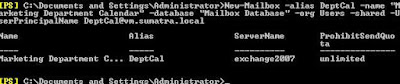
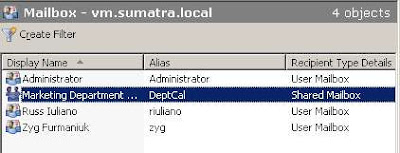
So to create a shared mailbox for the former Market Department Group calendar, you might use the following

[PS] c:\New-Mailbox -alias DeptCal -name "Marketing Department Calendar" -database "Mailbox Database" -org Users -shared -UserPrincipalName DeptCal@YOURDOMAIN.com


THEN it will show up in the Exchange Management Console!
What do you do with it now?
Well, not much.... yet.
This is a disabled account. We need to add user access to it, and this brings us into the dreaded world of Permissions.
First, create a security group (via Active Directory Users and Computers) in your domain called "Marketing Department Security Group" and add the users you want to access the calendar. And in our friend the Management Shell, grant that group full mailbox permissions:
[PS] c:\Add-MailboxPermission DeptCal -User:'Marketing Department Security Group' -AccessRights:FullAccess
We're not done yet. You will need to add "Send-As" permissions to the group as well. Those of you doing migrations are really used to this.
[PS] c:\Add-ADPermission "Marketing Department Calendar" -User:'Marketing Department Security Group' -ExtendedRights:Send-As -AccessRights:ReadProperty, WriteProperty -Properties:'Personal Information'
Users in the Group now have full rights to that shared calendar.
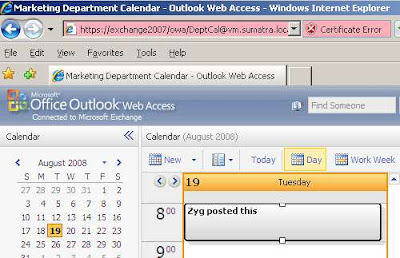
So in OWA just pass the DeptCal email address and use your own credentials to log in (please do not send me posts about my Certificate Error, it's a test server for gosh sakes).


SO in Meeting Maker if you have had a group calendar, map and migrate it into a USER calendar and then CHANGE it post-migration to a shared calendar using the "Type" command.
e.g.,
[PS] c:\Set-Mailbox DeptCal -Type:Shared
and set up your Security Groups.
Why not just create a Shared mailbox in Exchange and migrate into that? The account is Disabled -- we won't be able to re-create data in it with full fidelity. Create it as a User and then change it to Shared and you'll be happier with the results.

Need some Exchange Calendar applications or utilities developed for your enterprise-sized organization? Contact us.

Monday, August 11, 2008

UNDO Capability field-proven

You know, it had to happen.


We've been talking about how we have our own UNDO capability and that it hasn't needed to be used in the field since a Dutch MM 6.0 server mistakenly got inserted with an East Coast USA time zone.


Well, owing to an unfortunate bug we had to remove an entire insertion of a few thousand users a couple of weeks ago.


Good news: the UNDO worked fine. And we ran UNDO in parallel and the data was out in way less time than it took to put in.


Better news: their insertion re-ran this weekend without a hitch.


Bad news: Like the recent Incredible Hulk movie we need to re-set the "days since last incident" counter.

Saturday, July 12, 2008

Funambol and Migration into Exchange

We got an inquiry about Funambol and how after migration data we inserted wasn't being sync'ed by Funambol but calendar items created directly in Outlook were. After we looked up what Funambol was (usually we see folks use ActiveSync) and the client did some rooting around on their own, we had a reason.

Here's what happens.

You know our UNDO process?

In going into Exchange 2007 we insert the keyword "mmconv102659080256Z" into the Mileage field of an Exchange calendar object.

Why did we choose the Mileage field? Because it's easy to surface when using Exchange Web Services. So in the event we need to do an UNDO we can search through every mailbox and remove only the data we inserted. Very convenient, and a very good safety net.

BUT Funambol is looking at that field and analyzing it to make sure it's actually a Mileage (i.e., a numeric string). So looking at an alphanumeric string is causing it confusion.

Two possible solutions:
  1. Post migration: Just remove the Sumatra tags. Of course, do not do this until AFTER you've validated the data.
  2. Pre-migration: Choose a different tag that's purely numeric (e.g., "99999999999")

Either one will get you there.

We also insert data into the Billing field (for the technically inclined, they're the GUIDs of the calendar objects so we're sure we're acting on the correct objects when migrating).

We also know of at least one other application that uses the Mileage field for internal purposes - so keep an eye out.

Thursday, July 10, 2008

Validating 5000+ Users?

If you're doing a migration into Exchange 2003 or 2007 with more than 5000 users (and this showed up in this case with a migration of over 10,000), and you're using the same database regularly, use the Access "Compact and Repair" option between insertion runs.


The client doing this noticed a marked degradation in Validating user accounts after 5000 users. Investigating we determined a few code fixes that speed the process, but also that the best thing you can do is Compact and Repair the database.

Wednesday, July 09, 2008

Cool method for cleaning test Exchange databases

We really like it that we deal with smart people.

Case in point: Adam Smith at Yale who created a script called ‘clean-mailbox-database-sumatra.ps1’ that finds the databases on 'your-server' and dismounts them. It then finds and removes all *.edb files in e:\mailbox and then mounts the databases.

clean-mailbox-database-sumatra.ps1:
________________________________________________________________________
#Find all mailbox databases on your-server and dismount them
Get-MailboxDatabase -server your-server Dismount-Database -Confirm:$False

#Find all of the .EDB files and remove them
Get-ChildItem -Path e:\mailbox -Recurse -Include *.edb Remove-Item

#start all mailbox databases
Get-MailboxDatabase -server your-server Mount-Database
________________________________________________________________________

This would not be something to do on your production system (unless you REALLY wanted to clean it), but for a test lab dedicated to a calendar migration it's faster and easier than our selective Undo.

Many thanks, Adam!