It's been almost exactly a year since we did a sanity check on this #CalDAV to #MSExchange calendar migration tool.
Since then we've field-proven full-state migration of Oracle Calendar Server to Exchange using ICS files -- which means we could insert ICS FULL-STATE for any of the other iCalendar standards based calendars. You know -- Zimbra, Apple, Google being the only ones that matter these days.
Let us know if you have more than 500 users and want to give it a spin.
Thursday, May 28, 2015


Tuesday, May 26, 2015
Speeding an Oracle Calendar to #MSFTExchange Migration by Parallel Insertions
If you have more than a few hundred users, you can run multiple instances of the Oracle Calendar Server to Microsoft Exchange migration code.
Let's say you have 1000 users and want to break it down by half. Say from A to M and N through Z. You can set up two separate instances as follows:

Who "Blank" to M? Because numbers sort BEFORE "A" so things beginning with numbers are lost if you do not do "Blank" as your start.
Then "N" to "Z":

Just to be safe I'd run each of these on separate machines, but you use the SAME mapping tables for each.
Make sense?
Oh -- and if you want to insert just ONE calendar to test, this is the way to do it:
 Put the same name in each endpoint box.
And this is an Oracle Calendar to Office 365 migration in action:
Let's say you have 1000 users and want to break it down by half. Say from A to M and N through Z. You can set up two separate instances as follows:

Who "Blank" to M? Because numbers sort BEFORE "A" so things beginning with numbers are lost if you do not do "Blank" as your start.
Then "N" to "Z":

Just to be safe I'd run each of these on separate machines, but you use the SAME mapping tables for each.
Make sense?
Oh -- and if you want to insert just ONE calendar to test, this is the way to do it:

And this is an Oracle Calendar to Office 365 migration in action:
Thursday, May 21, 2015
Oracle Calendar Designate to #MSFTExchange Delegate Rights Migration
We at Sumatra are no strangers to the issues of delegate/proxy/designate migration into Microsoft Exchange 2013 / Office 365.
We just refuse to do it ourselves anymore.
Why? Because while we can give you the best possible technical solution, it is not always the best social or political solution for a given environment. Someone's gonna grumble. And we do not need that.
If YOU on the other hand can manage your organization sufficiently well for your purposes, we're fine with it.
Here's what you do.
Let's start at the back, where we insert calendar delegate rights into Exchange.
You need the command Add-MailboxFolderPermission in PowerShell.

Which means in Outlook looking at an Exchange server the user will see this in Calendar Properties:

We just refuse to do it ourselves anymore.
Why? Because while we can give you the best possible technical solution, it is not always the best social or political solution for a given environment. Someone's gonna grumble. And we do not need that.
If YOU on the other hand can manage your organization sufficiently well for your purposes, we're fine with it.
Here's what you do.
Let's start at the back, where we insert calendar delegate rights into Exchange.
You need the command Add-MailboxFolderPermission in PowerShell.
This format which can be executed in
PowerShell to set calendar permissions on Exchange. as we do here:

Which means in Outlook looking at an Exchange server the user will see this in Calendar Properties:

So working backwards, you need to get Designate permissions on the Oracle Calendar Server side.
Say you need to get Designate rights
for Russ Iuliano from OCS:
uniaccessrights -ls -grantor %1 -grantee
"S=Iuliano/G=Russ" -n 1 -p PASSWORD >>russ_rights.txt
|
The output of UNIACCESSRIGHTS is
relatively straight-forward to read:
"S=Iuliano/G=Russ"
Grantee: S=Iuliano/G=Russ/UID=riuliano/ID=257/NODE-ID=1
Designate
Right: CONFIDENTIALEVENT=VIEWTIME/CONFIDENTIALTASK=MODIFY/NORMALEVENT=
MODIFY/NORMALTASK=MODIFY/PERSONALEVENT=REPLY/PERSONALTASK=
MODIFY/PUBLICEVENT=NONE/PUBLICTASK=MODIFYEvent
Viewing Right: CONFIDENTIAL=ALL/NORMAL=ALL/PERSONAL=ALL
Grantee:
S=Whiplash/G=Snidely/UID=swhiplash/ID=260/NODE-ID=1Event
Viewing
Right: CONFIDENTIAL=NONE/NORMAL=ALL/PERSONAL=TIME
|
Depending on how you implement
your OCS Delegate to Microsoft Exchange Mapping you need to parse the UNIACCESSRIGHTS output into this
format which can be read in PowerShell to set calendar permissions on Exchange.
You need to execute this from PowerShell. Needless to say this command
should be called something like russ_rights.ps to execute in PowerShell.
To launch PowerShell: Start >
All Programs > Accessories > Windows PowerShell > Windows PowerShell right-hand
click and "Run-As administrator"
The parser we'll leave to you and write about in a future blog post.
Thursday, May 14, 2015
Full-State @Oracle Calendar Server Migration into @MSFTExchange Database Configuration
For full-state Oracle Calendar Server migrations, the
Sumatra code creates a small database to store Guest responses. Don't fret -- in contrast to our first-generation methods this one does not require you to ever open or modify the database.
The database will require you
download and install the Microsoft
Access Database Engine 2010 Redistributable.
For x32, install the
AccessDatabaseEngine.exe.
For x64, install the
AccessDatabaseEngine_x64.exe
The Sumatra code sets the
database provider in the configuration XML file based upon the operating
environment.
For x32, the provider is:
Provider=Microsoft.ACE.OLEDB.12.0;Data Source=
For x64, the provider is:
PROVIDER=Microsoft.Jet.OLEDB.4.0;Data Source=
Here are the lines in the XML as
setup for an x64 system. Note we include provider “sample” lines so you
can copy the provider setting appropriate to your environment.
Wednesday, May 13, 2015
If you fall asleep in meetings....
... make sure your boss is not a psycho North Korean strongman. Seriously, an anti-aircraft gun was the exit interview? That sounds like a 1966 Batman TV cliffhanger. Makes a US human resources drone look good.
I did once have a boss at ON whose motivational motto was something like "Garth, your beatings will continue until your morale improves. Party on! -- Wayne." Then there was the coke-head at Wang who'd get spontaneous nosebleeds and had fantastic reasons for not coming into work:"I got mugged at an ATM" and "paint fell on my show dogs."
Truth is as weird as fiction.
I did once have a boss at ON whose motivational motto was something like "Garth, your beatings will continue until your morale improves. Party on! -- Wayne." Then there was the coke-head at Wang who'd get spontaneous nosebleeds and had fantastic reasons for not coming into work:"I got mugged at an ATM" and "paint fell on my show dogs."
Truth is as weird as fiction.
Thursday, April 23, 2015
Why are the Russians Binge-Reading this Blog?
Dear Binge Readers in Russia,
 You never write and we never get any inquiries, but periodically throughout the week we get a few hundred views from you guys in the space of an hour.
What goes?
What goes?
Tuesday, April 21, 2015
New Option on Oracle Calendar Server Migrations to #MSFTExchange
When we recreate response states from Oracle Calendar Server 10.x to Exchange we have a new option:

As a default your un-responded meeting invitations are "Tentatively Accepted."
However, you can also set this to "Accept" "Decline" or "Do not apply a response."
I cannot see a reason you would want to Decline all instances -- but (and I am still flabbergasted) we got asked for it.
One thing that is possible is that if you originally Do not apply a response (i.e., leave them as invitations in user inboxes, you can then go back and "Accept" or :Tentatively accept" since we are keeping track of the responses.
UNDO gives you the option to limit removing guest responses by our alpha limits.

This capability is in oCalReader v 5.0.7.
As a default your un-responded meeting invitations are "Tentatively Accepted."
However, you can also set this to "Accept" "Decline" or "Do not apply a response."
I cannot see a reason you would want to Decline all instances -- but (and I am still flabbergasted) we got asked for it.
One thing that is possible is that if you originally Do not apply a response (i.e., leave them as invitations in user inboxes, you can then go back and "Accept" or :Tentatively accept" since we are keeping track of the responses.
UNDO gives you the option to limit removing guest responses by our alpha limits.
This capability is in oCalReader v 5.0.7.
Thursday, April 16, 2015
Meeting Responses in a Full-State Oracle Calendar Server to Exchange Migration
How do we deal with Meeting responses in a full-state migration from Oracle Calendar 10.x to Exchange?
- The response options in Exchange are Accept, Decline, Tentative, and No Response
- Oracle Calendar Server allows you to NOT respond to a meeting and it still shows up in your calendar. So in the field lots of people do not bother to actually Accept. Migrating these meetings to Exchange, we insert a non-response as “tentatively accepted” more as a sensible convenience than anything else.
- Exceptions to guest responses to recurring meetings are not inserted. E.g., if a guest accepts all but declines a few occurrences, or declines the recurring meeting but accepts a few occurrences. The latter situation actually cannot happen in Exchange but is possible in OCS.
Tuesday, April 14, 2015
Oracle Calendar Migration to #MSFTExchange #Office365 - Full State via new methods
We've further developed our oCalReader methodology so that now in addition to doing a partial migration it will also execute a full-state calendar migration from Oracle Calendar Server 10.x into Microsoft Exchange or Office 365.
You can see the new configuration options below:

A couple of notes on this:
RESOURCES

You can get your resource names from OCS with UNIUSER. A command something like this:
uniuser -resource -ls "R=*" -n 1 -p PASSWORD >resources.txt
should export them.
The new buttons "Guest Response" and "Cleanup" come into play if you are running individual migration steps.
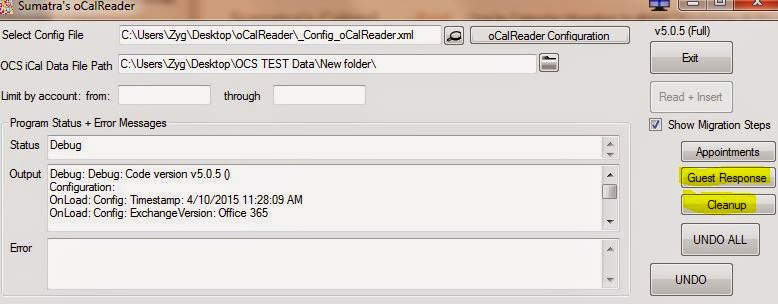
You can see the new configuration options below:
A couple of notes on this:
RESOURCES
- Works best for resources that are booked on a first-come-first-served basis.
- Does not work well when the resource owns the meeting. You cannot have a resource organize a meeting in Exchange!
- Requires a manual mapping of resource names to Exchange SMTP addresses (since resources in Oracle Calendar server don’t contain email addresses, or, worse, point to the admin managing the resource.)
You can get your resource names from OCS with UNIUSER. A command something like this:
uniuser -resource -ls "R=*" -n 1 -p PASSWORD >resources.txt
should export them.
The new buttons "Guest Response" and "Cleanup" come into play if you are running individual migration steps.
Friday, April 10, 2015
#MDaemon Calendar Migration to #MSFTExchange Trial Software
Trial software for our MDaemon to Exchange calendar, task, and contact migration may be downloaded here.
Thursday, April 09, 2015
Oracle Calendar Migration to #MSFTExchange @Office365 Recurrence Patterns
The question came in: "Which recurrence patterns migrate from Oracle Calendar Server to Exchange?"
The short answer to this is that NONE of them MIGRATE – our technology RECREATES them.
Oracle strips every recurrence pattern out of ICS exports in part because Outlook cannot handle the patterns OCS can produce.
Sumatra technology analyzes these patterns and produces the best matches it can for recurrences.
A couple of rules in this:
The patterns most likely to get picked up and transferred:
Over the last 15 years of doing this kind of migration – this is over 90% of recurrences in most environments
The patterns that are not going to get re-created as patterns:
The short answer to this is that NONE of them MIGRATE – our technology RECREATES them.
Oracle strips every recurrence pattern out of ICS exports in part because Outlook cannot handle the patterns OCS can produce.
Sumatra technology analyzes these patterns and produces the best matches it can for recurrences.
A couple of rules in this:
- THE WORST CASE is all the data goes in as one-time events or meetings. You do NOT lose data.
- You need at least 5 instances before we try to form a pattern recreation
- We look for exceptions with a 80% regularity by default (you can change this – but do not screw with it yet)
The patterns most likely to get picked up and transferred:
- Every 15th (for example) Day of the Month
- Every 2nd Wednesday (for example) of the Month
- Every MTWTF and variations of that, e.g., TuTh, MWF. etc.
- Weekly meetings / every other week / every fourth week
- Yearly meetings
Over the last 15 years of doing this kind of migration – this is over 90% of recurrences in most environments
The patterns that are not going to get re-created as patterns:
- Random selections of dates
- Every 1st AND 3rd Friday of the Month (sometimes with enough exceptions and a forgiving exception rate these will show up as “every other week” recurrences, but do not count on it)
- ANY recurrence with LOTS of exceptions. I.e., over 20%
Monday, March 30, 2015
DIY calendar process to Migrate @MSFTExchange to #Office365 -- here is the application
The situation: you want to move
from Exchange on-premises to the cloud aka Office 365.
You were shocked to discover Microsoft
does not have a simple migration solution outside of email. And the email solution is not even as flexible as imapsync. All the current third-party tools treat calendaring as an afterthought to email leaving half your calendaring data behind (recurring patterns, guest lists, guest responses).
The result is that post-migration your users see what looks to be their same Outlook/OWA mailbox only to discover
that their calendar meetings are broken.
We solved that problem.
So we created a calendaring / task / contacts migration process for Exchange on-premises to Office 365 that is an improvement over existing methods in that it gives you more information about guests in meetings (it's an improvement over everyone else if we give you ANY information about guests).
On-premises a meeting looks like this:

Migrated to another Exchange server it will look like this in Outlook with our "flat" option:

Note that we can map user names and resource names and preserve information about attendees outside the domain.
And you can download and try it here with documentation here. The trial version will insert your appointments for a month into the future. We're licensing it for $299 for one domain for two weeks. Based on our MDaemon migrations, we've seen under 1000 user migrations easily accomplished in that time. If you need more time, ask us.
If you manage your own migration you can get your data in for very low cost with imapsync handling email and our tools handling calendars, contacts, and tasks.
For those of you who want fully-functional calendars post-migration, we offer:
Full-state calendar migration for enterprises with full-state sync.
Contact us for additional details on full-state (though the documentation above is a great place to start).
Tuesday, March 17, 2015
Exchange Cumulative Update 8 - Automatic Profile Re-direct
Folks, especially those doing a DIY migration from on-premises Exchange to Office 365, you should look at CU 8.
The automatic profile redirect we'll need to look at but it sounds like it will be a really big help.
Oh yeah, and modern Calendar and Contacts Public Folders are now accessible in OWA.
Added March 24, 2015: profile redirect is not the big help we thought unless your main worry is Smart Phones. See: Exchange ActiveSync on-boarding to Office 365
The automatic profile redirect we'll need to look at but it sounds like it will be a really big help.
Oh yeah, and modern Calendar and Contacts Public Folders are now accessible in OWA.
Added March 24, 2015: profile redirect is not the big help we thought unless your main worry is Smart Phones. See: Exchange ActiveSync on-boarding to Office 365
Sunday, March 15, 2015
Time to replace the votive candle....
It comes as no surprise to anyone we've done migrations with that one of us has a superstition about keeping a votive candle burning during a migration. With a migration this weekend our Misericordia Divina (from a bodega in LA, long story) burned its last. Now we plan on replacing this with one of these time-oriented secular saints from the Unemployed Philosopher's Guild.


Thursday, March 12, 2015
DIY O365 Migration from Exchange - First Pass
Rarely do we get such an outpouring of "gimme gimme gimme."
So since we're really good at turning out stuff quickly, we've got a first pass at our DIY Guide to Migrating from Exchange to Office 365.
We have focused on the heavy lifting of migrating email (via imapsync), and calendars, contacts, and tasks (via our tech).
Remember: It's BETA, folks. You have comments, want additions, think you have something to add, we're really happy to take feedback.
The other issues: like user provisioning, delegate access, swapping MX records, we've not gone into detail at all since those are pretty well documented on line. If you need details on how to accomplish this, let us know.
Remember, you'll need to license imapsync.
If you need the calendar, contact, and task migration, drop us a line.
We'll have a simple flat version of our calendar migration software up in a couple of days.
It's simple to run, but unlike everybody else it will tell you who was in your meetings like this:

So since we're really good at turning out stuff quickly, we've got a first pass at our DIY Guide to Migrating from Exchange to Office 365.
We have focused on the heavy lifting of migrating email (via imapsync), and calendars, contacts, and tasks (via our tech).
Remember: It's BETA, folks. You have comments, want additions, think you have something to add, we're really happy to take feedback.
The other issues: like user provisioning, delegate access, swapping MX records, we've not gone into detail at all since those are pretty well documented on line. If you need details on how to accomplish this, let us know.
Remember, you'll need to license imapsync.
If you need the calendar, contact, and task migration, drop us a line.
We'll have a simple flat version of our calendar migration software up in a couple of days.
It's simple to run, but unlike everybody else it will tell you who was in your meetings like this:
Wednesday, March 11, 2015
Video of Full-State #Exchange to #Office365 Enterprise Calendar Sync
A short video of sync working in a migration between on-premises Exchange and Office 365.
Tuesday, March 10, 2015
DIY @imapsync to Migrate Email #Exchange to #Office365 -- We'll add a calendaring process
Your direct costs should never exceed 100 Euros (or $110 at the current exchange rate) for an email migration into Office 365 (From Exchange or any other IMAP server).
imapsync is more than capable of handling your Email migration. Buy the software and support.
Cards on the table here: we do not get any money from imapsync, but we've found it to be a quality product with a great guy behind it and a good support community. Add to that it's inexpensive nature and liberal software license and you really cannot go wrong.
You will need to make sure you have permissions on the Office 365 side if you wan to do multiple mailboxes without individual passwords. See our earlier posting on using imapsync to migrate email into Exchange.
You can also handle migration problems with the wealth of Exchange information in their FAQ:
imapsync is more than capable of handling your Email migration. Buy the software and support.
Cards on the table here: we do not get any money from imapsync, but we've found it to be a quality product with a great guy behind it and a good support community. Add to that it's inexpensive nature and liberal software license and you really cannot go wrong.
You will need to make sure you have permissions on the Office 365 side if you wan to do multiple mailboxes without individual passwords. See our earlier posting on using imapsync to migrate email into Exchange.
You can also handle migration problems with the wealth of Exchange information in their FAQ:
Pay special attention to the case of read receipts. Going into Office 365 can re-generate read receipts. So during your testing if that turns out to be a problem:
imapsync... --disarmreadreceipts
Other very useful FAQ solutions include what to do when encountering individual attachments over the default limit set by Exchange (10 Mb) and Office 365 (25 Mb), as well as line length issues.
We're working on a DIY document to take you through your own migration. Frankly, we get lots of questions that could be handled by such a guide. And we're tired of Microsoft black boxes and over-priced third party offerings.
We'll offer a "flat" calendar migration in an imapsync-like model just so folks can get their migration done if they don't mind a simple calendar migration. Contacts and tasks are included in this of course.
The goal here is to get your software costs for a migration to Office 365 to under US$1000 with you supplying your own elbow grease.
In rough numbers email, calendars, tasks, and contacts should be about 95% of the data you need to move.
imapsync... --disarmreadreceipts
Other very useful FAQ solutions include what to do when encountering individual attachments over the default limit set by Exchange (10 Mb) and Office 365 (25 Mb), as well as line length issues.
We're working on a DIY document to take you through your own migration. Frankly, we get lots of questions that could be handled by such a guide. And we're tired of Microsoft black boxes and over-priced third party offerings.
We'll offer a "flat" calendar migration in an imapsync-like model just so folks can get their migration done if they don't mind a simple calendar migration. Contacts and tasks are included in this of course.
The goal here is to get your software costs for a migration to Office 365 to under US$1000 with you supplying your own elbow grease.
In rough numbers email, calendars, tasks, and contacts should be about 95% of the data you need to move.
Sunday, March 08, 2015
The Absurd Side of Daylight Savings Time
Put your personal politics aside for a minute and remember that this is SATIRE. I have raw memories of an expository writing class where half the people in it did not realize that A Modest Proposal was NOT serious! Actually, it was serious, just not in the direction they thought. Some of those people probably work for the Federal government now.....
But OBAMA PERFORMS ILLUMINATI DAYLIGHT SAVINGS TIME RITUAL TO CAST WORLD INTO LIBERAL DARKNESS, ONE HOUR EARLIER is just darned funny.
 Daylight Savings Time is the bane of the calendar server migration expert. You need to have excruciatingly detailed knowledge about what is happening on both the source and the target server, and sometimes you just need to deal with bad situations.
Addition: March 9, 2015. Nacho Punch has an entire series of DST-themed comedy.
But OBAMA PERFORMS ILLUMINATI DAYLIGHT SAVINGS TIME RITUAL TO CAST WORLD INTO LIBERAL DARKNESS, ONE HOUR EARLIER is just darned funny.
Addition: March 9, 2015. Nacho Punch has an entire series of DST-themed comedy.
Thursday, March 05, 2015
Enterprise Calendar Migration #Exchange to #Office365 Revised Video
We revised our previous video and made it look prettier, for which we thank video editor Peter Hollander.
Wednesday, March 04, 2015
Electronic Road Sign Hacking
Does this have ANYTHING to do with calendar server migration?
Well.... a teeny tiny bit. In why we do not ever want your system passwords and why we purge any of your data as soon as we can if we need to look at it.
But it's also cool and amusing.
Besides, I'm pretty sure at least one of the signs they have photos of is on Massachusetts Avenue in the vicinity of MIT, so I need to link to it.
Head over to Jalopnik for How to Hack an Electronic Road Sign.
The method is based on the usual lack of physical padlock security, usual use of default password ("DOTS"), and dirt-simple method of resetting the entire system to default (CTRL+SHIFT+"DIPY").
Moral is left for the reader.
Well.... a teeny tiny bit. In why we do not ever want your system passwords and why we purge any of your data as soon as we can if we need to look at it.
But it's also cool and amusing.
Besides, I'm pretty sure at least one of the signs they have photos of is on Massachusetts Avenue in the vicinity of MIT, so I need to link to it.
Head over to Jalopnik for How to Hack an Electronic Road Sign.
The method is based on the usual lack of physical padlock security, usual use of default password ("DOTS"), and dirt-simple method of resetting the entire system to default (CTRL+SHIFT+"DIPY").
Moral is left for the reader.
Subscribe to:
Posts (Atom)